Set up a referral program
A referral program lets your own customers send their friends to you, and rewards the customer, the friend, or both. This article covers creating the program, choosing the rewards and what makes a referral count, putting customers into it, and the refer-a-friend panel for your own site.
Before you start
- Role: Owner, Admin or Manager to create the program, enrol customers and change its settings. Only an Owner or Admin can set a reward that is worth money (Cash, Account credit or Commission). A Manager sees those choices greyed out with the sentence "A reward paid in money or store credit is worth what it says, so only someone who may approve money sets its value."
- You need: tracking on your site and payments reaching Refficks, so a friend's signup and purchase are recorded. See Install tracking.
- The Referral module. It is on for every workspace. If your menu has no Referrals, it has been held back for your workspace; write to support@refficks.com.
A referrer is a partner like any other, with the Referrer role. One person can be an affiliate and a referrer at once, on one login.
Create the program
Go to Programs and press New program.
Type a Name, for example "Refer a friend".
In Module, choose Referral. "This cannot be changed once the program exists."
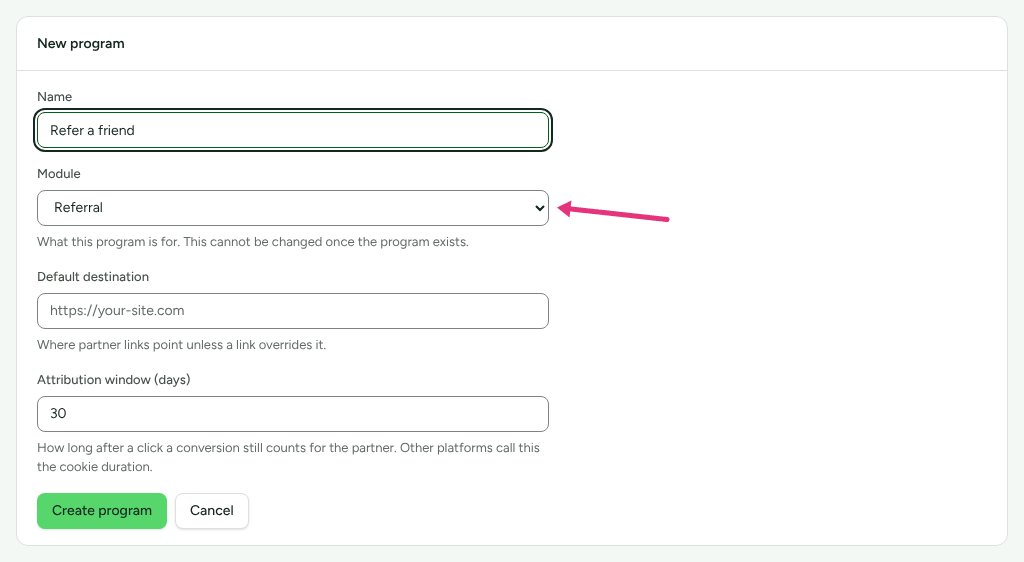
In Default destination, give the page a friend lands on unless you set a landing page later.
Set Attribution window (days): how long after a friend follows the link their signup still counts. The form starts at 30.
Press Create program, then open the new program from the list.
Choose the rewards
On the program's page, the Referral program card holds every setting. Until it is saved it says "Nobody can be enrolled until this is set up."
- Under What the referrer gets, choose a Reward:
- Cash: an amount, paid through your payout runs.
- Account credit: an amount on their account with you.
- Commission: a percentage of what the friend paid.
- Free period: a number of months.
- Nothing.
- Fill in the one value the reward needs (Amount (USD), Percentage or
Months). An amount is written the way a person writes it, such as
50.00; the line under it repeats what that comes to. - Under What their friend gets, choose Percentage discount, Fixed discount, Account credit, Free period or Nothing. A friend is never offered cash or commission.
Every reward is in the program's currency. Once saved, the card's badge states the offer in one line, for example "Give 20%, get USD 50.00".
Decide when a referral counts
Under When it counts, choose A referral succeeds when:
Choice What the screen says about it They create an account "Fastest to reward, and the easiest to abuse. Best for small, non-cash rewards." They start a trial "Rewards intent rather than revenue. Worth pairing with a hold period." They start a subscription "They have committed, but nothing has been paid yet." They pay their first invoice "Money has actually changed hands. The right default for cash rewards." They place an order "For one-off purchases rather than subscriptions." They pay their first invoice is the default.
Set Hold the reward for (0 to 365 days, 30 by default): "Time for a refund to arrive before anybody is paid. Zero pays immediately."
Refficks refuses cash or commission on an event where nobody paid, with: "A cash reward on "They create an account" pays out before any money has come in. Qualify on a payment, or reward with credit."
Set the restrictions and the words
- Under Restrictions:
- Only reward genuinely new customers is on by default: "Somebody already on your books was not introduced by this referral."
- Allow people to refer themselves is off by default. Refficks treats it as a self-referral when the friend has the referrer's own email address, or is the customer record already linked to that referrer. It never decides by IP address or device.
- Under Where the link goes, the Landing page is where a friend lands.
- Under What to tell people:
- How you describe the reward: shown to referrers above their link.
- The message they share: used by the copy button and every share
button. Put
{link}where their link should go. Left empty, the message is the offer line followed by the link. - Programme terms: a link to your rules, shown to referrers.
- Press Set up the program the first time, or Save referral settings afterwards. Saved. appears at the top of the card.
Put customers into the program
There are two ways in, set under Who can join › Referrers:
- Only customers I enrol (the default): only the customers you enrol get a link.
- Any customer can join: your refer-a-friend panel offers a Get my link button to a customer who is not a referrer yet (see the next section).
To enrol somebody by hand:
- In the Referrers card, type a name or email in Enrol a customer and press Find. Only customers who are not referrers yet are listed.
- Press Enrol beside the right person.
They get a link and a code made from their first name. "Nothing is sent for them. The link is theirs to pass on." A customer with no email address cannot be enrolled.
To let a referrer see their own referrals, press Invite in the Portal column. Refficks emails them a sign-in link, and the column then reads Invited, and Signed in once they are in.
Add the refer-a-friend panel to your site
The panel shows a signed-in customer their own link and code on your site, and can offer one to a buyer on your order confirmation page.
Go to Integrations › Developer and find the Refer-a-friend panel card.
Press Copy snippet in that card and paste it into the page.
On your server, when you draw the page, ask Refficks for a token for the customer who is signed in, with your secret key, and put it in
data-token. The token lasts ten minutes.curl https://go.refficks.com/api/v1/referral-tokens \ -H "Authorization: Bearer <SECRET_KEY>" \ -H "Content-Type: application/json" \ -d '{ "customer_external_id": "cus_123", "customer_email": "sam@example.com" }'The secret key starts
rk_live_…. On an order confirmation page, includecustomer_email: that page usually loads before the payment has reached Refficks, and without an address there is nobody to enrol.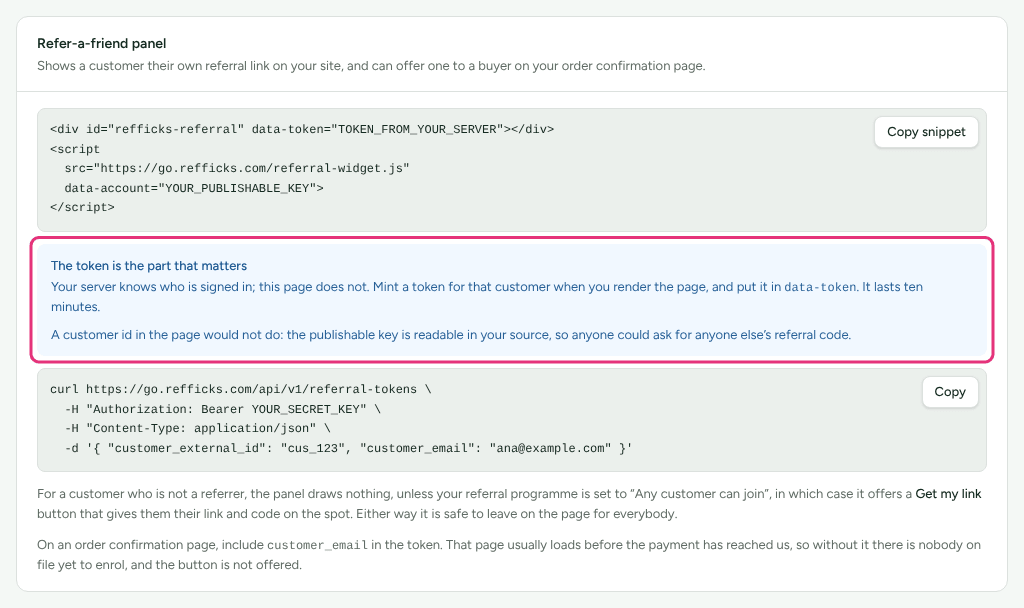
The token is the only thing that says who is on the page. A customer id in the page would let anybody ask for anybody else's code, because the publishable key is readable in your source.
For a referrer, the panel shows "Refer a friend", the offer, Your link and Your code with copy buttons, and Terms when you gave a terms link. For anybody else it draws nothing, unless the program is set to Any customer can join. It is safe to leave on the page for everybody.
What happens to a referral
- A friend follows a referrer's link, or uses their code.
- When the friend signs up, a referral appears on Referrals as Signed up, or as Rejected with the reason, for example "This customer was already known before the referral, and this programme rewards new customers only."
- When the friend does the thing you chose, the rewards are created. With a hold, the referral reads Waiting out the hold and each reward Held.
- Refficks checks every hour. Once the hold has passed, each reward reads Ready and the referral Qualified.
- Cash and Commission go into Commissions as a pending bonus. An Owner or Admin approves it there, and it is paid in your next payout run. When that payout is marked paid, the reward reads Fulfilled.
- A discount, an account credit or a free period is yours to deliver in your own billing system. Open the referral and press Mark delivered, then write what you called it in your system in What did you call it in your own system? and press I have delivered it. An account credit can instead be added in Stripe from the same place; see Store credit.
- Once every reward on a referral is delivered, it reads Rewarded.
If the payment that qualified a referral is refunded, the rewards not yet delivered are reversed and the referral reads Cancelled: "The payment that qualified this referral was refunded."
Milestones
Refficks counts each referrer's successful referrals and marks the 1st, 3rd, 5th, 10th, 25th and 50th. A milestone is an automation trigger, A referrer hit a milestone, not a reward on its own: to send an email or award a bonus, add an automation on it. Other referral triggers are Somebody was referred, A referral counted, A referral was refused, A referral ran out of time and A referrer got their first signup. See Automations.
Check it worked
- The program's Referral program card shows the offer badge, and the Referrers card lists everybody enrolled with their Code, Link, Referrals and Successful counts.
- How the programme is doing, on the same page, shows Referrers, Referring, Revenue brought in and Rewards cost over a window.
- Referrals lists every introduction with its Status and Rewards. Filter with Everything, Signed up, Held, Qualified, Rewarded or Rejected.
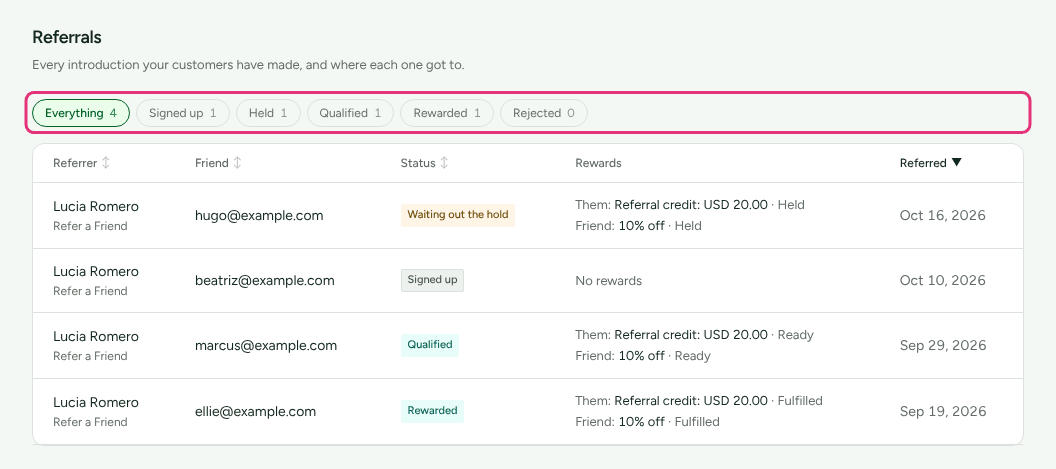
Open a referral to see What happened, in order, How they were credited from the attribution record, and both sides' Rewards.
What this does not do
- It does not send your referrers anything when you enrol them. Press Invite to give them a portal login; share the link yourself otherwise.
- It does not create the friend's discount in your billing system. A discount or free period is recorded as owed; you deliver it and press Mark delivered.
- Two settings have no field on the screen: a window after which an unconverted referral expires, and a limit on rewards per referrer. Without them, referrals do not expire and there is no limit.
- Only one referral program counts for a customer. The panel and the partner portal show a referrer the oldest referral program they are in.
- A referral counts only from a referral program's own link or code. A customer who arrived through an affiliate link was not referred by a friend.
Related
- Refer a friend: what your referrers see.
- Approve commissions: cash rewards wait there.
- Store credit: paying account credit in Stripe.
- Automations: act on milestones and referral events.
- Subscriptions, coupons and referral tokens: the token endpoint in full.