Change your workspace's address
Your workspace's address on Refficks is made from your company name when you sign up. It is where partners apply, and it is in your signup page's link. You can change it to one you prefer. The old address keeps working and sends everyone to the new one.
Before you start
- Role: Owner or Admin.
- Know this first: after a change you must wait 30 days before the next one, so choose carefully. "Each change asks for a new certificate, and those are rate limited across everyone on Refficks."
- It is not your own domain. A name such as
partners.example.comis set up separately; see Use your own domain.
Steps
Go to Settings › Workspace › Domains.
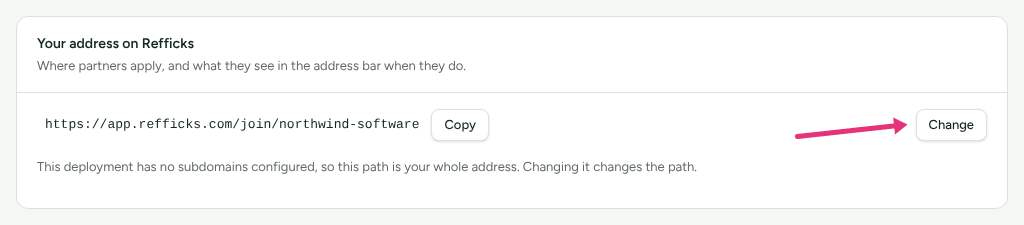
In Your address on Refficks ("Where partners apply, and what they see in the address bar when they do."), press Change.
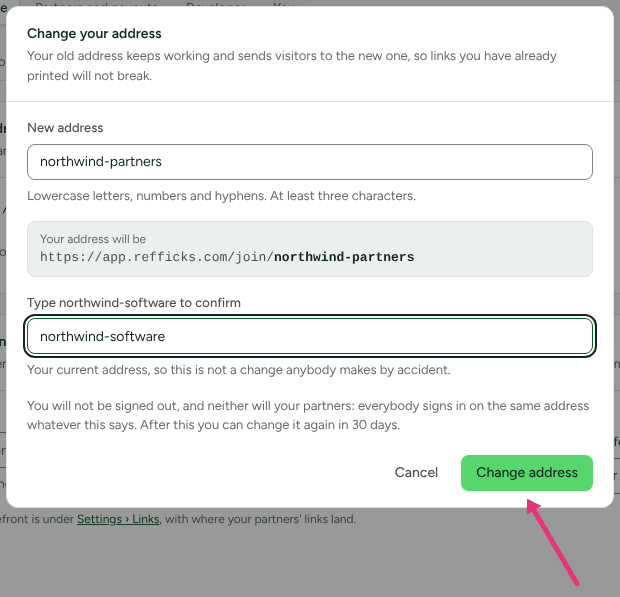
In Change your address, type the New address: "Lowercase letters, numbers and hyphens. At least three characters." The box below shows the whole address as partners will see it, with your part in bold.
If the screen says "That address is not available.", choose another. It gives the same answer for every reason: a reserved word, an address somebody else holds, or one somebody else used to hold.
In Type <your current address> to confirm, type your current address.
Press Change address. While Refficks prepares the new address the button reads Setting up.
Check it worked
- The card shows the new address, and under it: "You can change this again on <date>."
- Addresses you have used before lists the old one with the date you left it: "Every one of them still works and sends visitors here, so anything you printed keeps working. Nobody else can ever take them."
- Open your old address in a private window. You land on the new one.
- Settings › Developer › History has an entry, "address changed · Organization", with the old and new addresses. If Refficks changed it for you, the entry says it was Refficks.
What changes, and what does not
- Old addresses redirect. A visit to an address you have left is sent on
to the current one, path and all, as a permanent redirect. This holds for
both shapes of address:
https://<address>.<Refficks's domain>where the service gives each workspace a name of its own, andhttps://app.refficks.com/join/<address>where it does not ("This deployment has no subdomains configured, so this path is your whole address. Changing it changes the path."). - Up to a minute of lag. A front door somebody visited just before the change can keep serving itself, instead of redirecting, for up to 60 seconds. The page it serves is still yours.
- Nobody is signed out. "You will not be signed out, and neither will your partners: everybody signs in on the same address whatever this says."
- Your signup pages move with it: each program's Public signup page card shows the new address, and the copied address from before still works.
- Partner links move with it only if they go through Refficks, because those are built on this address. That is every link with Count clicks on our servers on (under Settings › Partners and payouts › Partner links), and any link that points straight at a Stripe Payment Link, which always goes through Refficks. Copies already shared keep working. Links that go straight to your website do not use this address at all.
- A released address is never given to anybody else. You can take one of your own old addresses back later: type it as the new address.
What this does not do
- It does not rename your company. That is Name under Settings › Workspace › Organization.
- It does not change a program's own Address (the
/p/…part). That is on the program's Public signup page card, and changing it there does break old links. - You cannot change it again for 30 days, and the Change button is greyed out until then.
Related
- Use your own domain: your signup page and portal on a name of your own.
- Create a program: the signup page's address.
- Partner links settings: links that go through Refficks.
- Read History: who changed what.