Intelligence, scores and recommendations
Intelligence is where Refficks says what it has noticed about your partners and what it suggests you do about it. Every night it scores each partner, looks for partners growing, stalling or worth a look, and turns what it finds into recommendations with their evidence beside them. Nothing that changes what a partner is paid ever happens without a person confirming the exact figure, and risk findings are shown only to managers and above.
The short version
- Needs you is the queue: recommendations ranked by what ignoring them costs, each with its evidence and one button that does it.
- Opportunities and Risks are findings: what Refficks noticed, which you open, dismiss or act on elsewhere.
- Reviews and Quality vs risk are for managers and analysts; Results says what happened after you acted.
- A recommendation that changes pay asks you to confirm the number, is never done in a batch, and has a ceiling: 50% for a rate, and USD 1,000 (or the same in your currency) for a bonus.
- Not now holds a recommendation or finding back for 30 days.
- Refficks does work on its own only if an owner or admin allows it under Settings › Partners and payouts › Automation, and then only low-risk work: today, sending a partner their link.
- Every partner named on Intelligence opens at their Insights section, where the findings and recommendations about them are.
In detail
The page
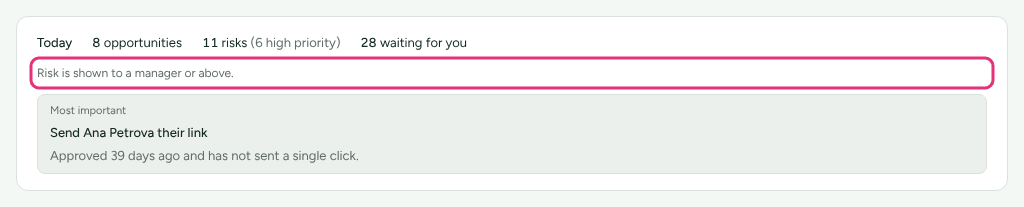
The Today card sits above the tabs: how many opportunities and risks are open ("3 opportunities (2 high priority)"), how many recommendations are waiting for you, what automation did since yesterday, and the Most important one, which opens that partner's Insights section. With nothing open it reads "Nothing is waiting for you. Findings appear here after the nightly pass." If AI assistance is on, a short summary written by the AI sits under the counts, marked as the AI's; every figure is counted by Refficks, not by the AI.
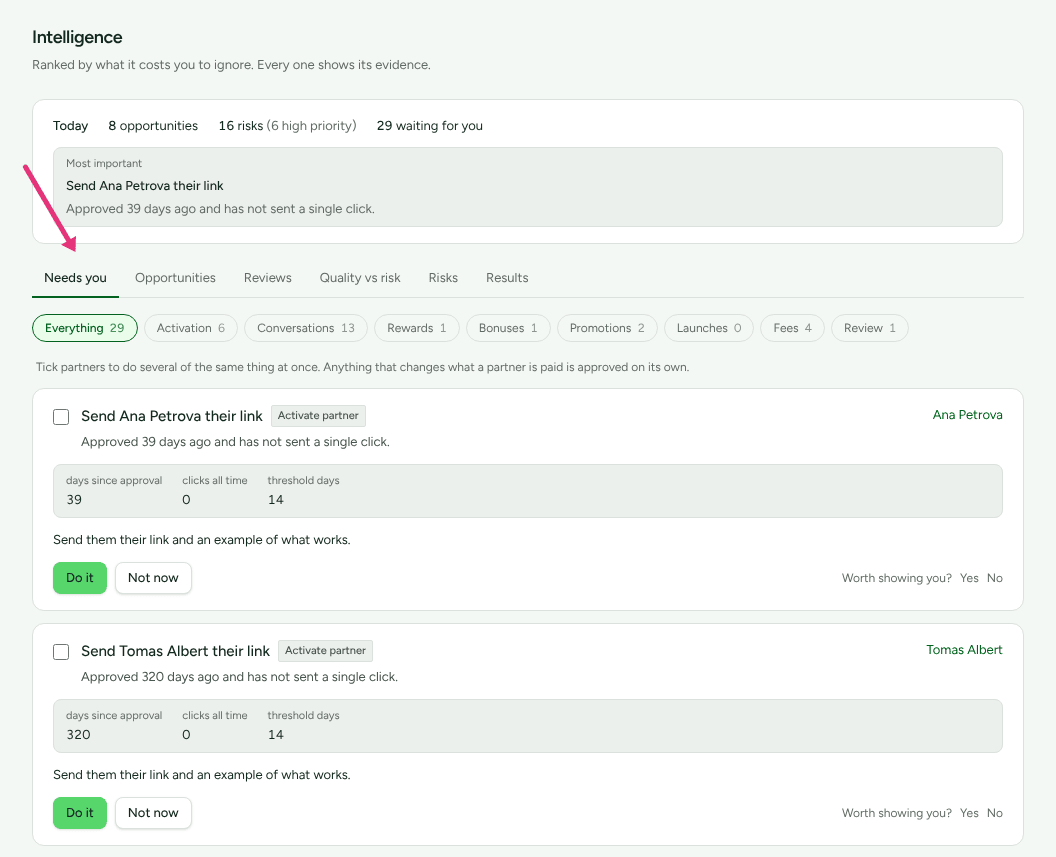
| Tab | Shows | Who sees it |
|---|---|---|
| Needs you | "Ranked by what it costs you to ignore. Every one shows its evidence." | Everyone; review prompts only for managers and above |
| Opportunities | "Partners growing fast, partners who have stalled, and partners already good at a job you have not offered them." | Everyone |
| Reviews | "Investigations and findings waiting on a person. Nothing here withholds anybody's money." | Owners, admins and managers |
| Quality vs risk | "Two readings that are allowed to disagree." | Owners, admins, managers and analysts |
| Risks | "Relationships under strain, partners falling away, and anything about somebody's numbers worth a look. Never an accusation." | Everyone; risk findings only for managers and above |
| Results | "What happened after you acted on these, measured over the 30 days that followed." | Everyone |
Needs you
Each card names the partner, says what Refficks recommends and why, and shows the figures it rests on. A badge says what kind of recommendation it is, or Review recommended for a prompt to look at somebody's numbers. A recommendation that spends money also carries Changes what they earn (a rate) or Costs you once (a bonus).
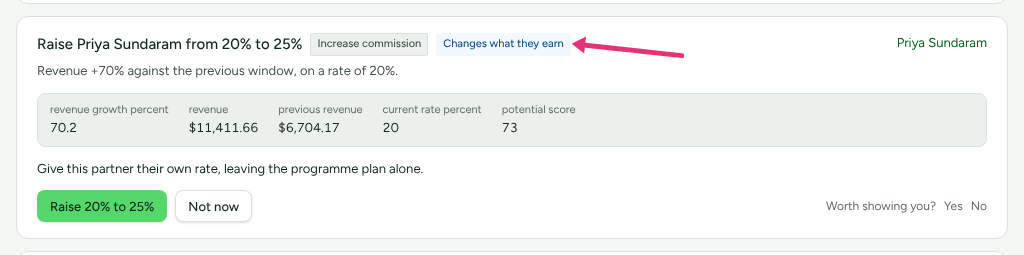
The chips above the list filter it: Everything, Activation, Conversations, Rewards, Bonuses, Promotions, Launches, Fees and Review, each with its count.
What each button does:
| Button | What happens |
|---|---|
| Do it, or Add them to a program | Carries out the recommendation: sends the email it drafted, or adds the partner to the program |
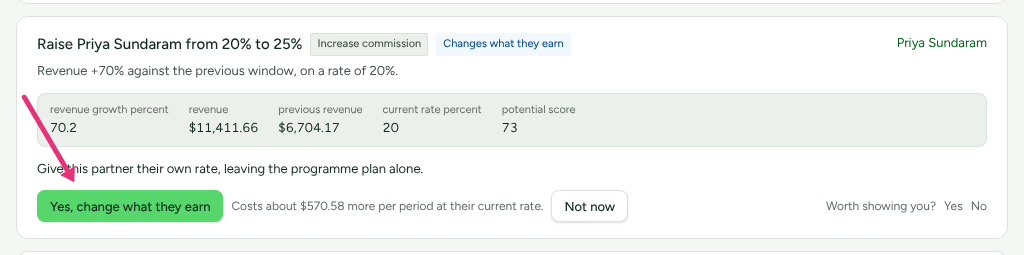
| Raise a rate to another, or Award an amount | Asks first. The button becomes Yes, change what they earn or Yes, pay this once, with the cost beside it: "Costs about … more per period at their current rate." or "Costs …, once." |
| Look at this partner or Open their profile | For a prompt with nothing to apply, such as a review or choosing a launch: opens the partner at Insights |
| Not now | Dismisses it. The same recommendation is not raised again for 30 days |
| Why this? | With AI assistance on: the AI explains the evidence in sentences, and says what would make acting on it wrong |
| Worth showing you? Yes / No | Your opinion of the rule that raised it, counted under Results |
A raise sets that one partner's own rate, leaving the program's plan alone. A bonus is written to the partner's ledger as owed; a payout run pays it.
Doing several at once. Recommendations that change nothing about pay have a tick box: "Tick partners to do several of the same thing at once. Anything that changes what a partner is paid is approved on its own." Tick partners of one kind, then press Do these and the number at the bottom. A report says which went and why any did not.
The ceilings on pay
Refficks will not talk anybody into more than this in one click:
- A rate: not above 50%. "Refficks will not set a rate above 50%. Set …% on the commission plan yourself if that is really what you want."
- A bonus: not above USD 1,000, EUR 1,000, GBP 800, CAD 1,400, AUD 1,500, JPY 150,000, INR 80,000 or BRL 5,000, and in another currency the dollar figure converted. "Refficks will not award a bonus above … Record a larger one yourself on the commissions screen."
These bound recommendations only. A plan that really pays more is yours to set on Commission plans.
Opportunities and Risks
These are findings: what Refficks noticed, with the numbers it noticed it on. Opportunities are partners growing and partners good at a job you have not offered them. Risks are partners going quiet, costing more than they bring, relationships under strain, unusual numbers, and work you are behind on. A badge names the kind of finding; another says "Low confidence" or "Medium confidence" when it is less than sure.
- Open their profile opens the partner at Insights.
- That is normal for them, This is wrong and Not now dismiss it, and tell Refficks which of three things it was. A dismissed finding is not raised again for 30 days.
- The recommendations a finding led to are named under it; act on them in Needs you.
Empty, they read "Nothing new to chase" and "Nothing looks wrong".
Reviews
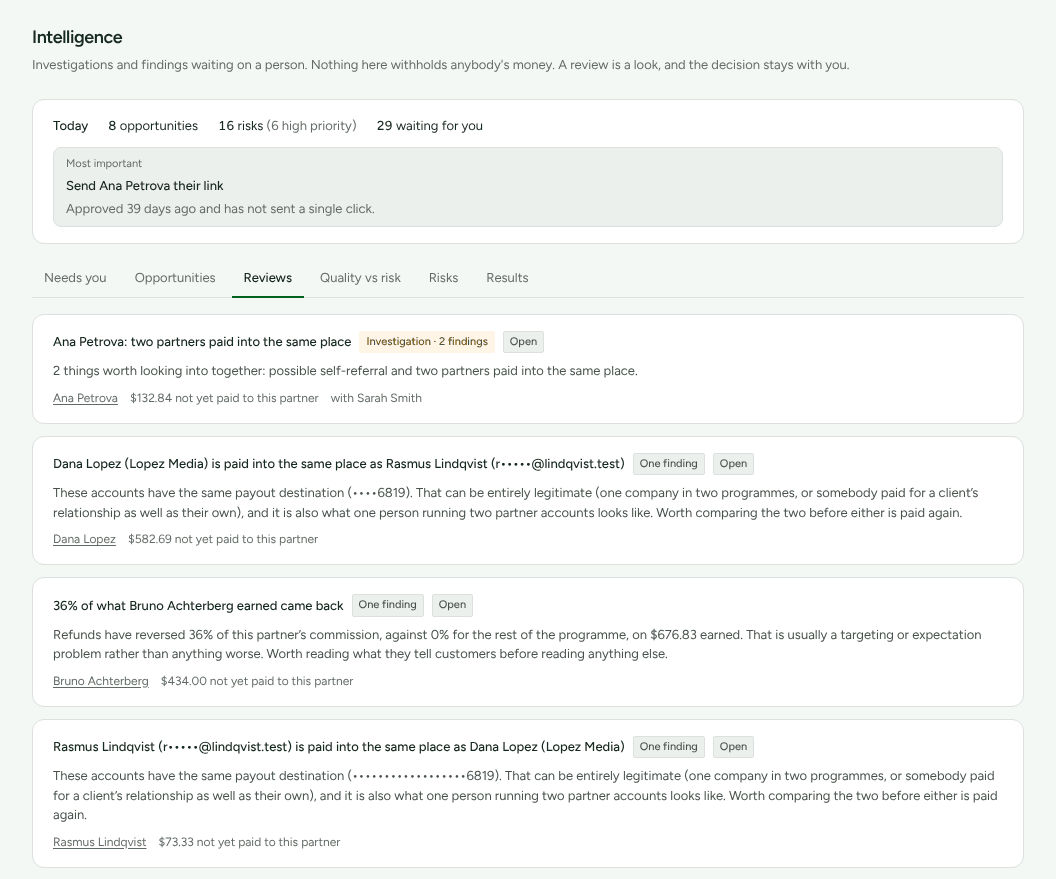
For owners, admins and managers. Each row is an Investigation with its number of findings, or One finding, with its status, the partner, what they have "not yet paid to this partner", and who it is with. "Nothing here withholds anybody's money. A review is a look, and the decision stays with you." Empty, it reads "No partner activity currently needs manual risk review."
Under the queue, How the detectors have been doing reports on Refficks's own rules: for each, how many findings it raised, how many are still open, confirmed, marked wrong or dismissed, and "…% of judged findings were real". A rule marked Watching, not acting on it yet shows its findings to nobody while it is tried out.
Quality vs risk
For owners, admins, managers and analysts. Four groups, each with its count, the partners in it and what to do:
| Group | What to do |
|---|---|
| Worth more of your money | "Their customers are worth having and nothing is outstanding. This is where more budget goes furthest." |
| Good, with something to check | "The partner is good and something is worth a look. Read the finding before you decide anything." |
| Worth a conversation | "Nothing is wrong; the customers they bring are not worth much. This is a conversation about targeting, not a concern." |
| Worth looking into | "Both readings point the same way. Worth a person's time before the next payout." |
Below them, Not enough to place yet counts the partners who "have not brought enough customers to judge on quality".
Results
What came of it lists each kind of recommendation you acted on: how many times (Acted on), how many partners were active in the 30 days after (Active afterwards), the Rate, and the Revenue associated. A recommendation that changed pay reads "Not judged": whether it worked is a question about what would have happened otherwise, which Refficks does not guess at. "These are things that happened after each action, in the same window. They are not proof that the action caused them."
What you told us counts your Yes and No answers per rule ("3 of 4 said useful") and why you said no.
A partner's scores
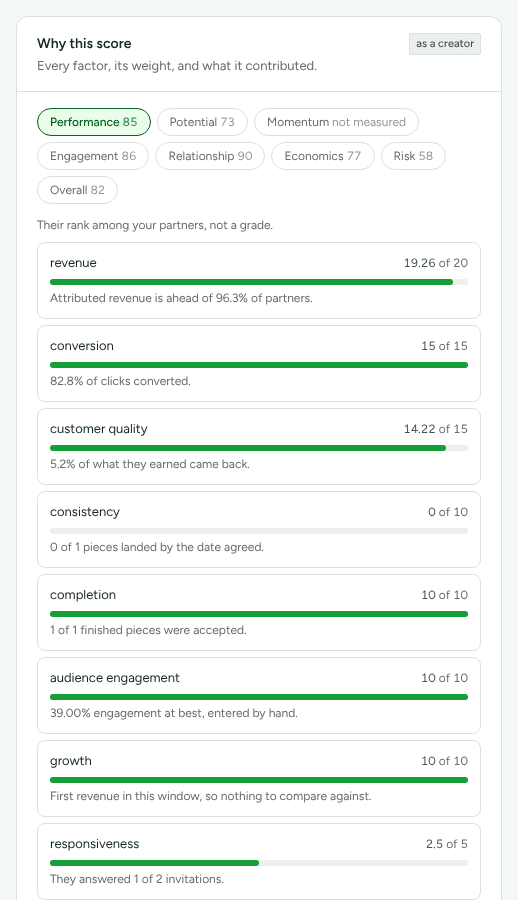
Open a partner and choose Insights: the Why this score card says "Every factor, its weight, and what it contributed." Seven scores out of 100, each answering one question, and an eighth for ordering lists:
| Score | Its question |
|---|---|
| Performance | "Their rank among your partners, not a grade." |
| Potential | "Room to grow, measured against their own history." |
| Momentum | "Which way they are moving, and how fast." |
| Engagement | "Whether there is anybody at the other end." |
| Relationship | "How the working relationship is going, including whether you have paid them what you agreed." |
| Economics | "What they cost you against what they bring in." |
| Risk | "Signals worth your eyes. Never a finding. Here, low is good." Managers and above only |
| Overall | "Only for putting this list in an order. Read the seven above it rather than this." |
Press a score to see its factors: each one's points out of its weight, a bar, and a sentence saying why. "not measured" is not zero: it means there was nothing to measure yet. A partner who has not clicked or sold is "Not scored yet". A badge says when a partner is measured as a particular role, such as "as a referrer", because each role is judged on different factors.
Risk is for managers and above
What Refficks suspects about a partner is a manager's to read. Below a manager (analysts and support seats):
- Needs you leaves out review prompts and drops the Review chip;
- Risks leaves out findings about a payout waiting on a review;
- Today leaves review prompts out of its counts;
- a partner's Why this score has no Risk score or factors.
Each of those places says so: "Risk is shown to a manager or above." An analyst still reads Quality vs risk, which is about the program as a whole.
What may run without you
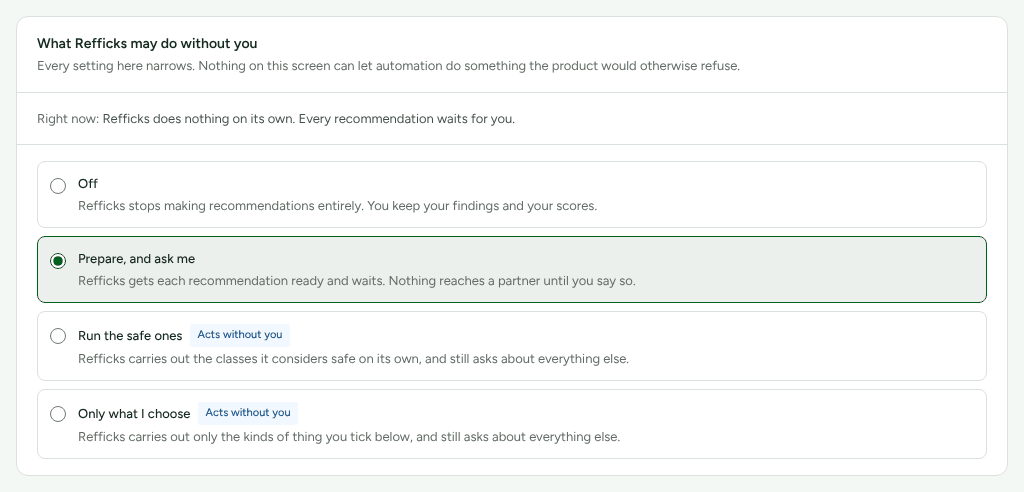
Settings › Partners and payouts › Automation decides what Refficks may do on its own. Owners and admins change it; everyone else can read it. "Every setting here narrows. Nothing on this screen can let automation do something the product would otherwise refuse."
| Mode | Meaning |
|---|---|
| Off | "Refficks stops making recommendations entirely. You keep your findings and your scores." |
| Prepare, and ask me (the default) | "Refficks gets each recommendation ready and waits. Nothing reaches a partner until you say so." |
| Run the safe ones | "Refficks carries out the classes it considers safe on its own, and still asks about everything else." |
| Only what I choose | "Refficks carries out only the kinds of thing you tick below, and still asks about everything else." |
Only low-risk work can ever run on its own. Today that is one kind: "Sending a partner their link is the only work Refficks considers safe to do unattended." Anything that changes pay needs a person whatever is set.
The Limits and Quiet hours cards bound it further:
- Most things done in a day: 25 unless you change it, 1 to 500.
- Most emails to one partner in a week: 2, at most 7. "Counts messages you send by hand too."
- Days before the same nudge again: 14, from 1 to 90.
- Least confident it may be: 0.8, from 0.8 to 1. "Below this the finding underneath is a guess, so Refficks will ask instead."
- Stop sending at 20 and Start again at 8, in the partner's own day.
Stop everything now pauses automation at once; Start it again resumes it. Programmes that are different holds one program to less than the rest of the account, and What Refficks has done lists every decision automation made, including the ones it decided against.
Where to see it in Refficks
- Intelligence, in the left menu, for the queue and the findings.
- A partner's Insights section, for What we have noticed, Partner quality, Why this score and What to do next about that one partner.
- Settings › Partners and payouts › Automation for what may run on its own.
Settings that change it
| Setting | Where | Default | What it changes |
|---|---|---|---|
| Automation mode | Settings › Partners and payouts › Automation | Prepare, and ask me | Whether anything runs without you |
| Most things done in a day | the same tab, Limits | 25 | How much automation may do in a day |
| Most emails to one partner in a week | the same tab | 2 | Emails to one partner, by hand or automated |
| Days before the same nudge again | the same tab | 14 | How soon automation repeats itself |
| Least confident it may be | the same tab | 0.8 | How sure a finding must be before automation acts on it |
| AI assistance | Settings › Partners and payouts › AI assistance | Whether Why this? and the AI summary are offered |
Limits
- AI may explain, summarize and draft here. It never changes a commission, approves a payout, reverses a commission or suspends a partner.
- A finding about a rate waits for enough data first: 20 clicks or 3 conversions, depending on the rate. A quiet program gets few findings.
- A recommendation that changes pay is never done in a batch, and never without the second press.
- Results reports what happened after, never that acting caused it.
Related
- Commission plans: set a rate above the ceiling, or for everyone in a program.
- Bonuses: what an awarded bonus is, and how it is paid.
- Automations: rules you write yourself, as opposed to what Refficks recommends.
- Team roles and permissions: who can read risk and who can act.