Be found by partners, and find them, in the directory
Refficks has a directory with two halves. Partners can browse programs that merchants have listed and ask to join them: you list a program in it from the program's page. And merchants can browse cards that partners have published and invite them: that half, Find partners, is switched off on this service.
Before you start
- Role: Owner, Admin or Manager, to list a program or to invite a partner.
- You need: a program that is Active and taking applications. A program with no public signup page has nothing to list, and nothing to invite anybody to. See Create a program.
List a program in the directory
- Go to Programs and open the program.
- Find the Partner directory card: "Whether partners browsing Refficks can find this programme." Its badge reads Not in the directory or Listed.
- Check what partners would open, under What a partner would open from
the directory. It is the program's own signup address, ending in
/p/<address>. - Press List it in the directory.
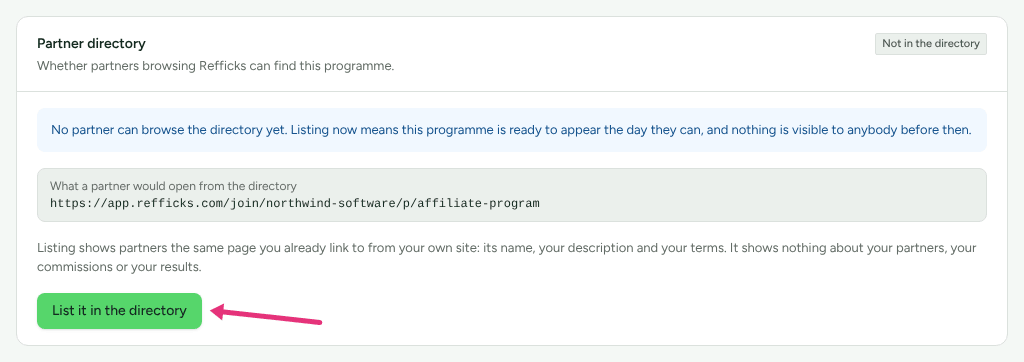
"Listing shows partners the same page you already link to from your own site: its name, your description and your terms. It shows nothing about your partners, your commissions or your results." To improve the listing, improve the signup page. See Customise your signup page and portal.
If the program is not open, the card says This programme cannot be listed yet: "This programme is not open to applications, so it has no page to list." and the button is greyed out.
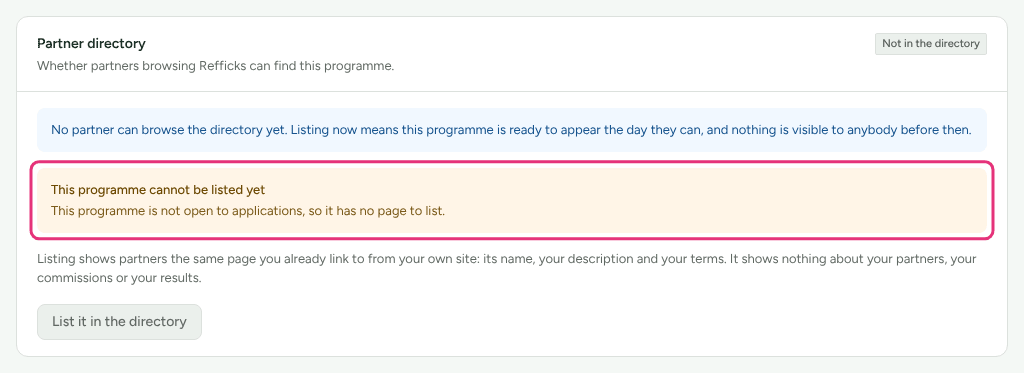
The card also says "No partner can browse the directory yet. Listing now means this programme is ready to appear the day they can…". That sentence is out of date: partners can already browse listed programs, as below.
What partners see
A partner with a portal login finds listed programs under Find programmes in their portal: "Merchants on Refficks who have asked to be found." They can narrow the list by Kind of programme. Nothing is ranked: the newest listing comes first. They press Ask to join, give their name and Where you will promote them, and are then handled like anybody who applies on your signup page: they wait for you, or join at once if the program approves applicants automatically. See Review partner applications.
A program appears there only while it is listed, Active and taking applications. Find programmes is not offered on a merchant's own domain.
Take it out
Press Take it out of the directory. "This takes effect immediately. Partners who already applied through it stay where they are." Closing the program to applications, or pausing it, also hides it from the directory.
Find partners and invite them
Switched off: Merchants searching partners' cards needs Refficks to turn it on for this service. While it is off, Find partners is not in the left menu. Partners can still publish a card and answer an invitation they already have.
With it on, Find partners appears in the left menu, below Programs:
- Go to Find partners: "Partners who published a card and said merchants may invite them."
- Optionally, narrow the list with What they cover. "Newest first. Refficks does not rank these or suggest anybody to anybody." The line also says how many invitations you can still send today.
- On a partner's card, press Invite them.
- Choose Which programme. Only programs open to applications are offered; with none, the card says No programme is open to applications.
- Optionally, write What you want to say: "the part a person actually reads before deciding."
- Press Send the invitation. "They are emailed under your name. You will not be given their address unless they join, and if they say no, you cannot ask again."
The card then shows where it stands: Waiting for an answer, Joined or Declined. A partner who accepts joins the program at once, already approved, and only then do you get their name and address as a partner. One who declines cannot be invited again: "They declined. You cannot invite them again."
Check it worked
- The program's Partner directory card reads Listed, with the time it was listed.
- In Find partners, an invited partner's card reads Waiting for an answer, then Joined or Declined.
- A partner who asked to join from the directory appears on Partners, as an Applicant if the program reviews applicants.
What this does not do
- A card shows only what the partner typed about themselves. It shows no email address, no programs they are in and nothing another merchant wrote.
- Refficks never ranks or recommends partners, and sends no email of its own about the directory. An invitation goes out under your name.
- You can send 25 invitations a day: "You have sent your 25 invitations for today. This resets tomorrow."
- You cannot invite the same partner twice, whatever they answered.
- A partner can block you. You are not told; their card is not shown to you.
- A partner who ended things with your workspace does not see your programs in Find programmes.
Related
- Create a program: opening a program to applications.
- Review partner applications: what to do with people who ask to join.
- Find programs and answer invitations: the same directory from a partner's side.
- Run more than one program: which address each program shows.