Set up your partner links
Settings › Partners and payouts › Partner links decides where every partner's link sends people, what the link carries, and how much the tracking script may do before a visitor agrees to cookies. This article goes through each card on that tab. It is for the merchant setting up a program, or anyone changing how links look.
A change here moves every partner's link at once. Nobody has to reissue a link, and links already shared keep working.
Before you start
- Role: everyone on your team can read the tab. Owners and admins can change it. Anybody else reads "Only an owner or admin can change what partner links carry." under the extra parameters, and the controls are greyed out.
- You need: your own website's address.
What your partners share
The first card shows an example link built from your settings: "An example built from your settings below. Jane is a partner; her real link uses her own code." Press Copy beside it to try it.

If it reads "You have not told us your website address yet, so this example uses a placeholder.", set your website next.
Set your website
- Under Your website, type the Website address, for example
https://example.com. A site that lives under a path, such ashttps://example.com/shop, can say so. - Press Save. "Saved. Your partners' links now point here."
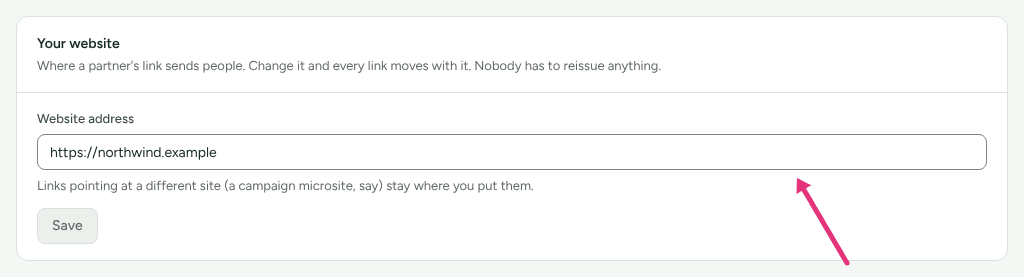
"Links pointing at a different site (a campaign microsite, say) stay where you put them." The address can be changed but not removed.
Add your other sites
Use Your other sites for a shop in another country, or a store on a different address from your blog. "Partners keep one link; it can land on any site you add here, and a visitor who moves between your sites stays the same visitor, so the partner is credited wherever they buy."
- Under Address of another site, type the address, such as
https://shop.example.co.uk: "Just the address, nothing after the name." - Press Add site. The site is listed as Waiting for DNS, with a TXT record.
- Add that TXT record at your DNS provider. "It proves the site is yours. Until then no partner link lands here."
- Press Check DNS. When the record is found, the site reads Live.
- Optionally, under Countries that land here, type two-letter country
codes, such as
GB, IE, and press Save. "A country can go to one site." - Tick This site has the same pages as my main website if it does: a link to a product page then lands on the same product there. Leave it off and visitors land on that site's home page.
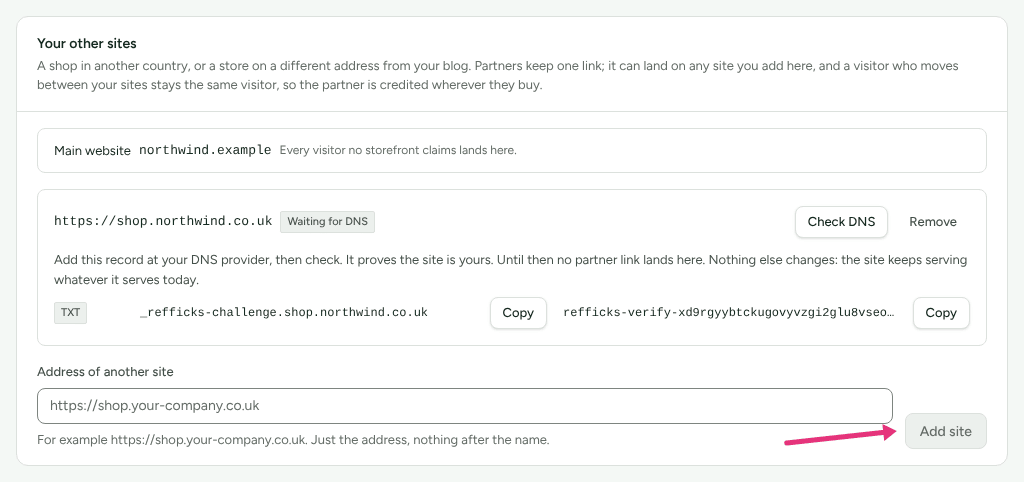
A site reads Not working when its record can no longer be found; press Re-check after fixing it, or Remove to take the site away. Every visitor no site claims lands on your main website.
Sending visitors by country works only on links that go through Refficks. With direct links, the card says "Visitors are sent by country only on links that go through Refficks." and points you to Count clicks on our servers. Partners can link to any page on a verified site either way.
Rename the bit that names the partner
The bit that names the partner is the parameter in your links that carries
the partner's code: in example.com/?rfi=jane, it is rfi. New workspaces
start with rfi.
- Type the new name under Parameter. It may use lowercase letters, numbers, underscores and hyphens, and must start with a letter.
- Press Rename.
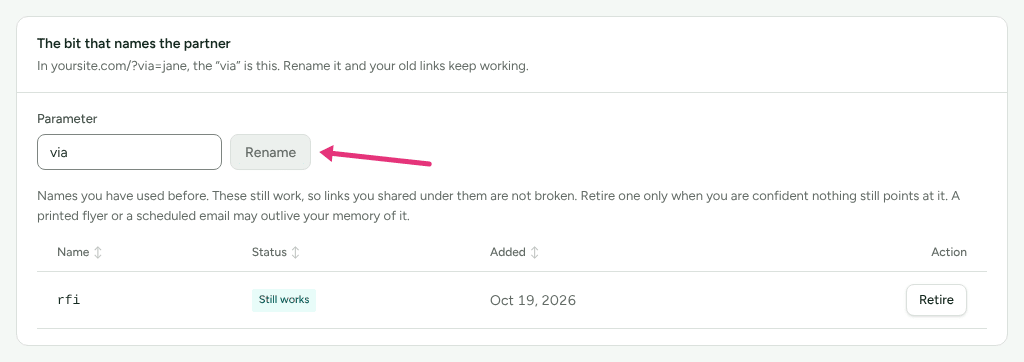
The old name stays in the list below as Still works, so links shared under it keep crediting partners. "Retire one only when you are confident nothing still points at it. A printed flyer or a scheduled email may outlive your memory of it."
- Retire stops links that use that name being recognised. The name you use now cannot be retired: "This is the parameter your links use now. Change it before retiring it."
- Bring back undoes a retirement.
The script on your site picks up a rename or a retirement within about five
minutes, with nothing to re-install. rk_vid, rk_ref and rk_sid are taken
by the tracker itself, and so is any name you already use as an extra
parameter.
Add extra parameters to every link
Extra parameters on every link adds your own parameters, such as
utm_source=affiliate, so your analytics can tell partner traffic apart. "They
never decide which partner is paid."
- Press Add a parameter.
- Type the Name, such as
utm_source, and the Value, such asaffiliate. - To make a value differ per link, use
{code}(the link's code),{partner_id}(the partner's id) or{program}(the program). "The partner's name is not offered. A name in an address ends up in every analytics tool and server log the visit passes through." - Press Save. "Saved. Every partner link carries these from the next click."
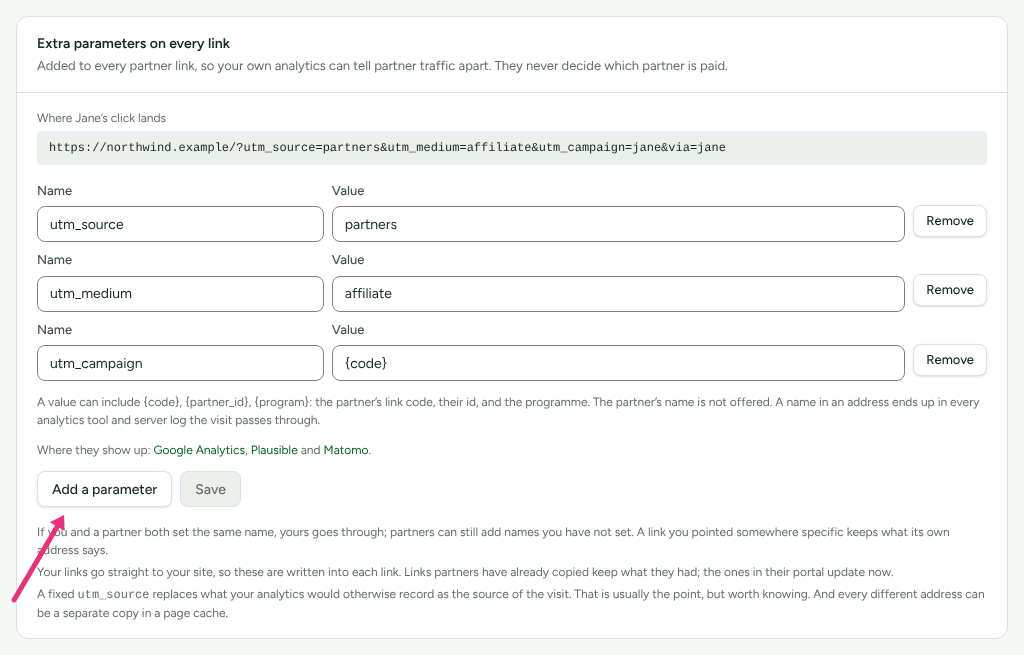
Where Jane's click lands shows the address a real click produces with what you saved.
- A link can carry at most 10 extra parameters. A name is letters, digits, dots, dashes and underscores, up to 40 of them; a value is 1 to 200 characters.
- If you and a partner set the same name, yours goes through. A link you pointed somewhere specific keeps what its own address says.
- With direct links, the parameters are written into each link, so "Links partners have already copied keep what they had; the ones in their portal update now." With links that go through Refficks, a change reaches every link already shared, from the next click.
- "A fixed
utm_sourcereplaces what your analytics would otherwise record as the source of the visit."
The card links to the Google Analytics, Plausible and Matomo guides, which say where these values show up in each tool.
Count clicks on our servers
Off by default. "Turning it on trades your domain in the link for a more complete click count."
- Normally, a partner's link goes straight to your website, and the script on your page records the click.
- With this on, the link goes through Refficks first, ending
/r/<code>, and is recorded there before the visitor reaches the same page on your site.
To turn it on, tick Count clicks before people reach my site.
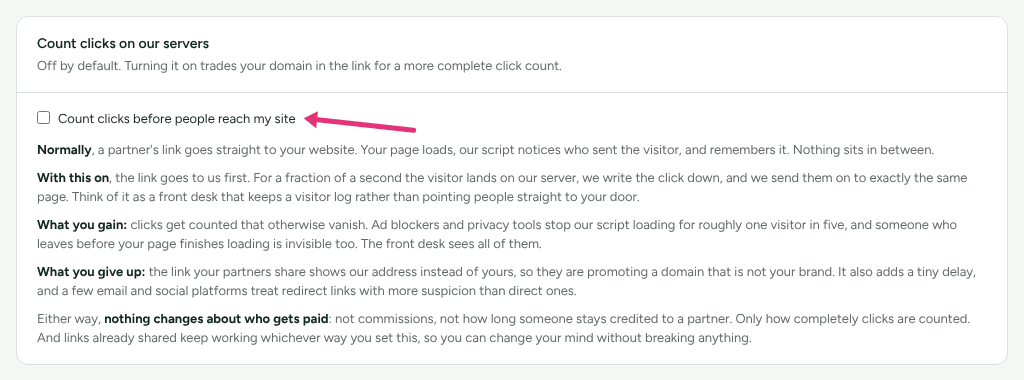
- What you gain: "Ad blockers and privacy tools stop our script loading for roughly one visitor in five, and someone who leaves before your page finishes loading is invisible too." Those clicks are counted.
- What you give up: "the link your partners share shows our address instead of yours", it adds a tiny delay, and "a few email and social platforms treat redirect links with more suspicion than direct ones".
- "Either way, nothing changes about who gets paid": not commissions, not how long someone stays credited. Links already shared keep working whichever way you set it.
One kind of link goes through Refficks whichever way this is set: a link whose
destination is a Stripe Payment Link (an address on buy.stripe.com). Stripe
drops any parameter it does not know, so a direct link to it could never
credit the partner. Once you have chosen a guide that sells through payment
links on Integrations › Where you sell (Stripe Payment Links, Stripe
Managed Payments, or a site builder's), the redirect also adds the partner's
code as client_reference_id, which Stripe hands back with the payment. A
visitor whose browser sends Global Privacy Control is sent on without it. See
Connect Stripe.
Where the Refficks service gives each workspace its own address, links that go
through Refficks are on that address, with your workspace's name in it. Links
handed out on Refficks's shared address, go.refficks.com/r/<code>, before
11 October keep working there. The example on What your partners share
shows Refficks's shared address either way.
Not yet documented: whether the hosted service at app.refficks.com gives workspaces their own address. A deployment without one hands out links on the shared address.
Wait for consent before tracking
Off by default. "Turn it on if your visitors must agree to cookies before anything is stored."
- Tick Store nothing until my cookie banner says yes.
- Add
refficks.consent(true);to your cookie banner's "accept" action, andrefficks.consent(false)to its "reject" or "withdraw" action, "which also clears what was stored".
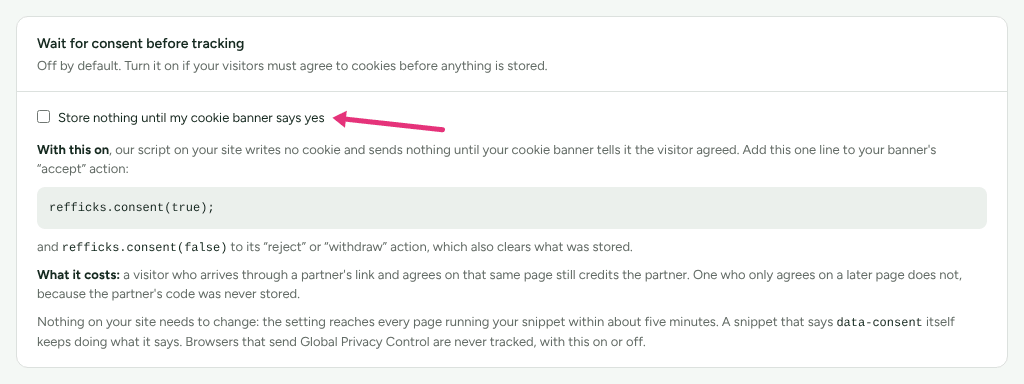
"Nothing on your site needs to change: the setting reaches every page running
your snippet within about five minutes. A snippet that says data-consent
itself keeps doing what it says. Browsers that send Global Privacy Control are
never tracked, with this on or off."
"What it costs: a visitor who arrives through a partner's link and agrees on that same page still credits the partner. One who only agrees on a later page does not, because the partner's code was never stored."
Switched off: Keep a partner's code in my site's links until the visitor decides (URL passthrough) appears in this card only once Refficks turns it on for its service, which waits for a legal review. With it on, the script adds the partner's code to the links between your own pages until the visitor decides, so agreeing on a later page still credits the partner, and nothing is stored before they agree. "Ask whoever advises you on privacy before turning this on."
Check it worked
- What your partners share shows your website (or, with Count clicks on
our servers on, an address ending
/r/jane), with your parameter name in place ofrfiif you renamed it. - Where Jane's click lands shows your extra parameters.
- Tracking › a link › Copy link gives a link in the new form; open it in a private window to see where it lands.
- Settings › Developer › History records parameter renames, retirements and restorations, changes to the extra parameters, and changes to the consent setting.
What this does not do
- Nothing here changes who is credited for a sale, how much they earn, or how long a click counts. Those are program settings (How attribution works).
- A rename does not rewrite links partners have already copied. Their old links keep working under the old name until you retire it.
- A site added under Your other sites gets no visitors and no visitor id until its DNS record is found.
- Sending visitors by country needs Count clicks on our servers.
Related
- Install the tracking script: the script these settings are served with.
- Consent and privacy: what the script writes, and when.
- Clicks or visits are not being recorded: when a link stops counting.
- Use your own domain: your signup page and portal on your own address.