Refer a friend
How to share your referral link and code, what happens after a friend uses them, and when your reward is ready. For customers a merchant has made a referrer.
Your portal may use the merchant's own words for partner, commission, payout, referral and reward.
Before you start
- You need: to be enrolled in the merchant's referral program, and a portal login. Enrolling gives you a link and a code; it does not send you a login. If you have neither, ask the merchant to invite you.
- Where: Refer in your portal menu. It is there when the merchant has you down as a referrer. The page is headed Refer a friend: "Share your link. When somebody you sent buys, you both get something."
If the page says "You are not in a referral programme", you are not enrolled yet: "If your account manager adds you to one, your link and code will appear here."
Share your link or code
The top card names the offer, for example "Give 20%, get USD 50.00", and the program. Under it, the merchant may say in their own words what the reward means.
- Copy Your link with the button beside it, or Your code for a friend who would rather type it at checkout.
- Or press Copy message to copy the merchant's message with your link already in it.
- Or press Email, WhatsApp or X to open that app with the same message filled in.
- Programme terms opens the merchant's rules, when they published them.
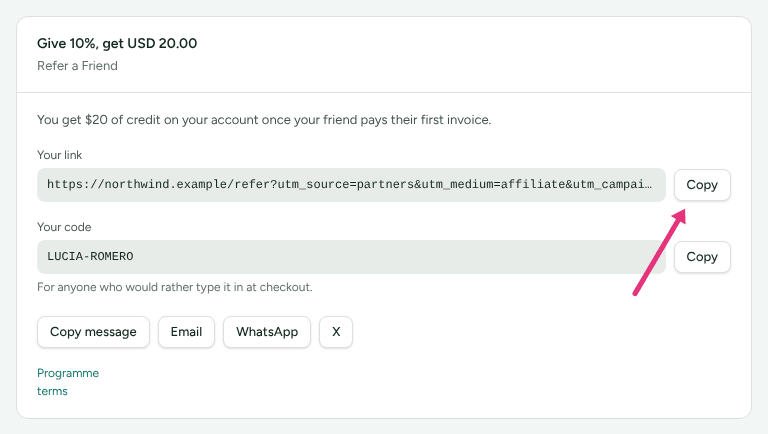
Every button sends the same message, so your friend reads the same offer whichever way you share it.
Follow your referrals
Under the share card, four figures:
| Figure | What it counts |
|---|---|
| Referrals | Everybody who signed up through your link or code. |
| Successful | Referrals that counted. |
| Ready | Rewards whose holding period is over, waiting for the merchant to pay or deliver them. |
| Still held | Rewards still inside the holding period. "Waiting out the refund window." |

Ready and Still held add up rewards with an amount, in one currency. A reward in another currency is left out of them and listed below with its own amount, and the page says how many were left out. A discount or a free month has no amount, so it is not in these two figures.
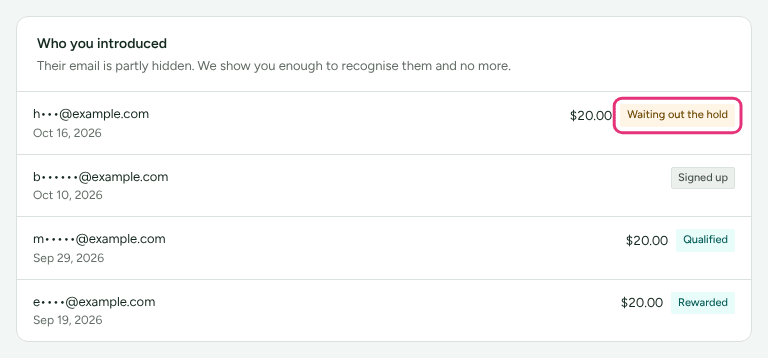
Who you introduced lists each friend: "Their email is partly hidden. We show you enough to recognise them and no more." Each line shows when they signed up, your reward for them when there is one, and a status:
| Status | What it means |
|---|---|
| Signed up | Your friend has an account. Nothing has counted yet. |
| Waiting out the hold | They did what the program rewards. The merchant holds rewards for a number of days in case of a refund. |
| Qualified | It counted, and your reward is ready. |
| Rewarded | Every reward on it has been delivered. |
| Rejected | It did not count. The reason is written beside it. |
| Expired | Your friend did not buy in time. |
| Cancelled | The payment that made it count was refunded. |
Two common reasons for Rejected:
- "The referrer and the referred customer are the same person." Buying through your own link does not count unless the merchant allows it.
- "This customer was already known before the referral, and this programme rewards new customers only."
When you get your reward
- Cash or commission is paid like any commission: the merchant approves it and pays it in their next payout. It appears on your Commission page too, where Your referrals shows only what referrals earned you. Add your payout details before then; see Add payout and tax details.
- Account credit or a free period is put on your account with the merchant. The merchant marks it delivered once they have done it.
Check it worked
Send your link to yourself in a private window and open it: you land on the merchant's page. Your friend appears under Who you introduced once they sign up, not when they click.
What this does not do
- A click alone is not a referral. Your friend appears once they sign up with the merchant.
- You never see your friend's full email address, and nothing about what they spend.
- A merchant who runs more than one referral program shows you one of them: the oldest you are in.
Related
- Get your links and codes: affiliate links, if you are also an affiliate.
- Understand your earnings: how a commission moves from pending to paid.
- When you get paid: payout timing.
- Partner getting started: signing in to the portal.