Credit or move a sale
Give a sale to the partner who earned it when Refficks could not tell, move a sale that went to the wrong partner, or record a sale no system saw. This is for owners, admins and managers who have checked the sale's reasoning and know better.
None of the three is silent. Your name and your reason are kept on the decision, Settings › Developer › History records it, and any money that moves does so as new ledger entries beside the old ones, never as an edit.
Before you start
- Role:
- Credit this sale to a partner and Move this to another partner: owners, admins and managers. An analyst or support seat reads the page and changes nothing.
- Record a sale: owners and admins only, because it creates money from one person's word.
- What a manager's decision does: a sale a manager credits or moves is credited at once, and its commission waits for an owner or admin to approve it, whatever the plan's holding period. A manager cannot move a sale whose commission is already approved or paid.
- You need: the partner approved in a running program. Refficks refuses anybody else: "… is not approved in any running programme, so nothing could be paid on it. Approve them first."
- Read the reasoning first. Open the sale's Why? page and read why it
went where it went (Read the attribution debugger).
The answer is often a setting or a missing
identify()call, which is worth fixing for every later sale.
Credit a sale that went to nobody
Use this when Conversions says "No partner" and you know whose sale it was: the customer named the partner, or the partner showed you.
- Go to Conversions, set the filter to Not attributed, type the customer's name or email into Search by partner or customer, and press Why? on the sale. You can also open the customer under Customers and press Why? beside the sale on their Journey card.
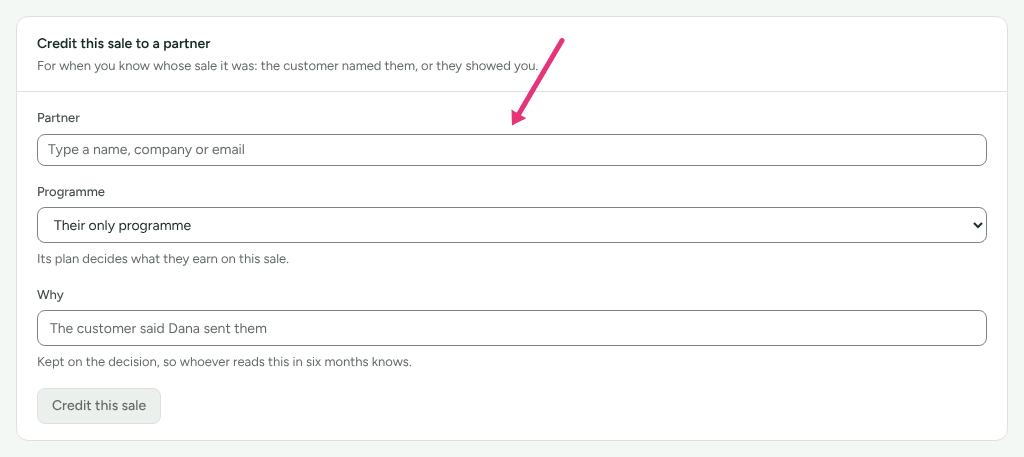
- Under Credit this sale to a partner, type the partner's name, company or email into Partner and choose them from the list.
- If you run more than one program, choose the Programme. "Its plan decides what they earn on this sale." Leave it on Their only programme when they are in one.
- Under Why, write the reason, for example "The customer said Dana sent them". "Kept on the decision, so whoever reads this in six months knows."
- Press Credit this sale.
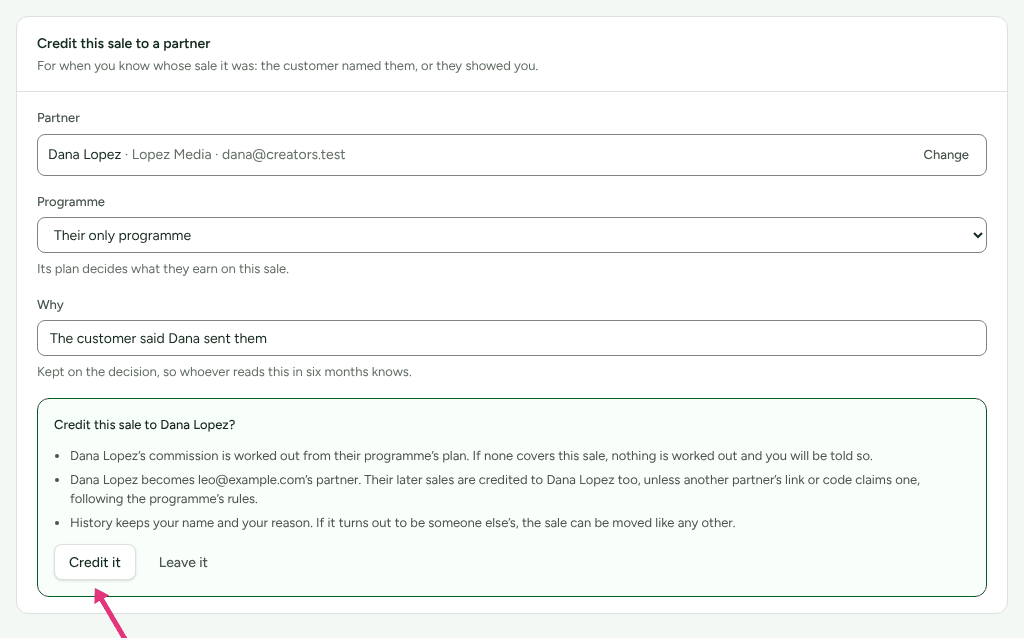
- Read the confirmation. It says, before anything happens:
- the partner's commission is worked out from their program's plan, and if none covers the sale, nothing is worked out and you are told so;
- if you are a manager: "You may not approve money, so the commission waits for someone who may, even where the plan would approve it by itself. So do the commissions on its renewals.";
- the partner becomes this customer's partner: "Their later sales are credited to" them too, "unless another partner's link or code claims one, following the programme's rules.";
- "History keeps your name and your reason. If it turns out to be someone else's, the sale can be moved like any other."
- Press Credit it, or Leave it to change nothing.
The page then says what happened to the money, for example "The sale is credited to them, and their commission has been worked out from their programme's plan." or "The sale is credited to them. Nothing has been worked out for them: they have no commission plan that covers this sale, so any payment is yours to add." The card is replaced by Move this to another partner, because the sale now has a decision that can be moved.
If the partner is in more than one program and you left Programme on Their only programme, Refficks asks: "… is in more than one programme. Choose which one this sale counts under."
Move a sale to another partner
Use this when The decision names the wrong partner.
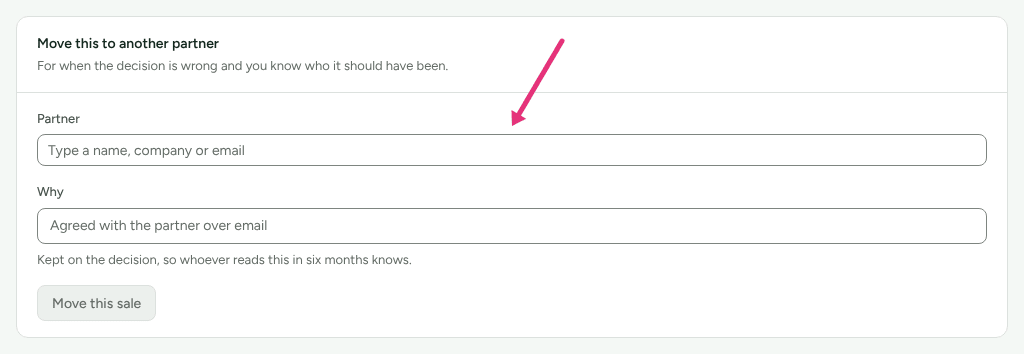
- On the sale's Why? page, find Move this to another partner: "For when the decision is wrong and you know who it should have been."
- Type the right partner's name into Partner and choose them. The partner who has the sale now is not offered.
- Under Why, write the reason, for example "Agreed with the partner over email".
- Press Move this sale.
- Read the confirmation:
- "The commission on it is taken back from the partner who has it now, as a new entry on their ledger, never an edit."
- The new partner's commission is worked out from their program's plan; if none covers the sale, nothing is worked out and you are told so.
- If you are a manager, the new commission waits for someone who may approve money, and so do the commissions on its renewals.
- "The decision that stands now is kept and stays readable, with your name and your reason on the one that replaces it."
- Press Move it, or Leave it.
The card then says what moved, for example "The previous partner's commission has been reversed. The new partner's commission has been worked out from their programme's plan."
If you are a manager and the commission on the sale is already approved or paid, the card says so in place of the button: "Moving this sale would take back a commission that is already approved or paid, so it needs someone who may approve money." Ask an owner or admin to move it.
Record a sale no system saw
Use this for a sale at a counter, over the phone or in person, when nothing tracked it. Owners and admins only.
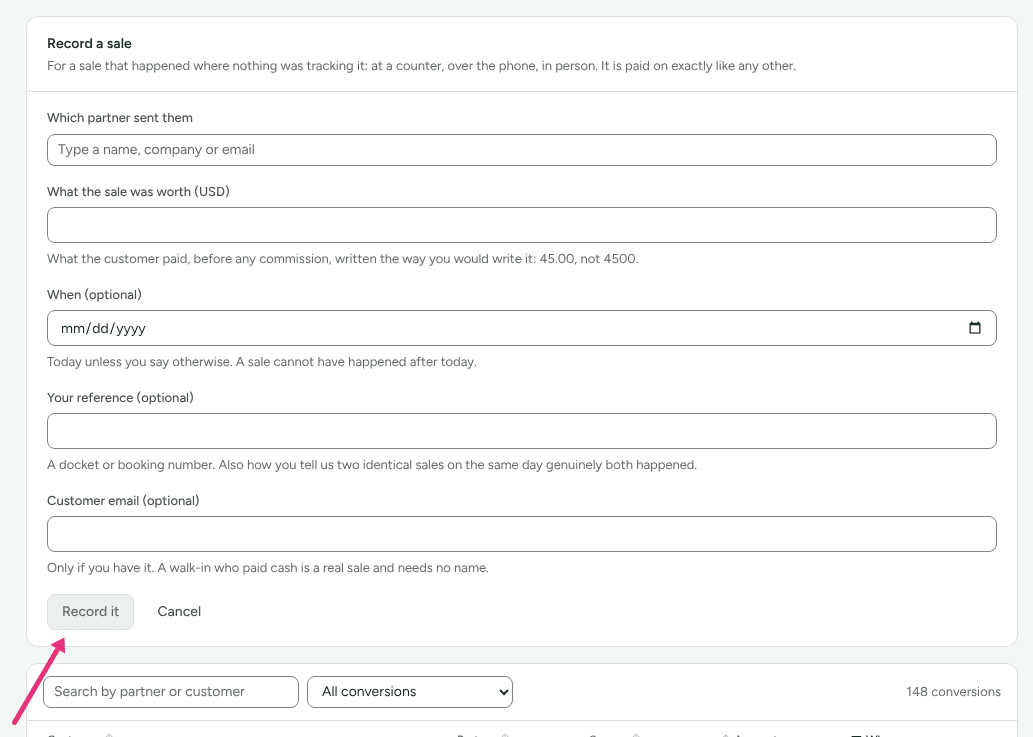
- Go to Conversions and press Record a sale.
- Under Which partner sent them, type the partner's name and choose them.
- Under What the sale was worth, type what the customer paid, before any
commission, the way you would write it:
45.00, not4500. The field is in your workspace's currency. - Fill in the optional fields if you have them: When (optional) ("Today unless you say otherwise. A sale cannot have happened after today."), Where (optional) if you have locations, Your reference (optional) such as a docket number, and Customer email (optional).
- Press Record it.
It reads "Recorded. The commission will appear once it has been worked out." Pressing it twice for the same partner, amount, day and reference records one sale: "You had already recorded this one, so nothing changed. Add a reference if two identical sales genuinely happened today."
A recorded sale is a touch of the highest rank, "Recorded by hand", so it beats any click or code on the same customer. The commission is worked out from the plan, as for any other sale.
Check it worked
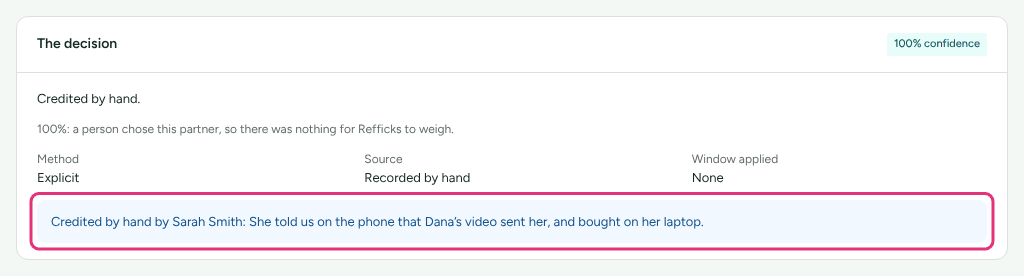
- The sale's Why? page names the partner under Attributed partner. The decision reads "Credited by hand." or "Attributed by hand.", with "Credited by hand by" (or "Attributed by hand by") your name and your reason beneath it, and What it paid lists the new commission. The line under the sentence says what the confidence badge means: "100%: a person chose this partner, so there was nothing for Refficks to weigh."
- Conversions shows the partner in the sale's Partner column.
- Commissions lists the new partner's entry. After a move, the previous partner's ledger has a reversal reading "Reversed because this sale was moved to another partner."
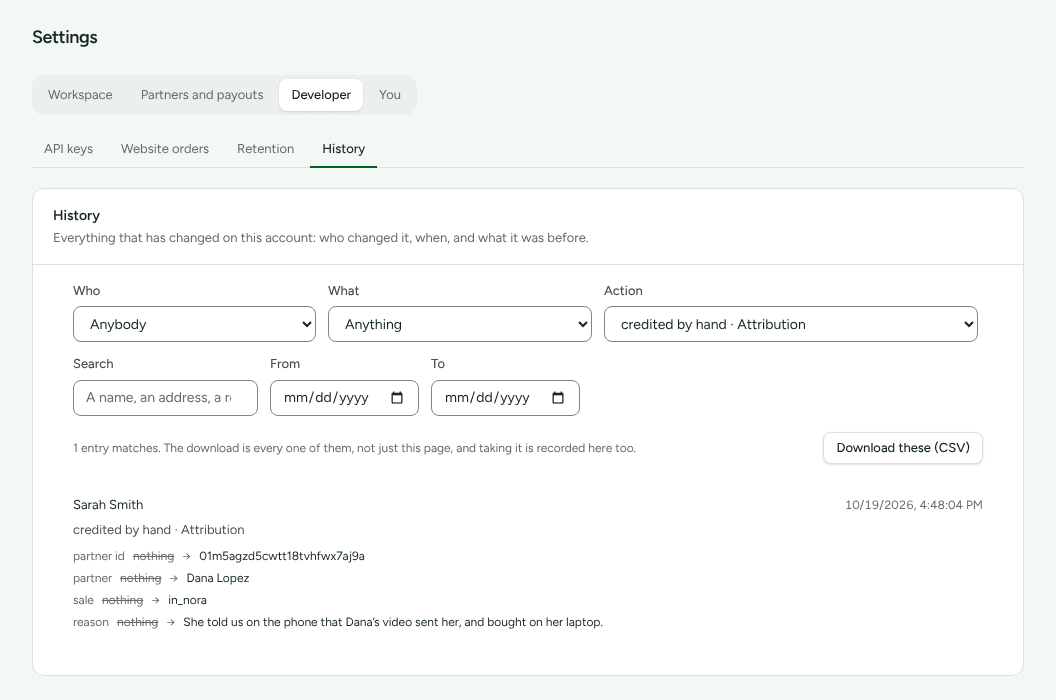
- Settings › Developer › History has an entry for each: "credited by hand · Attribution" (with the partner, the sale's id and your reason), "reassigned · Attribution" for a move, and "sale recorded by hand · partner" for a recorded sale.
What happens to the money
| You did | The previous partner | The new partner |
|---|---|---|
| Credited a sale that went to nobody | Nobody had it | An earned commission from their program's plan, or none, and you are told so |
| Moved a sale whose commission was pending or approved and unpaid | Their commission is marked reversed, with a reversal entry beside it; nothing is owed | Worked out from their plan |
| Moved a sale whose commission was already paid | A negative reversal is approved and comes off their next payout; the paid entry keeps saying paid | Worked out from their plan |
| Moved a sale back to a partner it was taken from | A pending adjustment restores what they had: "This sale was moved back to this partner." | |
| Recorded a sale | Worked out from their plan |
Known issue: a commission in a payout that has been built but not yet marked paid. Moving such a sale marks the commission reversed, and marking the payout paid afterwards pays it anyway: the same gap Refunds and reversals describes for a refund. Until it is fixed, cancel that payout (open it under Payouts and press Cancel) and build it again after the move.
What this does not do
- It never changes the sale itself: the amount, the customer and the date stay as they arrived. Only who earns it changes.
- It never splits a sale between two partners.
- Crediting a sale gives that partner the customer's later sales too, unless another partner's link or code claims one. Sales already decided stay where they are.
- Record a sale has no program field. For a partner in more than one program it records the sale without crediting them, and the sale reads "No partner". Open it and use Credit this sale to a partner, which asks for the Programme.
- A manager cannot approve the commission a credit or move creates; an owner or admin does that on Commissions.
- Nothing here re-decides other sales. To change how future sales are decided, change the program's rules (How attribution works).
Related
- Read the attribution debugger: every card on the Why? page, before you decide.
- A sale was not credited to a partner: fix the cause so the next sale is credited without you.
- Approve commissions: approving the commission a manager's decision left waiting.
- Read History: find who credited or moved a sale, and why.