Use your own domain for your signup page and portal
Serve your signup page and your whole partner portal on a name of your own,
such as partners.example.com, instead of the address Refficks gives you.
Partners then apply, sign in and work there, under your name. It takes two DNS
records and a press of a button.
Before you start
- Role: Owner or Admin. Everybody else can open Settings › Workspace › Domains and read what is set.
- You need: access to your domain's DNS (wherever you manage records for
example.com), and a name you do not use for anything else, usually a subdomain such aspartners.example.com. It will point at Refficks. - Time: a few minutes, plus however long your DNS provider takes to publish a record.
The same screen proves a domain for single sign-on, which needs only the first record and changes nothing about what the name serves. See Two-step sign-in and single sign-on.
Steps
Go to Settings › Workspace › Domains.
In Your own domains, type the name in Domain: "Just the hostname, no https:// and no path." For example
partners.example.com.In What it is for, keep Partner portal and signup page.
Press Add domain. The domain appears with the badge Waiting for DNS, and two records under it.
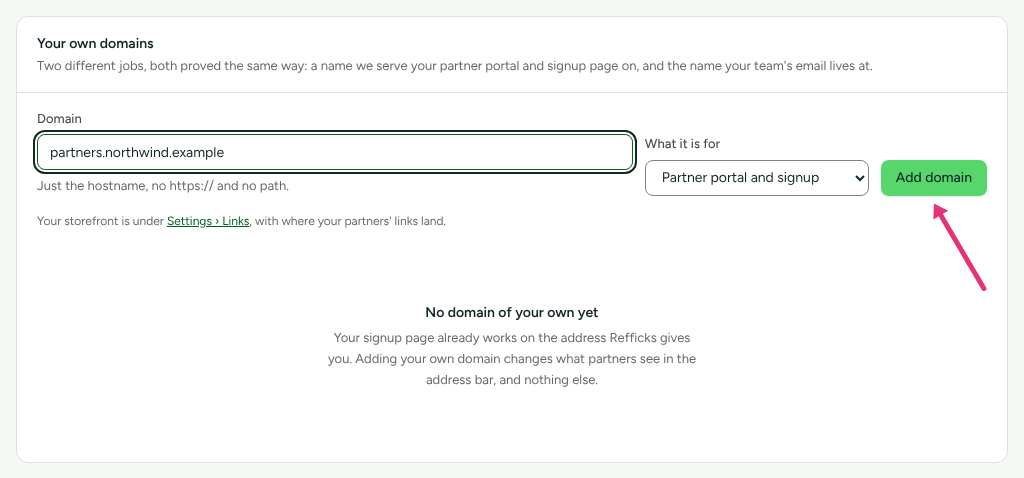
At your DNS provider, add both records exactly as the screen shows them. Each name and value has a copy button beside it. "The TXT record proves the domain is yours; the CNAME is what sends visitors to us."
Type Name Value TXT _refficks-challenge.partners.example.comThe value on screen, beginning refficks-verify-…CNAME partners.example.comThe address on screen Back on Settings › Workspace › Domains, press Check DNS.
- If both records are found, the badge reads Live.
- If not, it reads Not working, and a line under it says what is wrong. That is the usual first answer while DNS is still publishing. Wait, and press Check DNS again.
What a failed check says, and what to do:
| The screen says | Do this |
|---|---|
| "No TXT record found at … It may not have propagated yet." | Check the TXT record's name, wait, and check again. |
| "The TXT record at … does not match the value we issued." | Copy the value again from the screen, with its copy button, and replace the record's value with it. |
| "No CNAME record found at …. Point it at …." | Add the CNAME record. |
| "… points at … rather than …." | Change the CNAME's value to the address on screen. |
| "That domain is already in use by another account. Contact support if it is yours." | Another Refficks workspace proved the name first. Write to support. |
| "Another account proved control of this domain, so this claim was set aside. Contact support if it is yours." | As above. |
Check it worked
The domain reads Live: "Live. Your partner portal and signup page are served at https://partners.example.com, and the certificate is issued automatically on the first visit."
Then:
- Open
https://partners.example.comin a private window. You see your signup page if a program is open to applications. The first visit can be slow while the certificate is issued, and for up to a minute after the check, the name may not answer yet. - Open
https://partners.example.com/portal/login. You see the partner sign-in with your name, logo and colours. - Settings › Developer › History records "domain added" and "domain verified".
Under a live domain, the screen also offers a way onto your own website: Put the portal on your website with Copy the embed code, where the domain is part of your site, or otherwise Link to the portal from your website with Copy the link.
What changes for partners
- Signup pages. Each open program's page answers on your domain, by the
same paths:
https://partners.example.com/for your first open program,/creatoror another kind when two kinds are open, and/p/<address>for one of two programs of the same kind. The Public signup page card on a program still shows the Refficks address, which keeps working. See Run more than one program. - The portal. Sign-in and every portal screen are served on your domain. Only your partners can sign in there. Somebody who is not gets: "This is <your company>'s partner portal, and this account is not one of their partners. Sign in with the address you use with <your company>." A partner already signed in to Refficks elsewhere can press Continue with your Refficks sign-in.
- Your dashboard stays on Refficks's address. Nobody signs in to it on your domain.
What this does not do
- It does not check your records again on its own. Refficks looks when you press Check DNS, or Re-check on a live domain. A re-check that fails turns the domain to Not working, and it stops being served until it passes again.
- A partner portal name serves only Refficks. "A partner portal address points at Refficks, so it needs a name of its own": you cannot use the same name for single sign-on or a storefront too.
- The purpose is fixed when you add the name. To use it for something else, remove it and add it again.
- Names Refficks owns are refused: "That domain belongs to Refficks. Use your own." So is anything that is not a hostname, a name another workspace has proved ("That domain is already in use."), and a name you have already added for the same purpose.
- Where partners' links land (your storefronts) is set under Settings › Partners and payouts › Partner links, not here, though it is proved the same way. The Domains screen points there (it calls the tab "Settings › Links").
- Your workspace's address on Refficks does not go away. See Change your workspace's address.
When to contact support
Write to support@refficks.com if a check keeps failing with records you have checked, or another account holds your name. Include:
- the domain, and the purpose you chose;
- the exact words under Not working;
- the time you last pressed Check DNS.
Never send a password, an API key or a signing secret.
Related
- Change your workspace's address: the address Refficks gives you, and changing it.
- Customise your signup page and portal: what partners see on the domain.
- Two-step sign-in and single sign-on: proving your email domain for single sign-on.
- Create a program: opening a signup page.