Consent, cookies and privacy in tracking
This page is for whoever reviews privacy for a merchant: what the Refficks tracking script writes in a visitor's browser, when it writes it, what it sends, and what Refficks keeps. In short: two first-party cookies, written only with consent and never for a browser that sends Global Privacy Control; no raw IP address is ever stored; and each merchant sees its own visitor id, so two merchants cannot match the same person by it.
The short version
- The script writes two cookies on your own site,
rk_vidandrk_ref, each kept for 365 days, and one per-tab marker in session storage. - A browser that sends Global Privacy Control gets nothing written and nothing sent, on your site or through Refficks's own address. Do Not Track on its own is not read.
- On a site that asks first, nothing is written until your cookie banner calls
refficks.consent(true).refficks.consent(false)clears both cookies. - An IP address is turned into a salted hash and a country as the request arrives; the address itself is never stored. A browser string is reduced to three words and never stored.
- A shopper who declines can still credit a partner by typing the partner's code, with no visitor, buyer, IP hash, country or device recorded.
- Visits, clicks and touches are kept two years, except those a sale was decided on, which stay with the sale.
In detail
What the script writes in the browser
On your own site, first-party, path /, SameSite=Lax, and Secure on an
https page:
| Name | Kind | Holds | Kept for |
|---|---|---|---|
rk_vid |
Cookie | A random 26-character id for this browser, the visitor id | 365 days |
rk_ref |
Cookie | The partner codes this browser arrived with, most recent first, at most five | 365 days |
rk_visit |
Session storage | A marker that this tab's visit has started, so only its first page is counted as an arrival | Until the tab closes |
The cookies are readable by scripts on your page, because the script itself reads them, and they carry nothing meaningful on their own. Nothing is put in local storage.
When Count clicks on our servers is on, a partner's link passes through
Refficks's own address first. That address sets its own rk_vid (365 days)
and rk_sid (a visit id, 30 days) there, not on your site. A browser that
sends Global Privacy Control gets neither, and is sent straight on.
A partner's link that points straight at a Stripe Payment Link
(buy.stripe.com) always passes through Refficks's address, whatever that
setting says, because there is no page of yours for the script to run on.
Once you have chosen a guide that sells through payment links, the redirect
adds the partner's code to Stripe's address as client_reference_id, as the
script does for payment links on your pages. For a browser that sends Global
Privacy Control it adds nothing.
Each merchant has its own visitor id
The redirect does not hand your site the browser's own id from Refficks's
address. It hands you an id made from that browser's id and your workspace,
in the rk_vid parameter of the address the visitor lands on, and the script
on your page adopts it only when the browser has no rk_vid of yours yet. The
same browser always gets the same id at your site, which is what joins its
clicks there, and a different id at every other merchant. Nothing you hold
says anything about its id elsewhere.
When the script writes anything
| What the visitor or your site says | What happens |
|---|---|
| The browser sends Global Privacy Control | Nothing written, nothing sent, on every page. The redirect through Refficks's address sets no cookie and records no click. There is no setting to change this. |
The snippet has no data-consent and Wait for consent before tracking is off |
Consent is assumed: the cookies are written and the page view sent when the page loads |
The snippet carries data-consent="false", or Settings › Partners and payouts › Partner links › Wait for consent before tracking is on |
Nothing is written or sent until your banner calls refficks.consent(true) |
Your banner calls refficks.consent(true) |
The code from this page's address and a visitor id are written down, and the page view is sent |
Your banner calls refficks.consent(false) |
Both cookies are cleared, and the script takes its additions back off your checkout links |
Your site calls refficks.reset(), at logout |
Both cookies are cleared, so the next person on that computer starts afresh |
A snippet's own data-consent="true" or "false" always wins over the
setting. The setting reaches every page running your snippet within about five
minutes.
The price of waiting. While consent is withheld, a partner's code seen in the address is held in memory for that page only. A visitor who agrees on the page they landed on still credits the partner. One who agrees only on a later page does not, because the code was never written down. Refficks chose that rather than storing anything before consent.
Switched off: URL passthrough, Keep a partner's code in my site's links until the visitor decides, would carry the code in the links between your own pages until the visitor decides, storing nothing. It is built and waits for a legal review before Refficks offers it.
Credit through a code, without consent
A shopper who declined cookies, or whose browser sends Global Privacy Control, can still credit a partner by typing the partner's discount code at checkout. Stores and billing platforms that report from their own servers report the code with the sale. An order your confirmation page reports for such a shopper is sent for the code alone, marked as cookieless, with no visitor id, no buyer, and no IP hash, country or device recorded; Refficks refuses a visitor or a buyer on such an order. Its commission waits for a person: "The shopper declined cookies, so only the code they typed says who earns this, with no buyer to check it against, and it waits for someone to approve it."
What the script sends
- A page view from each page: the page's path only, never its query string, fragment or title. On the first page of a visit, the referring site, of which Refficks keeps the host.
- The landing with a partner's code, once: the address landed on, the
referring page, and the campaign and sub-id tags in the address (
utm_*,sub1tosub5). - Who signed up, when your page calls
identify()orlead(): only what you pass, an id, an email address or a name. - An order, only if you switched on Settings › Developer › Website orders and your confirmation page reports one.
A page view cannot name anybody; naming a person is identify()'s, and
Refficks refuses a customer on a page view. The script never sends an amount
except in a website order, and never says which partner earns.
What Refficks keeps from each request
- IP address: turned into a salted hash and a country when the request arrives. The address itself is never stored.
- Browser string: reduced to three words (device, browser and operating system) and never stored.
- A delivery from a store that carries a buyer's IP address or browser string has them replaced before it is stored: the address by its hash, the browser string by a marker.
The landing address of a partner's click is kept whole, query string included. It is the address a merchant or partner built for the link, not a customer's own page, but a link can carry anything a partner put in it. Screens that show a customer's journey reduce every address to its path.
Who sees a customer
Inside your workspace, your team sees the customers you have. Partners see the customers credited to them on their commissions, their download and their payout statements, with the address shortened to its first letter and domain by default: "d•••@gmail.com". An owner or admin can change that under Settings › Workspace › Organization › Your customers, as partners see them.
How long it is kept
| What | Kept |
|---|---|
| A visit and where it came from | Two years after it started |
| A click, a code or a referral that reached a customer | Two years after it happened, unless a sale was decided on it: then it stays as long as the sale's record |
| Raw events as they arrived (page views, sign-ups, sales) | 365 days unless you set another figure under Settings › Developer › Retention, in Raw events from your systems, never fewer than 90 |
No attribution window reaches past 365 days, so nothing older than two years can still credit anybody. Erasing a customer, and what closing a workspace does, are in Retention, erasure and closing your account.
Where to see it in Refficks
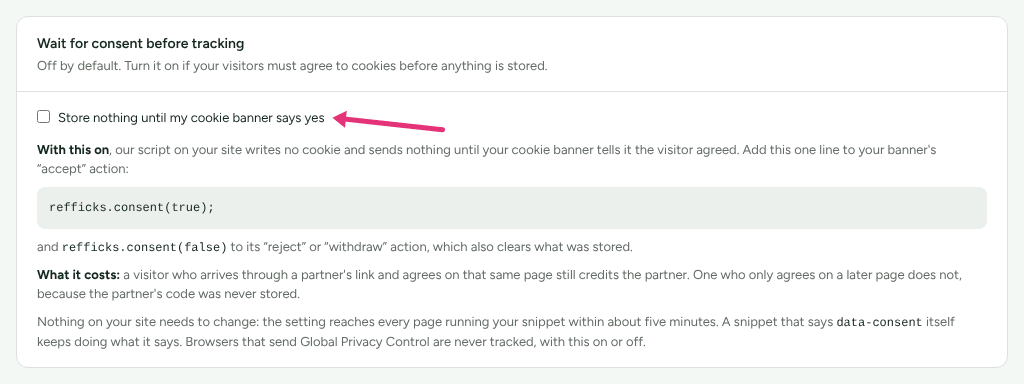
- Settings › Partners and payouts › Partner links › Wait for consent before tracking holds the consent setting and the two lines to add to your banner.
- In a browser,
window.refficks.visitorId()returnsnullwhile consent is withheld or Global Privacy Control is on, and the visitor id once tracking is allowed. - A customer's page shows their Journey and Identity: every visit, touch and id Refficks joined to them.
Settings that change it
| Setting | Where | Default | What it changes |
|---|---|---|---|
| Store nothing until my cookie banner says yes | Settings › Partners and payouts › Partner links › Wait for consent before tracking | Off | The script writes nothing until refficks.consent(true) |
data-consent |
Your snippet | Not set | "false" waits for consent, "true" assumes it; either beats the setting |
| Count clicks before people reach my site | Settings › Partners and payouts › Partner links › Count clicks on our servers | Off | Clicks are recorded on Refficks's address, which sets its own cookies there |
| Let my confirmation page report orders | Settings › Developer › Website orders | Off | Whether your page may report orders, including code-only orders for shoppers who declined |
| Show partners their customers' full email addresses | Settings › Workspace › Organization | Off | Whether partners see whole addresses or shortened ones |
| Event retention | Settings › Developer › Retention | 365 days | How long raw events are kept, 90 days at least |
Limits
- Refficks does not run a cookie banner. Your banner tells the script what the visitor chose.
- The Google Tag Manager template loads the script only after consent, so a code-only order for a shopper who declined is not reported through it.
- Ad blockers and privacy tools stop the script for some visitors whatever they consent to.
Related
- Install the tracking script: the
snippet,
identify()and your banner's calls. - Tracker JavaScript reference:
consent(),reset(),visitorId()and everydata-attribute. - Set up your partner links: the consent and click-counting settings in context.
- Retention, erasure and closing your account: how long data is kept, and erasing a customer.