Clicks or visits are not being recorded
You or a partner opened a partner link, and the Clicks number on Tracking did not move. The most common cause is that the Refficks script is not running on the page the link lands on: by default a partner's link goes straight to your website, and the script on that page is the only thing that records the click.
Check this first
- Go to Tracking and press Copy link on the partner's link. (The
Link column shows the link's code as
/r/<code>; the button copies the address partners actually share.) - Open the copied link in a private window, in a browser that does not send Global Privacy Control and has no ad blocker.
- Look at the address you land on. It should be your website, with the
partner's code in it, for example
https://example.com/?rfi=dana. (A link whose destination is a Stripe Payment Link lands on Stripe's checkout instead. It always goes through Refficks, which records the click itself, so step 4 does not apply to it.) - On that page, open the browser's console and run
window.refficks.visitorId().- It returns an id: the script is running and allowed to record. Wait for Tracking to refresh; it does so every 10 seconds.
- It returns
null: the script is running but not allowed to record yet (consent, or Global Privacy Control). window.refficksisundefined: the script is not on this page, or did not load.
Likely causes
| What you see | Likely cause | Fix |
|---|---|---|
| You land on a placeholder or the wrong website | Your website address is missing or wrong | Set your website address |
| You land on your site, but the partner's code is not in the address | A redirect on your site dropped the query string | Keep the code in the address |
window.refficks is undefined |
The script is not on that page, or something stopped it loading | Get the script onto the page |
visitorId() returns null |
The visitor has not agreed to cookies, or the browser sends Global Privacy Control | Consent and privacy |
| Your own test click counts, but far fewer than your partners report | Ad blockers and privacy tools stop the script for some visitors | Count clicks on our servers |
| Clicks stopped for one partner or one program | The partner was suspended or archived, the link was paused, or the program was paused | The link no longer earns |
| Clicks stopped after you renamed your link parameter | The old name was retired | Bring the old name back |
| A second click from the same browser on the same day is not counted | That is the rule for the default link | Nothing to fix |
| Getting started still says "Nothing has arrived from your site yet, by tracker or by API." | The snippet's key is shortened, mistyped or revoked | Fix the key in the snippet |
| Clicks appear minutes late, or not at all, while everything above checks out | Clicks are recorded by a background job | When to contact support |
Diagnose it step by step
- Run the four checks above. If you never reach your site, go to Your website address is wrong or missing.
- If you reach your site without the code in the address, go to The code is lost on the way.
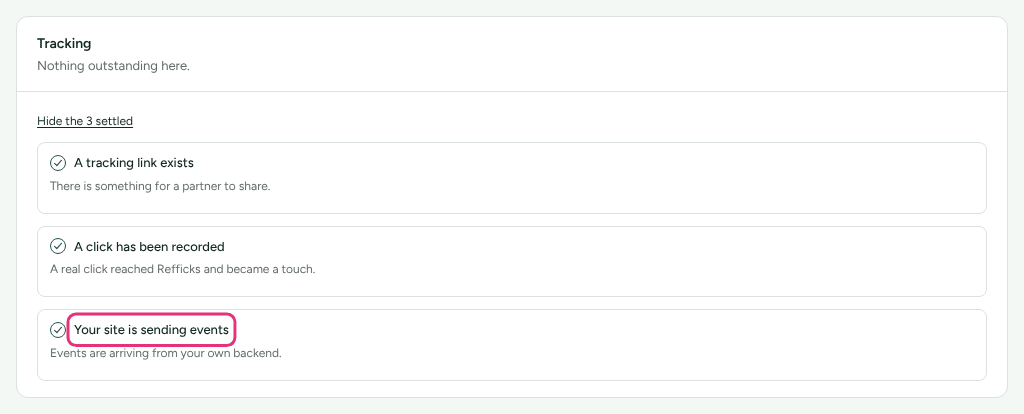
- Go to Getting started and read the Tracking lines. Your site is sending events ticks only for something your site or server sent; a click alone does not tick it. Once ticked it is folded away: press Show the N settled in the Tracking group to see it. If it is not done (it is listed in full, with "Nothing has arrived from your site yet"), the script has never reached Refficks: go to The key in the snippet is wrong.
- If Your site is sending events is done but this page records nothing, the script is missing from, or blocked on, this particular page: go to The script is not running.
- If your own clicks count and only some partners' do not, go to Some visitors block the script and The link no longer earns.
Fixes
Your website address is wrong or missing
- Go to Settings › Partners and payouts › Partner links. What your partners share shows an example link built from your settings. If you see "You have not told us your website address yet, so this example uses a placeholder.", the address is missing.
- Under Your website, type your Website address and press Save. The card says "Saved. Your partners' links now point here." Nobody has to reissue a link.
- Check the Destination column on Tracking. A link pinned to another address, such as a campaign microsite, keeps that address. That page needs the script too.
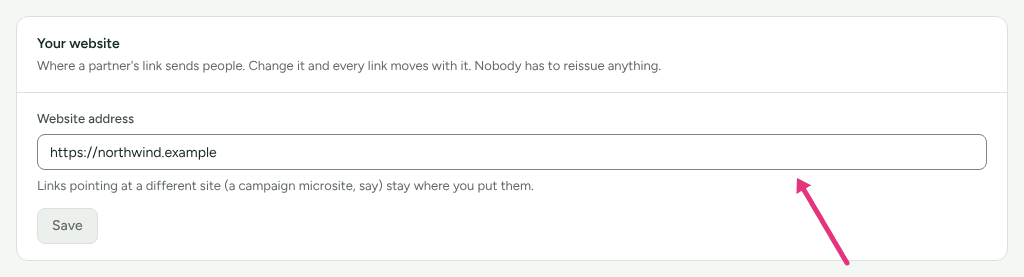
Owners and admins can change Settings › Partners and payouts › Partner links.
The code is lost on the way
The script reads the partner's code from the address of the page it runs on.
If your site redirects the visitor before that page loads, for example to a
language version or a sign-in page, and the redirect drops everything after
the ?, the code is gone. Make the redirect keep the query string. For links
made from now on, you can also point them at the final page with Default
destination on the program's Settings card: "Where new partner links
point unless the link overrides it."
The script is not running
- Not on this page. Paste the snippet into the
<head>of every page a partner's link can land on. See Install the tracking script. - Not published. Many site builders run code in the head only on the published site, not in their editor or preview. On WordPress, "test on your site's own address, logged out."
- Delayed or combined by an optimiser. Caching and optimisation plugins
that delay JavaScript until the visitor interacts stop the script reporting
a quick visit. Exclude
refficks.jsfrom any setting that delays, defers or combines JavaScript. On a WooCommerce store connected through the Refficks plugin, the store's card on the WooCommerce guide (Integrations › Where you sell) says so when it sees it, naming the plugin when it can. - Blocked by your site's Content Security Policy. The script loads from, and reports to, the Refficks address in your snippet. Your policy has to allow that address for scripts and for connections.
Consent and privacy
- A browser that sends Global Privacy Control is never recorded: no cookie, no click, nothing sent, through your site or through Refficks's own address. This is deliberate and has no setting.
- If your snippet carries
data-consent="false", or Wait for consent before tracking on Settings › Partners and payouts › Partner links is on, nothing is recorded until your cookie banner callswindow.refficks.consent(true). Check your banner's "accept" action makes that call. - A visitor who agrees on the page they landed on still credits the partner. One who agrees only on a later page does not: the code was never stored.
See Consent and privacy.
Some visitors block the script
Settings › Partners and payouts › Partner links says ad blockers and privacy tools "stop our script loading for roughly one visitor in five". To count those clicks too:
- Go to Settings › Partners and payouts › Partner links.
- Under Count clicks on our servers, tick Count clicks before people reach my site.
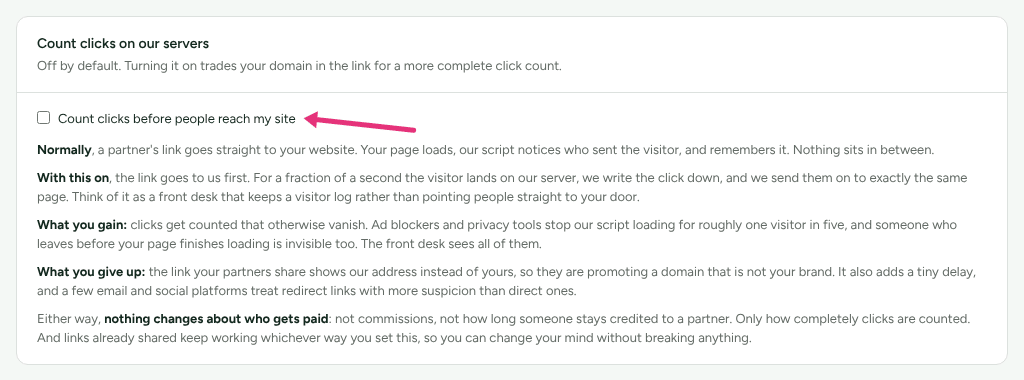
Partner links then go through Refficks's own address first, ending
/r/<code>, and the click is recorded there. "What you give up: the link your
partners share shows our address instead of yours, so they are promoting a
domain that is not your brand." Links already shared keep
working either way, and "nothing changes about who gets paid". A browser that
sends Global Privacy Control is still not recorded.
The link no longer earns
A link stops recording clicks and touches when:
- the partner is suspended in that program (Programs › the program, then Suspend beside them; Reinstate undoes it);
- the partner is archived;
- the program's Status is Paused or Archived;
- the link itself was paused or archived through the API. The Tracking screen does not show a link's status.
On the default link the visitor still reaches your site; the partner earns nothing from it. With Count clicks on our servers on, a refused link does not send the visitor to your site at all.
A program in Draft still records clicks.
Not yet documented: where Refficks sends a visitor whose redirect link is refused. It is a fallback address set for the whole service (the production set-up script points it at the service's own home page), or a "not found" answer when none is set.
The old parameter was retired
- Go to Settings › Partners and payouts › Partner links, The bit that names the partner.
- Find the old name in the list. Retired means links that use it are no longer recognised.
- Press Bring back. The script picks up the change within about five minutes; nothing on your site needs editing.
The key in the snippet is wrong
The snippet in Website tracking on Integrations › Connections shows
your publishable key shortened, followed by …. Pasted as it is, nothing is
recorded.
- Go to Settings › Developer › API keys. If your publishable key's Last used reads "Never", the script has never reported with it.
- Open your site's source and find the Refficks
<script>tag. - Check the key after
?a=and indata-accountis the full key, startingrk_pub_, in both places. - If you no longer have the full key, create a new publishable key under Create a key and paste it into both places. You can then press Revoke on the old one.
When to contact support
Write to support@refficks.com if the checks above pass and clicks still do not appear on Tracking after a few minutes. Include:
- the partner link you opened, exactly as you copied it;
- the address you landed on;
- the date and time of the click, with your time zone;
- the browser you used;
- whether Count clicks on our servers is on;
- the result of
window.refficks.visitorId()on that page; - if the link went through Refficks's own address, the
X-Request-Idheader from that response, from your browser's network panel.
Never send a secret key, a webhook signing secret, or a partner's payout details. Support does not need them and will not ask for them.
Related
- Install the tracking script: the
snippet, consent and
identify(). - Partner links settings: every card on Settings › Partners and payouts › Partner links.
- Verify your first conversion: a full test from click to commission.
- A sale was not credited to a partner: when the clicks are there and the sale still goes to nobody.