Connect Stripe
Connect your Stripe account so every payment, renewal, refund and dispute reaches Refficks by itself, is credited to the partner who brought the customer, and is priced against your commission plans. For owners and admins of a workspace that takes payments through Stripe.
What it does
- Credits partners for: paid invoices (subscriptions, renewals and one-off invoices), one-time Checkout purchases (Payment Links, Buy Buttons, Pricing Tables, your own Checkout Sessions), and, when you switch it on, payments that belong to no invoice and no checkout.
- Takes commission back for: refunds (a partial refund takes back its share), disputes (when the dispute opens) and credit notes.
- Records: new and changed customers and subscriptions, trials and cancellations.
- Does not: count a test-mode payment as a sale, change a commission when a dispute is later won, or touch anything in your Stripe account unless a person presses a button that says so.
Before you start
- Role in Refficks: owner or admin. Anyone else sees "You need an owner or admin to set this up" on the Stripe page.
- Access in Stripe: permission to add webhook endpoints in your Stripe dashboard, and, to use Connect with Stripe, permission to approve an application on the account.
- Refficks holds: your Stripe account id (
acct_…, which is not a secret) when you approve Refficks, and the signing secret of the webhook endpoint you create (whsec_…), stored encrypted and never shown again. Refficks holds no Stripe key of yours. It connects as a platform: Stripe knows your account approved Refficks, and you can withdraw that from your Stripe dashboard. - An account id comes only from Stripe. Refficks records your
acct_…only when Stripe sends you back after you approve it. There is no field to type one in: a typed id could borrow another merchant's approval.
The two halves of the connection
The Stripe page treats these separately, because either can work without the other:
| Half | What it lets happen | What you do | Card on the Stripe page |
|---|---|---|---|
| Approval at Stripe | Refficks can act on your account: create partner codes as promotion codes, list your coupons, ask Stripe which invoice a refund belongs to, count payments outside invoices and checkouts, add store credit. | Press Connect with Stripe and approve. | Your Stripe account, with the badge Approved or Not approved |
| Webhook endpoint | Stripe sends your payments to Refficks. Without it, nothing arrives. | Add an endpoint in Stripe and paste its signing secret into Refficks. | Your endpoint, with its URL, a status badge and the counters Delivered, Rejected and Last delivery |
Connect with Stripe appears only when the Refficks service you use is registered with Stripe as a platform. If the Stripe page shows no Your Stripe account card, approval is not available there, and only the webhook half is offered. Everything that needs approval (promotion codes, naming your coupons, payments outside invoices and checkouts, store credit) is then unavailable.
Switched off: Refficks can also receive every approved account's payments through one platform endpoint, so that approving at Stripe is the whole setup and there is nothing to paste. That endpoint is switched off until Refficks registers it with Stripe. Until then, every account needs its own webhook endpoint and signing secret, as below. When it is on, the Stripe page says "Stripe sends this account's payments to Refficks directly" and offers pasting a secret only under Connect by pasting a signing secret instead.
Connect
1. Approve Refficks at Stripe (if offered)
- Go to Integrations. It opens on Connections. Press Set up Stripe on the Stripe card.
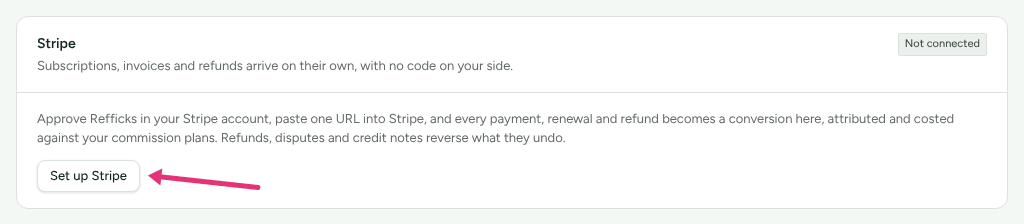
- On the Your Stripe account card, press Connect with Stripe.
- Approve the connection on Stripe's page. Stripe sends you back to Refficks.
- Check the card now shows Approved and your account id,
acct_….
Refficks checks again, when Stripe sends you back, that you are still an owner or admin. Someone whose role changed while they were on Stripe's page connects nothing.
To connect a second Stripe account (another company with its own Stripe), press Approve another account and approve it at Stripe. Its own panel then asks for its signing secret. Each account's sales are tracked separately, and your partners stay as they are. A second account cannot be added by pasting: where Connect with Stripe is not offered, the page says "Another Stripe account is added by approving it at Stripe, which this deployment does not offer."
2. Let Stripe send you payments
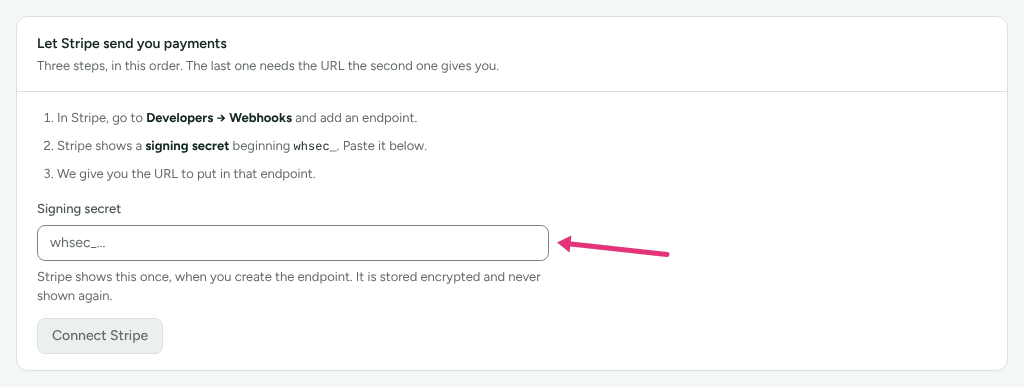
The Let Stripe send you payments card asks for the signing secret first and gives you the endpoint URL after. Stripe asks for the URL before it shows the secret, so do it in this order:
- In your Stripe dashboard, go to Developers → Webhooks and add an
endpoint. Enter a temporary URL, such as
https://example.com, and select the events listed under Events to send. - Copy the endpoint's signing secret. It begins
whsec_. - In Refficks, on the Let Stripe send you payments card, paste it into
Signing secret.
- If you approved Refficks in step 1, the card says "Approved at Stripe, but no signing secret yet, so nothing can arrive." Press Connect this account.
- If you did not, press Connect Stripe. The form asks for the signing secret only.
- The Your endpoint card appears with your endpoint URL. It ends in
/webhooks/stripe/followed by a long token. Press Copy URL. - In Stripe, edit the endpoint you created and replace the temporary URL with the one you copied.
The URL contains a token that identifies your workspace. Treat it like a password: do not post it anywhere public.
Events to send
The Stripe page does not list events. Refficks acts on these Stripe event types; select them on the endpoint, or select all events:
| Stripe event | What Refficks records |
|---|---|
invoice.paid |
A paid invoice: the main revenue event |
checkout.session.completed |
A one-time purchase (mode: payment). A subscription checkout is recorded but not counted: its invoice carries the money |
charge.refunded |
A refund |
charge.dispute.created, charge.dispute.closed |
A dispute opening (takes commission back), and its outcome (moves no money) |
credit_note.created |
A credit note against a paid invoice |
customer.subscription.created, .updated, .deleted |
Subscriptions, trials and cancellations |
customer.created, customer.updated |
Customers |
invoice.created, invoice.payment_failed |
Invoices issued and failed payments |
charge.succeeded, charge.captured |
Only used when Count payments outside invoices and checkouts is on |
Any other event type is recorded and shown as Ignored with a reason, for
example "Duplicate of invoice.paid: the same payment, reported twice." for
invoice.payment_succeeded, or "Not an event type Refficks acts on." Nothing
is counted twice.
Configure
Pass the partner to Stripe
A payment is credited to a partner when Refficks can tell who sent the buyer. Refficks reads, in this order:
client_reference_idon the Checkout Session: a partner's referral code.metadata.refficks_ref: a referral code, for objects that have noclient_reference_id.metadata.refficks_visitor: the visitor id the Refficks script keeps in therk_vidcookie. Refficks looks up the partner, the link and any sub-IDs from the visitor's click.
It also credits a sale through a partner's discount code when that code reaches Stripe as a promotion code (see below), and through anything else Refficks knows about the customer, such as an earlier sign-up on your site.
Payment Links, Buy Buttons and Pricing Tables. Open the Stripe Payment
Links guide on Integrations › Where you sell and press I sell with
Stripe Payment Links. From then on the Refficks script adds the visitor's
referral code to buy.stripe.com links, Buy Buttons and Pricing Tables as
client_reference_id. Nothing changes on your site until you press it. A link
or embed that already sets client_reference_id is left as you wrote it. The
guide's own page lists what this does not do; the main limits:
- A payment link for a subscription is not credited from the link, because Refficks counts the subscription's invoices and they do not carry the code. Such a sale is credited only if Refficks knows the buyer another way.
- A visitor who has not accepted cookies, or whose browser sends Global Privacy Control, carries nothing to Stripe. A partner's discount code still credits them.
- Which of a partner's links was clicked, and sub-IDs, are not recorded on these sales.
A partner's link straight to a payment link. A partner's link can also
point at a payment link itself, with no page of yours in between. Under
Tracking, give the link the buy.stripe.com address as its destination.
Once you have pressed I sell with … on any Payment Links guide (the
general one, Stripe Managed Payments, or a site builder's), Refficks adds
that link's code as client_reference_id as it sends the visitor on to
Stripe, so the script is not needed for that sale. Until you press it, nothing
is added, and Stripe drops the referral parameters the link carries.
Such a link is always handed out in its redirect form, through Refficks, even
when Count clicks before people reach my site is off under Settings ›
Partners and payouts › Partner links: only the redirect can put the code
where Stripe reads it. A client_reference_id you wrote into the destination
yourself is left alone, and a visitor whose browser sends Global Privacy
Control carries nothing to Stripe.
Checkout Sessions your server creates. Read the rk_vid cookie and put it
in the session's metadata. For a subscription, put it in
subscription_data.metadata as well: Stripe copies that onto every invoice,
and the invoice is what Refficks credits. The Stripe page shows this example
under Checkout Sessions your server creates:
const visitor = req.cookies.rk_vid;

await stripe.checkout.sessions.create({
  // ...your line items, mode and return URLs, as now...
  metadata: { refficks_visitor: visitor },
  // Only for a subscription:
  subscription_data: { metadata: { refficks_visitor: visitor } },
});
A checkout that never loads the Refficks script has no visitor id to pass. It
can send the partner's code as client_reference_id instead.
Turn partner codes into Stripe promotion codes
Needs approval at Stripe. Managers, admins and owners can do this.
- Go to Programs and open the program.
- On the Sync codes to Stripe card, choose the Discount (A percentage or A fixed amount), how it Applies (Once, For a number of months or On every invoice), and any conditions.
- Press Choose discount.
- Press Sync every partner code, or tick some codes and press Sync … selected.
The whole card, for Stripe and for stores, is in Sync partner codes.
Refficks makes one Stripe coupon with your discount and one promotion code per partner code, in every Stripe account you approved. A code Stripe refuses (for example, one that clashes with a code you made by hand) is reported with Stripe's reason, and the others still sync. Refficks never deletes or edits a promotion code in Stripe.
Stripe does not allow a coupon's discount to be edited, so changing the discount makes a new coupon at the next sync. The card then shows Changed since last sync and warns that "Partners synced before this change keep the old discount" until you sync them again.
Credit one of your own Stripe coupons to a partner
For a coupon you already hand out under its own name (for example SUMMER20
in a creator's video), you can name it as a partner's code. A sale carrying
that coupon is then credited to the partner as if the customer had typed
their code. Needs approval at Stripe; managers, admins and owners.
- Go to Partners and open the partner. They open on Overview.
- On the Discount codes card, press Name a Stripe coupon as … beside their code.
- Choose a coupon from your Stripe account. A coupon already credited to another code, or the one Refficks made for synced codes, cannot be chosen.
- Press Credit this coupon to ….
The code then reads "Also credited for the Stripe coupon …". Press Stop to undo it. Sales before you named it stay as they were.
Count payments outside invoices and checkouts
Some platforms charge your Stripe account with their own payment form (Podia, SamCart, MemberSpace and others). Those payments belong to no invoice and no checkout, so Refficks leaves them out unless you switch this on.
- On the Stripe page, find Payments outside invoices and checkouts.
- Tick Count payments outside invoices and checkouts for the account.
From then on, Refficks asks Stripe about each such payment and counts one that belongs to neither as a sale, credited like any other. The box shows "Counting payments made since …". Commission is worked out on the whole amount charged, because a payment like this says nothing about tax or shipping. Payments from before you switched it on are not counted. Each one waits about two minutes before it is read, so the buyer's thank-you page can name them first.
The box cannot be ticked until you approve Refficks at Stripe; it says "Approve Refficks in Stripe first." and why.
Stripe Managed Payments
If Stripe is your merchant of record, use the Stripe Managed Payments guide on Integrations › Where you sell (also listed as Lemon Squeezy). The route is the same as Payment Links. Differences:
- Make each payment link with Managed Payments switched on in Stripe. A link made before cannot be switched over.
- Commission is worked out before the tax Stripe collects. A buyer who pays in their own currency is credited in your price's currency.
- A one-time purchase also makes an invoice. Refficks counts the checkout, which carries the partner's code, and records the invoice as Ignored ("Already reported by …") without counting it. The invoice waits 30 seconds for the checkout to arrive first. If it arrives more than 30 seconds earlier, the invoice is counted instead, and the sale is credited only if Refficks knows the buyer another way.
- If Stripe will not let a Managed Payments account approve Refficks, connect with a pasted signing secret instead.
Add store credit in Stripe
Where a reward or payout is paid as store credit, a person can press Add … credit in Stripe (for example "Add $20.00 credit in Stripe") on a referral's account credit, an ambassador's redemption, or an approved store-credit payout. Refficks adds it to the customer's balance in your Stripe account. One press, once: it never adds the same credit twice. Needs approval at Stripe. See Pay your partners.
Website orders while Stripe reports payments
While Stripe is connected, holds a signing secret, is not in error and has delivered something in the last 30 days, Refficks refuses orders reported by a shopper's browser, with "Stripe already reports this account's payments, verified, so an order reported from a browser is not recorded, because it would be the same sale twice. Report sales Stripe does not take from your server."
Test it
Send yourself a test
- On the Stripe page, find Send yourself a test.
- Choose an Event: A subscription payment, A one-time purchase, A new subscription or A refund.
- Optional: type a partner's link code into Referral code.
- Press Send test event. The page says "Signed, verified and queued. It will appear below as a test once it has been processed, saying what a real payment like it would have credited."
Within seconds a row appears under Recent deliveries with the badge Test and a sentence saying what a real payment like it would have credited, for example "A real one like it would have credited Sam Rivera $59.80 through “sam-rivera”: 20% of USD 299.00 (Standard affiliate)." It is "Recorded as a test: it credits nobody, pays nothing and appears in no report."
This shows what your commission plans would pay. It does not prove the connection: Refficks signs the test with the secret it holds and checks it with the same secret, so a mistyped secret still passes, and nothing is sent to or from Stripe. The screen says it "proves your secret"; it cannot. Only a delivery from Stripe proves the secret matches and that Stripe can reach the URL.
Make a payment in Stripe's test mode
A payment made in Stripe's test mode arrives with the badge Test, is priced the same way, and is never counted as a sale.
Refficks holds one signing secret per Stripe account. Stripe's test mode and live mode have separate endpoints, each with its own secret, so:
- Connect first with the test-mode endpoint's secret, if you want to see test payments arrive.
- Make a test purchase through a partner's link.
- Once it shows under Recent deliveries, open Replace the signing secret and paste the live endpoint's secret. The URL stays the same, so add the same URL to the live endpoint.
An endpoint whose secret is not the one Refficks holds has every delivery rejected (see the table below), so do not leave a test endpoint pointing at the same URL after you switch to live.
Check it worked
- Integrations › Connections: the Stripe card's badge reads Connected.
- Integrations › Stripe › Your endpoint: Delivered goes up and Last delivery shows the time of the latest one. Rejected does not go up. (It counts every refusal since you connected and does not reset after a fix.)
- Recent deliveries: each Stripe event with its event id (
evt_…), its outcome (Processed, Ignored, Test, Pending, Failed) and, for a sale, a Why? link to the conversion and its attribution reasoning. Press Stripe event, Outcome or Received to sort the list. - Conversions: a live paid invoice or one-time purchase appears as a conversion. Commissions shows the partner's commission with its arithmetic, for example "20% of USD 299.00".
What happens when something fails
| Failure | What Refficks does | What you see | What to do |
|---|---|---|---|
| The signing secret is wrong, or the endpoint is a different one (test vs live) | Refuses the delivery with HTTP 400; it is not recorded | Rejected goes up; status Error; The most recent problem says "A delivery arrived with a signature we could not verify."; owners and admins are emailed "Stripe events are not reaching Refficks", at most once a day | Replace the signing secret with the one from that endpoint's page in Stripe |
| A delivery could not be translated | Records it as Failed | Status Degraded; "A delivery could not be translated." | Write to support with the event id |
| You disconnected and connected again | The old URL stops working (Stripe sees HTTP 404) | Nothing new arrives | Copy the new URL into your Stripe endpoint |
| Refficks was removed from the account in Stripe | Coupon sync, coupon lists and store credit stop for that account | Stripe refuses those actions | Press Connect with Stripe again |
| An account id was typed in before Refficks stopped accepting typed ids | Refficks cleared it. The connection keeps its secret and URL, so payments still arrive; it reads Not approved, and codes synced into that account read as paused | Settings › Developer › History has an entry from "Refficks, automatically" marked "account unconfirmed", naming the account and why | Press Connect with Stripe and approve that account; its codes come back |
| An event type Refficks does not act on | Records it as Ignored with the reason | The reason under the row | Nothing; or stop sending that event |
| A test-mode payment | Records it as Test | The preview sentence | Nothing: test payments are never counted |
The email's switch is Tracking or a connection needs a look, under Settings › You › Your emails. For a step-by-step diagnosis, see Stripe sales not arriving.
Disconnect
On the Your endpoint card, press Disconnect. (The button appears once the account has a signing secret.) Refficks then:
- deletes the stored signing secret and retires the endpoint URL. Stripe's next delivery to it is refused, so delete the endpoint in Stripe too;
- forgets the account id, so coupon sync, coupon naming, store credit and counting payments outside invoices stop for that account;
- keeps every delivery, conversion and commission the connection ever brought. Nothing is deleted or recalculated;
- pauses partner codes synced into that account. The program's Sync codes to Stripe card says "Some codes are paused with their account". They come back the moment the same account is connected again; a different account gets codes of its own when you sync;
- records "disconnected" with the account id in Settings › Developer › History.
Disconnecting in Refficks does not remove Refficks's approval from your Stripe account. To withdraw it, remove Refficks from your Stripe dashboard's list of connected applications.
Not yet documented: Where the Stripe dashboard lists connected platforms has not been checked against a real Stripe account.
Connecting again (by approving or pasting a secret) makes a new endpoint URL. Paste the new URL into Stripe.
Related
- Choose an integration — whether Stripe, a store app or another connection fits how you sell.
- Stripe sales not arriving — diagnose payments that do not show up.
- Sale not credited — a payment arrived but no partner, or the wrong one, was credited.
- Sync partner codes — the discount, its conditions, overrides and paused codes.
- Stripe Payment Links guide — the in-app steps and checks for links, Buy Buttons and Pricing Tables.