How bonuses work
A bonus is a one-off payment to a partner, written to the commission ledger like any other money they are owed. It recognises something that already happened and costs once; unlike a raise, it changes nothing about what the partner earns from their next sale. This article says where bonuses come from, the limits on them, and how they are approved and paid.
The short version
- A bonus comes from one of three places: a recommendation you accept, a creator passing a revenue target on a collaboration, or a referral reward paid in money.
- Every bonus is written Pending. A person approves it; no plan's timer ever approves a bonus.
- Once approved it goes into the next payout run like any commission, paid the way its program pays.
- A bonus from a recommendation is capped per currency. Refficks never awards one above the cap.
- A bonus cannot be paid twice: a double click or a retried request writes nothing more.
Where bonuses come from
A recommendation you accept
Intelligence sometimes recommends a one-off bonus for a partner, with the amount and the reason. Its badge reads "Costs you once", and the list's filter can show Bonuses only.
- Go to Intelligence and, on its Needs you tab, read the recommendation.
- Press Award $250.00 (the amount it proposes).
- Read "Costs $250.00, once." and press Yes, pay this once, or Not now.
Accepting writes a pending bonus described with the recommendation's title. It needs an owner, admin or manager to accept, and an owner or admin to approve the bonus afterwards. Refficks never awards a bonus by itself: "This recommendation changes what a partner is paid, so it has to be confirmed explicitly."
A creator passing a revenue target
A collaboration's brief can set a Bonus ("Optional. An extra payment once a creator passes a revenue target.") and Paid once they reach ("Attributed revenue on this launch. Leave either blank for no bonus."). Both appear under How creators are paid only when it is Commission only or Fee and commission, beside the Programme: a bonus is paid on the sales a creator brings, which needs a programme. Saving Fee only removes a bonus, and the form says so before you press Save. When a creator's revenue credited to them on that launch passes the target, Refficks writes the bonus once, described for example "Bonus: passed USD 5,000.00 on Spring launch". Only sales in the collaboration's currency count toward the target. See Run creator collaborations.
A referral reward paid in money
In a referral program, a reward to the referrer that is money (a fixed amount, or a share of what the friend paid) is written to the ledger as a bonus, for example "Referral reward: USD 25.00". Account credit, discounts and free months are rewards of their own and are not bonuses. See Run a referral program.
The limits
A bonus from a recommendation may be at most:
| Currency | Largest bonus |
|---|---|
| USD | $1,000 |
| EUR | €1,000 |
| GBP | £800 |
| CAD | CA$1,400 |
| AUD | A$1,500 |
| JPY | ¥150,000 |
| INR | ₹80,000 |
| BRL | R$5,000 |
Above it, Refficks refuses: "Refficks will not award a bonus above USD 1,000.00." In a currency with none of these figures and no fixed rate to work one out, no bonus is awarded from a recommendation at all. A bonus must also be more than nothing.
A recommended raise is capped too: Refficks will not set a rate above 50% from a recommendation. "Set 60% on the commission plan yourself if that is really what you want."
Not yet documented: Both refusals end "Record a larger one yourself on the commissions screen" (or "Record it yourself …"), but no screen records a bonus by hand. Write to support@refficks.com if you need to pay one.
Approving and paying a bonus
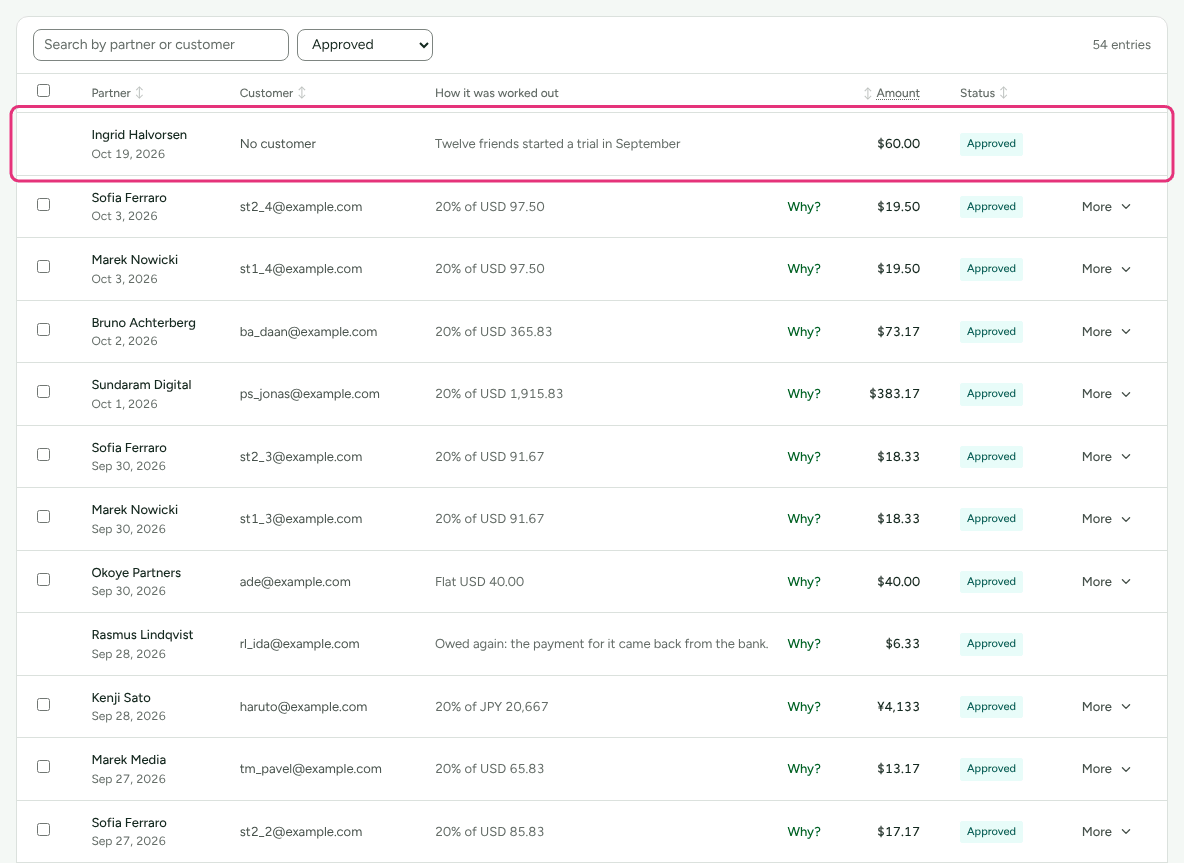
- Go to Commissions. A bonus is a row whose How it was worked out is its description, for example "Bonus: passed USD 5,000.00 on Spring launch". Type the partner's name into Search by partner or customer to find it.
- Press Approve (owner or admin). To reject it instead, press More on its row and choose Reject.
- Pay it in the next payout run (see Pay your partners).
A bonus is paid the way its program pays: "bonuses are always paid this way", in money, store credit, or as each partner chooses (see Pay partners in store credit). It is in the currency it was awarded in, and the payout minimum applies to it like any other money.
What a refund does
Nothing. A refund reverses the commission on the refunded sale, not a bonus. A collaboration bonus stands once the target is passed, and the refunded sale still counts toward the launch's revenue. If a sale behind a creator's target is moved to another partner, the collaboration's performance says so in words and leaves the decision to you.
Decide on a bonus while it is Pending: Reject it there if it should not be paid.
Not yet documented: The Commissions screen offers Cancel commission… only on commissions earned on a sale, so a bonus you approved by mistake has no way back on the screen. Write to support@refficks.com before it is paid. See Refunds and reversals for how a reversal works.
What this does not do
- No automation, timer or AI approves or pays a bonus.
- A bonus does not change a plan or a partner's rate.
- There is no screen to award a bonus by hand.
Related
- Approve commissions: what happens after a bonus is written.
- Intelligence and recommendations: where recommended bonuses come from.
- Commission entry types and statuses: the Bonus row among the others.
- Run creator collaborations: bonus targets on a brief.