A sale was not credited to a partner
A sale shows "No partner" on Conversions, or it went to a different partner than you, or a partner, expected. The most common cause is that Refficks never connected the buyer to the partner's click: the sale arrived for somebody it had not seen on your site, or the click was outside the program's window. Every sale's page says which.
Check this first
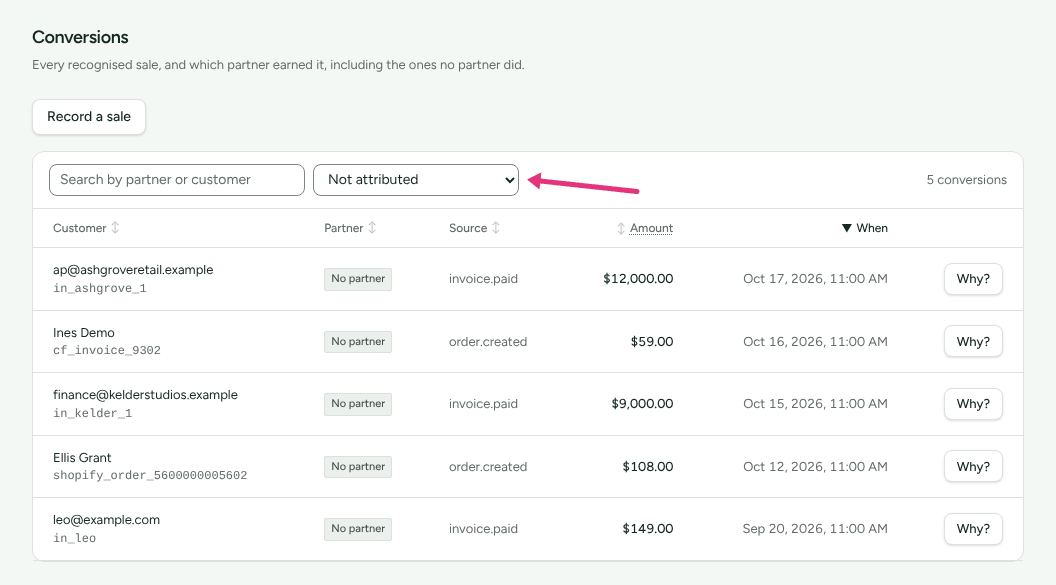
- Go to Conversions. Set the filter to Not attributed to list only sales credited to nobody.
- Find the sale: type the customer's name or email into Search by partner or customer. The customer is in the first column, with the sale's own id beneath it; the search does not look at that id. Or open the customer under Customers: the sale on their Journey card reads "No partner was credited." with a Why? link beside it.
- Press Why? to open Why this conversion was attributed.
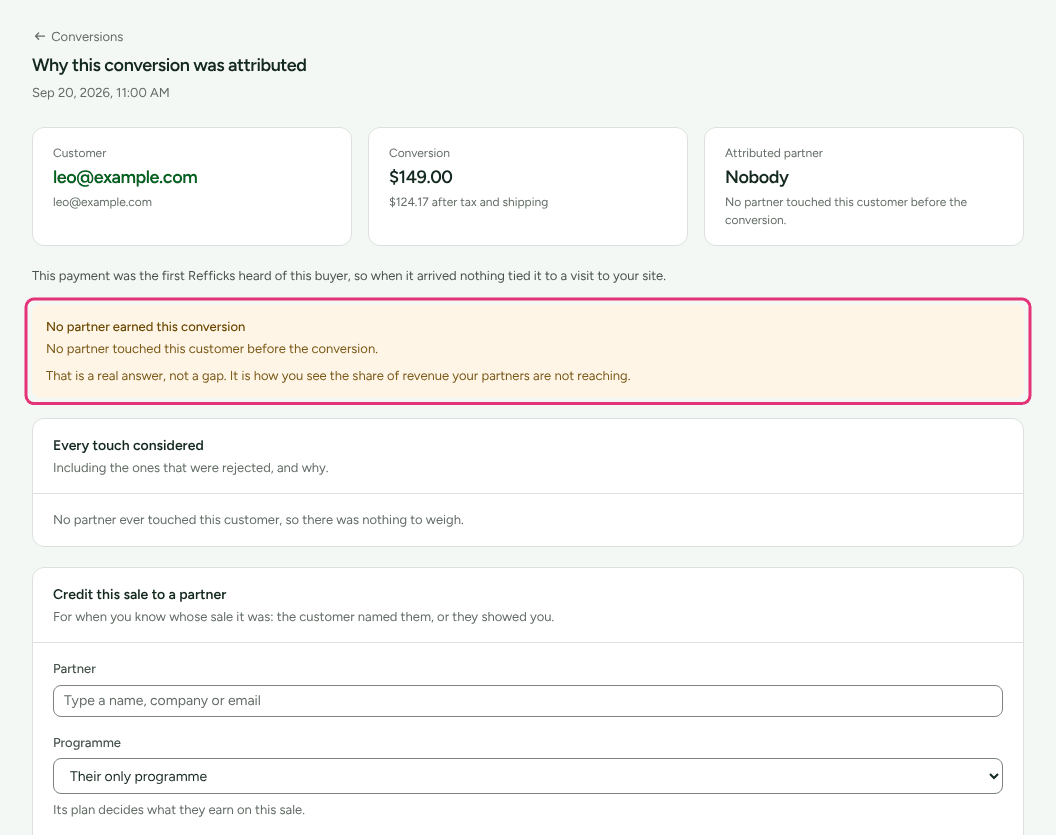
- Read three things on that page:
- the sentence under the three figures at the top, which says how the buyer was found, when Refficks knows;
- the box No partner earned this conversion and its sentence, or The decision if somebody was credited;
- Every touch considered, with each touch's reason.
If the sale is not in Conversions at all, go to The sale never became a conversion.
Likely causes
| What the sale's page says | Likely cause | Fix |
|---|---|---|
| "This payment was the first Refficks heard of this buyer, so when it arrived nothing tied it to a visit to your site." | The buyer never said who they were on your site, or used a different email or id there | The buyer was not identified |
| "No partner touched this customer before the conversion." and "No partner ever touched this customer, so there was nothing to weigh." | No click or code was recorded for this customer | Clicks or visits are not being recorded, then the code |
| "Every touch on this customer had expired by the time of the conversion." A touch reads "Outside the 30-day attribution window." | The sale came after the window | The click was outside the window |
| A touch reads "This partner is suspended from this programme." or "This partner is no longer one of your partners." | The partner was stopped when the sale landed | Credit the sale by hand, if you mean to pay it |
| A touch reads "This programme does not count …" or "This programme does not let codes decide attribution." | The program's rules exclude that kind of touch | How this program decides |
| A touch reads "Happened after the conversion." | The click came after the purchase | Nothing to fix; it may win the customer's next sale |
| "This subscription began before Refficks heard of it; nobody acquired it through a partner." | A renewal of a subscription from before you connected | Credit the sale by hand |
| The decision names a different partner | Another touch outranked this partner's | Another partner was credited |
| The partner's code was used, and they were not credited | The code is not theirs in Refficks, was not reported, or lost to a click | A partner's code was used but did not count |
| The sale is not listed at all | It did not reach Refficks as a sale | The sale never became a conversion |
Diagnose it step by step
- Open the sale's Why? page. If it names a partner, go to Another partner was credited.
- If Every touch considered is empty, Refficks has no partner touch on this customer. Open the customer from the Customer figure at the top and read their Journey and Identity cards. If the journey shows the partner's click under a different customer, the buyer was not identified. If there is no click anywhere, see Clicks or visits are not being recorded.
- If touches are listed but all read Not eligible, their reasons tell you which rule excluded them. Use the table above.
- If the sale was recorded in the last 24 hours, wait: it may still be credited later.
Read the attribution debugger explains every card on the page.
Fixes
The buyer was not identified
A click belongs to a browser. A sale from Stripe, a store or your server belongs to a buyer's email or account id. Refficks joins the two only when your site says who the browser belongs to.
- Call
window.refficks.identify()when somebody signs up or logs in, with the same email or id your billing uses. See Install the tracking script. - If your server reports the sale, it can send the visitor id itself: the
script keeps it in the
rk_vidcookie on your own site, which your server receives with the buyer's request. Send it asvisitor_id. - If your server creates Stripe Checkout Sessions, put the same id in
metadata.refficks_visitor. - If you sell through Stripe Payment Links, open the Stripe Payment Links
guide on Integrations › Where you sell and press I sell with Stripe
Payment Links (owners and admins), so the script adds the partner's code
to each payment link on your pages. A partner's link that points straight at a payment link
(
buy.stripe.com) gets the code from Refficks as the visitor is sent on, once the guide is chosen. Before that, Stripe drops what the link carries, and the sale is not credited from the link. - On BigCommerce, the script links an order to the visit through the shopper's cart. An order placed with "Buy now" skips the cart and is credited only through the partner's code.
Credited later. If the buyer is identified within 24 hours after a sale credited to nobody, Refficks decides the sale again by itself. When a partner now qualifies, the sale moves to them, the decision begins "Credited later: the buyer was identified by your website on" a date, and the partner's page says "Credited later" under Performance. After 24 hours, credit it by hand.
The click was outside the window
Each touch keeps the window it was recorded with. To give future clicks longer (owners, admins and managers):
- Go to Programs and open the program.
- On its Settings card, change Attribution window (days), from 1 to
- Press Save changes. "A change applies to clicks from now on, not to clicks already recorded."
For a sale that should have counted, credit it by hand.
The program's rules excluded it
Programs › the program › How this program decides says which touches count. "This program only counts" followed by a list means some kinds are excluded: a referral program, for example, does not count your server naming a partner. Codes do not decide attribution excludes every code. Changing a rule affects sales from then on, never one already decided.
Another partner was credited
Read The decision on the sale's page.
- "The most recent eligible touch, from the highest-priority source (…). 2 partners had a live claim." Under Last touch, the later click wins. Under First touch, the earlier one. The line under it says what the confidence badge means, for example "85%: how sure the evidence is that this partner sent the sale. Refficks starts at 95% for a tracking link and takes 10 points off for each other partner with a live claim on the customer (one here, 30 points at most). It is there to weigh the decision by, and changes nothing anybody is paid."
- A click and a code compete: under the default A click beats a code, the partner whose link was clicked wins over the partner whose code was typed.
- "This customer was already attributed to this partner on" a date, "and no newer touch competes." A returning customer stays with the partner who won them while nobody else has a live claim.
- "…and this programme keeps a customer with the partner who first won them." The program is set to The first partner keeps the customer; the newer touch is on the journey and did not take the sale.
Under other rules on the same page shows who would have won under First partner touch, Last partner touch and Codes beat clicks. If the decision is wrong for this sale, move it. See How attribution works for every rule.
A partner's code was used but did not count
- The code is not theirs in Refficks. It must be listed under Tracking › Coupon codes for that partner. The shop's own codes credit nobody.
- The platform did not report the code. Stripe, your store or your server has to send the code with the sale. A partner's code that does not exist in your store or Stripe cannot be used at its checkout at all; the program's page is where codes are synced to a connected store.
- The code is paused, expired or used up. It then credits nobody: "The code expired on" a date, or "The code has been used its" N "times."
- A click beat it. Under A click beats a code, a click on any partner's link inside the window wins.
- The program ignores codes. Codes do not decide attribution is set.
The sale never became a conversion
- It was not a sale. Only
invoice.paidandorder.createdevents are sales.subscription.created,trial.startedandcustomer.createdare recorded and never become conversions. - It was a test. A payment in Stripe's test mode, or a test from Send yourself a test, is "Recorded as a test: it credits nobody, pays nothing and appears in no report." Many other integrations treat their test purchases the same way.
- Nothing is reporting sales. Getting started shows Your billing is connected, Something has come through it and A sale has reached Refficks. Checks already settled fold under Show the N settled, so any of the three still listed in full is not done yet. Then see Stripe sales are not arriving or the integration's own card on Integrations › Connections.
- A browser order was refused or replaced. Orders reported from your confirmation page need Settings › Developer › Website orders switched on, and are refused while Stripe or a Shopify store already reports your sales. An unsigned report of an order is set aside once your server reports the same order signed: Settings › Developer › History shows "set aside · Event", and the signed report is the sale that counts.
- Your workspace is closed. Sales are recorded and wait until it reopens.
A referral program refused the referral
On Referrals, a rejected referral carries its reason:
- "The referrer and the referred customer are the same person." The program's Allow people to refer themselves is off.
- "This customer was already known before the referral, and this programme rewards new customers only." The program's Only reward genuinely new customers is on.
Both are under the program's Referral program card, in Restrictions, and apply to referrals from then on.
Credit or move the sale by hand
Owners, admins and managers can do this from the sale's Why? page.
- A sale credited to nobody: use Credit this sale to a partner. Search for the Partner, say Why, press Credit this sale, then Credit it. The partner also becomes this customer's partner for later sales, unless another partner's link or code claims one.
- A sale credited to the wrong partner: use Move this to another partner. Search for the Partner, say Why, press Move this sale, then Move it. "The commission on it is taken back from the partner who has it now, as a new entry on their ledger, never an edit."
The partner must be approved in a running program, or Refficks refuses: "… is not approved in any running programme, so nothing could be paid on it. Approve them first." A manager's credit or move leaves the commission waiting for an owner or admin, and a manager cannot move a sale whose commission is already approved or paid. Credit or move a sale has every step and what History and the ledger show.
A partner says they sent a sale
Partners can ask about a missing sale from their portal, and you answer under Queries. Before you answer, open the sale's Why? page: the reason there is the answer. Ask the partner for the date, the link or code they shared, and the customer's email if they know it.
When to contact support
Write to support@refficks.com if the sale's page gives a reason that does not match what you can see, or the sale is missing and its integration shows the delivery arrived. Include:
- the address of the sale's Why? page, which contains the conversion's id;
- the sale's own id, shown under the customer on Conversions;
- the partner's name and the link or code they shared;
- the exact sentences in No partner earned this conversion or The decision, and the reasons under Every touch considered;
- the date and time of the click and of the purchase, with your time zone.
Never send a secret key, a webhook signing secret, or a partner's payout details. Support does not need them and will not ask for them.
Related
- Read the attribution debugger: every card on the Why? page.
- Credit or move a sale: give a sale to the partner who earned it.
- How attribution works: every rule the decision follows.
- Clicks or visits are not being recorded: when there is no touch to credit.
- Answer partner queries: replying to partners under Queries.