What happens to a commission when a sale is refunded?
A refund never edits the commission it undoes. Refficks writes a second entry beside it, a reversal, that takes back the refund's share: if the commission has not been paid yet the two cancel out, and if it has, the negative amount stays owed and comes off what the partner earns next.
The short version
- Refficks never silently changes a commission. The original entry keeps saying what was earned; the reversal beside it says what came off and why.
- Before payout, a full refund cancels the pair. Both entries read Reversed and nothing goes into a payout run.
- After payout, the original stays Paid, because it was. The reversal is an approved negative amount that nets against the partner's next earnings.
- A partial refund takes back its share: USD 10.00 of a USD 299.00 sale takes USD 2.00 off a USD 59.80 commission.
- A dispute (chargeback) is treated as a refund on the day it opens. Winning it later gives nothing back by itself; a person decides.
- A cancelled subscription reverses nothing. Its later renewals never happen, so they earn nothing.
In detail
A full refund before the commission is paid
Say Sam Rivera earned "20% of USD 299.00", USD 59.80, and the customer is refunded in full while the commission is still Pending or Approved.
Refficks writes a reversal of -USD 59.80 described "Reversed because the sale was refunded." and marks the original Reversed. The two leave the payout pipeline together, so you owe nothing and the next run leaves them out. On Commissions, the original's row says why under its status: "Cancelled: Reversed because the sale was refunded."
A full refund after the commission is paid
If the USD 59.80 has already gone out in a payout, that money has left your bank. The original entry keeps saying Paid, with "Taken back: Reversed because the sale was refunded." under it, and the reversal of -USD 59.80 is written as Approved. It is a clawback:
- If Sam earns USD 100.00 next month, the next payout is USD 40.20: the USD 100.00 commission and the -USD 59.80 reversal, netted in one payout. Its What this is made of list shows both entries.
- If Sam earns nothing more, Payouts › Ready to pay shows Sam with "Owes more than they have earned" and pays nothing. The negative amount waits for later earnings.
Nothing asks the partner to send money back. A clawback only ever reduces what Refficks would otherwise pay, and only in the same currency: a USD clawback waits for USD earnings, never euros.
A partial refund
A partial refund takes back its share of the commission:
Commission: 20% of USD 299.00 = USD 59.80 Refund: USD 10.00 of the sale, so 10.00 ÷ 299.00 of the commission comes off Reversal: -USD 2.00, "Reversed in part: USD 10.00 of the USD 299.00 sale was refunded."
The original entry is not touched. The reversal follows the commission:
- If the commission is still Pending, the reversal is pending too and says "Approved or rejected with its commission". Approving the commission approves both, so the partner is paid USD 57.80. You cannot approve or reject the reversal on its own.
- If the commission is Approved or Paid, the reversal is approved and nets against the next payout, like a clawback.
A second partial refund takes the next share. When the refunds add up to the whole sale, whatever is left is taken back and the original reads Reversed: in the example, a second refund of the remaining USD 289.00 writes -USD 57.80.
Some providers report a running total of everything refunded so far (Stripe's charge refunds do). Refficks brings what it has taken back up to that total's share, so a delivery that arrives twice or out of order never takes anything twice.
When the share cannot be worked out, Refficks takes back all of what is left. That happens when the refund is the whole sale or more, when the sale's amount was never reported, or when the refund and the sale are in different currencies.
Disputes and chargebacks
A dispute withdraws the money on the day it opens, so Refficks reverses the commission then, as it would for a refund of the disputed amount. Waiting for the bank's decision would mean paying a partner from money the provider has already taken.
If you win the dispute, the money comes back but the reversal stays. Putting it back is a decision about a partner's pay, so Refficks records the outcome and leaves it to you (see Putting a reversal back).
Cancelled orders and cancelled subscriptions
- A store order cancelled after it was paid (Shopify, BigCommerce, WooCommerce) is reported as a refund of whatever is left, and takes back the rest of the commission.
- A cancelled subscription takes nothing back. The commissions on payments already made stand; the customer's later renewals never happen, so they earn nothing.
A refund that arrives before its sale
Providers sometimes deliver a refund before the sale it undoes. A refund that names its sale waits for it, then takes back its share once the sale's commission is written. It never guesses at a different sale.
Shares paid to a recruiter
If the partner was recruited by another partner who earns a share of their commission, the share is reversed with the commission, in full or in the same proportion, and described "Taken back with the commission it was a share of."
Cancelling a commission yourself
You can take a commission back without a refund, for example when the customer never took delivery. It works exactly like a refund:
- Go to Commissions and find the commission. Typing the partner's or the customer's name into Search by partner or customer narrows the list to them.
- Press More on its row and choose Cancel commission….
- In Why is this being cancelled?, write the reason. It becomes the reversal's description, which the partner reads.
- Press Cancel this commission. If you move to another page, filter or search first, the form closes and nothing is cancelled.
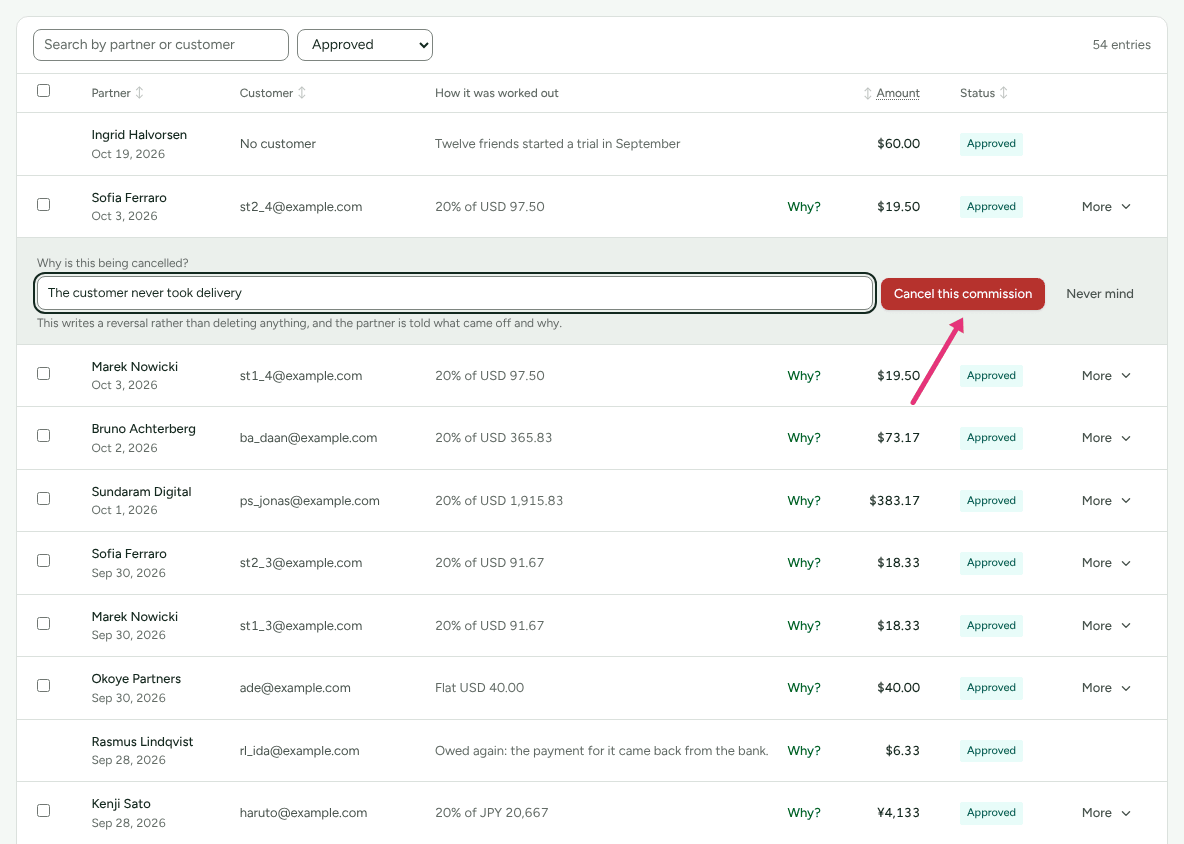
"This writes a reversal rather than deleting anything, and the partner is told what came off and why." The commission's own row then says why under its status: "Cancelled:" and your reason, or "Taken back:" and your reason on a commission that was already paid. You need to be an owner or admin. Cancel commission… is offered only on a commission earned on a sale, and not on one that has nothing left to take back.
Putting a reversal back
A reversal made by mistake, or a refund your provider later undid, can be taken back while nothing has been paid on it:
- Go to Settings › Developer › History.
- Find the entry for the reversal: use Search, or set Action to "reversed · Commission" ("reversed in part · Commission" for a partial refund).
- Press Take the reversal back.
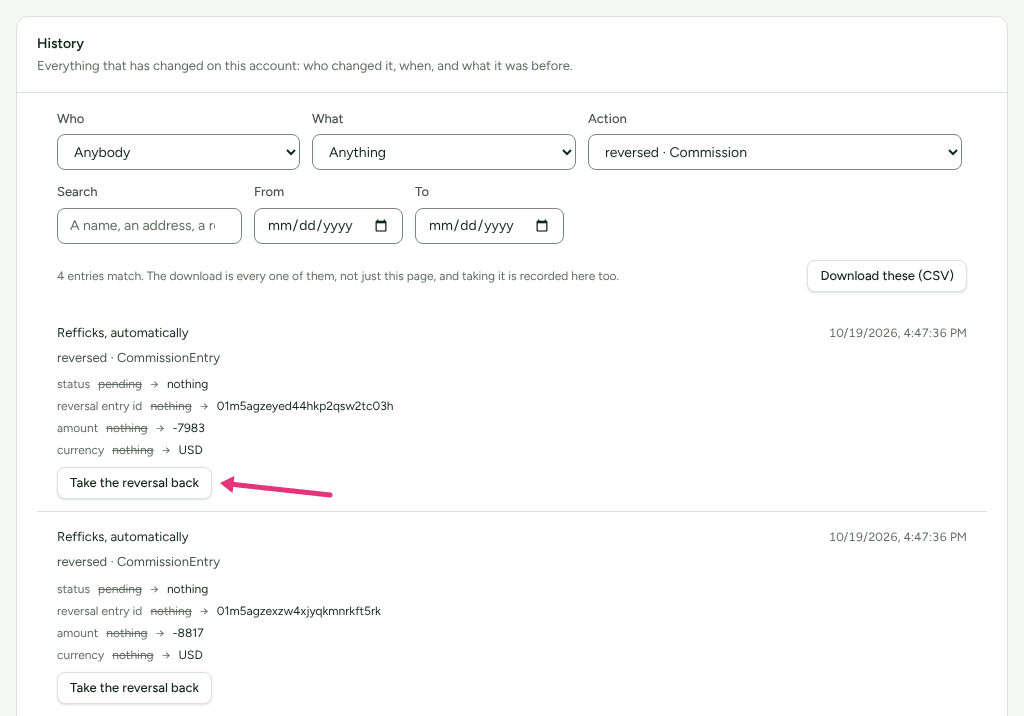
The commission returns to the status it had before, and the partner's history says "A cancelled commission was restored". Both facts stay in History. Only an owner or admin can do this, and only while the reversal is neither settled nor in a payout run. Otherwise the button is replaced by a sentence such as "That reversal has already been settled. Raise a new adjustment instead."
Not yet documented: There is no screen for raising an adjustment by hand. If a reversal can no longer be taken back and the sale stands, write to support@refficks.com with the commission and the conversion.
When a provider tells Refficks that a refund was undone (RevenueCat when Apple reverses a refund, a Recurly refund credit voided), your team is told, and the delivery says whose commission is still taken back and whether it can be put back in History.
Where to see it in Refficks
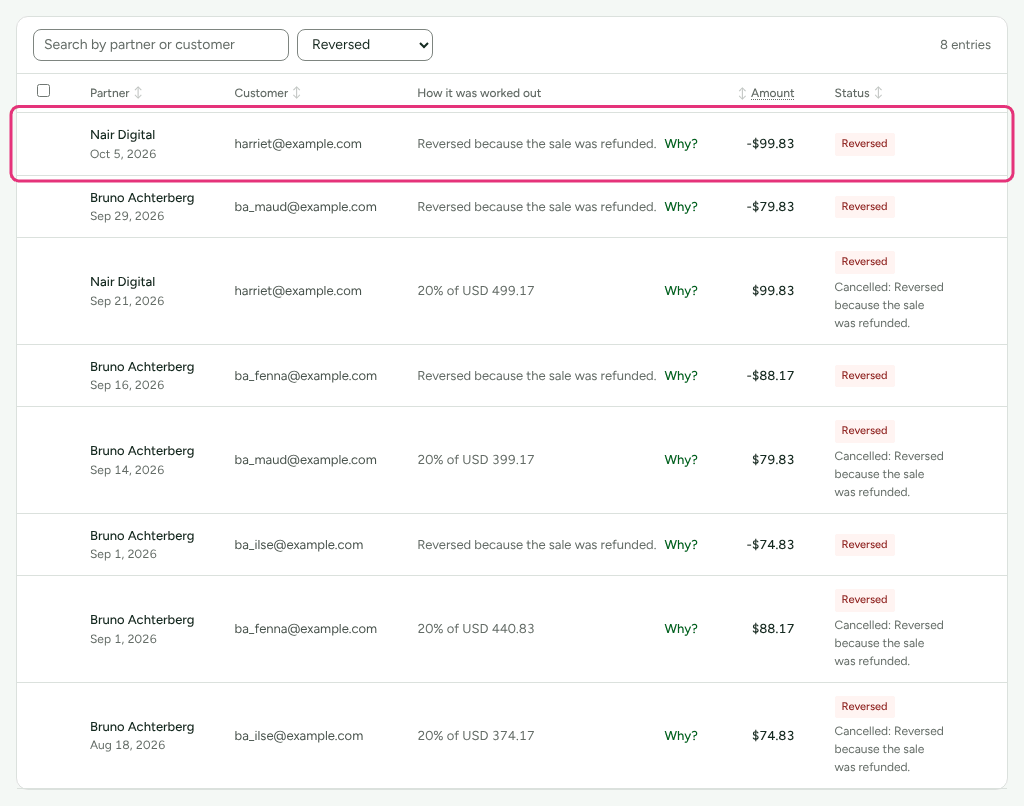
Commissions: set the status filter to Reversed, and type a partner's or customer's name into the search box to narrow it. Reversals show as negative amounts, with their description in How it was worked out, and each reversed commission says why under its status ("Cancelled: …"). A paid or partly refunded commission keeps its own status and reads "Taken back: …".
Conversions, then the refunded conversion: What it paid lists the earned entry and its reversal with their statuses.
Payouts, then a payout: What this is made of lists any clawback netted in it.
The partner's portal: their commission list shows the reversal with the same sentence, and their history says, for example, "Part of a commission taken back: USD 2.00".
Settings › Developer › History: who cancelled what, with the reason.
Settings that change it
| Setting | Where | Default | What it changes |
|---|---|---|---|
| Approve automatically after (days) | Program › Commission plans › Approval › Change | Off | A holding period gives refunds time to arrive before a commission becomes payable; a refunded one is reversed instead of approved |
There is no setting that turns reversals off.
Limits
Refficks reverses what your store or payment provider reports. A refund made somewhere Refficks does not hear from (cash back over the counter, a refund in another system) takes nothing back until you cancel the commission yourself (More, then Cancel commission…).
If a refund arrives after you have built a payout but before you mark it paid, cancel that payout (open it under Payouts and press Cancel), then press Create payouts again, so the new payout reflects the refund.
Known issue: if the whole sale is refunded and you mark the old payout paid instead, the partner is paid for the refunded sale and no clawback is written for a later run. What this is made of on the payout does not show a commission's status, so before you press I have sent this, open Commissions, choose Reversed in the status filter, type the partner's name into the search box, and compare their reversed entries with the lines on the payout. If a line on the payout is among them, cancel the payout and build it again.
A clawback is never collected from the partner. A partner who never earns again keeps the balance below zero.
Reversals are worked out in the sale's currency. Nothing is converted.
Why? on a reversal's row opens "That conversion does not exist": the link carries the refund's id rather than the sale's. Press Why? on the original commission's row instead.
In a closed account, refunds are recorded and their reversals wait until the account is reopened.
Related
- Approve commissions: approving a commission approves its pending reversals with it.
- Pay your partners: how clawbacks net in a payout, and payments the bank sends back.
- A partner was left out of a payout: "Owes more than they have earned" and the other reasons.
- A commission is missing or wrong: when a commission seems to have disappeared.