Retention, erasure and closing your workspace
How long Refficks keeps your workspace's data and how to change it, how to erase what you hold about one partner or one customer, and what happens when a workspace is closed. For owners and admins.
Before you start
- Role: owner or admin, to change Settings › Developer › Retention, erase a partner, forget a customer, or take an export. A manager can archive a partner, which is the first step of erasing one.
- Erasing and forgetting cannot be undone. There is no copy to restore from.
- If you are thinking of leaving Refficks, take a copy of your data first: Reports, exports and History › Exports.
How long Refficks keeps things
Settings › Developer › Retention ("How long we keep things") has four windows. "You can keep anything for longer than the default. You cannot go below the minimum on each row."
| Window | What it covers | Default | Minimum |
|---|---|---|---|
| Raw events from your systems | "The purchases, sign-ups and cancellations your own systems send us." An event that earned somebody a commission is never removed, however old | 365 days | 90 days |
| The audit trail | "Who changed what, and when." (Settings › Developer › History) | 2,557 days (seven years) | 2,557 days |
| Imported data from a previous platform | "The original export, and the rows we staged from it." The clock starts at cut-over; nothing is removed before | 365 days | 90 days |
| Failed background jobs | "What a job was given when it went wrong." | 30 days | 7 days |
Two things are never removed on a schedule, as the card What this does not reach says:
- "The click and visit records behind an attribution are kept for as long as the commission they explain."
- "Commissions, payouts and the attributions behind them are never removed on a schedule. They are your financial record."
Change a window
- Go to Settings › Developer › Retention.
- On the window's card, type a number of days into Keep for. The hint gives the minimum and the default; leave it empty to follow the default.
- Press Save.
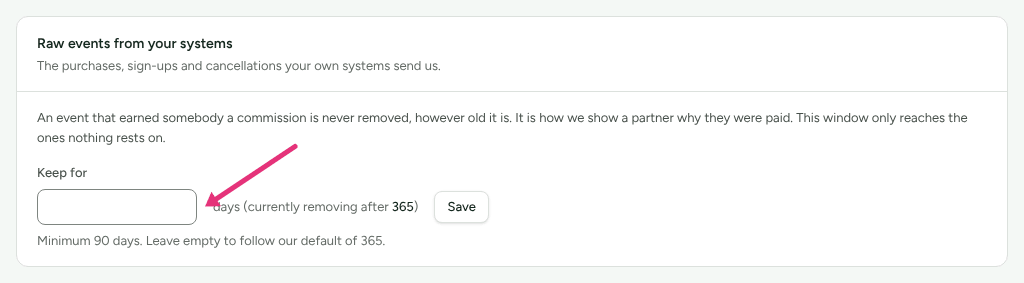
Beside the box, "currently removing after …" gives the number of days in force. If a saved number is below the minimum, the card says so and the minimum applies until you save a number at or above it.
Erase a partner's data
Archiving a partner keeps everything and only changes their status. Erasing removes what you store about them, at your company only.
- Archive the partner first: on their page, press Archive. "An archived partner earns nothing, so archiving is what stops their links converting against a record that no longer has a name on it." (An archived partner is found again under Partners with the Archived filter, and Unarchive brings them back.)
- On their page, choose Account. At its foot a sentence reads "Archive keeps everything and only changes a status. To remove this person's personal data for good, read how erasure works." Press read how erasure works: the Erasing a partner's data card opens in its place.
- Press Erase this partner's data. Until they are archived the button is disabled and the card says "Archive them first."
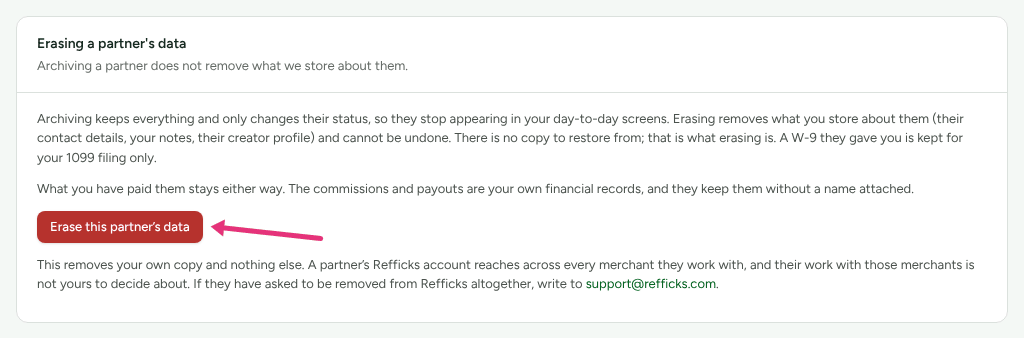
- Read what the dialog says goes and stays, type the partner's email address into Type … to confirm, and press Erase permanently.
What the dialog lists:
- Removed: "Their name and contact details, your notes about them, messages you sent them, a W-8 they gave you, their creator profile, and their portal sign-in for you."
- Kept for your 1099 filing: a W-9 they gave you, encrypted, readable only by your year-end tax file, "deleted four years after the last return it could back."
- Kept, without a name: "Commissions, payouts and attributions."
- Not touched: "Their Refficks account, and their work with any other merchant."
Check it worked
The card reads "This record was erased on …". If any connected tool, such as an email platform, still holds the partner, a Still outside Refficks list says where and what to delete there yourself. It is shown once, as the erasure happens. Later, the card is behind the same read how erasure works link at the foot of Account.
A partner who wants to be removed from Refficks altogether, across every merchant, writes to support@refficks.com.
Forget a customer
For a customer who has asked you to remove their personal data.
- Open the customer from Customers.
- At the bottom of their page, on Forget this person, press Forget this person.
- Read What goes, What stays, and why and What this does not reach, type the customer's name or email address as asked, and press Forget them.
What goes: "Their name, email address, country and your own reference for them. Every identifier that ties a click or a purchase back to them. The hashed address on their sessions." What stays: "The purchases, the commissions they earned your partners, and the attribution behind each one, without a name on them."
Raw events your own systems sent are never altered. If one carried the customer's address, it goes on the schedule under Settings › Developer › Retention, not at once.
Close your workspace
There is no button to close a workspace. Ask Refficks support at support@refficks.com, and they close it. Take an export first, from Import and export › Export.
Not yet documented: How Refficks support confirms that a request to close a workspace comes from someone entitled to make it is not written down in the product.
While a workspace is closed:
- Nobody on your team can get in. The dashboard answers "This account has been closed."
- Its signup pages stop answering. Partners already in can still sign in to their portal and read what they earned.
- It goes quiet. Refficks stops checking your connections, sends nothing in your name (newsletters, outreach, scheduled reports, team emails), and runs none of your automations or webhooks. Stored connections are kept, so a reopen picks up where it stopped.
- Sales are recorded and wait. A sale that still arrives is kept, but nobody is credited and no commission is worked out until the workspace is reopened. Nothing approves by itself.
- A payout already approved still goes out.
- Keys: your secret API keys and helpdesk keys are refused with
ACCOUNT_CLOSED. The tracking script's publishable key and the store plugin's key still report, so nothing is lost if you reopen.
Ninety days after closing, the workspace is deleted, except what the law needs kept:
- self-billed invoices, their agreements and the payouts they cover, and W-9s kept for a 1099, each until its own legal period ends (seven years for the invoices and payouts);
- Settings › Developer › History.
Partners' names and contacts go, as in an erasure. At deletion Refficks also disconnects what it can at your providers (HubSpot, Klaviyo, Slack, Stripe through Connect, a BigCommerce store) and emails the owners what each was told and where to remove the rest.
Until the 90 days are up, Refficks support can reopen the workspace on request. After the deletion, it cannot.
What this does not do
- Retention windows cannot go below their minimums, and the audit trail cannot be shortened at all.
- Erasing a partner does not delete their Refficks account or their work with other merchants, and does not remove what you paid them from your records.
- Forgetting a customer does not delete what they bought or the commissions on it.
- Neither erasure reaches outside Refficks: delete the person in your other tools yourself.
- Closing does not delete anything on the day, and you cannot close or delete the workspace yourself. Delete your account on Settings › You › Security removes only your own login, and is refused while you are the only owner of a workspace.
Related
- Reports, exports and History — take a copy of your data.
- Read History — the record an erasure never removes.
- Consent and privacy — what the tracker stores and when.
- Suspend, archive or end access — archiving a partner, the step before erasing one.
- Tax forms and 1099s — the W-9 an erasure keeps.