Connect Shopify
Link your Shopify store to Refficks so every paid order, refund and cancellation reaches Refficks from Shopify itself, and a partner's discount code or link on an order credits that partner. For owners and admins of a workspace that sells through Shopify.
What it does
- Credits partners for: each order Shopify reports as paid. The order is credited to the partner whose discount code is on it, to the partner whose link the shopper followed (once storefront tracking is set up and the shopper allowed marketing), or through a buyer Refficks already knows.
- Takes commission back for: refunds (the share of the goods the refund gives back) and orders cancelled after they were paid (what is left of the commission). Refunding only the shipping takes back nothing.
- Measures an order on its goods: the order's total less shipping (and the tax on it), tips and import duties, in the store's currency. Tax is included unless you switch Subtract tax before commission on.
- Leaves gift cards out when they are bought: a gift card earns when it is spent, not when it is bought.
- Never counts a test order: an order Shopify marks as a test is shown with what it would have paid, and nothing more.
- Also: puts partners' codes into the store as a Shopify discount, lets a partner's link put their code in the shopper's cart, gives partners a QR code for your till, pays partners in your store's own store credit, and limits a commission plan to some collections, products, variants or SKUs.
- Does not: change an order, a customer or a price in your store, or read your customer list. Without Recharge's marks (see below) it does not tell a subscription renewal from a new order: each paid order is a sale, and your commission plan decides whether a customer's later orders pay.
Before you start
- Role in Refficks: owner or admin to link a store, set up checkout tracking or change a store's settings. Anyone in the workspace can see the store on Integrations › Connections; others see "Only an owner or admin can change how a store's orders are measured."
- Access in Shopify: permission to install apps in the store's Shopify admin.
- Refficks holds: an access token for the store that expires and is renewed, stored encrypted under a key used only for integrations, and never shown or logged. It also makes a publishable key of the store's own for the storefront and the checkout. That key is listed under Settings › Developer › API keys with whose it is and no Revoke button, and it is revoked when the app is uninstalled. Refficks never holds a key you made.
- The Shopify card on Integrations › Connections appears only where Refficks's Shopify app is offered, or once a store is linked. The card says "A store connects from the Refficks app inside its Shopify admin, and shows here once it has."
The Refficks app is not listed in the Shopify App Store.
Not yet documented: How to install the app on your store while it is not listed. No Refficks screen offers an install link. Write to support@refficks.com and ask for one.
What the app asks Shopify for
Shopify asks you to approve these when the app is installed, and again when Refficks starts asking for more. Until you approve new access, the store keeps working with what it already has.
| Shopify access | What Refficks does with it |
|---|---|
read_orders |
Reads paid orders, cancellations and refunds |
read_products |
Reads which collections an order's products were in, for plans that pay on collections |
write_pixels, read_customer_events |
Sets up the checkout pixel that says which customer a visitor turned out to be |
write_discounts |
Makes, edits and adds to the discount that holds partners' codes, and nothing else |
write_store_credit_account_transactions, read_store_credit_account_transactions, read_store_credit_accounts |
Adds a partner's payout as store credit, and reads it back before any retry |
Connect
- In your Shopify admin, install the Refficks app and open it.
- The app says "Connect your-store.myshopify.com to Refficks". Press Connect to Refficks. A new tab opens on Refficks, and the app says "Finish in the tab that opened".
- In the new tab, sign in to Refficks if you are not signed in. The page asks "Connect your-store.myshopify.com?" and names the workspace you are working in.
- Check the workspace name. Only say yes if you opened this from the store's own admin just now. Press Connect your-store.myshopify.com to workspace. The page says "your-store.myshopify.com is linked to workspace".
- Go back to the Shopify admin tab. The app finishes connecting by itself and says "your-store.myshopify.com is connected to workspace". You can close the Refficks tab.
The link in step 2 works for 15 minutes. After that the page says "This link has expired or was already used. Open the Refficks app in your Shopify admin again for a new one."
The confirm button is greyed out, with the reason above it, when:
- the store is linked to another Refficks account: "store is already connected to another Refficks account. It has to be disconnected there first.";
- you are not an owner or admin: "Only an owner or admin of workspace can connect a store to it."
Once the store connects, Refficks sets up checkout tracking by itself (see the next section), and the store appears on Integrations › Connections with the badge Working.
Set up tracking for sales without a code
A sale with a partner's discount code is credited from the order alone. To credit a sale where the shopper used no code but came through a partner's link, two parts have to work. The store's card on Integrations › Connections shows them under Sales without a discount code:
| Part | What it does | Who sets it up | Badges |
|---|---|---|---|
| Checkout | The Refficks checkout pixel says which customer a visitor turned out to be when they finish checking out. It sends no amount, product or address. | Refficks, when the store connects and whenever the app is opened after a failure | Set up, Not set up, Failed |
| Storefront | The Refficks tracking app embed in your theme records which partner link a shopper arrived through. | You, in your theme editor | Reporting, Not seen yet |
To switch the storefront part on:
- Go to Integrations › Connections and find your store on the Shopify card.
- Under Sales without a discount code, press Open the theme editor on the app embed. Shopify's theme editor opens on the app embeds.
- Turn on Refficks tracking and save the theme.
- Visit your storefront. Once the embed reports, Storefront reads Reporting, with the address it reported from and when.
Until the storefront reports, the card says "The checkout is ready to say who bought. Until the storefront reports too, an order with no discount code still credits nobody." When both work it says "Checkout tracking is on: an order with no discount code is still credited to the partner whose link the shopper came through."
If Checkout reads Not set up or Failed, an owner or admin can press Set up on the card. Opening the Refficks app in your Shopify admin does the same.
Consent. The embed loads the Refficks script refusing, and tells it what the shopper chose in Shopify's Customer Privacy settings, and again whenever they change it. Shopify runs the pixel only for a shopper who allowed marketing. A shopper who declines is neither given a cookie nor reported, and their order is credited only through a discount code.
Configure
Each setting on the store's card applies to orders from the moment you change it. Orders already counted keep what they were measured on. Only owners and admins can change them.
Subtract tax before commission
Off by default. The card says which way it is set:
- Off: "Commission is worked out on each order's goods with their tax, the default. Shipping, tips and duties are never counted."
- On: "Commission is worked out on each order's goods before tax. Shipping, tips and duties are never counted."
Under it the card explains why this matters if you also sell through Stripe: "A sale through Stripe is measured without its tax. With this off, the same €120 sale with €20 VAT pays on €120 from Shopify and €100 from Stripe." Settings › Developer › History records each change.
Recharge bills this store's subscriptions
Turn this on if Recharge bills subscriptions in this store. Each order then waits 15 minutes after it is paid and is read again for what Recharge wrote on it, so that:
- a renewal stays with the partner who won its subscription;
- a shipment of a prepaid subscription earns nothing, because it was paid for on the order that began or renewed the subscription.
While an order waits, its line under Latest from this store says "Waiting for Recharge to mark it. It is counted 15 minutes after it arrived."
A renewal of a subscription Refficks never saw begin credits nobody. The card says so: "A renewal of a subscription Refficks never saw begin (no earlier order from that customer on this store) credits nobody, as on every billing platform. A person can still credit it by hand."
If Recharge marks orders without saying which subscription each is, the card warns you to turn on "Send additional order data to Shopify" in Recharge (Settings › Order processing).
Partners' codes as a Shopify discount
From a program's page, Sync codes makes one Shopify discount for the program in each linked store, with every partner's code on it. The Shopify options are Applies to (One-time purchases and subscriptions, One-time purchases only or Subscriptions only), Once per customer, Can be combined with and Which collections it applies to. A minimum order goes on the discount. After you change the discount in Refficks, or if someone deletes codes in Shopify, press Resync all partner codes. See Sync partner codes for the whole card.
Let a partner's link put their code in the cart
On the same card, under Partners' links, tick Apply each partner's code through their link. A shopper who follows a partner's link to your Shopify store arrives with that partner's code already in their cart. It is off until you turn it on, because, as the card says, "The code stays in the cart until they remove it, so a sale can carry it even if they come back later through another partner's link, and a sale with a partner's code is credited as your attribution settings say."
It works only when the partner has a usable code in the program, the code is
in a linked store, and the link lands on the store's own address or its
myshopify.com address. The card says, for each store, whether links reach
it. If your store is at a different address from the website on your partner
links, change your website on Settings › Partners and payouts › Partner
links.
Codes at the till
Each partner whose code is in a linked store sees QR code for the till beside it in their portal. Staff scan it at a Shopify POS till to apply the code, and the sale is credited to the partner through the code. A sale made at the till reads "Point of sale" under Sold through on its conversion page.
Plans that pay on some products
A commission plan's Pays on can be Every sale, Only some collections, Only some products, Only some variants or Only some SKUs, chosen by name from the store's catalogue. On an order with other things in it, the plan pays only on the matching lines. See Commission plans.
Store credit as a partner's commission
A commission plan can say partners are Paid as store credit in a linked Shopify store, once the store has approved the store credit access. A payout built for that store then offers a button such as Add $20.00 store credit in Shopify. Refficks adds the credit to the store credit of the customer Refficks has seen buy in the store under the address the partner gave for store credit, and Shopify emails them. If Refficks cannot tell which store or which customer, the payout says so and keeps the form for recording a credit added by hand. See Store credit.
Shopify takes no protection against a request being sent twice, so if the answer to a partner's first credit is lost, Refficks asks a person to look under Store credit on the customer's page in Shopify and press It's there or Add it again. Nothing settles the payout until they answer.
Availability: Store credit in Shopify was built on
mainon 13 October 2026 and may not yet be on app.refficks.com.
Orders from your thank-you page
While a linked store can read orders, Refficks refuses orders reported from a shopper's browser with: "Your Shopify store already reports this account's orders, verified, so an order reported from a browser is not recorded, because it would be the same sale twice. Report sales Shopify does not take from your server." If Stripe also reports for this workspace, Stripe's sentence is shown instead.
Test it
- Place an order in your store with a partner's discount code, paid with Shopify's Bogus Gateway or a payment provider's test mode.
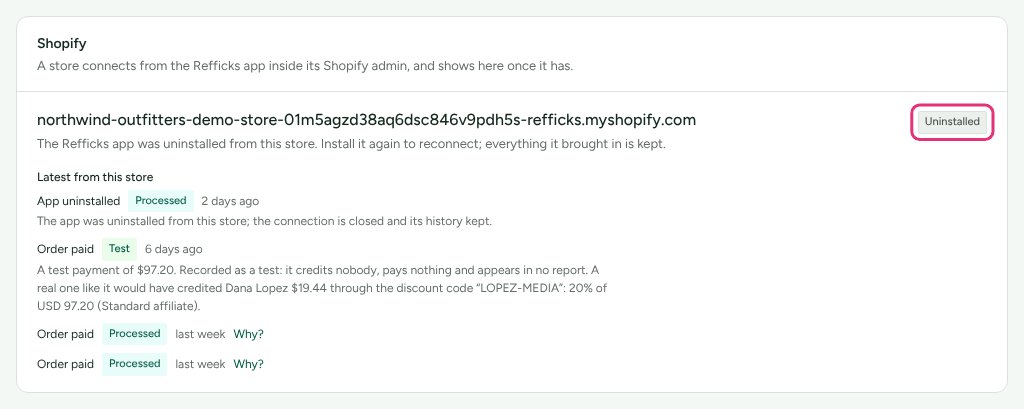
- In Refficks, go to Integrations › Connections and find the store on the Shopify card. Under Latest from this store, the order appears within seconds as Order paid with the badge Test.
- Read the sentence under it. It says what a real order like it would have paid the partner, and that it "credits nobody, pays nothing". Nothing reaches the ledger.
A real order then appears as Order paid, Processed, with a Why? link to its conversion, and the card's line reads "Connected … · last order …".
Check it worked
On Integrations › Connections, each store on the Shopify card has a badge and the server's own sentence:
| Badge | What the card says | What to do |
|---|---|---|
| Working | "Paid orders, cancellations and refunds from this store reach Refficks, and a partner's discount code on an order credits them." (with "No order has arrived yet." until one has) | Nothing |
| Not finished | "Linked. Open the Refficks app in this store's Shopify admin to finish connecting." | Open the app in your Shopify admin |
| Needs reconnecting | Shopify's reason, then "Open the Refficks app in this store's Shopify admin to reconnect." | Open the app; it reconnects by itself |
| Needs approval | "Refficks now asks this store for more access (its orders and products, and checkout tracking), and the store has not approved it yet. Open the Refficks app in the store's Shopify admin and approve it when Shopify asks." | Open the app and approve when Shopify asks |
| Uninstalled | "The Refficks app was uninstalled from this store. Install it again to reconnect; everything it brought in is kept." | Install the app again, if you meant to keep it |
Below the badge, Latest from this store lists the last five deliveries (Order paid, Order cancelled, Refund, App uninstalled and the privacy requests) with their outcome. A paid order's Why? link opens its conversion and the attribution reasoning.
What happens when something fails
| Failure | What Refficks does | What you see | What to do |
|---|---|---|---|
| Shopify stops accepting Refficks's token | Stops asking the store anything | Needs reconnecting | Open the Refficks app in your Shopify admin |
| Refficks asks for new access you have not approved | Keeps working with the access it has; checkout tracking or store credit may wait | Needs approval, or Checkout Failed: "Shopify has not given Refficks the access it needs for checkout tracking. Open Refficks from the store's Shopify admin and approve it when Shopify asks." | Open the app and approve |
| Shopify cannot be reached while an order is read | Marks the delivery Failed and tries again; the order is not counted without its collections | Failed under Latest from this store | Nothing; it is retried |
| A refund arrives before its order | Waits and tries again: "Refficks could not tell whether order … showed prices with tax, so this refund's share of it could not be worked out. It will be tried again." | The sentence under the refund | Nothing |
| Shopify reports the same order twice | Counts it once | The second delivery is kept and not counted | Nothing |
| The storefront embed is off | Credits code-less orders to nobody | Storefront Not seen yet: "Turn on "Refficks tracking" in your theme's App embeds, …" | Turn the embed on |
| Recharge marks orders without their subscription | Counts the order without it | A warning under the Recharge setting | Turn on "Send additional order data to Shopify" in Recharge |
If sales stop arriving altogether, see An integration stopped.
Disconnect
There is no Disconnect button for Shopify in Refficks. Uninstall the Refficks app in your Shopify admin. Refficks then:
- deletes its tokens for the store, which Shopify has already revoked;
- revokes the publishable key it made for the store. Shopify removes the pixel and the embed's settings with the app;
- shows the store as Uninstalled, and keeps every delivery, conversion and commission the store brought in;
- records the uninstall in Settings › Developer › History.
Installing the app again on the same store reconnects it. About 48 hours after an uninstall that is left alone, Shopify asks Refficks to forget the store's customer data; Refficks forgets the customers only that store named and removes the store's customer ids from the rest.
If you delete your Refficks account, the email Refficks sends tells you to uninstall the app in your Shopify admin under Settings, Apps and sales channels. That path is taken from Shopify's help pages.
Related
- Which integration should I use? — whether Shopify alone is enough, or you also need Stripe or the script.
- Sync partner codes — the discount, its options, and what happens when a code changes.
- Store credit — paying partners in your store's own store credit.
- Refunds and reversals — how much a refund or cancellation takes back.
- Sale not credited — an order arrived but no partner, or the wrong one, was credited.