Connect a billing platform or creator checkout
How Refficks connects to the subscription billers (Chargebee, Recurly, Paddle, Polar, Maxio, RevenueCat, and Recharge when it is switched on) and the creator checkouts (ThriveCart, Gumroad, SamCart, Kajabi, ClickFunnels, Thinkific, Teachable): what you paste where, what each one credits, and which ones need a person to approve every commission. For owners and admins who take payments through one of them.
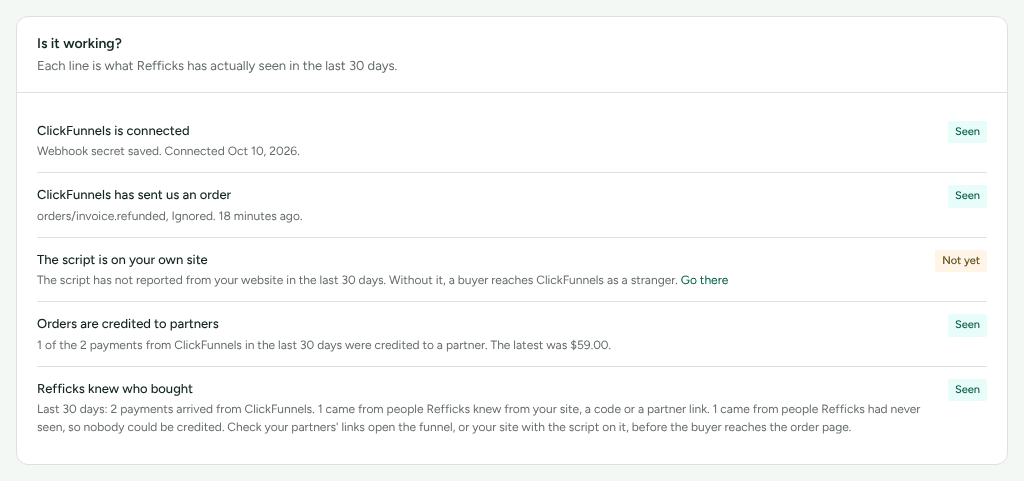
Each provider has a guide inside Refficks, on Integrations › Where you sell, with the exact steps for that provider's own screens, a connection form in its first step, and an Is it working? card. This article says what to choose and how Refficks behaves; follow the guide for the clicks.
Compared
Proof is how Refficks knows a delivery came from the provider:
- Signed — the provider signs each delivery with a secret you paste into Refficks, or with a password or header value Refficks makes for you. A commission on such a sale can approve itself, on a plan that approves by itself.
- Unsigned — the provider signs nothing. The address Refficks gives you is the only thing that vouches for a sale, so every sale is marked Unverified and its commission waits for a person to approve it, even on a plan that approves by itself.
| Provider | What you give Refficks | Proof | Credits partners for | Refunds | Guide |
|---|---|---|---|---|---|
| Chargebee | Nothing: Refficks makes a username and password for the webhook. You say whether it is your live or test site | Signed (password) | Paid invoices: first payment, renewals, one-off charges | Taken back; chargebacks if Chargebee records them | chargebee |
| Recurly | A read-only API key and the endpoint's secret key, and where your site is hosted | Signed | Paid invoices | Taken back; chargebacks once final | recurly |
| RevenueCat | Nothing to start: Refficks makes an Authorization header value. RevenueCat's signing secret is optional | Signed (header), and checked against the signature too if you add the secret | App Store and Google Play purchases and renewals | Taken back for the latest period only | revenuecat |
| Paddle Billing | The notification destination's secret, after you save the address in Paddle. You say whether it is your live or sandbox account | Signed | Completed payments: one-time, first and renewal | Taken back; chargebacks and invoice credits too | paddle |
| Polar | The webhook endpoint's secret, after you save the address in Polar. Live or sandbox organization | Signed | Paid orders: one-time, first and renewal | Taken back; Polar sends no word of a chargeback it did not head off with a refund | polar |
| Maxio Advanced Billing | Nothing. You say whether it is your live or test site | Unsigned (Refficks holds no Maxio key) | Payments that settle an invoice | Taken back; refused Direct Debit too | maxio |
| ThriveCart | Your ThriveCart secret word | Signed (secret word) | Orders and renewals | Taken back, per payment | thrivecart |
| ClickFunnels 2.0 | The endpoint's webhook secret, after you save the address in ClickFunnels | Signed | Paid invoices | Full refunds taken back; a partial refund is yours to decide | clickfunnels |
| Thinkific | The webhooks' signing secret, made in Thinkific beside the address | Signed | Course payments, subscriptions and payment plans | Taken back on Thinkific Payments only | thinkific |
| Teachable | Nothing | Unsigned | Course payments, subscriptions and payment plans | Taken back | teachable |
| Kajabi | Nothing | Unsigned | Payments | Not sent: reverse by hand | kajabi |
| Gumroad | Nothing | Unsigned | Sales and renewals, in US dollars only | Not sent: reverse by hand | gumroad |
| SamCart, from its server | The currency your store charges in | Unsigned | Orders and renewals | Taken back, partial refunds by share | samcart-notifications |
| SamCart, from its order page | Nothing: a script on your order summary page | Reported by the buyer's browser, so each commission waits | First payments only | Not reported: reverse by hand | samcart |
| Recharge | A read-only API token and its API client secret | Signed | Not available yet | none |
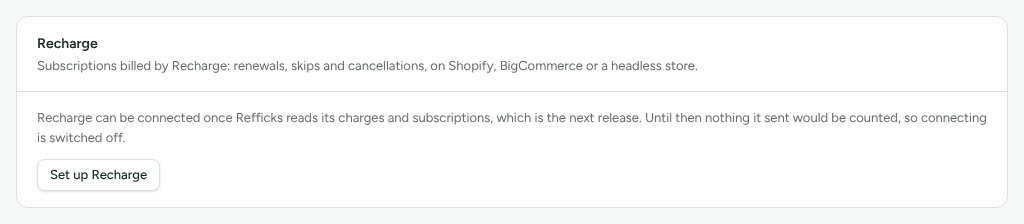
Switched off: Recharge cannot be connected yet. Its card on Integrations › Connections says "Recharge can be connected once Refficks reads its charges and subscriptions, which is the next release. Until then nothing it sent would be counted, so connecting is switched off." Refficks has to switch it on. On a Shopify store, the separate Recharge bills this store's subscriptions setting already works; see Connect Shopify.
Before you start
- Role in Refficks: owner or admin. Anyone else sees "An owner or admin connects provider" on the guide, because connecting gives the provider an address that records sales.
- The guide holds one connection for its provider. The address Refficks gives you carries a token that identifies your workspace. Keep it to yourself.
- Refficks holds: the secret, password or header value for that one address, stored encrypted and never shown again, and for Recurly a read-only key. It never holds a key that can change anything in the provider. A key that can write is refused and not kept.
- The Refficks script belongs on your own site for every provider here. It is what tells Refficks which partner a buyer came through.
Connect
- Go to Integrations › Where you sell and open the provider's guide.
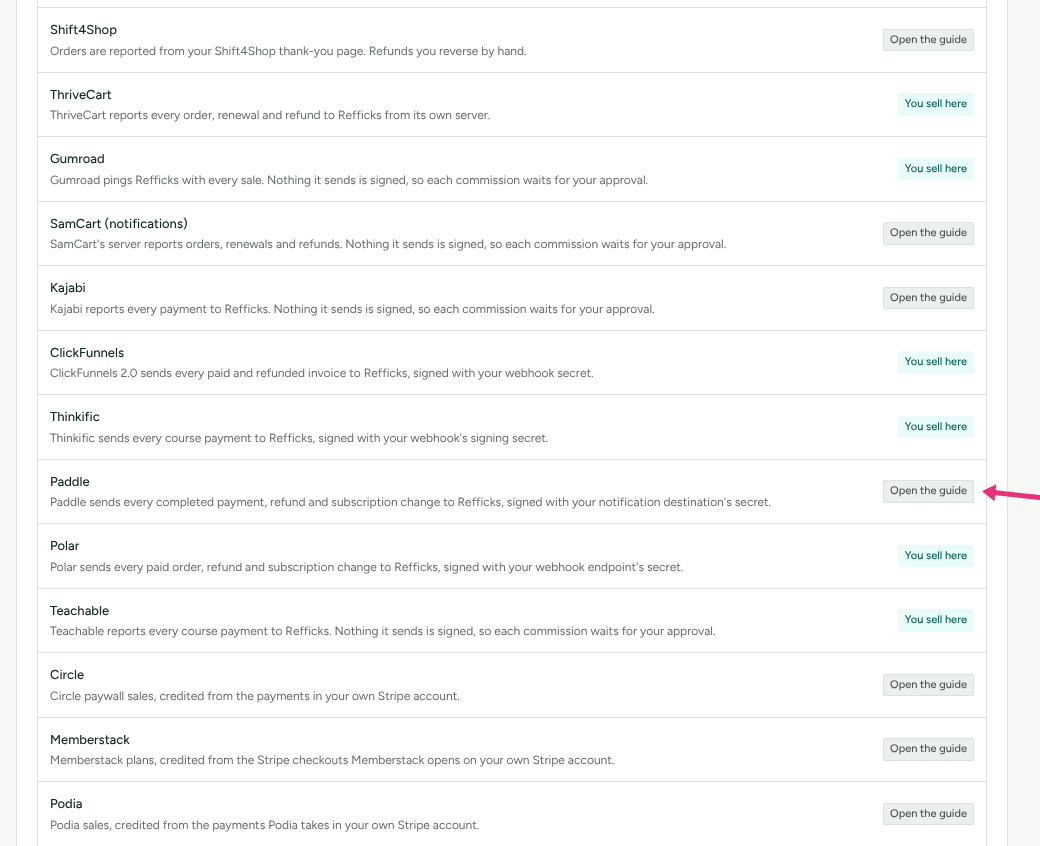
- Read What this gives you, and what it does not at the top. The limits are there, before the steps, on purpose.
- If the guide offers I sell with provider at the top, press it. For ThriveCart, Gumroad, SamCart, ClickFunnels, Thinkific, Teachable and Polar, that is what makes the Refficks script hand the visitor on to the provider's checkout links. "Nothing changes on your site until you say you sell this way."
- In the guide's first step, fill in the connection form and press
Connect provider:
- for Chargebee, Paddle, Polar and Maxio, choose Which provider site is this for? (or account, or organization): your live one, or your test or sandbox one, where "Everything is translated and shown with what it would have credited. Nothing is ever credited.";
- for ThriveCart, paste the Secret word;
- for SamCart's notifications, type The currency your store charges in, because SamCart's amounts do not say;
- for Recurly, choose Where is your Recurly site hosted? and paste the Read-only API key and The endpoint's secret key.
- Copy the address Refficks shows and add it in the provider, as the guide says.
- If Refficks made a password or header value (Chargebee, RevenueCat), it shows "Copy these into provider now" once. Paste it into the provider before you leave the page.
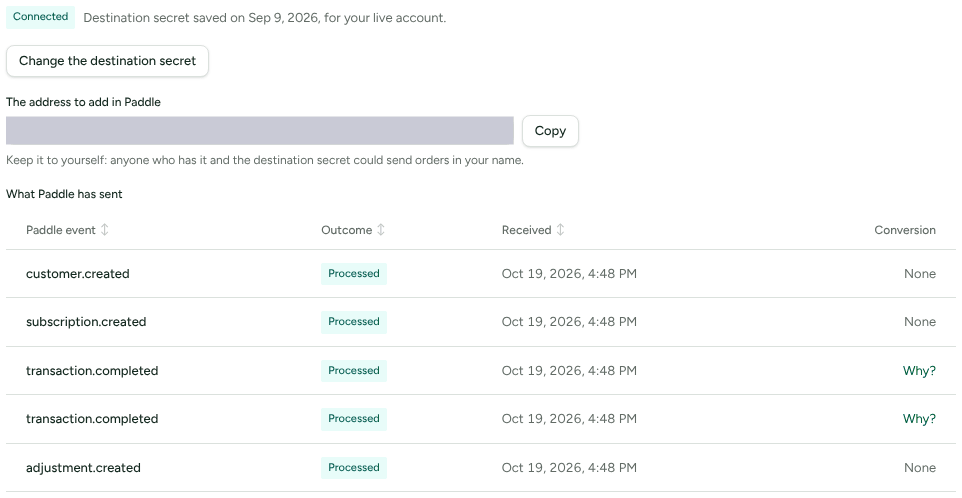
- If the provider shows its secret only after you save the address (ClickFunnels, Thinkific, Paddle, Polar), the connection reads Waiting for the secret until you paste it: "Until it is saved, every delivery is refused."
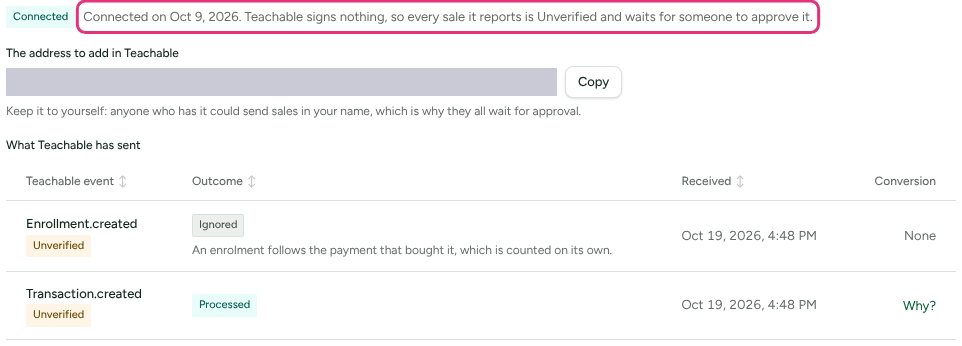
For an unsigned provider, the connection says so before you connect: "Provider signs nothing it sends, so the address you get is the only thing that vouches for a sale. Every sale it reports is marked Unverified and waits for someone to approve its commission, even on a plan that approves by itself." Once connected, the line beside the Connected badge says it again: "Connected on …. Provider signs nothing, so every sale it reports is Unverified and waits for someone to approve it."
Test it
Each guide's connection says what to do first. In short:
| Provider | First delivery |
|---|---|
| Chargebee | Press Test Webhook on the webhook in Chargebee. It arrives and says the connection works |
| Recurly | Make a purchase on your Recurly site. A sandbox site's purchase arrives as a test |
| RevenueCat | Press Send test event on the webhook in RevenueCat. It arrives and says the connection works. Sandbox purchases are shown and never credited |
| Paddle | Buy through a partner's link with one of Paddle's test cards, on a sandbox connection |
| Polar | In your sandbox, buy through a partner's link with Stripe's test card |
| Maxio | In Maxio, open the endpoint's Actions menu and choose Test |
| ThriveCart | Make a test purchase in ThriveCart's test mode |
| ClickFunnels | Buy from your funnel in test mode |
| Thinkific | Send a test event from the Succeeded webhook in Thinkific |
| Gumroad | Buy your own product in Gumroad: it arrives as a test |
| Teachable, Kajabi, SamCart | There is no test mode Refficks can tell apart: a purchase arrives as a sale waiting for approval, which you reject |
A test delivery arrives with the badge Test and a sentence saying what a real one like it would have credited. It credits nobody and pays nothing.
Check it worked
- The guide's connection, under What provider has sent: each delivery with its outcome (Processed, Ignored, Test, Pending, Failed), the badge Unverified where nothing vouched for it, and a Why? link to the conversion it made.
- The guide's Is it working? card: whether the provider is connected, has sent an order, whether the script is on your own site, whether orders are credited to partners, and whether Refficks knew who bought. "Each line is what Refficks has actually seen in the last 30 days."
- Commissions: a sale from an unsigned provider waits there for someone to approve it.
Notes per provider
Chargebee
Refficks makes the username and password; nothing is typed in, and the password is shown once. The first delivery ties the connection to the Chargebee site it came from. Invoices are counted on their value before tax, however the customer paid (cash, Chargebee credits, or both), and an invoice paid in parts is counted once, when the last part arrives. Past invoices are not imported. In-app purchases Chargebee copies from the app stores are left out, so they are never paid twice. Make a new password replaces it; the old one keeps working for 24 hours while you paste the new one into Chargebee.
Recurly
Refficks reads each invoice with your read-only key, and the screen lists The calls Refficks makes with your key, and no others. Buying a gift card earns nothing; the card earns when it pays an invoice. A credit for a plan change is not a refund. Shipping is not yet taken out of what partners earn on. Past invoices are not imported when you connect; ask support if you need them. Check connection tests the key, and Recurly is the one provider here with a Disconnect button: Recurly has no way for a key's holder to cancel it, so you also revoke the key in Recurly.
RevenueCat
A purchase is counted on RevenueCat's price in US dollars before its estimated tax, so an app sale and a web sale of the same plan pay alike. Under What app-store sales earn on, per programme you can choose the estimated proceeds after the store's cut instead, for sales from that day. A free trial earns nothing; the partner is paid when it turns into a paid subscription. Refficks never matches people by device, IP address or advertising id: a purchase from someone Refficks has not seen before credits nobody. Apple reversing a refund does not give the commission back by itself; your admins are told whose commission it was.
Paddle Billing
Commission is worked out on each payment before tax and before Paddle's fee. A partner's code works only if the same discount exists in Paddle, and only codes Paddle reports after you connect are read. A buyer is matched by email only when Paddle reports them as a new or changed customer after you connect, so Refficks waits two minutes before counting a payment, for that report to arrive first. A returning Paddle customer is credited by their link or a code. Paddle Classic accounts (made before August 2023) are not read, and the webhook simulator's example data credits nothing.
Polar
Commission is worked out after discounts and before tax and Polar's fee. With
I sell with Polar chosen, the script hands the visitor to your Checkout
Links. A Checkout Link whose own metadata sets reference_id keeps yours, so
its buyer is credited by email or code. A sale lost to a chargeback keeps its
commission until you reverse it on the Commissions page.
Maxio Advanced Billing
Nothing Maxio sends is checked against your site's shared key, "because the same key opens your subscribers' card-update pages and Refficks does not hold it". A payment waits about a minute for the invoice it paid. A site that bills by statements, an invoice paid in parts, a payment of several invoices at once, and amounts in a currency without cents are recorded and not counted: record such a sale by hand.
ThriveCart
With I sell with ThriveCart chosen, the script hands the visitor to your ThriveCart checkout. A checkout embedded in your page or opened as a popup, or on a name of your own, does not carry the visitor yet, so those orders are credited to nobody. If you also connect the Stripe account ThriveCart charges through, each payment is counted once.
ClickFunnels 2.0
A buyer is credited through their link only if the funnel's first page was opened with it, or Refficks already knows their email. ClickFunnels does not say how much a partial refund was: it is kept and shown, takes nothing back, and you decide on the Commissions page. A funnel on a domain of your own needs that domain added in the guide. ClickFunnels' own affiliate programme is not read; if you run both, a sale can earn a commission in each.
Thinkific
Your Thinkific site must offer webhooks with a signing secret, which Thinkific is still rolling out. Refunds and cancellations arrive only for Thinkific Payments; a refund through Stripe or PayPal connected to Thinkific is not reported, so reverse its commission by hand. Check your first payment's total: Thinkific prints its amounts without saying their unit.
Teachable
Every sale waits for approval. Each course has its own thank-you page, and each needs the guide's code for a buyer to be credited through their link. Commission is worked out on each payment less the VAT Teachable reports.
Kajabi, Gumroad and SamCart
All three sign nothing, so every commission waits for approval. Kajabi passes nothing on from a partner's link: a buyer who typed no code and was not known to your site is credited to nobody. Kajabi and Gumroad send no refunds: reverse those commissions by hand on the Commissions page. Gumroad counts only dollar prices. For SamCart, use the notifications guide or the order summary guide, not both: both would report every order.
What happens when something fails
| Failure | What you see | What to do |
|---|---|---|
| A delivery's signature, password or header does not match | Error, and "Provider's last delivery was refused" with the reason | Paste the secret again (Change the secret), or make a new password or Authorization value and paste it into the provider |
| The secret is not saved yet | Waiting for the secret; every delivery is refused | Paste the secret the provider shows |
| A delivery could not be read | Failed on the delivery, with the reason | Write to support with the delivery's time |
| A provider that sent sales has gone quiet | "Provider has sent nothing for 14 days, though it sent sales before." Owners and admins are emailed for Recurly, Chargebee and RevenueCat | Check the webhook in the provider |
| An unsigned sale | Unverified; its commission waits | On Commissions, press Approve on its row, or Reject under the row's More |
Disconnect
Recurly's connection has a Disconnect button. The others have none yet: delete the webhook in the provider so nothing more is sent, and write to support@refficks.com to have the address retired. Everything a connection brought in stays.
Related
- Which integration should I use? — every provider in one place, with what each has been seen doing.
- Approve commissions — where an Unverified sale's commission waits.
- Refunds and reversals — how much a refund takes back, and reversing one by hand.
- Install tracking — the script on your own site, which every provider here needs.
- All public guides — each provider's
steps, readable without an account:
.../docs/guides/<key>with the keys in the table above.
Availability: The public guide pages are built on
main. On 8 October 2026 app.refficks.com did not yet serve them. Inside Refficks, the same guides are on Integrations › Where you sell.