Connect BigCommerce
Install the Refficks app in your BigCommerce store so each paid order, refund and cancellation reaches Refficks, and a partner's code or link on an order credits that partner. For owners and admins of a workspace that sells through BigCommerce.
What it does
- Credits partners for: an order once its payment is confirmed (Awaiting Fulfillment, Awaiting Shipment, Awaiting Pickup, Partially Shipped, Shipped, Completed or Partially Refunded). An order still Pending, Awaiting Payment or in Manual Verification counts when a later status says it was paid. It is credited to the partner whose code is on it, or to the partner whose link the shopper followed when the order went through the cart.
- Measures an order on its goods after discounts, without tax, postage, handling or gift-wrapping.
- Takes commission back for: a refund (its share), and an order cancelled, declined or disputed after it counted. A dispute won later does not give the commission back.
- Leaves gift certificates out when they are bought: a gift certificate earns when it is spent.
- Also: puts partners' codes into the store as a promotion, limits a commission plan to some products, variants or SKUs, and sends a gift certificate for a partner's store-credit payout or an ambassador's reward.
- Does not: credit a "Buy now" order through a partner's link. Such an order never goes through the cart, so it is credited only through a code. It does not change an order, a customer or a price in your store.
Before you start
- Role in Refficks: owner or admin to connect or disconnect a store. Anyone else sees "Only an owner or admin of workspace can connect a store."
- Access in BigCommerce: permission to install apps in the store's control panel.
- Refficks holds: the store's access token, stored encrypted under a key used only for integrations, and never shown. It holds nothing else of BigCommerce's.
- The BigCommerce card on Integrations › Connections appears only where Refficks's BigCommerce app is offered, or once a store has been connected. Where the app is not set up, the BigCommerce page says "The BigCommerce app is not set up on this server yet."
The Refficks app is not listed in BigCommerce's marketplace.
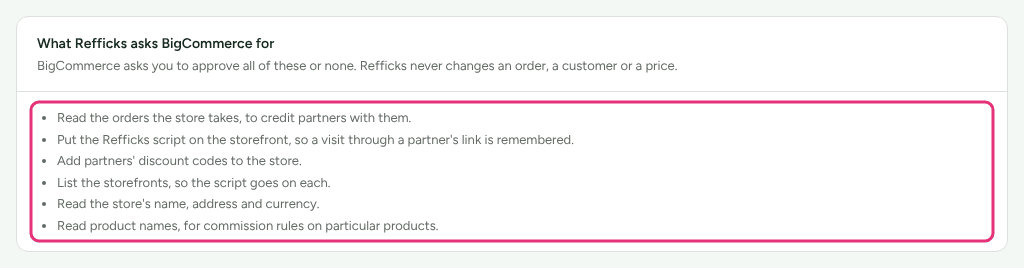
What the app asks BigCommerce for
BigCommerce asks you to approve all of these or none. The BigCommerce page in Refficks lists them under What Refficks asks BigCommerce for: "Refficks never changes an order, a customer or a price."
- Read the orders the store takes, to credit partners with them.
- Put the Refficks script on the storefront, so a visit through a partner's link is remembered.
- Add partners' discount codes to the store.
- List the storefronts, so the script goes on each.
- Read the store's name, address and currency.
- Read product names, for commission rules on particular products.
Connect
- Go to Integrations › Connections and press Connect BigCommerce on the BigCommerce card.
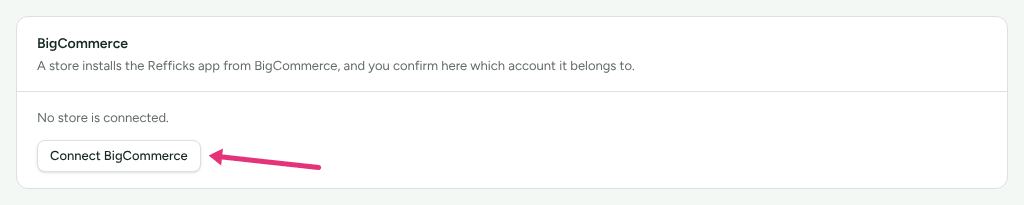
- On the BigCommerce page, under Stores, press Connect a store. BigCommerce's install page opens in a new tab.
- Sign in to BigCommerce if asked, and approve the permissions.
- BigCommerce opens the Refficks app in your control panel. It says "Connect store to Refficks". Press I already use Refficks, or Create a Refficks account if you have none. A new tab opens. The link works for fifteen minutes; opening the app again gives a new one.
- In the new tab, sign in to Refficks if you are not. The page asks "Connect store?" and names the workspace you are working in. Only say yes if you installed the app from that store's own control panel just now.
- Press Connect store to workspace. The page says "store is connected to workspace". Press See your BigCommerce stores.
If you are signed in to Refficks under an address that is neither the store owner's nor that of whoever installed the app, the page warns you first. Confirming is refused when the store is connected to another Refficks account: "This store is connected to another Refficks account. It has to be disconnected there, or the app uninstalled in BigCommerce, first."
Once the store is connected, Refficks asks BigCommerce to send its orders and puts its script on the store's storefronts. Each takes up to a minute, and the store's line under Stores says so while it happens.
How a partner's link is remembered
Refficks puts one script on each of the store's storefronts, for shoppers who accept analytics cookies. The script reports the shopper's cart, so an order placed from that cart is credited to the partner whose link the shopper followed. BigCommerce lets an app's script run on five storefronts; the store's line names any storefront beyond that which does not have it.
A "Buy now" order skips the cart, and a bare order number from a browser is not taken, because anybody could name the next one. So such an order is credited only through a partner's code.
Configure
Partners' codes as a BigCommerce promotion
From a program's page, Sync codes makes one promotion in each connected store, with every partner's code on it. BigCommerce has no billing cycles, so "there a code takes this off the order it is used on". A minimum order goes on the promotion, in your store's currency, and the promotion can be limited to some products. See Sync partner codes.
Plans that pay on some products
A commission plan's Pays on can be Only some products, Only some variants or Only some SKUs, chosen by name from the store's catalogue. Collections are Shopify's: "A BigCommerce sale's lines name their products, variants and SKUs, so limit the plan to those instead." See Commission plans.
Gift certificates as store credit
Where a partner's payout, an ambassador's reward or a referral reward is paid as store credit in a BigCommerce store, the payout or reward offers a button such as Send a $15.00 gift certificate. BigCommerce emails nobody about a certificate an app makes, so Refficks makes the code and emails it to the person, and keeps only its last four characters. The line then reads "Made a $15.00 gift certificate ending … in BigCommerce on …", and Send the code again sends it once more. See Store credit.
Check it worked
- Place an order in your store with a partner's code, and pay for it.
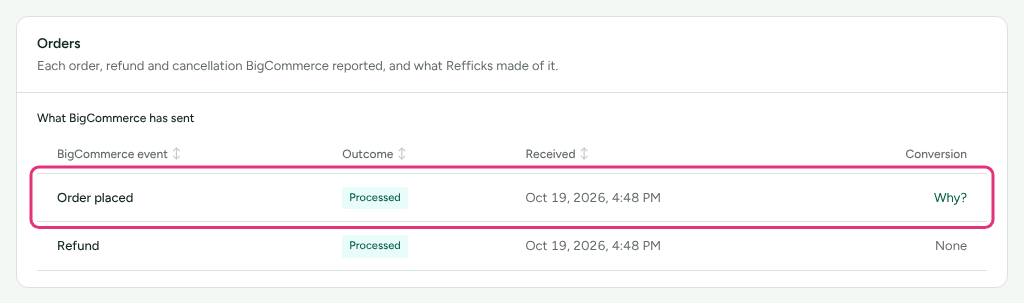
- In Refficks, open Integrations › BigCommerce. The order appears under Orders as Order placed, with what Refficks made of it and a Why? link to the conversion.
- Under Stores, the store reads Connected and "BigCommerce sends this store's orders to Refficks. The last arrived …".
Each store under Stores has a badge:
| Badge | What the page says |
|---|---|
| Connected | "Connected. Refficks holds this store's access." Refficks checks it every hour, and the line says when it last did |
| Needs approving again | "BigCommerce no longer accepts Refficks's access to this store. Open the app from Apps › My Apps in your BigCommerce control panel and approve it again." Orders placed since then wait, and are counted once it is approved again |
| Disconnected | Disconnected from Refficks; BigCommerce keeps the app installed until you uninstall it |
| Uninstalled | "The Refficks app was uninstalled from this store in BigCommerce. Everything it brought in is kept. Install the app again to reconnect." |
The hourly check
Every hour Refficks asks each connected store:
- whether it still accepts Refficks's access. If not, the store reads Needs approving again and owners and admins are emailed;
- whether its order feed to Refficks is still on. If BigCommerce switched it off or it is missing, Refficks switches it back on, emails owners and admins, and the store's line says for thirty days when no orders arrived;
- whether the script is still on each storefront. If somebody took it off in BigCommerce, the line names the storefronts and offers Put the script back;
- whether a busy store has gone quiet. The line says "No order has arrived for … days, though this store usually has orders most days."
What happens when something fails
| Failure | What Refficks does | What you see | What to do |
|---|---|---|---|
| Setting up the order feed failed | Credits no sale from the store | BigCommerce's reason, then "Until that works, no sale from this store is credited to a partner." and Try again | Press Try again |
| The script could not be put on the storefronts | Credits partners only through their code | The reason, then "Until that works, a partner is credited only through their code." and Put the script back | Press Put the script back |
| The store refuses Refficks's access | Holds the store's orders | Needs approving again | Open the app from Apps › My Apps in BigCommerce and approve it |
| BigCommerce switched off the order feed | Switches it back on; orders placed in the gap are not sent again | "BigCommerce had switched off this store's order feed, and Refficks switched it back on. No order arrived between … and …, and BigCommerce does not send again what it held back, so an order placed then has not been credited." | Ask support to bring those orders in (below) |
| The link to finish connecting has expired | Connects nothing | "This link has expired or was already used. Open the Refficks app from Apps › My Apps in your BigCommerce control panel for a new one." | Open the app again |
Missed orders
When BigCommerce held orders back, Refficks staff can read the store's order list for the gap and bring those orders in. Their commissions wait for someone to approve them, and the store's line then says "Refficks brought in the orders placed then on …; their commissions wait for someone to approve them." Write to support@refficks.com with the store and the dates. A merchant cannot start this from their own screens.
Disconnect
Under Stores, press Disconnect on the store, then confirm.
Refficks deletes the access it holds for the store. Everything the store brought in is kept. The app stays installed in BigCommerce until you uninstall it under Apps › My Apps in your BigCommerce control panel: "Refficks cannot do that itself."
Uninstalling the app in BigCommerce has the same effect, and the store then reads Uninstalled.
Related
- Which integration should I use? — BigCommerce beside Stripe and the other stores.
- Sync partner codes — partners' codes as a BigCommerce promotion.
- Store credit — paying partners and ambassadors in gift certificates.
- Refunds and reversals — how much a refund, cancellation or dispute takes back.
- An integration stopped — when a store stops sending orders.