Pay partners through Tremendous
Connect your own Tremendous account so partners can choose Tremendous as their way of being paid. Each approved payout is sent from your Tremendous balance as one reward when you press; Tremendous emails the partner, who chooses how to receive it from what your campaign offers (PayPal, Venmo, a bank transfer or a gift card), and the payout is marked paid when Tremendous says the email arrived.
Availability: Built on
mainon 14 October, after the last deployment of app.refficks.com this article was checked against. Integrations › Tremendous appears only where Refficks has set Tremendous up for the service; otherwise the page says "Tremendous is not set up on this deployment yet."
What it does
- Sends: one Tremendous reward per approved payout, from your balance, only when somebody presses Send through Tremendous or Send every Tremendous payout.
- Records: the payout as Paid, with the reward's id as its reference, once Tremendous says the email arrived; back to approved if the order is cancelled, rejected or fails.
- Does not: "Refficks makes no other call with your connection. It never tops up your balance, never approves anything inside Tremendous, and never sends a payout nobody pressed send for."
Before you start
- Role in Refficks: owner or admin. Others see "Only an owner or admin can connect Tremendous." Support acting on your behalf cannot connect it.
- In Tremendous: "a Tremendous account with a balance. Refficks pays from the balance only, and never tops it up." The balance must be one that orders from an app may be paid from; one that is not is refused when you connect.
- A campaign where you pay Tremendous's fee. "Only campaigns where you pay Tremendous's fee can be chosen, so partners receive all they are owed." In Tremendous, that is a campaign set to "Add to order total".
- Refficks holds: the connection Tremendous gives it when you approve Refficks there, kept encrypted. Nothing is pasted.
Connect
Go to Integrations › Connections and press Connect Tremendous on the Tremendous card (or open Integrations › Tremendous).
Press Connect Tremendous, sign in to Tremendous, and approve Refficks.
Back in Refficks, the card reads Connected, with your Tremendous account, the currency your balance is kept in, who connected it and when. "Connected. Choose the campaign rewards go with, and nothing can be sent until you do."
If you press Deny in Tremendous, nothing is kept: "You chose not to allow Refficks. Connect again when you are ready."
Configure
The campaign rewards go with
- Under The campaign rewards go with, read the list of your campaigns. Each says "You pay Tremendous's fee." or "Partners pay Tremendous's fee on this campaign, so they would receive less than they are owed." (which shows Cannot be chosen).
- Press Choose beside a campaign where you pay the fee. It then reads Chosen, and the card says "Now …".
The campaign decides what partners can choose when the email arrives. The card also says what Tremendous charges: "Tremendous adds 4% to a payout whenever the campaign offers PayPal, Venmo or a bank transfer, even if the partner chooses a gift card. It is taken from your balance on top of the payout. Gift cards go at face value."
The most one payout may be
Tremendous caps one payout unless it has raised the cap for your account. Refficks holds payouts to that cap in each currency:
| Currency | Usual cap |
|---|---|
| USD | $2,000 |
| EUR | €1,700 |
| GBP | £1,500 |
| CAD | CA$2,700 |
| AUD | A$3,000 |
| JPY | ¥290,000 |
| INR | ₹160,000 |
| BRL | R$10,500 |
"Tremendous sends at most $2,000.00 in one payout unless it has raised that for your account. Ask Tremendous by email, then set your new limit here." Once Tremendous has raised it:
- Under The most one payout may be, type the Amount and its Currency.
- Press Save the limit.
"Payouts in EUR are held to this. Payouts in any other currency are held to Tremendous's usual cap in theirs." Back to Tremendous's usual cap undoes it. A payout over the limit offers no button, and its page says why and points at Integrations › Tremendous.
Offering Tremendous to partners
- Under Offering Tremendous to partners, press Offer it to partners. Until a campaign is chosen the button is disabled: "Choose a campaign first: it decides what partners can choose when the email arrives."
- The card reads On: "Offered. Partners can choose Tremendous as their way of being paid."
Partners then see Tremendous among their ways to be paid, and give the Email Tremendous sends your payout to. Changing it needs their password, like any payout details. Stop offering it holds the money of partners who chose Tremendous: Ready to pay shows them with "Chose Tremendous, which you no longer offer", and nothing they are owed changes.
The same card recommends one more safeguard in Tremendous: "add an order approval rule for orders sent from the API (Team settings > Order approvals). Every payout is then approved twice, once here and once there. Leave "Allow approvals via the API" off, so only a person in Tremendous can approve." It also says: "Tremendous rewards expire a year after they are sent unless your campaign says otherwise. A reward never redeemed returns its money to your balance, and Refficks still shows the payout as paid."
Send
- Build and approve the run as usual (see Pay your partners).
- Open an approved Tremendous payout and press Send through Tremendous, or press Send every Tremendous payout on the Payouts card.
- Read what will happen, then confirm: "$59.80 will be sent from your Tremendous balance to d•••@…. Tremendous emails them, and they choose how to receive it. Tremendous adds its fee, taken from your balance." For all of them, one order each, and any that cannot be sent are listed with why.
Refficks reads each order every five minutes until it has ended. While Tremendous has a payout, nobody can mark it paid, cancel it or record a refusal by hand.
Test it
Connect Tremendous's sandbox if you have one. The card says "Connected to Tremendous's sandbox: its money is not real, so nothing sent there will be recorded as paid." A sandbox payout reads Sandbox test and is approved again, still owed, once the sandbox answers. Then pay one partner a small amount from your live account.
Where a payout stands
| The badge on the payout's Tremendous line | What it means |
|---|---|
| Sending to Tremendous | Refficks is sending it. |
| With Tremendous | Sent; Refficks reads it every few minutes until the email arrives. |
| Waiting for approval in Tremendous | Your account holds orders from Refficks for a person to approve. "Approve it under Orders in Tremendous, and Refficks reads it again within a few minutes." |
| Tremendous is reviewing this order | Tremendous reviews some orders before sending them. |
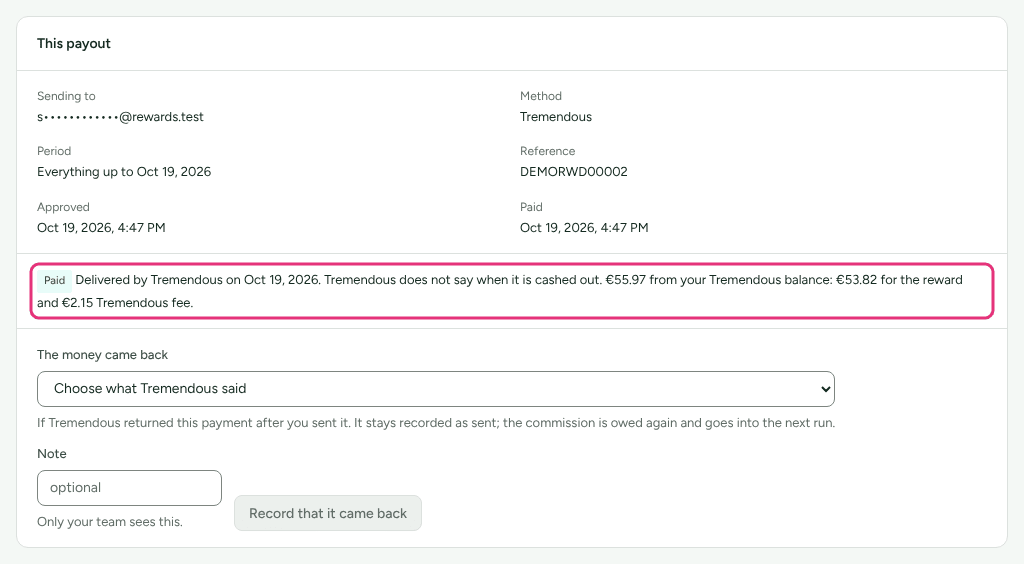
| Paid | "Delivered by Tremendous on …. Tremendous does not say when it is cashed out." The reference is the reward's id, and the line says what your balance paid, fee included. |
| Not delivered | Tremendous could not deliver the email. Resend or cancel the reward in Tremendous; a cancelled reward comes back as not paid and its money goes back to your balance. |
| Not paid by Tremendous | The order was cancelled, rejected or failed in Tremendous; the payout is approved again. |
| Not sent | "Tremendous took nothing from the last attempt", in Tremendous's words (for example its cap). |
| Not confirmed | Refficks could not tell whether Tremendous has it. Look for the order with that reference in Tremendous, then record the payout by hand. |
What happens when something fails
| Failure | What Refficks does | What you see | What to do |
|---|---|---|---|
| No campaign chosen | Sends nothing | "Choose the campaign rewards go with under Integrations → Tremendous." | Choose one. |
| Over Tremendous's cap or your limit | Sends nothing for that payout | "This payout is …, more than Tremendous sends in one payout …" | Ask Tremendous to raise the cap, set your limit, or pay by hand. |
| A currency Refficks has no cap for | Sends nothing for it | "Refficks has no figure for Tremendous's cap in …" | Pay it from the file or by hand. |
| Tremendous refuses the connection, or the balance can no longer be used | The daily check notices, emails your team, and sends nothing | The card reads Needs reconnecting | Press Connect again. |
| An answer from Tremendous never came | Asks again with the same reference, which Tremendous answers with the first order | Not confirmed | Wait; if it stays, check in Tremendous. |
Disconnect
- On Integrations › Tremendous, press Disconnect.
- Read "Refficks asks Tremendous to end its access and deletes its copy of the connection. Partners stop being offered Tremendous. Your balance, and anything Tremendous already sent, are untouched." and press Disconnect.
The page then says whether Tremendous confirmed it. If it did not: "In Tremendous, check that Refficks is no longer listed among the apps your team has approved, and remove it there if it is." Connecting the same Tremendous account again later keeps your campaign, limit and offer; a different account keeps the limit and asks you to choose a campaign again.
Related
- Pay your partners: the whole run.
- A partner was left out of a payout: "Chose Tremendous, which you no longer offer", and payouts that did not arrive.
- Send payouts through PayPal: sending from your PayPal balance instead.
- Add payout and tax details: what partners give when they choose Tremendous.