Which integration should I use?
Connect whatever takes your customers' money. Refficks credits a partner when it hears about a payment, and the best place to hear about it is the system that took the payment, not the shopper's browser.
The short version
- Where do your customers pay? Find that row in the tables below and connect it. If they pay in two places, connect both.
- Prefer a connection that reports from a server and signs what it sends (Stripe, Shopify, Paddle, Chargebee and others). A commission from a source that signs nothing, or from a shopper's browser, never approves by itself: a person approves each one.
- Add the Refficks script to your site as well, unless your guide says it is not needed. The script records which partner sent the visitor; the payment connection says what they paid.
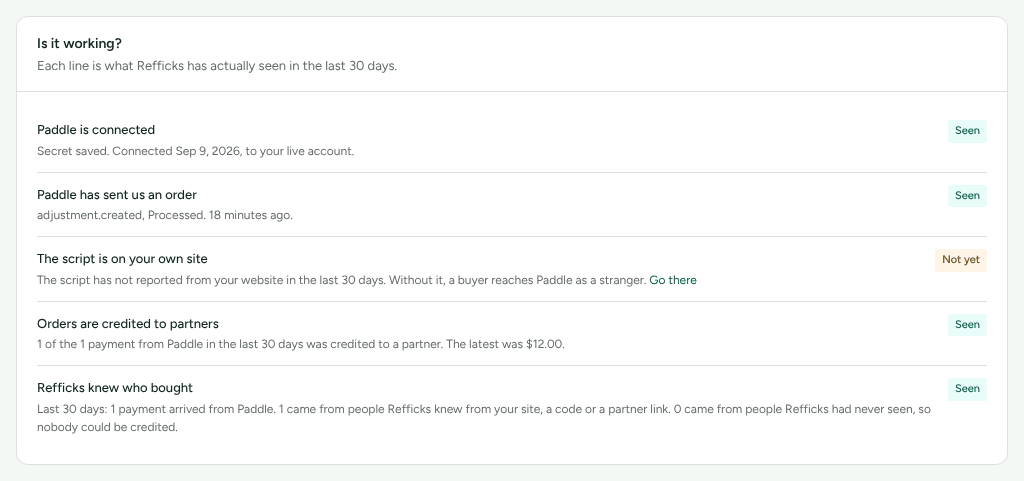
- Every route is listed on Integrations › Where you sell, the tab after Connections, which is where Integrations opens. Each guide says what it gives you and what it does not before its steps, and shows what Refficks has actually seen in the last 30 days under Is it working?.
- Almost every integration is built from the provider's documentation and has not met the real provider yet. The tables say which ones have.
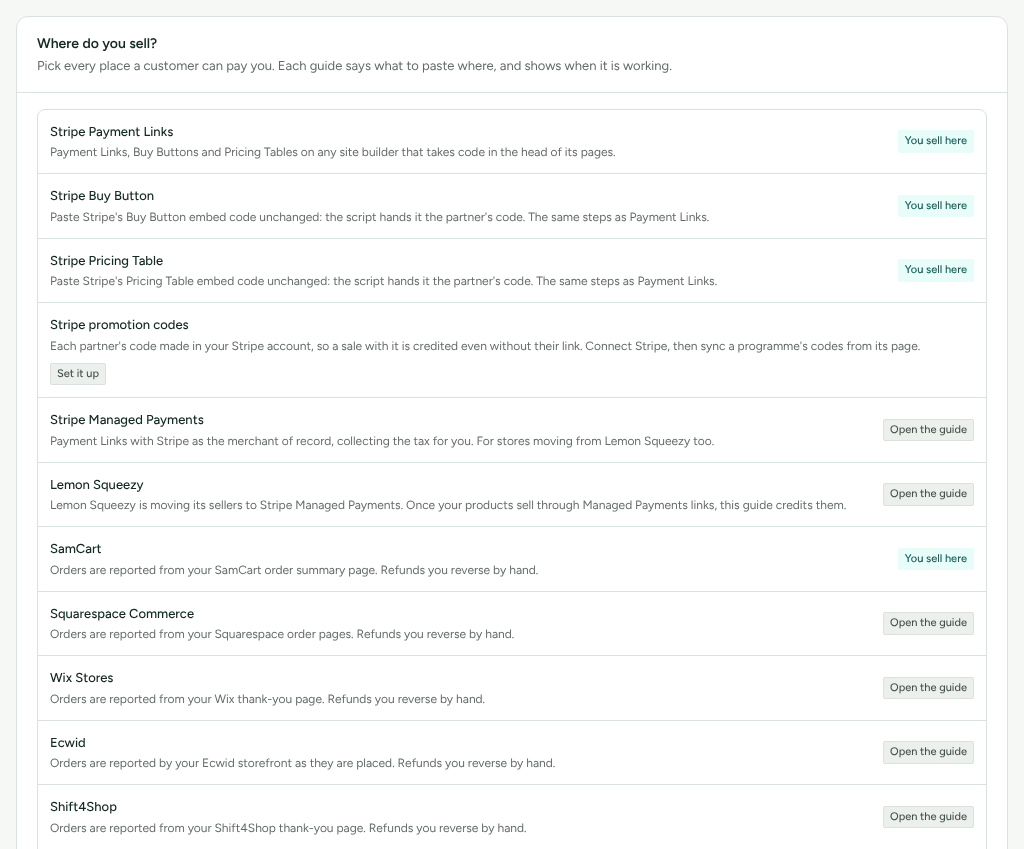
Availability: The public guide pages linked below (
https://app.refficks.com/docs/guides/<key>) are built onmain. On 8 October 2026 app.refficks.com did not yet serve them. Inside Refficks, the same guides are on Integrations › Where you sell.
How to read the tables
Connects by says what you do:
- Approve — you approve Refficks on the provider's own consent screen (OAuth) or install Refficks's app from the provider.
- Webhook — Refficks gives you an address to paste into the provider, and you paste back the secret the provider signs with (or Refficks gives you a password or header to paste there).
- Script — the Refficks script on your pages, sometimes with a few lines more on your order confirmation page.
- Plugin — the Refficks WordPress plugin, a zip you download from Refficks.
Each guide ends with Is it working?: "Each line is what Refficks has actually seen in the last 30 days." That is where to check a route once it is set up.
Payment providers and checkouts
| You take payments with | Connects by | Credits partners for | Refunds | Guide |
|---|---|---|---|---|
| Stripe (subscriptions, invoices, Checkout) | Approve, and Webhook | Paid invoices and renewals, one-time checkouts | Taken back automatically; disputes too | Connect Stripe |
| Stripe Payment Links, Buy Buttons, Pricing Tables | Stripe connection, and Script (or a partner link straight to the payment link) | One-time purchases through the link (a subscription link is not credited from the link) | Automatic | stripe-payment-links |
| Stripe Managed Payments (also for stores leaving Lemon Squeezy) | Stripe connection, and Script | One-time purchases, before the tax Stripe collects | Automatic | stripe-managed-payments |
| Paddle Billing | Webhook (signed) | Completed payments and subscription changes | Automatic | paddle |
| Polar | Webhook (signed), Script for Checkout Links | Paid orders and subscription changes | Automatic | polar |
| Chargebee | Webhook (Refficks gives you a username and password) | Paid invoices | Automatic, chargebacks too | chargebee |
| Recurly | Webhook, and a read-only API key | Paid invoices | Automatic, final chargebacks too | recurly |
| Maxio Advanced Billing (formerly Chargify) | Webhook (unsigned); every commission waits for your approval | Payments | Automatic | maxio |
| RevenueCat (App Store and Google Play) | Webhook (Refficks gives you a header value) | Purchases and renewals | Automatic | revenuecat |
| ThriveCart | Webhook (your secret word) | Orders and renewals | Automatic | thrivecart |
| ClickFunnels 2.0 | Webhook (signed) | Paid invoices | Full refunds automatic; a partial refund you decide by hand | clickfunnels |
| Thinkific | Webhook (signed) | Course payments | Automatic on Thinkific Payments; by hand through Stripe or PayPal | thinkific |
| Teachable | Webhook (unsigned); every commission waits for your approval | Course payments | Automatic | teachable |
| Kajabi | Webhook (unsigned); every commission waits for your approval | Payments | By hand: Kajabi sends no refunds | kajabi |
| Gumroad | Webhook (unsigned); every commission waits for your approval | Sales | By hand: refunds are not sent | gumroad |
| SamCart, from its server | Webhook (unsigned); every commission waits for your approval | Orders and renewals | Automatic | samcart-notifications |
| Your own server or billing system | Server events with a secret API key | Anything you send | You send them | Send events from your server |
"Automatic" means a refund reported by the provider takes back its share of the commission by itself. See Refunds and reversals.
Online stores
| Your store | Connects by | Credits partners for | Refunds | Guide |
|---|---|---|---|---|
| Shopify | Approve: install the Refficks app from your Shopify admin. The Shopify card on Integrations › Connections appears only where Refficks's Shopify app is offered. | Paid orders, with or without a discount code. A commission plan can also pay partners in your store's own store credit | Automatic, cancellations too | Not in the guide list |
| WooCommerce | Webhook (two webhooks), or the Refficks WordPress plugin | Paid orders | Automatic, cancellations too | woocommerce |
| BigCommerce | Approve: install the Refficks app from BigCommerce. The BigCommerce card appears only where Refficks's BigCommerce app is offered. | Paid orders | Automatic | Not in the guide list |
| Squarespace Commerce | Script on the order pages; commissions wait for your approval | Orders | You reverse them by hand | squarespace-commerce |
| Wix Stores | Script on the thank-you page; commissions wait for your approval | Orders | By hand | wix-stores |
| Ecwid | Script on the storefront; commissions wait for your approval | Orders | By hand | ecwid |
| Shift4Shop | Script on the thank-you page; commissions wait for your approval | Orders | By hand | shift4shop |
| SamCart, from its order page | Script on the order summary page; commissions wait for your approval | Orders | By hand | samcart |
Refficks's Shopify, BigCommerce and WordPress apps are not listed in any app directory. A partner's discount code becomes a real discount in Stripe, Shopify, BigCommerce or WooCommerce when you sync it from the program's page. See Sync partner codes.
Creator and membership platforms on your own Stripe
These platforms take payments in a Stripe account that belongs to you. Connect that Stripe account, add the script, and follow the platform's guide.
| Platform | Credits partners for | Guide |
|---|---|---|
| Circle | Paywall sales | circle |
| Memberstack | Plans bought through Stripe Checkout | memberstack |
| Podia | Sales, counted as payments outside invoices and checkouts | podia |
| MemberSpace | Plans, counted as payments outside invoices and checkouts | memberspace |
Podia and MemberSpace need Count payments outside invoices and checkouts switched on for the Stripe account. See Connect Stripe.
Site builders selling with Stripe payment links
The Stripe Payment Links route, with each builder's own menus and catches. All need the Stripe connection and the script.
Framer, Webflow, Squarespace, Wix, HighLevel, Carrd, Ghost, Softr, Bubble, and WordPress (the plugin puts the script on every page).
Your own app
For an app you or an AI builder wrote.
- Your checkout code — pass the visitor to Stripe Checkout: Next.js, Ruby on Rails, Django, Laravel.
- Your sign-in — name new accounts at sign-up, so their later payment is credited: Clerk, Supabase, Auth0, Auth.js (NextAuth), Better Auth.
- Built with AI — two prompts to paste: Lovable, Bolt, Base44, v0.
Things that are not payments
These help, but none of them records a sale on its own.
| What | What it does |
|---|---|
| Forms and booking: Calendly, Cal.com, Typeform, Tally, Jotform, Gravity Forms, HubSpot forms, Marketo forms | Names the person who booked or sent the form, so their later payment is credited to the partner who sent them |
| Analytics: Google Analytics, Plausible, Matomo | Partner visits in your own analytics, each partner on their own line. Nothing to install |
| Google Tag Manager | Puts the Refficks script on your site from your container, waiting for consent |
| HubSpot (CRM) | Keeps the deals partners bring in step with Refficks |
| Klaviyo, Mailchimp, Iterable | Your partners' links and codes in your own email tool |
| PayPal | Sends approved PayPal payouts from your own PayPal balance |
| Tremendous | Pays partners from your own Tremendous balance, each choosing how to receive it from what your campaign offers. The card appears only where Refficks's Tremendous app is set up |
| Zendesk, Freshdesk, Gorgias | Referral and partner details beside a helpdesk ticket |
| Zapier, Make, n8n, Pabbly Connect | Partner work in an automation platform. "Sales come from your payment provider, never from an automation." |
Moving from another affiliate platform
Rewardful, FirstPromoter, Tolt, Tapfiliate, UpPromote, GoAffPro, LeadDyno, Refersion and Everflow are not integrations: Refficks reads your partners, codes and balances from them once, as a migration. See Migrate from another platform.
Switched off for now
Built, and turned off until Refficks completes a registration, a review, or the owner's decision. The cards say so on Integrations › Connections.
Switched off: Recharge — "Recharge can be connected once Refficks reads its charges and subscriptions, which is the next release. Until then nothing it sent would be counted, so connecting is switched off."
Switched off: Webflow as a connected site. Connecting is switched off: "Connecting Webflow comes with the release that reads a site's orders. Until then nothing a site sent would be counted, so connecting is switched off." Selling with Stripe payment links on a Webflow site is a separate route, the Webflow guide above.
Switched off: AppsFlyer — "Refficks is not yet listed in AppsFlyer's partner marketplace, so AppsFlyer cannot send it installs. This page connects once it is."
Switched off: Slack team notifications, until Refficks's Slack app is registered. YouTube checks on creators' published videos, until Google's review. Stripe's platform webhook (approving at Stripe as the whole setup, with nothing to paste). URL passthrough (carrying a partner's code in your links before a visitor consents). Merchant billing.
Settings that change it
| Setting | Where | Default | What it changes |
|---|---|---|---|
| I sell with … | The guide's own page, opened from Integrations › Where you sell | Not chosen | For link-based routes (Stripe Payment Links, SamCart and others), turns on what the script does to your checkout links. For the Stripe Payment Links routes it also lets a partner link that goes straight to a buy.stripe.com link carry the partner's code. Nothing changes on your site until you press it. Owners and admins only |
| Count payments outside invoices and checkouts | Integrations › Stripe | Off | Counts Stripe payments that belong to no invoice and no checkout (Podia, MemberSpace, SamCart and others) |
| Website orders | Settings › Developer › Website orders | — | Orders reported by a shopper's browser. While Stripe or a Shopify store reports your sales, browser orders are refused so nothing is counted twice |
Limits
- Refficks does not convert currencies. Each sale is recorded in the currency it was paid in, and totals are per currency.
- Orders reported from a shopper's browser, and deliveries from a provider that signs nothing, never approve themselves: a person approves each commission.
- A route that reports from a page (the store scripts above) does not hear about refunds. Reverse those commissions by hand.
- Refficks is not certified by, partnered with or listed by any of these providers. It works with them.
Related
- Connect Stripe — the most complete integration, in detail.
- When an integration stops — what an Error or Degraded connection, or a quiet one, means.
- Install tracking — the script, or a no-code install.
- Send events from your server — when you take payments with something not listed here.
- All public guides — every route's steps, readable without an account.