Connect Klaviyo, Mailchimp, Iterable or HubSpot
Send your partners' news, links and codes into your own email tool, or keep the deals partners bring in step with your CRM. For owners and admins whose team works in Klaviyo, Mailchimp, Iterable or HubSpot.
What each one does
| Tool | Connects by | What Refficks sends or reads | What it never does |
|---|---|---|---|
| Klaviyo | Approve Refficks in Klaviyo | Events (metrics) for partners' news, and partner details on each partner's Klaviyo profile. Creates a profile for a partner Klaviyo does not have | "Refficks cannot subscribe or unsubscribe anyone, read your customers, or send any email or text." |
| Mailchimp | Approve Refficks in Mailchimp, then choose an audience | Events and partner details on contacts already in that audience. Adds a partner who is not there only if you turn adding on, and then as a non-subscribed contact | "Refficks never adds a contact, changes anyone's subscription, sends a campaign, exports an audience or reads your reports." |
| Iterable | Paste a JavaScript API key and its JWT secret | Events and partner details on each partner's Iterable user. Or, with no key at all, a data feed your templates read | "The key cannot read, export or delete anyone, subscribe or unsubscribe anyone, or send anything." |
| HubSpot | Approve Refficks in HubSpot (installing needs a Super Admin there) | Reads the deals you link, their stages, amounts and close dates, and keeps them in step. Sends a partner's lead into HubSpot only if you turn sending on | "Refficks cannot change a deal's stage or amount in HubSpot, and sends nothing to HubSpot unless you turn sending on." |
Klaviyo, Mailchimp and HubSpot appear on Integrations › Connections only where Refficks is registered with them, or once a connection exists. Where it is not, the page says, for example, "This deployment is not registered with Klaviyo yet, so there is nothing to connect to." Iterable needs nothing registered, so its card is always there.
Switched off: Slack team notifications. Refficks's Slack app is not registered yet, so no workspace can be connected, and the Slack card is not drawn. When it is, Refficks will ask Slack for one permission, "to post in the channels you pick", and "Messages name partners and say what happened. They never include customers, partners' contact or payment details, anything a partner wrote, or risk findings about a named partner."
Before you start
- Role in Refficks: owner or admin to connect, disconnect, and choose what is sent. Others see "Only an owner or admin can choose what is sent to tool."
- Access in the tool:
- Klaviyo: a user who can approve an app on the account;
- Mailchimp: an Owner, Admin or Manager. An Author or Viewer can connect, and the page then says "That is not enough to change contacts, so nothing could be kept current";
- Iterable: permission to make API keys;
- HubSpot: a Super Admin to install the app.
- Refficks holds: the tool's tokens or key, stored encrypted under a key used only for integrations, and never shown again.
Connect an email tool
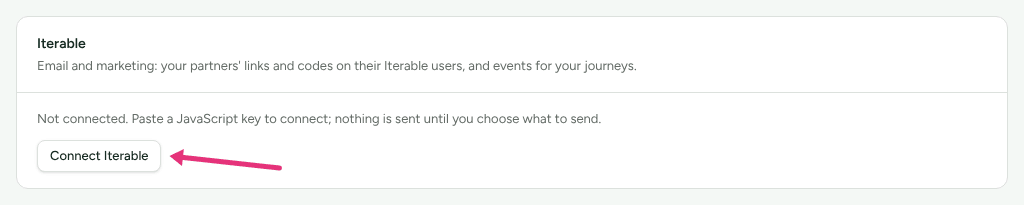
- Go to Integrations › Connections and press Connect Klaviyo, Connect Mailchimp or Connect Iterable on the tool's card.
- On the tool's page:
- Klaviyo or Mailchimp: press Connect Klaviyo or Connect Mailchimp on the Connection card, and approve Refficks on the tool's own screen. It sends you back to Refficks.
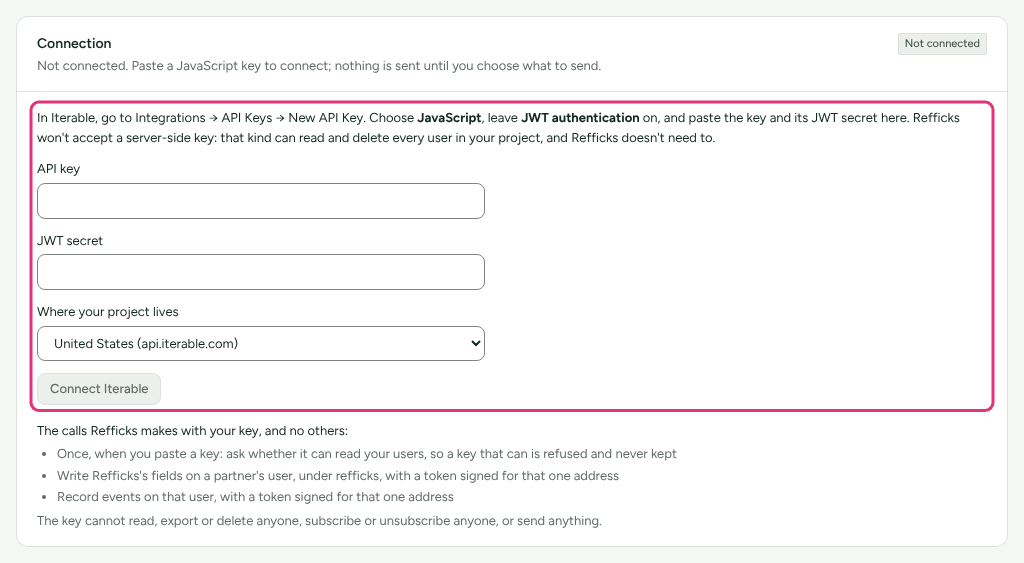
- Iterable: in Iterable, make a new API key, choose JavaScript, and leave JWT authentication on. Paste the API key and JWT secret, choose Where your project lives, and press Connect Iterable. Refficks will not accept a server-side key: "that kind can read and delete every user in your project, and Refficks doesn't need to."
- For Mailchimp, choose the Audience to write to.
- Under What goes to tool, choose who and what. Nothing is sent until you do (see below).
For Iterable, the page also lists Event names. "Iterable may ignore an event name it has not seen from a JavaScript key. Either allow event creation on the key for its first days, or define these under Data Schema → Custom events."
Choose what is sent
The What goes to tool card is the same for all three email tools.
- Partners in these programmes: tick the programs. Nothing about a partner in an unticked program is sent.
- Only these kinds of partner: leave all clear to send every kind (affiliate, creator, referrer and the rest), or tick some.
- Events: each one appears in the tool under its own name, such as
Refficks Commission Earned in Klaviyo or
rf_partner_first_salein Mailchimp. The picker suggests six (partner approved, first sale, commission earned and reversed, payout paid, partner gone quiet) and ticks none. Mailchimp starts automations from events on paid plans only. - Partner details on their profile: their link, their discount code,
where they sign in, the program, every program, tier, status, kinds of
partner, successful referrals, and when they joined. Each comes with the tag
to type in a template, for example
{{ person.refficks_link }}in Klaviyo,*|RF_LINK|*in Mailchimp, and{{refficks.link}}in Iterable, with a Copy tag button. No money figures go on a profile: those travel only with events.
Then:
- Examples of each event sends one example of each chosen event to you, so the events appear in the tool and you can build flows before a partner earns anything.
- Send current partners fills in the partner details for everyone your saved choice covers.
- Activity lists what was sent, what was held back and why, and what failed.
Partners' consent
Refficks follows each partner's own email choices:
- A partner who turned off programme email gets nothing sent about them, unless you tick Also send money events to partners who opted out of programme email: commission earned, commission reversed and payout paid. "Your own emails about money still reach them."
- A partner who turned off one kind of email (for example tips and reminders) gets no event of that kind.
- Klaviyo and Iterable create a person for each partner they do not
already have. "Refficks never subscribes anyone", but Klaviyo counts every
profile it can email toward your plan, and a campaign to a segment that does
not check consent could reach them. Exclude
refficks_partner = true(Klaviyo) orrefficks.partner(Iterable) from those segments, or use a flow or journey instead. - Mailchimp writes only onto contacts already in your audience unless you turn adding on. With adding on, a partner who is not there is added "as a non-subscribed contact": they can receive automations you mark as transactional, never campaigns, and Mailchimp counts each toward your contact limit. With it off, a partner who is not there is left out, and Activity says so.
- When a partner is erased, Refficks clears what it wrote about them in the tool, and archives a Mailchimp contact it added.
Iterable without a key: the data feed
Under Data feed: without giving Refficks a key, Refficks makes an address and a token your Iterable templates can read at send time. Iterable asks Refficks about each person as it sends, and nothing is sent to Iterable otherwise. The token is shown once. A workspace using only the feed sees the badge Data feed on the Iterable card.
Connect HubSpot
- Go to Integrations › Connections and press Connect HubSpot on the HubSpot card, then Connect HubSpot on the Connection card.
- Approve Refficks in HubSpot. It sends you back to Refficks.
- Pick how HubSpot's pipeline stages map to Refficks's deal stages. Until you do, the card says "nothing is kept in step before you do".
- Link a deal from its page under Deals. From then on, its stage, amount and close date follow HubSpot.
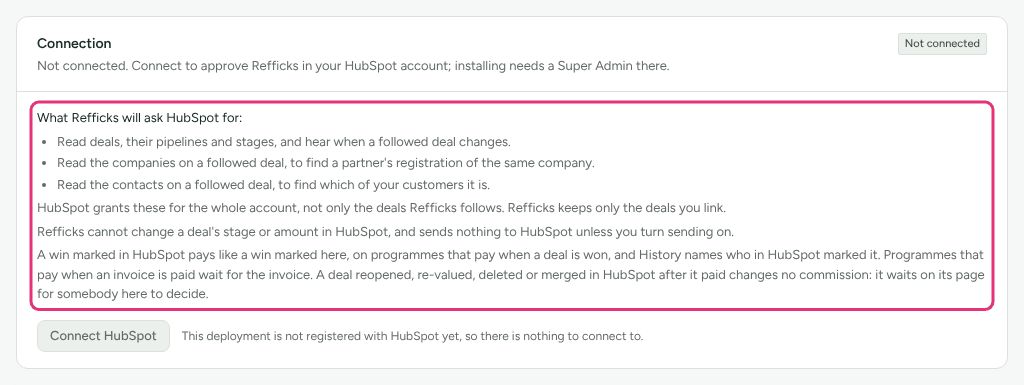
What Refficks asks HubSpot for: to read deals, their pipelines and stages; to read the companies on a followed deal; and to read the contacts on a followed deal, to find which of your customers it is. "HubSpot grants these for the whole account, not only the deals Refficks follows. Refficks keeps only the deals you link."
Money. "A win marked in HubSpot pays like a win marked here, on programmes that pay when a deal is won, and History names who in HubSpot marked it. Programmes that pay when an invoice is paid wait for the invoice. A deal reopened, re-valued, deleted or merged in HubSpot after it paid changes no commission: it waits on its page for somebody here to decide."
Sending leads into HubSpot is off until you press Turn on sending on the Sending to HubSpot card and approve two more permissions in HubSpot: to create a contact for a partner lead HubSpot does not know, and to create the deal. Then someone who manages partners can send a qualified lead or a deal to HubSpot from its page. Refficks "never creates a company, and never changes a deal once it is in HubSpot". A program can be set to send its qualified leads by itself.
Check it worked
- The tool's card on Integrations › Connections shows a badge in the server's own words (for example Working, Paused or Needs reconnecting) and, for an email tool, how many partners are in it and when something was last sent.
- Activity on the tool's page lists each event and detail sent, held back or failed, with the partner and the reason.
- HubSpot's Recent activity lists what HubSpot sent about linked deals and what each did.
What happens when something fails
| Failure | What Refficks does | What you see | What to do |
|---|---|---|---|
| An email tool stops accepting Refficks's connection | Holds what happens meanwhile: events and examples wait up to seven days; partner details and erasures wait for the reconnect however long it takes | Needs reconnecting, with "Nothing is sent to tool until you do"; owners and admins are emailed for Klaviyo | Connect again |
| HubSpot stops accepting Refficks's connection | Stops keeping linked deals in step, and catches up on what changed when you reconnect | Needs reconnecting; owners and admins are emailed | Press Connect again |
| Ten sends in a row fail | Pauses sending | "Sending to tool is paused", with a button to resume | Fix the cause, then resume |
| A partner turned off programme email, or has no email address | Sends nothing about them | The reason in Activity, such as "They turned off programme email." | Nothing |
| Mailchimp: a partner is not in the audience and adding is off | Sends nothing about them | "They are not a contact in the Mailchimp audience you chose, and adding people who aren't there was off, so nothing was sent. …" | Add them in Mailchimp, or turn on adding |
| You reconnect to a different account | Sends nothing that waited for the old one | "It was waiting for the tool account you had before …" | Press Send current partners |
Disconnect
On the tool's page, press Disconnect, then confirm. Some tools need a second step on their side, which the page names:
- Klaviyo: Refficks gives up its access and is no longer listed among the account's integrations. If Klaviyo could not be reached to confirm, check its integrations list yourself.
- Mailchimp: "Mailchimp gives apps no way to hand access back", so remove Refficks there: "In Mailchimp, go to Integrations → Manage → Other connections, click the X beside Refficks and type DELETE."
- Iterable: "In Iterable, go to Integrations → API Keys and delete the JavaScript key you gave Refficks."
- HubSpot: "Refficks removes itself from your HubSpot account and deletes its access here, and stops following any deal there. Your deals in Refficks keep their stages and history."
Related
- Partner emails — the emails Refficks itself sends partners, and their switches.
- Agency and B2B — deals, leads and the stages HubSpot keeps in step.
- Consent and privacy — what partners can turn off, and erasure.
- Which integration should I use? — everything else Refficks connects to.
- HubSpot forms guide — naming the person who sent a HubSpot form, which is separate from the CRM connection.