Connect Zapier, Make, n8n or Pabbly Connect
Use an automation platform for partner work: be told when something happens in Refficks, and add partners, links and codes from a Zap, a scenario or a workflow. For owners and admins, and the developer who builds the automation. "Sales come from your payment provider, never from an automation."
What it does
- Tells your automation when a partner applies, is approved, earns a commission or is paid, among other events, through the signed webhooks every workspace has.
- Adds partners, programme places, links and codes, each recorded in Settings › Developer › History under the key that made it.
- Does not record sales or refunds. Your payment provider or store reports those to Refficks directly; a sale reported from an automation as well would count twice, so the key cannot do it.
- Does not decide who earns. A partner added this way arrives as an applicant, and approving them, choosing their tier or suspending them is done in Refficks by a person.
Before you start
- Role in Refficks: owner or admin. The automation card on Integrations › Developer is shown only to them. A key cannot be made while Refficks support is signed in as you.
- A plan for what to automate. Each platform's guide in Refficks has the steps in that platform's own words: Make, n8n and Pabbly Connect. Zapier has its own app instead of a guide.
- Refficks holds: only enough of the key to recognise it. The key is shown once.
Availability: The public guide pages are built on
main. On 8 October 2026 app.refficks.com did not yet serve them. Inside Refficks, the guides are linked from the automation card on Integrations › Developer.
Make a key for the platform
- Go to Integrations › Developer and find the card Zapier, Make, n8n and Pabbly Connect.
- Press Make a key for platform, for example Make a key for Make.
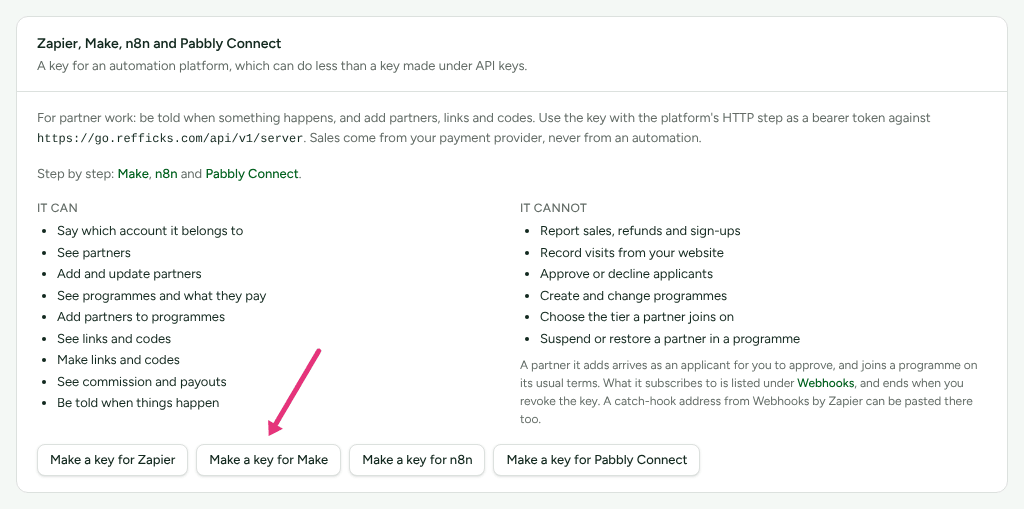
- The card says "Copy your platform key now". Copy it and paste it into the platform. "This is the only time it will be shown." If you lose it, revoke it under Settings › Developer › API keys and make another.
Every platform's key can do the same things. The card lists them:
| It can | It cannot |
|---|---|
| Say which account it belongs to | Report sales, refunds and sign-ups |
| See partners | Record visits from your website |
| Add and update partners | Approve or decline applicants |
| See programmes and what they pay | Create and change programmes |
| Add partners to programmes | Choose the tier a partner joins on |
| See links and codes | Suspend or restore a partner in a programme |
| Make links and codes | |
| See commission and payouts | |
| Be told when things happen |
It is also refused, with a sentence saying so, when it tries to archive a partner, restore an archived one, switch a link or a code on or off, or claim a promotion made in Stripe for a code. For example: "A key made for Zapier cannot archive a partner. That is for a person to decide, in Refficks or with a secret key." A merchant's own secret key, made under Settings › Developer › API keys, can still do those.
Be told when something happens
- In the platform, make the step that listens for a webhook, and copy its address. (Make: a Custom webhook; n8n: a Webhook node's Production URL; Pabbly Connect: Webhook by Pabbly › Catch Webhook; Zapier: the Refficks app's triggers, or a Webhooks by Zapier catch hook.)
- In Refficks, open Integrations › Webhooks, paste the address, tick the events the automation should hear about, and add the endpoint.
- Copy the signing secret it shows once.
Refficks sends only to https:// addresses that resolve to the public
internet. A failed delivery is tried five times over about an hour, then the
endpoint is paused and you are told. See
Outbound webhooks for the events and
their bodies.
A subscription the Zapier app makes with its key is listed under Integrations › Webhooks too, and ends when you revoke the key.
Check a delivery came from Refficks
Every delivery carries an X-Refficks-Signature header,
t=<seconds>,v1=<signature>, where the signature is HMAC-SHA256 of
<seconds>.<raw body> under the signing secret, written in hex. Each guide
says how its platform checks it:
- Make: compare
v1withsha256(<seconds>.<body>; hex; <signing secret>), on the body exactly as it arrived, and stop the scenario when they differ or the time is more than five minutes old. - n8n: turn on the Webhook node's Raw Body option, compute the HMAC with a Crypto node, and compare in an IF node.
- Pabbly Connect: cannot check a signature. Treat the webhook address as the secret: share it with nobody, and if it leaks, delete the endpoint in Refficks and make a new webhook in Pabbly. A forged delivery can only start your workflow, and the key cannot do anything that changes what a partner is paid.
Add partners, links and codes
Use the platform's HTTP step with the key as a bearer token, against
https://<your Refficks API address>/api/v1/server:
POST /partnerswith an email (and a name, if you have one) adds a partner. They arrive as an applicant for you to approve in Refficks, and no "Partner applied" delivery is sent, because nobody applied.- Once you approve them in Refficks, a "Partner approved" delivery goes out. Another automation can listen for it.
POST /programs/{program}/partnerswithpartner_idadds them to a programme.POST /tracking-linksorPOST /coupon-codeswithprogram_idandpartner_idmakes their link or code.
A refusal comes back as JSON with error.message saying why, such as
"Approve this partner before adding them to a program." See
Server API.
Zapier
The Refficks app on Zapier signs in with a key made on the card above.
| Triggers | New Partner Application, Partner Approved, Partner's First Sale, New Commission, Commission Reversed, Payout Sent, New Referral, Referral Counted, New Lead, and New Event (any other event, from a list Refficks serves) |
| Actions | Create Partner (arrives as an applicant), Add Partner to Programme, Create Tracking Link, Create Coupon Code |
| Searches | Find Partner (by email or tracking-link code), Find Programme, Find or Create Partner |
There is no action for recording a sale or a refund, approving applicants, or choosing a tier.
The app is private and not listed in Zapier's directory.
Not yet documented: How to be invited to the private Refficks app on Zapier, and which Refficks service it points at for your account: it has been run against Refficks's staging service. Write to support@refficks.com. Meanwhile, a Webhooks by Zapier catch hook pasted under Integrations › Webhooks, and Zapier's own web request steps with the key, work like the other platforms above.
Check it worked
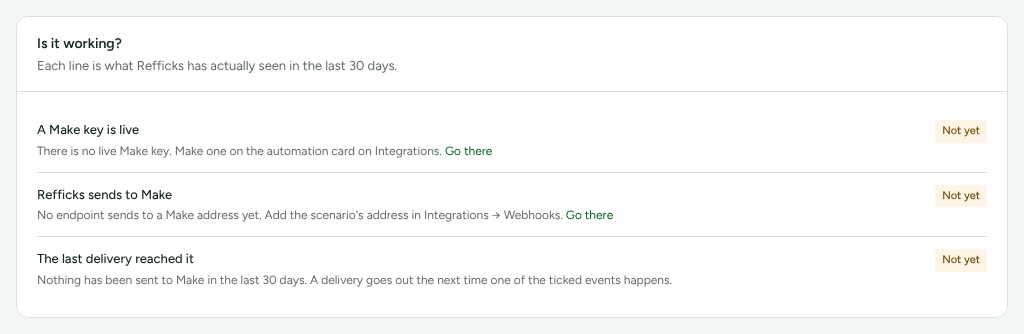
Each platform's guide (Make, n8n, Pabbly Connect) has an Is it working? card:
- A platform key is live: made, and when it was last used.
- Refficks sends to platform: an endpoint under Integrations › Webhooks sends to the platform's own webhook address, or was made with its key.
- The last delivery reached it: the platform accepted the latest one in the last 30 days.
A check that has not passed reads Not yet and says what is missing, with Go there where there is something to set up.
Deliveries, and why any failed, are under Integrations › Webhooks, with Send again.
What happens when something fails
| Failure | What you see | What to do |
|---|---|---|
| The automation tries something the key cannot do | 403 with "A key made for platform cannot … That is for a person to decide, in Refficks or with a secret key." | Do it in Refficks, or with a secret key from Settings › Developer › API keys |
| An action names a partner not yet approved | A refusal such as "Approve this partner before adding them to a program." | Approve the applicant in Refficks first |
| Make switches off a webhook no scenario used for five days | Make answers 410; deliveries fail and the endpoint is paused | Use the scenario again, then turn the endpoint back on in Integrations › Webhooks |
A self-hosted n8n is not on a public https:// address |
The endpoint form refuses the address | Put n8n behind a public https:// address |
| A delivery keeps failing | The endpoint is paused after five tries over about an hour, and you are told | Fix the receiver and turn the endpoint back on |
Revoke a key
Revoke it under Settings › Developer › API keys. Every subscription it made ends with it, and the platform's next request with it is refused. Partners, links and codes it already made stay.
Related
- API keys — the full secret key, and what it can do that an automation key cannot.
- Outbound webhooks — events, bodies, retries and pausing.
- Server API — every endpoint the key can call.
- Review applications — approving the partners an automation adds.
- Webhook deliveries failing — when a platform stops accepting deliveries.