Send payouts through PayPal
Connect a PayPal app of your own so approved PayPal payouts are sent from your PayPal balance with one press, and each is marked paid with PayPal's reference when PayPal says it arrived. Without it, you pay PayPal partners from the PayPal upload file instead.
Availability: Built on
mainafter the last deployment of app.refficks.com this article was checked against (8 October). If Integrations › PayPal is not there, pay from the PayPal file on Payouts.
What it does
- Sends: approved payouts to partners who chose PayPal, from your PayPal balance, only when somebody presses Send through PayPal or Send every PayPal payout.
- Records: each payout as Paid, with PayPal's reference, once PayPal says it arrived; or back to approved, or refused, when PayPal says it did not.
- Does not: send anything nobody pressed for, top up your balance, or touch your bank. "Refficks makes no other call with your app. It never sends a payout nobody pressed send for, and never shows the secret back."
Before you start
- Role in Refficks: owner or admin. Others see "Only an owner or admin can connect PayPal."
- In PayPal: a business account with Payouts switched on. "PayPal switches Payouts on for a business account on request, which can take a few days." Refficks checks before keeping anything.
- Refficks holds: your app's client ID and secret, kept encrypted and never shown back. "PayPal does not yet let Refficks connect by signing in, so for now it asks for your app's client ID and secret. Once PayPal does, this page asks you to connect again that way, and Refficks deletes the secret."
Connect
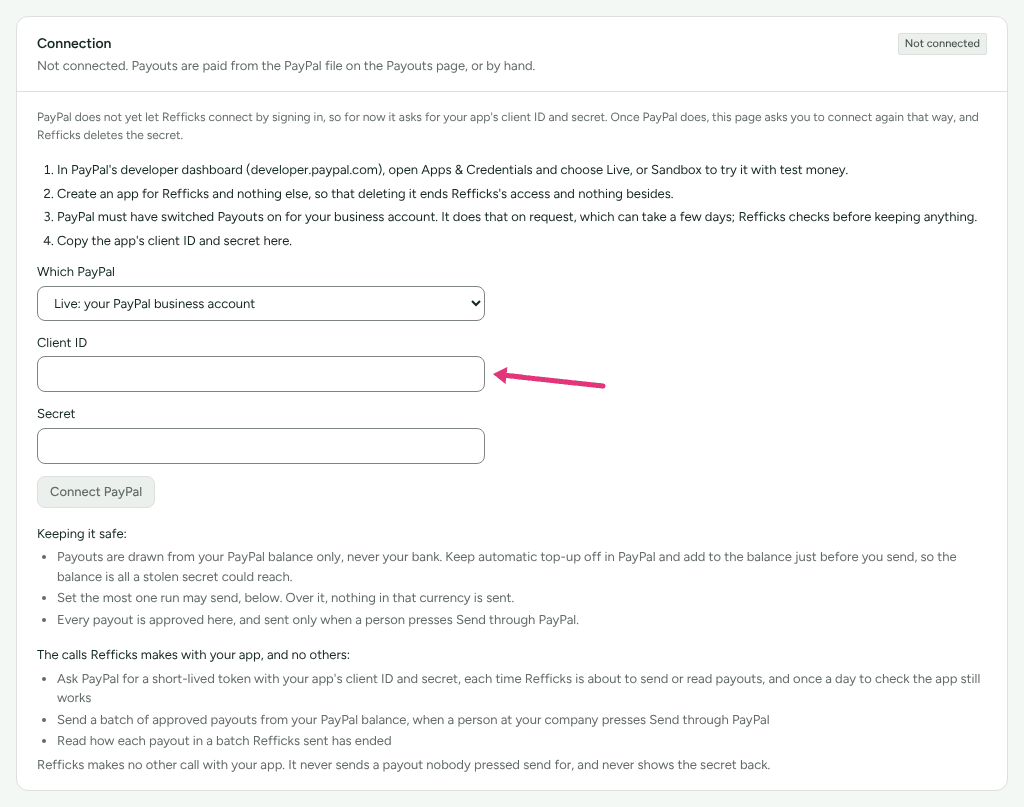
In PayPal's developer dashboard (developer.paypal.com), open Apps & Credentials and choose Live, or Sandbox to try it with test money.
Create an app for Refficks and nothing else, "so that deleting it ends Refficks's access and nothing besides."
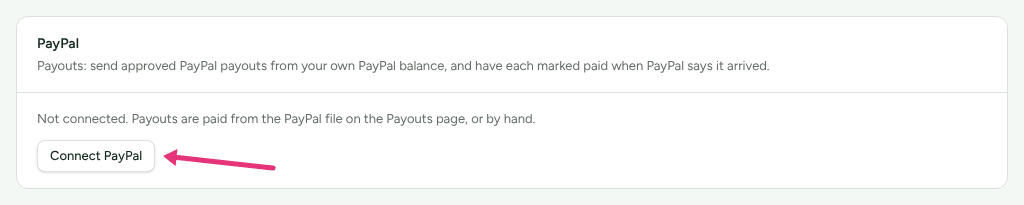
In Refficks, go to Integrations › Connections and press Connect PayPal on the PayPal card.
In Which PayPal, choose Live: your PayPal business account or Sandbox: PayPal's test money, to try it. Nothing sent there is recorded as paid.
Paste the app's Client ID and Secret.
Press Connect PayPal.
The card then reads Working (or Sandbox), with the end of the app's client ID, who connected it and when, and when it last worked.
If PayPal does not accept the pair, nothing is kept and the page says so, for example "PayPal accepted the app, but your PayPal account cannot send payouts yet. … Ask PayPal to enable Payouts, then paste these again. Nothing was kept."
Configure
Keep it safe
The page lists what limits the harm a stolen secret could do:
- "Payouts are drawn from your PayPal balance only, never your bank. Keep automatic top-up off in PayPal and add to the balance just before you send, so the balance is all a stolen secret could reach."
- "Set the most one run may send, below. Over it, nothing in that currency is sent."
- "Every payout is approved here, and sent only when a person presses Send through PayPal."
It also lists the three calls Refficks makes with your app, and no others: a short-lived token, sending a batch, and reading how a batch ended.
The most one run may send
- Under The most one run may send, type an Amount and its Currency (three letters, like USD).
- Press Save the limit.
"Runs in USD are held to this. A run in any other currency is not." A payout over it offers no button; its page says "This payout is $3,000.00, more than the most you set for one run ($2,500.00). Raise the limit under Integrations → PayPal, or pay it from the file or by hand." Remove the limit takes it away: "No limit is set: one press can send every approved PayPal payout."
Send
- Build and approve the run as usual (see Pay your partners).
- Either open one approved PayPal payout and press Send through PayPal, or press Send every PayPal payout on the Payouts card.
- Read what will happen, then confirm. For one payout: "$59.80 will be sent from your PayPal balance to …. PayPal emails them; the payout is marked paid with PayPal’s reference once PayPal says it arrived." For all of them: one PayPal batch for each currency, and "Any that cannot be sent are listed here, with why."
Refficks reads PayPal's answer every five minutes until each payout has ended. While PayPal has a payout, nobody can mark it paid, cancel it or record a refusal by hand.
Test it
- Connect a Sandbox app.
- Send one approved PayPal payout.
- Open the payout. Its PayPal line, in the This payout card, reads Sandbox test: "Sandbox money is not real, so nobody was paid and this payout is still owed." The payout is approved again once the sandbox answers.
Then disconnect the sandbox app, connect your live app, and pay one partner a small amount.
Where a payout stands
| The badge on the payout's PayPal line | What it means |
|---|---|
| With PayPal | Sent; Refficks reads PayPal's answer every few minutes. |
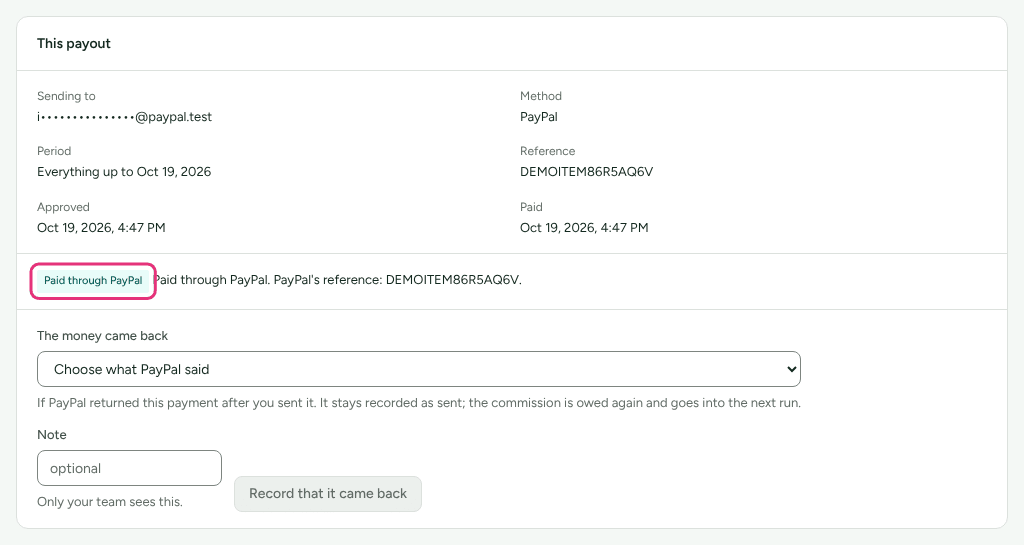
| Paid through PayPal | PayPal paid it. The payout reads Paid, with PayPal's reference. |
| Waiting to be claimed | Sent to an address with no PayPal account; PayPal emailed them how to claim it. "If nobody claims it within 30 days it goes back to your PayPal balance, and Refficks records it as not paid." |
| Held by PayPal | PayPal is reviewing it. |
| Not paid by PayPal | PayPal did not pay it, with PayPal's own words. |
| Came back through PayPal | PayPal paid it and it came back. The commission is owed again. |
| Not sent | "PayPal took nothing from the last attempt", with why. |
| Not confirmed | Refficks could not tell whether PayPal has it. Look for the batch in your PayPal activity, then mark the payout paid or record the refusal. |
What happens when something fails
| Failure | What Refficks does | What you see | What to do |
|---|---|---|---|
| The partner's PayPal details are not an email address | Sends nothing for them | "Their PayPal details are not an email address, so PayPal cannot pay them." | They change it in their portal; pay this payout from the file or by hand. |
| A zero-decimal currency payout with fractions | Sends nothing for it | "PayPal takes … in whole units only, …" | Pay it from the PayPal file or by hand. |
| Over your limit | Sends nothing in that currency over it | "This payout is …, more than the most you set for one run …" | Raise the limit, or pay by hand. |
| PayPal no longer accepts the secret, or Payouts was switched off | Sends nothing; the daily check notices | The card reads Needs a new secret | Paste the app's current client ID and secret and press Save the new secret. |
| An answer from PayPal never came | Asks again; PayPal refuses the same batch twice, so it cannot be paid twice | Not confirmed | Wait; if it stays, check PayPal and record it by hand. |
Disconnect
- On Integrations › PayPal, press Disconnect, then Disconnect again to confirm.
- In PayPal's developer dashboard, open Apps & Credentials, choose Live or Sandbox, and delete the app you made for Refficks.
Refficks deletes its copy of the client ID and secret. "PayPal has no way for a secret's holder to cancel it, so the app keeps working until you delete it." Payouts PayPal still has are not read until you connect the same app again; their pages say how to record them by hand meanwhile.
Related
- Pay your partners: the whole run, and the PayPal upload file.
- A partner was left out of a payout: when a partner says the money did not arrive.
- Pay partners through Tremendous: the other way to send from a balance.
- Choose an integration: everything else you can connect.