An integration has stopped, or says Error
For owners and admins who got an email such as "Paddle events are not reaching Refficks", or who see Error or Degraded on a connection. The most common cause is a secret, password or signing key that changed at the provider and not in Refficks.
Check this first
- Open the email. Its first line says what went wrong, in the provider's or Refficks's words.
- Press Check the connection in the email, or go to Integrations. Both open on the Connections tab. Open the Where you sell tab and that provider's guide.
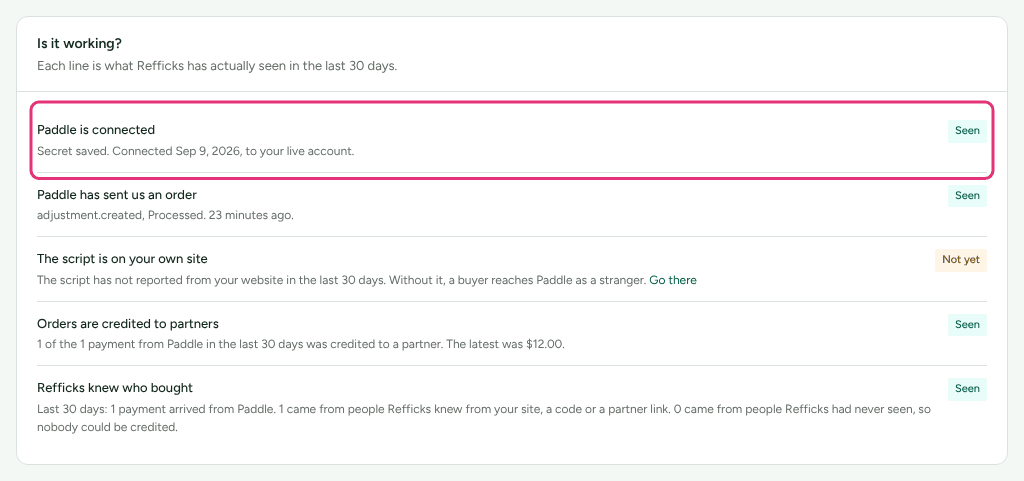
- Look at the connection in the guide's first step, and at Is it working? at the end of it. The line "… is connected" says what Refficks last heard.
Which email you got
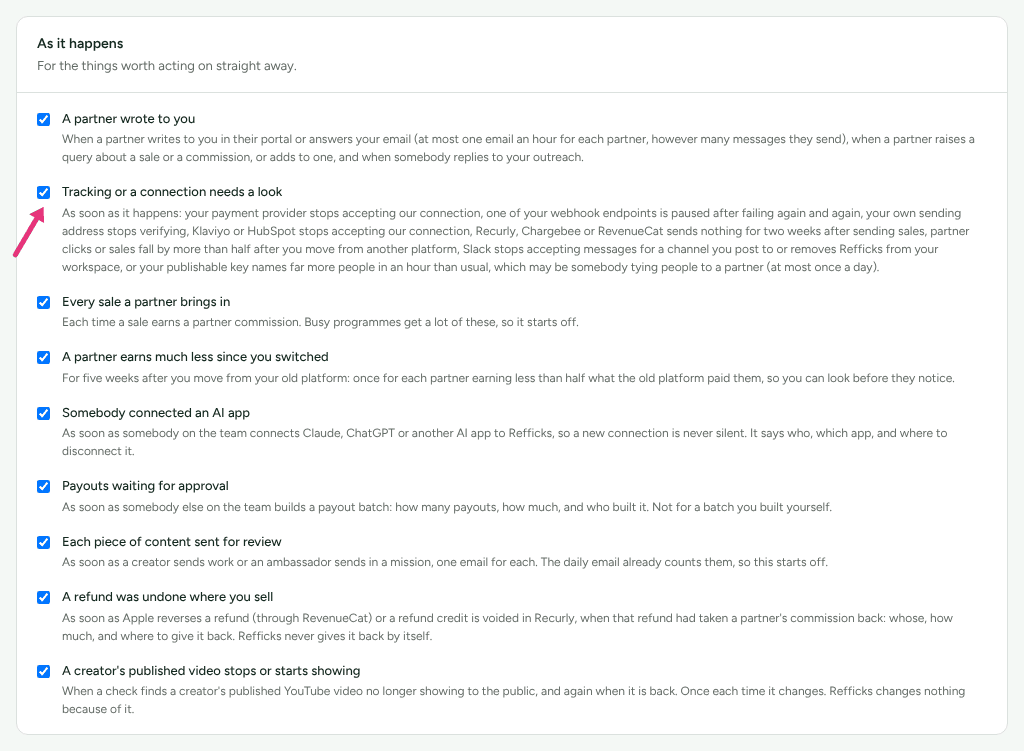
All of these go to owners and admins, under the switch Tracking or a connection needs a look on Settings › You › Your emails ("For people who manage the account: an admin or owner."). Each email ends "You get this because "Tracking or a connection needs a look" is on for you at …", with a link that turns it off.
| Subject | What happened | How often |
|---|---|---|
| "… events are not reaching Refficks" | The provider sent a delivery Refficks refused. The connection reads Error | At most once a day while it lasts |
| "… has sent nothing for 14 days" | A live connection that sent real sales has gone silent. Nothing failed: a webhook was probably switched off at the provider | Once for each quiet spell |
| "… needs reconnecting" (Klaviyo, Mailchimp, Iterable, HubSpot, PayPal, Tremendous) | The provider stopped accepting Refficks's connection: removed on its side, expired or suspended | Once each time it breaks |
| "Sending to … was paused" | Sends to a marketing platform failed again and again, so Refficks stopped sending | Once each time it pauses |
| Something else under the same switch | One of your own webhook endpoints was paused, your sending address stopped verifying, a store uninstalled Refficks, Slack stopped accepting posts, a helpdesk used an old key, or the tracker named far more people than usual | See Related |
Likely causes
| What you see | Likely cause | Fix |
|---|---|---|
| Badge Error; "…'s last delivery was refused" with a reason about a signature, a secret, a password or an Authorization value | The secret Refficks holds is not the one the provider signs with: changed, rolled or mistyped at the provider, or a test endpoint and a live one sending to one address | Give Refficks the current secret |
| Badge Error; "A verified delivery arrived without an event id." | The provider sent something Refficks could verify but could not identify | Contact support |
| Badge Degraded; "A delivery could not be translated." | Deliveries arrive and verify, but one of them could not be read. The rest are still counted | Contact support with the delivery |
| "… has sent nothing for 14 days, though it sent sales before." | The webhook is off, deleted or failing at the provider, or you really had no sales | Switch the webhook back on |
| "Waiting for the secret" (ClickFunnels, Thinkific, Paddle, Polar) | The address was added at the provider, but the secret it showed was never saved in Refficks. Every delivery is refused until it is | Paste the secret into the guide's first step |
| "… needs reconnecting" | The provider ended Refficks's access | Connect it again |
What the states mean
| State | What Refficks does | What it means for sales |
|---|---|---|
| Connected | Accepts, stores and processes every delivery | Counted |
| Error | Answers each refused delivery with an error (HTTP 400 for a signature it could not verify), stores nothing from it, and counts it as refused | Not counted. Most providers retry for a while, so events sent again after the fix arrive |
| Degraded | Keeps the delivery it could not translate as Failed, and carries on | Every other delivery is counted |
| Disconnected | Has no connection: an address that was retired answers "Unknown webhook endpoint." (HTTP 404) | Not counted |
A connection goes back to Connected by itself with the next delivery that verifies (after Error) or is processed (after Degraded). A quiet connection has no state of its own: it reads as connected, and the guide's "… is connected" check says how long it has been silent.
Diagnose it step by step
- Read the reason. In the guide's first step, the alert "…'s last delivery was refused" quotes it, and Is it working? repeats it under "… is connected". Match it in the table below.
- Check the provider's own log. Most providers list each delivery they sent and what Refficks answered. A 400 is a refusal; a 404 means the address is not one Refficks knows; a 2xx means Refficks accepted it.
- Check what has arrived. The guide's deliveries list shows each one Refficks stored, with its outcome. If the latest is recent and Processed, the connection works again.
| The reason says | Provider | What to paste again |
|---|---|---|
| "…a signature that does not match the secret saved here, or before one was saved. Paste the secret of the notification destination…" | Paddle | The destination secret (pdl_ntfset_…), from Paddle > Events > Notifications |
| "…a signature that does not match the secret saved here, or before one was saved. Paste the secret of the webhook endpoint…" | Polar | The webhook secret (whsec_…), from Settings › Webhooks in Polar |
| "…a signature that does not match the webhook secret saved here, or before one was saved…" | ClickFunnels | The webhook secret, from Workspace Settings → Webhooks |
| "…a signature that does not match the signing secret saved here, or before one was saved. Every Thinkific webhook sending here must use that one secret…" | Thinkific | The one signing secret all three webhooks use |
| "…a signature that does not match the signing secret saved here. If you regenerated the secret in Recurly, paste the new one here…" | Recurly | The new signing secret; Recurly keeps signing with the old one for 24 hours |
| "…a username or password that is not the one Refficks gave you…" | Chargebee | Make a new password in Refficks and paste it into the webhook in Chargebee |
| "…an Authorization value or a signature that is not the one this connection holds…" | RevenueCat | The current Authorization value, or RevenueCat's signing secret if you turned signing on |
| "…a secret word that does not match the one saved here." | ThriveCart | The secret word |
| "…signed with a secret that is not the one Refficks gave you…" | WooCommerce | The current secret, in both Refficks webhooks in WooCommerce |
| "…whose signature does not match the API client secret pasted with the token, or that was more than 48 hours old." | Recharge | The API client secret, with the token |
| "A delivery arrived with a signature we could not verify." | Stripe and others | The signing secret. For Stripe, see Stripe payments are not appearing |
Fixes
Give Refficks the current secret
- At the provider, open the webhook, endpoint or destination that sends to Refficks and copy its current secret.
- In Refficks, open the provider's guide on Integrations › Where you sell.
- In its first step, press Change the … (for example Change the destination secret), paste it, and press Save. For Chargebee, press Make a new password instead and paste the new one into the webhook in Chargebee: the password before it keeps working for a day, so nothing is refused while you change it.
- At the provider, resend a failed event if it offers that, or wait for its next retry. The badge turns Connected when one verifies.
Recurly, RevenueCat and WooCommerce have connection forms of their own, so their buttons are worded differently; the guide's first step is still where the secret goes.
Owners and admins can do this; anyone else sees "An owner or admin connects …".
Switch the webhook back on at the provider
Several providers switch a webhook off on their side after repeated failures, and send nothing after that. The quiet-connection sentence says what to check for each one, for example:
- WooCommerce: "check both Refficks webhooks are Active. WooCommerce switches a webhook off after five failed deliveries and does not send again what it missed."
- Polar: "Polar switches an endpoint off after ten failed deliveries in a row."
- Maxio: "Maxio pauses an endpoint after 26 failed deliveries in a row and switches it off after 51."
- Thinkific: "Thinkific removes ones that keep failing."
Fix what made them fail first (usually the secret, above), then switch the webhook on again at the provider. A sale it never sent is not recorded, except where Refficks reads the provider's own record: Recurly and Recharge are checked daily, and the sentence says so.
The 14-day check runs only for providers that can say what to check (Paddle, Polar, Chargebee, Recurly, RevenueCat, Recharge, Maxio, ClickFunnels, Thinkific, Teachable and WooCommerce), and only for a live connection that has sent real sales. A test or sandbox connection never counts as quiet.
Connect it again
For Klaviyo, Mailchimp, Iterable, HubSpot, PayPal and Tremendous, press the button in the email, or open the provider's card on Integrations › Connections, and connect it again. For marketing platforms, what waited goes once you do: "events for up to … days, partner details and erasures however long it takes". Nobody's commission or payout changes.
Check it worked
- The connection's badge reads Connected, and the refusal alert is gone.
- Is it working? ticks "… is connected" and "… has sent us an order" with a recent time.
- The deliveries list has a new row that reads Processed.
When to contact support
Write to support@refficks.com if a connection reads Degraded, if it reads Error with a reason not in the table above, or if it stays Error after you replaced the secret and the provider resent an event. Include:
- your workspace name and the provider;
- the email's subject and first line, or the reason the guide shows;
- the provider's event or delivery id and the time it was sent;
- the HTTP status the provider recorded for Refficks's answer.
Never send a signing secret, webhook password, Authorization value, API key, or your webhook address (it carries a token that identifies your workspace). Support does not need them and will not ask for them.
Related
- Stripe payments are not appearing — the same diagnosis on Stripe's own page.
- Webhook deliveries failing — when it is one of your own webhook endpoints that was paused.
- Choose an integration — which providers sign their deliveries, and which have been seen for real.
- Sale not credited — the delivery arrived, but no partner was credited.