Send events from your server
Report sign-ups, sales and refunds to Refficks from your own backend with
POST /api/v1/events, so partners are credited for sales no integration
reports. For a developer wiring a merchant's systems to Refficks.
Before you start
- A secret key (
rk_live_…). An owner or admin makes one under Settings › Developer › API keys (Create and manage API keys). A publishable key, and a key made for Zapier, Make, n8n or Pabbly Connect, are refused here with403 FORBIDDEN. - One reporter per sale. If Stripe or another integration already sends Refficks a sale, do not report the same sale here as well: it would be recorded twice.
- A way to tell Refficks who the buyer came from, if you want partners credited. See How Refficks finds the partner.
Integrations › Webhooks is for what Refficks sends you. Its first card, Sending events to Refficks, points back here: what your server sends Refficks goes to this endpoint, and the Server events card on Integrations › Developer shows a short example.
The request
POST https://go.refficks.com/api/v1/events
| Header | Required | What to send |
|---|---|---|
Authorization |
Yes | Bearer <SECRET_KEY>. The word Bearer, one space, then the key. |
Idempotency-Key |
Yes | A string you choose, up to 255 characters, that names this one event. See Retries and duplicates. |
Content-Type |
Yes | application/json |
Body
| Field | Type | Notes |
|---|---|---|
event_type |
string, required | One of the types below. |
external_id |
string, up to 255 | Your id for the thing: the order, invoice or refund number. A refund names a sale by this. |
occurred_at |
ISO 8601 date-time | When it happened in your system. Left out, the time Refficks received it. Send it: a late report keeps its real date. |
customer.external_id |
string, up to 255 | Your id for the customer. The strongest way to recognise a person across events. |
customer.email |
email, up to 255 | |
customer.name |
string, up to 255 | |
customer.country |
2 letters | ISO 3166 alpha-2, such as GB. |
visitor_id |
string, up to 64 | The browser's Refficks visitor id, as your own site holds it. Joins the person to the partner links they clicked before. See The visitor id. |
referral_code |
string, up to 64 | A partner's link code, if your own page captured one. |
coupon_code |
string, up to 64 | The discount code typed at checkout. properties.coupon is read the same way. |
attribution.partner_id |
string | You name the partner outright. |
attribution.program_id |
string | Which program, when that partner is in more than one. |
properties.amount |
integer | Money paid, in minor units (see Amounts). |
properties.currency |
3 letters | ISO 4217, such as USD. Always with an amount. |
properties.net_amount |
integer | What you keep after tax and shipping, in minor units. Commission is paid on this. |
properties.refunded_external_id |
string | On a refund, dispute or credit note: the external_id of the sale it undoes. |
properties.subscription |
string | On an invoice for a subscription: that subscription's id. Renewals keep the partner who won the subscription. |
properties.* |
anything | Other properties are kept as sent, for example plan. |
organization_id |
— | Refused. Your workspace comes from the key, never from the body. |
Your server's occurred_at is believed. The browser tracker's is not: a post
from a web page is dated when it arrives, whatever time it says. A backfill
of old sales therefore has to come from your server.
Event types you can send
| Type | Use it for | Earns or reverses commission |
|---|---|---|
customer.created |
A new account or sign-up | No |
customer.updated |
A customer's details changed | No |
lead.created |
A form fill or other pre-sale sign-up | No |
trial.started |
A free trial began (properties.trial_ends_at) |
No |
order.created |
A one-time purchase | Yes, earns |
invoice.paid |
A paid invoice, including each subscription renewal | Yes, earns |
invoice.created, invoice.payment_failed |
Recorded for the customer's history | No |
subscription.created, subscription.updated, subscription.cancelled |
A subscription's life | No |
order.refunded, payment.refunded |
Money given back | Yes, reverses |
payment.disputed |
A chargeback opened: the money has gone | Yes, reverses |
credit_note.issued |
Money credited back against a paid invoice | Yes, reverses |
payment.dispute_closed |
The bank decided a dispute | No |
tracking.visit, tracking.click |
Normally the tracking script's job | No |
The example on the Server events card posts subscription.created.
That records the subscription on the customer's page and earns nothing: the
money is the invoice.paid that follows it. Subscription events and their
properties are in
Subscriptions, coupon codes and referral tokens.
Thirteen other event types exist, and Refficks writes them itself:
conversion.created, and the later stages of leads, deal registrations and
opportunities. Sending one is refused with 422 and a message naming what to
send instead. For example, conversion.created answers: "Refficks writes
conversion.created itself, when it attributes a sale to a partner. Report the
sale (invoice.paid or order.created) and the conversion follows from it." A
type that does not exist at all answers "Unknown event type."
Amounts
Every amount is an integer in the currency's minor unit, beside its currency. A minor unit is not always a hundredth:
| You mean | Send |
|---|---|
| USD 49.00 | "amount": 4900, "currency": "USD" |
| €12.50 | "amount": 1250, "currency": "EUR" |
| ¥4,900 (yen have no minor unit) | "amount": 4900, "currency": "JPY" |
Send amounts the way Stripe counts them for that currency. A decimal is refused with "Amounts are integer minor units: 29900 for $299.00."
Send net_amount whenever tax or shipping is included in amount. Refficks
never works out a net from a gross. Without net_amount, commission is paid on
the whole amount, tax included.
How Refficks finds the partner
The response to your request does not say who earned the sale. Refficks works that out afterwards, from every clue the event and the customer's history carry. Send whichever of these you have:
visitor_id: the browser's Refficks visitor id. See The visitor id.customer.external_idorcustomer.email: if the tracking script already identified this person, a later event with the same id or email joins them up.coupon_code: a partner's discount code credits the sale even if nobody clicked anything.referral_code: a partner's link code your page or server captured.attribution.partner_id: you name the partner. Refficks checks the partner exists in your workspace, that the program is clear (sendattribution.program_idwhen they are in more than one), and that they are still earning in it. If any check fails, the event is recorded and that partner is not credited from it. Find a partner's id withGET /api/v1/server/partners/lookup?email=…(The Server API).
How the clues are weighed is in How attribution works.
The visitor id
The tracking script keeps the visitor id in a first-party cookie called
rk_vid on your website's own host. Read it from the request your website
sends your server (the sign-up form post, for example), or in the browser with
window.refficks.visitorId(), and pass it along. It is absent when the
visitor has not consented to cookies or their browser sends Global Privacy
Control.
- It is your workspace's id for that browser. When somebody follows a partner's link, Refficks hands your site an id made for your workspace alone: the same browser always gets the same id from you, and a different one from any other merchant. So send the value your own site holds, as it is. A value copied from another workspace, or from another merchant's site, matches nothing in yours.
- Some frameworks hide it. Laravel, for example, encrypts cookies and
reads
rk_vidas empty until it is left out of encryption; the in-app guide for Laravel shows how. If the code that reads it runs on another domain than your site, the cookie never reaches it: sendwindow.refficks.visitorId()from the page instead. - Your server sending it vouches for it. When your server reports a
visitor_idtogether with the customer's id or email, that pairing is yours, and a sale credited through it approves on your plan's timer as usual. Where only a shopper's browser named a customer you already knew, the commission waits for a person instead, with "A shopper's browser said it was this customer, whom you already knew, and that is all that links the partner's click to this sale, so it waits for someone to approve it."
Steps
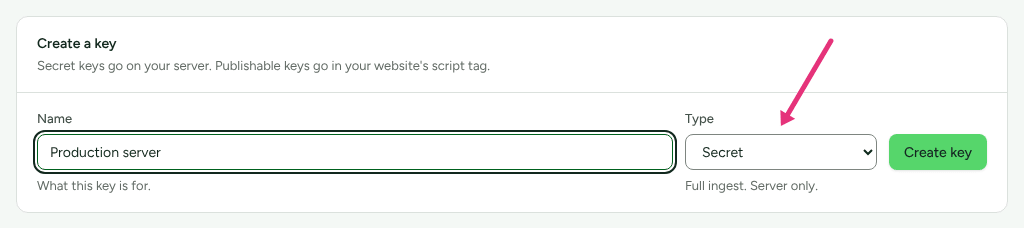
Create a secret key under Settings › Developer › API keys and store it on your server.
When a customer signs up, send
customer.createdwith their id, email andvisitor_id(example 1).When a payment succeeds, send
order.createdfor a one-time purchase orinvoice.paidfor an invoice or renewal (example 2).When you refund, send
order.refundedorpayment.refundednaming the sale inproperties.refunded_external_id(example 3).Retry on a timeout or a
5xxwith the sameIdempotency-Keyand the same body.
1. A sign-up
curl -X POST https://go.refficks.com/api/v1/events \
  -H "Authorization: Bearer <SECRET_KEY>" \
  -H "Idempotency-Key: signup-usr_4821" \
  -H "Content-Type: application/json" \
  -d '{
    "event_type": "customer.created",
    "occurred_at": "2026-10-16T09:12:00Z",
    "customer": {
      "external_id": "usr_4821",
      "email": "jordan@example.com",
      "name": "Jordan Lee",
      "country": "GB"
    },
    "visitor_id": "<RK_VID_COOKIE_VALUE>"
  }'
This records the customer and ties the partner links that browser followed to
them, so a later payment from usr_4821 can be credited.
2. A paid order
Jordan pays USD 58.80, of which USD 9.80 is sales tax, using a partner's code.
curl -X POST https://go.refficks.com/api/v1/events \
  -H "Authorization: Bearer <SECRET_KEY>" \
  -H "Idempotency-Key: order-1001-paid" \
  -H "Content-Type: application/json" \
  -d '{
    "event_type": "order.created",
    "external_id": "order-1001",
    "occurred_at": "2026-10-16T09:20:00Z",
    "customer": { "external_id": "usr_4821", "email": "jordan@example.com" },
    "visitor_id": "<RK_VID_COOKIE_VALUE>",
    "coupon_code": "SAM20",
    "properties": {
      "amount": 5880,
      "net_amount": 4900,
      "currency": "USD"
    }
  }'
Responds: 202 with
{
  "data": {
    "object": "event",
    "id": "01jc8y2w…",
    "event_type": "order.created",
    "customer_id": "01jc8xq4…",
    "status": "accepted",
    "occurred_at": "2026-10-16T09:20:00+00:00"
  }
}
A subscription payment is the same shape with "event_type": "invoice.paid",
the invoice number as external_id, and the subscription's id in
properties.subscription.
3. A refund
Two days later you refund USD 19.60 of that order.
curl -X POST https://go.refficks.com/api/v1/events \
  -H "Authorization: Bearer <SECRET_KEY>" \
  -H "Idempotency-Key: refund-77" \
  -H "Content-Type: application/json" \
  -d '{
    "event_type": "order.refunded",
    "external_id": "refund-77",
    "occurred_at": "2026-10-18T15:00:00Z",
    "customer": { "external_id": "usr_4821" },
    "properties": {
      "refunded_external_id": "order-1001",
      "amount": 1960,
      "currency": "USD"
    }
  }'
amount is this refund's own amount. A third of the sale was refunded, so a
third of its commission is taken back, as a new reversal entry beside the
original. Refunds together never take back more than was earned.
Always send refunded_external_id. A refund that names its sale reverses that
sale, and waits for it if the sale has not arrived yet. A refund that names no
sale reverses the customer's most recent commission, which is a guess. See
Refunds and reversals.
Retries and duplicates
The Idempotency-Key is the event's identity in your workspace.
| You send | Refficks answers |
|---|---|
| A new key | 202 with "status": "accepted". The event is recorded. |
| The same key and the same body again | 200 with "status": "duplicate" and the original event's id. Nothing is recorded twice. |
| The same key with a different body | 409 IDEMPOTENCY_CONFLICT: "This idempotency key was already used with a different payload." error.details.event_id names the event already recorded under that key. |
| No key | 422: "An Idempotency-Key header is required so a retry cannot double-count." |
So a retry is always safe, as long as you reuse the key and the body.
Choose keys that cannot collide with anything else in the workspace. The key
is unique across every event your workspace holds, including those Stripe and
the tracking script report, so name your own: order-1001-paid,
refund-77. Never reuse the order number alone for both the sale and its
refund.
Check it worked
- The response is
202with"status": "accepted", or200with"status": "duplicate"for a repeat. - Getting started ticks "Your site is sending events", with "Events are
arriving from your own backend.", and "A sale has reached Refficks" after
the first
order.createdorinvoice.paid. Ticked checks are folded away in each group: press Show the N settled (with the number) under Tracking and under Sales reaching Refficks to read them. - Conversions lists each sale with your
external_idunder the customer, and either the partner who earned it or No partner. Open a row to read Why this conversion was attributed. - Customers shows the person, with your id under Your customer ID.
- Settings › Developer › API keys shows today's date under Last used for the key.
Processing happens after Refficks answers you, so a conversion can appear a
moment after the 202.
What this does not do
- No test mode. Every event a secret key sends is recorded, and events are never deleted. To try it out, credit a partner you control, then reject the commission on Commissions (More, then Reject, on its row) or send a refund for the sale.
- It does not report outcomes. The response acknowledges receipt. It does not say who was credited or what they earned, and when a named partner, link code or discount code is not used, nothing on any screen says why. Check Why this conversion was attributed on the conversion.
- It does not work out tax. Send
net_amount, or commission is paid on the fullamount. - It does not merge reporters. A sale sent here and by an integration is two sales.
- A browser cannot use it. Revenue is reported from your server only. A publishable key is refused.
- It stays up during Refficks maintenance, unlike the Server API, so a sale is not lost while the dashboards are down.
Related
- Create and manage API keys — the secret key this needs.
- Subscriptions, coupon codes and referral tokens — the subscription properties, and the other secret-key endpoints.
- Why was my API call refused? — every refusal this endpoint gives, and the fix.
- How attribution works — what Refficks does with the clues you send.
- Why was this sale not credited to a partner? — when a conversion says No partner.
Availability: The in-app guides at
app.refficks.com/docs/guides/…are newer than the last deployment of app.refficks.com this article was checked against.