Move your program from another platform
Bring your partners, the money your old platform still owes them, and their coupon codes into Refficks, run both side by side, then switch over on a date you choose. For merchants leaving Rewardful, FirstPromoter, Tolt, Tapfiliate, UpPromote, GoAffPro, LeadDyno, Refersion or Everflow, or coming from any platform that exports a spreadsheet.
The promise the screen makes: "Nothing is imported until you say so." Reading files or a platform changes nothing in your account until you press an import button.
Before you start
- Role:
- Owner or Admin to start a migration, connect a platform, import, and switch over.
- Manager or above to match columns, decide about duplicates and answer for partners' codes.
- Analysts can read a migration; Support cannot open it.
- You need: your old platform's API key, or its exports as CSV files.
- Time: reading takes minutes. Plan on a few weeks of running side by side before you switch, so you can compare what each would pay.
How it works
- Read your old platform, through its API or from files.
- Check what was found, match the columns, and decide what happens to partners you already have.
- Import partners, then their codes, then the money still owed.
- Compare: while your old platform still pays, Refficks works out what it would pay for every sale, pays nobody, and compares the two.
- Switch over on a date, after which Refficks pays.
Start a migration
- Go to Import and export. It opens on the From another platform tab, where migrations start.
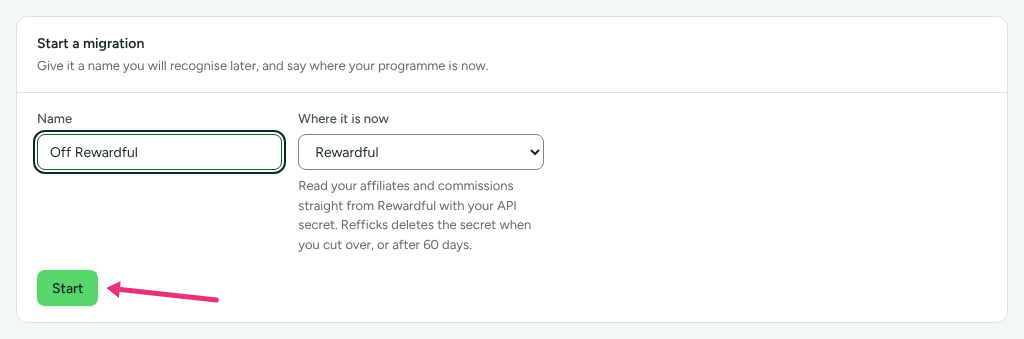
- In Start a migration, type a Name you will recognise, for example "Off Rewardful".
- In Where it is now, choose your platform, or CSV or spreadsheet. The line under it says what will be read and when Refficks deletes the key.
- Press Start. The migration appears under Your migrations; open it.
Read your old platform
From its API
Nine platforms are read straight from their APIs. What Refficks asks for:
| Platform | Asks for | Also asks |
|---|---|---|
| Rewardful | API secret | |
| FirstPromoter | API key | Account ID; the currency your account reports in |
| Tolt | API key | |
| Tapfiliate | API key | |
| UpPromote | API key | The currency your account reports in (your Shopify store's) |
| GoAffPro | Access token | |
| LeadDyno | Private key (not the public one your site's tracker uses) | |
| Refersion | Client secret, from an OAuth client made for Refficks alone | Client ID |
| Everflow | Network API key |
- On the migration's page, the Read from <platform> card says where to find the key in your platform.
- Paste it, fill in anything else the card asks for, and press Read from <platform>.
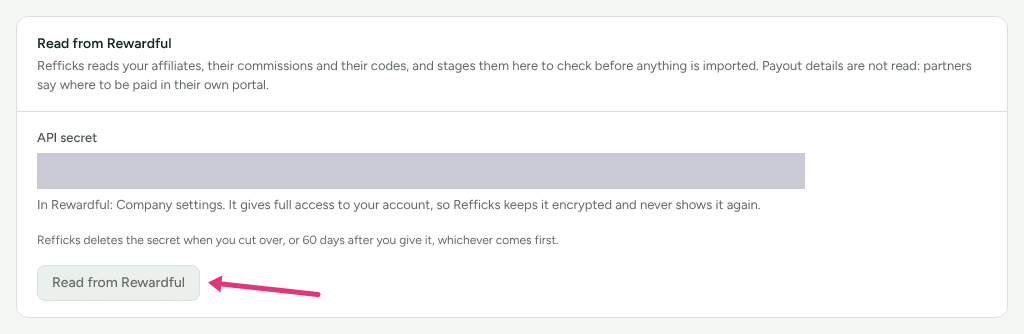
Refficks reads your partners, their commissions and their codes, and stages them to check. "Payout details are not read: partners say where to be paid in their own portal." The read is paced under the platform's rate limit, so a large program takes a few minutes; the files appear on the page as each is read. Everflow gives the last 365 days of conversions.
If a partner in Everflow has more than one person on their account, a Who is each partner? card asks you to choose the one who is the partner, and the read waits until you have.
The key does not stay. "Refficks deletes the key when you cut over, or 60 days after you give it, whichever comes first." Until then the card says when it will be deleted, with Delete it now to do it sooner. Deleting it in Refficks does not end it at the platform: the card says how to revoke or replace it there, and you should.
To read again later, start a new migration.
From files
For CSV or spreadsheet, or any data a platform does not hand over:
- In Add a file, choose What is in it: Partners, Programmes, Customers, Sales, Commissions, Payouts, Tracking links or Coupon codes.
- If a partners file also has each partner's code, tick It also has each partner’s coupon code. The file is read twice, once for each.
- Choose the File (up to 100 MB) and press Read it.
Add one file at a time. While Refficks is reading one, the next waits, and the card says why.
LeadDyno has no list of coupons, and Refersion's is in an API it has retired, so for those two export the codes and add them as a file.
Check what was found
What we found counts the rows of each kind: "Read from your files and held aside. None of it is in your account yet." Partners, commissions and coupon codes can be imported. Programs, customers, sales, payouts and tracking links are read and shown Read only for now.
Match the columns
For each kind of file, a card What your <kind> columns mean lists Your column, a sample of What is in it, and what it Becomes. Refficks guesses where it can (marked Guessed). For each column choose a field, Keep as a note, or Ignore this column, then press Save and check the rows. Saving imports nothing; every row is checked against your choices.
A row that cannot go in is held back with its reason, and a row with something to look at goes in with a note. See Rows refused in an import.
Partners you already have
Already in Refficks lists people in your file whose email belongs to a partner here. Choose what happens to them:
- Leave the one here alone: "Nothing about the partner already in Refficks changes."
- Fill in what is missing: "Only fields that are empty here are filled in from your export. Nothing already filled in is changed."
You can choose differently for one person, and press Save what happens to them.
Import the partners
What will happen says exactly what the import would do, worked out "by the same code that does the import": Partners to create, those already here whose empty fields get filled in, those left exactly as they are, and any that Cannot go in yet.
- Decide whether to tick Invite these partners to your portal. It is off by default. Off: "No partner will be emailed, and no payout will be started." On: each new partner is emailed an invitation.
- Press the button, which says what it will do: Import N partners, Fill in N already here, or both.
Imported partners are approved and, if you have exactly one program, enrolled in it. A migration never starts your automations: no welcome email, no webhook, no marketing event, whatever you tick. Running the import again creates nobody twice; rows already in read Imported by this migration already.
Bring partners' codes across
Partners’ coupon codes brings each partner's code over as it is, so a code already printed on a podcast read or a business card keeps crediting them. "A code somebody here already holds waits for you to give it a new one or leave it out."
- If you have several programs, choose Programme these codes belong to and press Use this programme. A partner not yet in it is added to it with their code.
- For each code that needs you, type a new code in New code for <name> and press Use this code, or press Leave it out ("Nobody here is credited when a customer types one of these."). Bring it back undoes that.
- Press Bring over N codes. An Admin does this step.
A code whose partner is in your partners file but not imported yet waits until they are. A partner who brings a code is not also given one made from their name. If your program syncs codes to a store or Stripe, the codes are made there too; a store or Stripe account that already has the code refuses a second copy.
Bring across money still owed
Money your old platform still owed adds up your old platform's commission rows per partner. "Refficks does not work these figures out."
- Under What each of your statuses means, choose for every status in
your file:
- Still owed to them: "Becomes an opening balance in Refficks. You will be the one paying it."
- Already paid: "Kept on the partner as history, and never payable here."
- Cancelled, or never owed: "Counted nowhere."
- Press Save what these mean. Until every status has an answer, nothing is added up.
- Read the totals, one line per currency, and each partner's balance with "Read from your file as:" beside it, so a misread amount shows. Nobody here has this address marks a balance that matches no partner.
- Press Yes, Refficks pays these now. "They arrive pending. Nobody is paid until you approve them in Commissions, the same as everything else."
Each becomes an opening balance on the partner, pending your approval. See Approve commissions.
Check it adds up
Does it add up compares "What your file held, what arrived, and what happened to the difference", kind by kind, marked Matches or Does not match. Under Look up one row, type an ID from your old platform or an email; with nothing typed it lists the rows that did not go in, and what happened to each.
Run both side by side
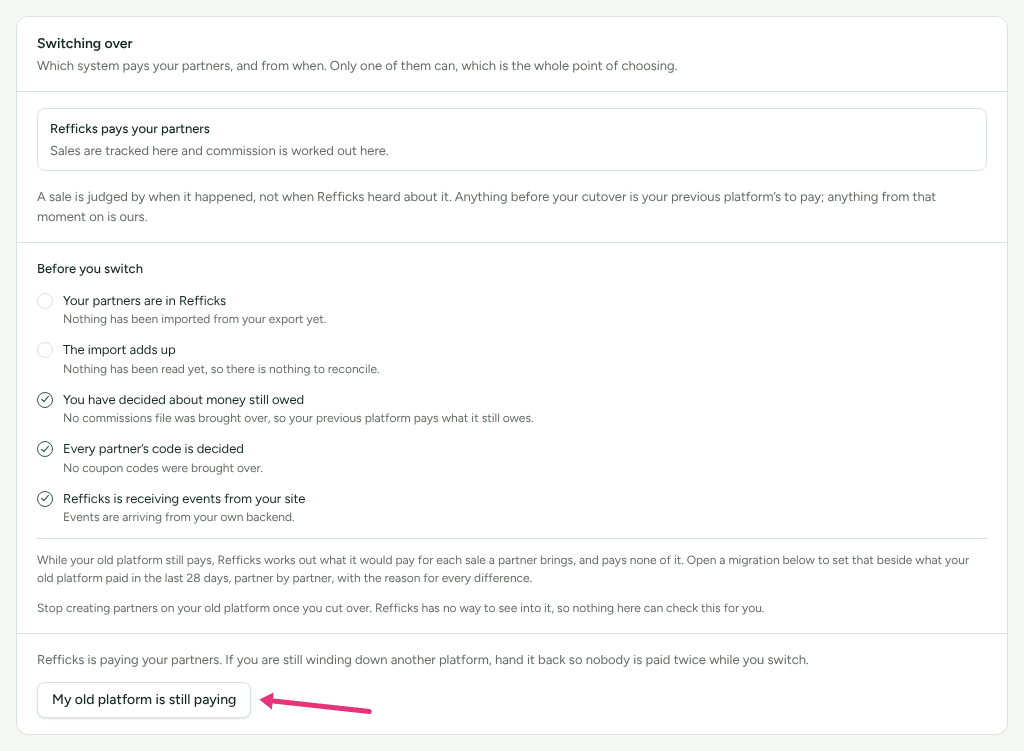
While your old platform still pays, Refficks must not pay too. On Import and export › From another platform, in Switching over, press My old platform is still paying. From then on "Refficks tracks everything and works out no commission, so nobody is paid twice while you switch."
The migration's Beside <platform> card then shows what Refficks would have paid, partner by partner, over the last 28 days, against what the old platform paid: Same, or a reason such as Not seen by Refficks ("check the tracking snippet or the payment connection first") or Credited to somebody else. "It changes nothing on either side." A fresh comparison is made every morning; Compare now asks for one sooner. For a migration from files, upload your old platform's commission export under Compare with a file and press Compare.
Switch over
The Before you switch checklist on Switching over ticks itself from what Refficks can see:
- Your partners are in Refficks
- The import adds up
- You have decided about money still owed
- Every partner’s code is decided
- Refficks is receiving events from your site
"Stop creating partners on your old platform once you cut over. Refficks has no way to see into it, so nothing here can check this for you."
Then, as an Owner or Admin, either:
- set When Refficks takes over and press Set the date, or
- press Refficks pays from now.
"A sale is judged by when it happened, not when Refficks heard about it. Anything before your cutover is your previous platform's to pay; anything from that moment on is ours." When Refficks takes over, any platform key it still holds is deleted: at once with Refficks pays from now, and within the hour after a date you set.
Check it worked
- Your migrations shows the migration's progress under Where it is up to.
- Partners lists the imported partners; their codes are on their pages.
- Commissions lists the opening balances, pending.
- After the switch, Switching over reads Refficks pays your partners. For 35 days Beside <platform> watches Since you switched. After the first 7 days, anybody earning less than half what the old platform paid them is emailed to you once ("A partner earns much less since you switched", under Settings › You › Your emails).
What this does not do
- It imports partners, their codes and money still owed. Old sales, payouts, customers and links are read, not imported.
- It never copies payout details. Partners add them in their portal.
- Opening balances are not approved for you, and no payout is started.
- It never emails partners unless you tick Invite these partners to your portal, and never starts automations.
- A connected platform is read once. To read it again, start a new migration.
- Deleting the key in Refficks does not revoke it at the platform.
Related
- Import partners from a spreadsheet: a quicker way in for a plain list.
- Rows refused in an import: why a row was held back, and the fix.
- Approve commissions: approving the opening balances.
- Install the tracking script: needed before the switch, so Refficks sees your sales.