Why are Refficks webhook deliveries failing?
For a merchant whose own server is not receiving the webhooks Refficks sends, or is receiving them and refusing them. The most common causes are an address Refficks will not send to, a redirect, and a signature check run on re-encoded JSON instead of the raw body.
Check this first
Go to Integrations › Webhooks (owners and admins only).
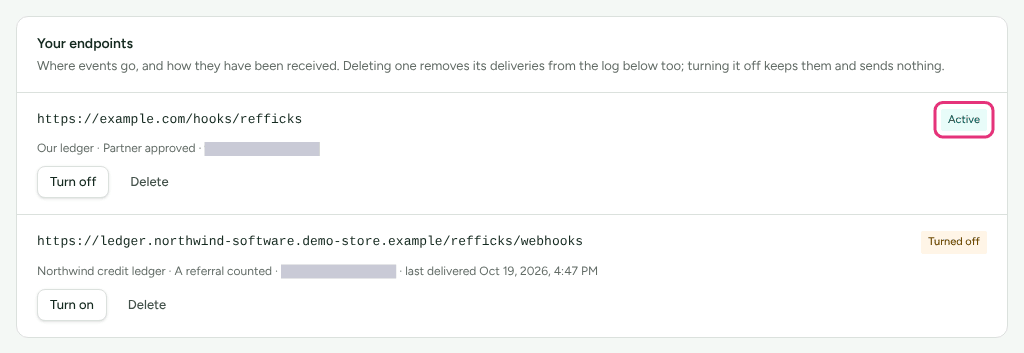
Under Your endpoints, read the badge on your endpoint. Anything other than Active means Refficks is not sending to it.
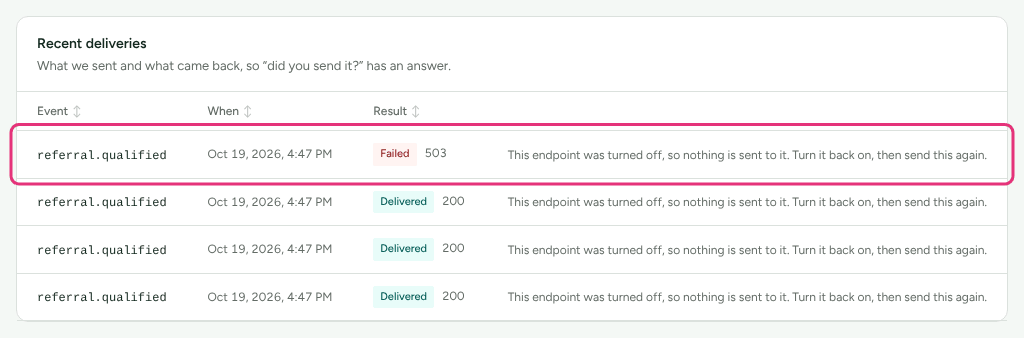
Under Recent deliveries, read the Result of the latest rows: a badge, then the status your server answered or the error Refficks met, or "No answer yet" while the first attempt is still out.
Those two places answer most cases. The table below says what each reading means.
Likely causes
| What you see | Likely cause | Fix |
|---|---|---|
| Add endpoint refuses the address: "That address is only reachable from inside a private network, so Refficks will not send to it." | The name resolves to a private, loopback or other internal address, or ends in .local, .internal and the like. |
Use a public address |
| "A webhook endpoint must be an https:// address." | The address starts http://. |
Use https://. |
| "… could not be found. Check the address is spelled right and is live." | The name does not resolve. | Check the spelling and the DNS record. |
| Add endpoint is greyed out | No event is ticked under What to send, or Refficks support is acting as you (the sentence under the button says so). | Tick an event; or add it yourself when you next sign in. |
| Nothing in Recent deliveries ("Nothing sent yet") | The event is not ticked on the endpoint, has not happened since you added it, or came from an import. | Nothing is being sent |
| Sending with "No answer yet" | The first attempt has not come back yet. | Wait a minute; the log refreshes every ten seconds. |
Failed with 301, 302, 307 or 308 |
Your address redirects. Refficks never follows a redirect. | Use the final address |
Failed with 401 or 403 |
Your server, or something in front of it, refused the request. Often your own signature check. | Signature checks |
Failed with 404 or 405 |
The path or method is not what your server listens on. | Check the route accepts POST at that exact path. |
Failed with a 5xx |
Your receiver errored. | Check your server's logs at that time. |
| Failed with an error about a timeout or a connection | No answer within 10 seconds, or the server could not be reached. | Answer within 10 seconds |
| Failed: "The webhook endpoint's address was refused: …" | The name now resolves to an address Refficks will not send to. It is checked before every delivery. | Use a public address |
| Failed: "Not sent. …" | The endpoint was turned off or paused when the delivery was due. The sentence says which. | Turn it back on and send again |
| Badge Paused after repeated failures | Ten failed attempts in a row. | Turn it back on and send again |
| Badge Removed by the receiver, and "The receiver said this subscription no longer exists (410), so nothing more is sent to it." | Your server answered 410 Gone, which tells Refficks to stop. |
Your server said stop |
| Delivered, but your application did nothing | Your server answered 2xx and then failed, or a different endpoint got it. |
Check your receiver's own logs. Refficks does not read your response body. |
| The same delivery arrives more than once | Retries, Send again, or two endpoints asking for one event. | Duplicates |
Diagnose it step by step
- Open Integrations › Webhooks. If the endpoint's badge is not Active, go to The endpoint is paused or Your server said stop.
- Look in Recent deliveries for a row with your event. If there is none, go to Nothing is being sent. Press the Event heading to sort the log by event when it is long.
- If the row reads Sending, Refficks is still retrying. Its last attempt is about 51 minutes after the first. Read the status beside the badge for what went wrong so far.
- If the row reads Failed, read the status or error beside it and find it in the table above.
- If the row reads Delivered and your application still did nothing, the problem is after your server answered. Check your receiver's logs, and whether it verified the signature and then failed.
Fixes
The address is refused
Refficks sends only to https:// addresses where every IP address the name
resolves to is public. It refuses private networks (such as 10.x,
192.168.x, 172.16–31.x), loopback, link-local addresses including cloud
metadata services, carrier-grade NAT, and names such as *.local and
*.internal. It also refuses a username or password in the address ("Put the
secret in the path instead") and numeric shorthand for an IP address.
- Give your receiver a public hostname with a valid HTTPS certificate.
- Add it again on Integrations › Webhooks with Add endpoint.
A receiver on your own computer is not reachable this way. Put it behind a public HTTPS address first.
Not yet documented: the IP addresses Refficks sends from. If your firewall only admits listed addresses, ask support@refficks.com.
A redirect
Refficks treats a 3xx as a failure and does not follow it, so that a public
address cannot send a delivery somewhere private. Common causes: a missing or
extra trailing slash, example.com redirecting to www.example.com, or an old
path that moved.
- Find the final address: request it yourself and follow the redirects.
- Add a new endpoint with the final address, and put its new signing secret in your receiver.
- Delete the old endpoint.
The address of an endpoint cannot be edited, which is why this is a new endpoint with a new secret.
The signature does not verify
Check these in order:
- Verify the raw body. The signature covers the exact bytes Refficks sent.
Parsing the JSON and encoding it again can change them (Refficks writes
non-ASCII characters as
\uescapes and leaves/unescaped, and your encoder may not). In Express, useexpress.raw({ type: 'application/json' })on the route. In PHP, readphp://input. In Laravel,$request->getContent(). - Use this endpoint's secret, whole. Every endpoint, and every
subscription made through the Server API, has its own secret. It starts
whsec_, and the prefix is part of it. The endpoint's row shows the first eight characters: compare them with what your receiver holds. - Sign
<t>.<body>. The string is thetvalue from the header, a full stop, then the body. Not the body alone. - Compare hex. The
v1value is a lowercase hex digest, not base64. - Check your clock. If your server rejects timestamps older than a few minutes, its clock must be right. Every attempt is signed when it is sent, so a correct clock never rejects a retry.
The receivers in Receive Refficks events with webhooks were tested against Refficks's own signing code; compare yours with them.
Answer a delivery that fails your check with a 4xx, not a 2xx. It then
shows as failed in the log, and once your receiver is fixed you can press
Send again.
A timeout
Refficks waits 10 seconds for an answer. Store the delivery, answer 200, and
do the slow work afterwards, in a queue or a background job.
Nothing is being sent
- On Your endpoints, check the endpoint lists the event. The row shows the event's name when there is one, or how many events it has. The screen has no control to change an endpoint's events: to add one, add a new endpoint with every event you want, put its secret in your receiver, and delete the old endpoint.
- Make the event happen after the endpoint was added. Refficks does not send events from before, or anything brought in by an import from another platform.
- Check the part of the product the event belongs to is in use. Referral, B2B and creator events are only sent when those things happen. The webhook event reference says what makes each one fire.
- A closed account sends nothing until it is reopened.
The endpoint is paused
Refficks pauses an endpoint after ten failed attempts in a row, across all its deliveries, and emails owners and admins "A webhook endpoint was paused". While paused, nothing is sent to it, not even retries that were waiting.
- Fix the cause, using the status or error in Recent deliveries.
- Press Turn on on the endpoint. This also clears the count of failures.
- On each delivery you still need, press Send again. Deliveries that failed while the endpoint was down are not resent by themselves.
Send again sends the original body as a new delivery. Where it would be refused, because the endpoint is still off or paused, the reason stands in its place.
Your server said stop
An answer of 410 Gone tells Refficks the subscription no longer exists. It
stops at once, without counting a failure, and the endpoint reads Removed by
the receiver.
- For an endpoint you added on Integrations › Webhooks, the row says "If
that was a mistake, turn it back on." Press Turn on, and make sure your
server no longer answers
410. - For a subscription an automation platform made (for example a Zap), turn the automation back on in that platform. It subscribes again.
The same delivery arrives twice
That is expected, and harmless if your receiver remembers what it has handled.
Skip a delivery whose id and occurred_at you have already processed. See
Receive each fact once.
You lost the signing secret
It is shown once and cannot be shown again. Add a new endpoint at the same address with the same events, put the new secret in your receiver, then delete the old endpoint. Deleting an endpoint also removes its deliveries from the log, so press Turn off instead if you want to keep them for a while.
When to contact support
Write to support@refficks.com if deliveries still fail after the checks above, or if the log says something this page does not explain. Include:
- the endpoint's host (not its full address if the path holds a token);
- the event, and the time of a failed delivery from Recent deliveries;
- the Result text exactly as shown;
- the
X-Refficks-Deliveryheader value, if your server logged it; - for a signature problem, the
t=value from the header and whether your receiver reads the raw body.
Never send the signing secret, an API key, or a partner's payout details. Support does not need them and will not ask for them.
Related
- Receive Refficks events with webhooks — the signature scheme, retries and the delivery log in full.
- Webhook event reference — what makes each event fire, and what it carries.
- API errors and limits — when the problem is your server calling Refficks instead.
- Create and manage API keys — a revoked key ends the subscriptions it made.