Create and manage API keys
Make the key your server uses to report sales and manage partners, or the key your website's tracking script carries, and revoke or replace either one. For whoever wires a merchant's systems to Refficks.
Before you start
- Role: owner or admin. Anybody else who opens the tab reads "Only owners and admins can see API keys."
- You need: to know where the key will live. A key for a server is a secret key. A key for a web page is a publishable key.
- Base URL for everything a key reaches:
https://go.refficks.com/api/v1.
Which key you need
| Secret key | Publishable key | |
|---|---|---|
| Starts with | rk_live_… |
rk_pub_… |
| Lives | On your server. Never in a browser, an app or a repository. | In the tracking script tag on your website. Anyone can read it. |
| What the form says | "Full ingest. Server only." | "Tracking only. Safe in a browser." |
| Can | Report sales, refunds, sign-ups and the other server events (POST /events). Use everything under /server/*: partners, programs, enrolments, links, codes, commissions and payouts (read only), webhook subscriptions. Mint referral-widget tokens (POST /referral-tokens). |
Record visits and identify customers from the browser. Report an order from the shopper's browser only if you turn that on under Settings › Developer › Website orders. |
| Cannot | Approve, reject or reverse a commission, or create, approve or pay a payout. No endpoint does those things, for any key. | Read anything. Report revenue through the tracker's beacon (it refuses any amount). Reach /server/* or POST /events. |
There is one kind of secret key. The live in rk_live_ is part of the
prefix, not a mode: there are no test keys and no test mode, so every event a
secret key sends is recorded in your workspace.
Neither key signs anybody in to the dashboard. The dashboard's own endpoints
answer 401 to both.
Create a key
Go to Settings › Developer › API keys. Settings shows four groups above its tabs; choosing Developer opens API keys, its first tab.
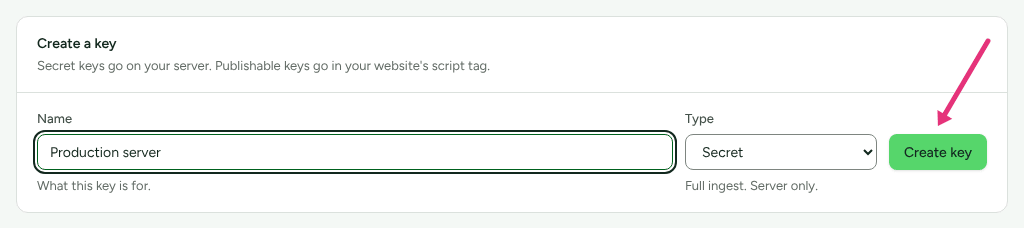
Under Create a key, type a Name that says where the key will be used, for example "Production server". The name is how History and the key list refer to it later.
Choose the Type: Secret or Publishable.
Press Create key.
The panel Copy this key now appears: "This is the only time it will be shown." Press Copy and put the key where it will live, such as your server's secret store.
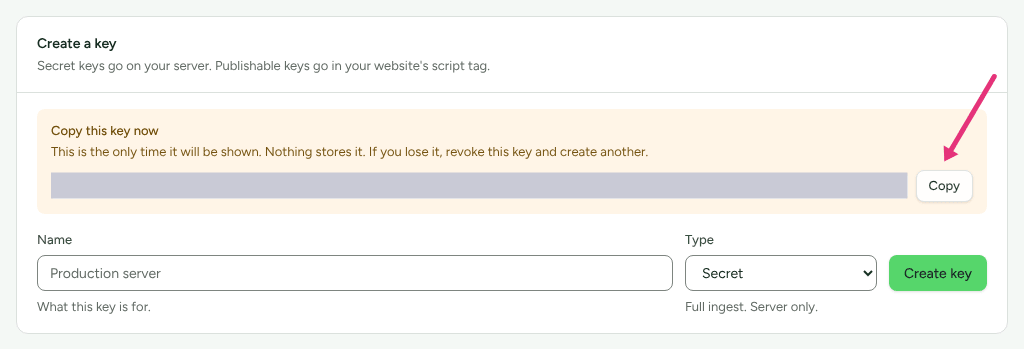
Refficks keeps only a hash of the key and its first 12 characters. Nobody, support included, can show you the key again. If you lose it, revoke it and create another.
During a support session the Create key button is greyed out, with "Refficks support cannot make API keys, helpdesk or store keys, team invitations, webhook addresses or AI app connections here, because each would keep working after this session ends. Ask them to make it when they next sign in." Support can walk you through it; you press the button yourself.
Check it worked
For a secret key, ask Refficks who the key belongs to:
curl https://go.refficks.com/api/v1/server/me \
  -H "Authorization: Bearer <SECRET_KEY>"
A working key answers 200 with your workspace and the key:
{
  "data": {
    "object": "key_owner",
    "organization": { "id": "01jc…", "name": "Northwind Software", "currency": "USD" },
    "key": {
      "id": "01jc…",
      "name": "Production server",
      "purpose": null,
      "purpose_label": null,
      "abilities": [
        { "ability": "ingest", "label": "Report sales, refunds and sign-ups" },
        { "ability": "partners:read", "label": "See partners" }
      ]
    },
    "dashboard_url": "https://app.refficks.com/dashboard/overview"
  }
}
The abilities list above is shortened. A key made on Settings › Developer ›
API keys holds every ability.
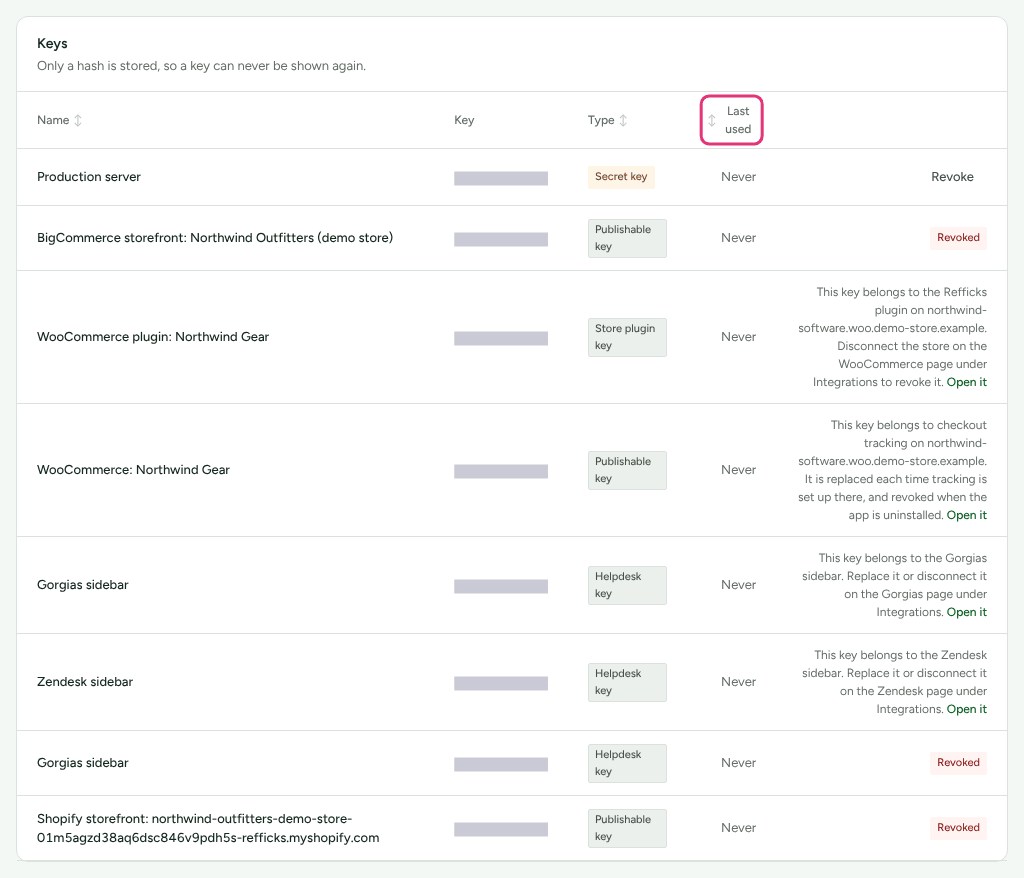
Back on Settings › Developer › API keys, the key's row in Keys shows its first characters under Key, its Type, and the date in Last used, which changes from "Never" the first time the key is used. Press a column heading (Name, Type or Last used) to sort the list by it.
For a publishable key, install the tracking script with it (see Install tracking). When the first event arrives, Getting started ticks "Your site is sending events" under Tracking. A ticked check is folded away: press Show the N settled (with the number) to read it.
Keys made for automation platforms
A key for Zapier, Make, n8n or Pabbly Connect is made somewhere else and can do less, because whoever builds an automation in that account can use it.
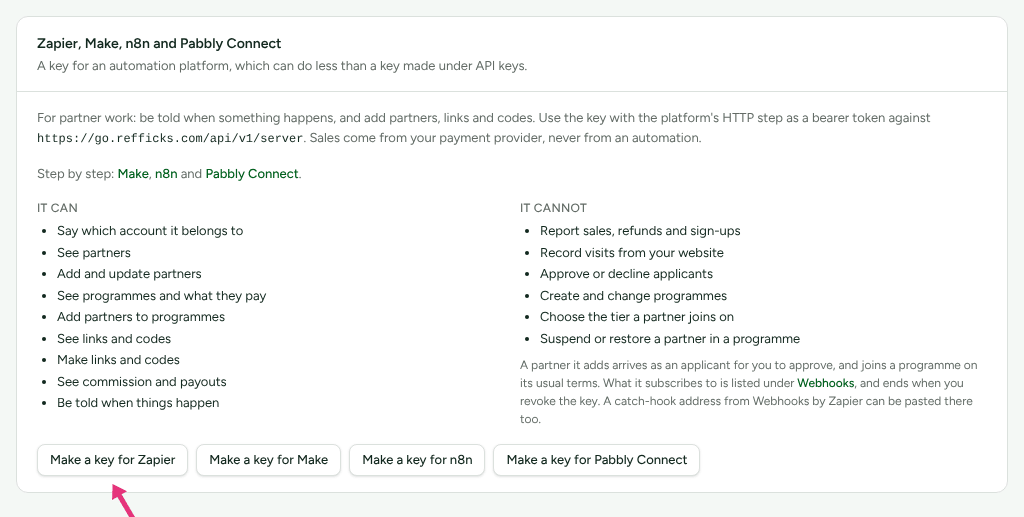
Go to Integrations › Developer and find the card Zapier, Make, n8n and Pabbly Connect, the last on the tab.
Press Make a key for Zapier (or Make a key for Make, Make a key for n8n, Make a key for Pabbly Connect).
Copy the key from the panel. It is shown once.
The card lists what such a key can and cannot do. It can: "Say which account it belongs to", "See partners", "Add and update partners", "See programmes and what they pay", "Add partners to programmes", "See links and codes", "Make links and codes", "See commission and payouts", "Be told when things happen". It cannot: "Report sales, refunds and sign-ups", "Record visits from your website", "Approve or decline applicants", "Create and change programmes", "Choose the tier a partner joins on", "Suspend or restore a partner in a programme".
These are refused to such a key too, though it holds the abilities around them, because each decides who earns:
- archiving a partner, or restoring an archived one;
- switching a link or a code on or off (sending
statusto change it); - claiming a promotion code made in Stripe for a partner's code
(
external_promotion_id).
Each is answered 403 FORBIDDEN with one sentence, for example "A key made
for Zapier cannot archive a partner. That is for a person to decide, in
Refficks or with a secret key." A key made on Settings › Developer › API
keys can do all of them.
A partner such a key creates arrives as an applicant. Any other request it may
not make is refused with 403 FORBIDDEN, and on the Server API
error.details.ability names the missing ability. On Settings › Developer ›
API keys the key is listed with "Made for Zapier, so it can do less than a
key made here." and a What it can do link, which opens the card on
Integrations › Developer.
Availability: The Pabbly Connect key is newer than the last deployment of app.refficks.com this article was checked against. Zapier, Make and n8n keys are on the card already.
Replace a key (rotate)
- Create a new key of the same type, as above.
- Put the new key in place on your server or website, and deploy.
- On Settings › Developer › API keys, check that Last used on the new key shows today's date.
- Press Revoke on the old key.
The old and the new key both work until you revoke the old one, so there is no gap. Last used shows a date, not a time, so if you need to be sure nothing still uses the old key, wait until a day has passed with its date unchanged.
Revoke a key
- Go to Settings › Developer › API keys.
- Press Revoke on the key's row.
There is no confirmation and no undo. The key stops working at once: its next
request is answered 401 UNAUTHENTICATED with "That API key is not valid." It
stays in the list with a Revoked badge, so you can still see when it was
made and last used.
Revoking a key also ends every webhook subscription it made (an automation platform's, for example). They stay on Integrations › Webhooks with "The key that made this subscription was revoked, so nothing more is sent."
Some keys in the list belong to a connection and have no Revoke button. Their row says where they are managed and links there with Open it:
- a helpdesk sidebar's key (
rk_help_…), managed on that helpdesk's page under Integrations; - the key Shopify checkout tracking uses, replaced each time tracking is set up and revoked when the app is uninstalled;
- the Refficks WordPress plugin's key (
rk_store_…), revoked when you disconnect the store on the WooCommerce guide, under Integrations › Where you sell.
What is recorded
- Settings › Developer › History has an entry when a key is created and when it is revoked, with its name, type and first characters. Never the key itself.
- Anything a key changes appears in Settings › Developer › History under the key's name, for example "Your “Production server” API key", not as Refficks.
- Last used on the key's row is updated each time the key is used.
What this does not do
- No permission picker. A secret key made on Settings › Developer › API keys does everything a secret key can. To hand out less, use an automation-platform key.
- No expiry date is offered on the screen. A key works until you revoke it.
- No test mode. Events you send are real, and events are never deleted.
- A lost key cannot be recovered. Replace it.
- Support cannot make one for you. Keys outlast a support session, so the session cannot create them.
- A closed account's keys stop. Its secret keys are answered
403 ACCOUNT_CLOSED. Its publishable key keeps recording, and those sales wait for the account to be reopened.
Related
- Send events from your server — what to do with a secret key first.
- The Server API — managing partners, links and codes with the same key.
- Receive Refficks events with webhooks — being told when something happens, instead of asking.
- Why was my API call refused? — what
401,403and429mean and what to do. - Install tracking — where the publishable key goes.