Receive Refficks events with webhooks
Have Refficks POST to your own server when something happens, such as a partner being approved, a commission being earned or a payout being paid, with a signature that proves the request came from Refficks. For the developer who builds the receiver and the admin who registers it.
Before you start
- Role: owner or admin. Anybody else who opens the tab reads "Only owners and admins can set up webhooks."
- You need: an
https://address on the public internet that answers a POST, and a receiver that can read the request body exactly as it arrived, before any JSON parsing. - Time: a few minutes to register; longer to write the receiver.
Integrations › Webhooks is only for what Refficks sends you. Its first card, Sending events to Refficks, says where the other direction is set up: your store or payment platform's own address under Integrations (a store on Connections, a payment platform in its guide on Where you sell), your server's sales through the events API (the Server events card on Integrations › Developer), and your website under Settings › Developer › Website orders.
Add an endpoint
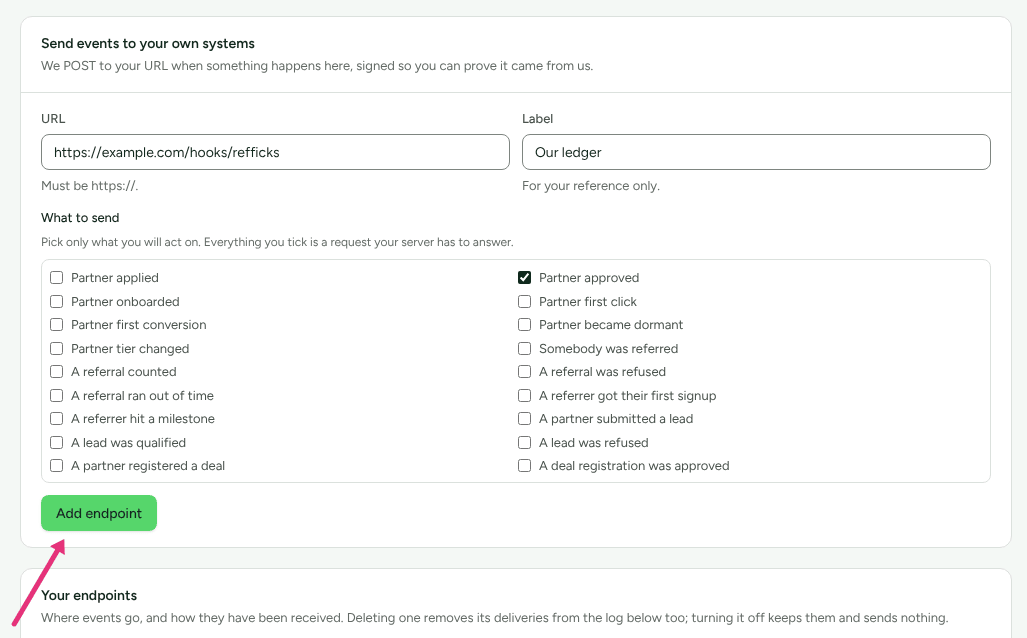
Go to Integrations › Webhooks.
In Send events to your own systems, type the address into URL, for example
https://example.com/hooks/refficks.Optionally type a Label ("For your reference only."), such as "Our ledger".
Under What to send, tick each event your server will act on. The screen says why to keep it short: "Everything you tick is a request your server has to answer."
Press Add endpoint. Refficks checks the address first, and refuses it with a reason if it cannot send there (see Addresses Refficks will send to).
The panel Copy this signing secret now shows a secret beginning
whsec_. "This is the only time it will be shown." Press Copy and put it in your receiver's configuration now.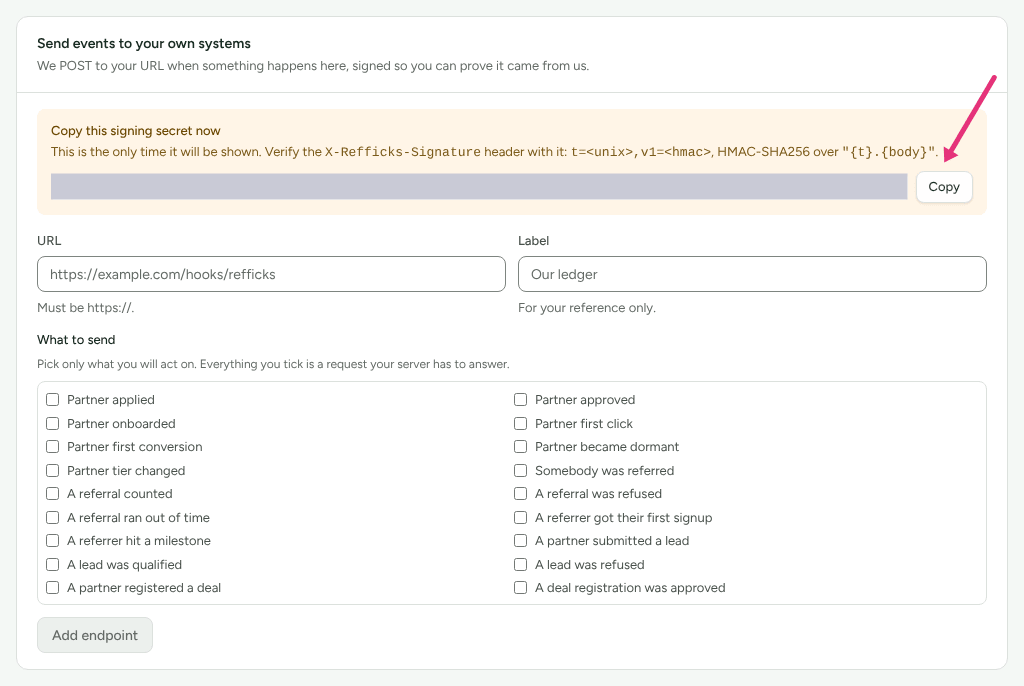
Each endpoint has its own secret. After this, the endpoint's row under Your endpoints shows only the secret's first eight characters, so you can tell two apart.
During a support session Add endpoint is greyed out, with a sentence saying Refficks support cannot make webhook addresses there "because each would keep working after this session ends." An owner or admin adds it when they next sign in.
Check it worked
- Make something happen that you ticked. With Partner approved ticked, for example, approve an applicant, or add a partner under Partners › Add partner (a partner added by hand arrives approved).
- Back on Integrations › Webhooks, read Recent deliveries. It refreshes
every ten seconds. A working endpoint shows the event (
partner.approved), the badge Delivered, and the status your server answered, such as200. A delivery not yet answered reads "No answer yet". - On your server, check that the signature verified (see Verify the signature).
Your endpoints also shows "last delivered" with the time of the most recent success.
Addresses Refficks will send to
The address is checked when you add it and again before every delivery, because a name can be pointed somewhere else later.
| Refused | What the screen says |
|---|---|
http:// |
"A webhook endpoint must be an https:// address." |
| Anything that resolves to a private, loopback, link-local or other internal address, including cloud metadata services. Every address the name resolves to must be public. | "That address is only reachable from inside a private network, so Refficks will not send to it." |
A name ending .local, .internal, .localhost, .lan and similar |
The same sentence |
| A name that does not resolve | "{host} could not be found. Check the address is spelled right and is live." |
| A username or password in the address | "A webhook address cannot carry a username or password. Put the secret in the path instead." |
A numeric shorthand such as 2130706433 |
"Write the address as a hostname. Refficks does not send to numeric shorthand like this." |
| No event ticked | "Choose at least one event to be told about." (The button stays greyed out until you tick one.) |
Refficks connects to the address it checked, not to whatever the name says a
moment later, and it never follows a redirect. A 301 or 302 counts as a
failed delivery.
A token in the address's path is allowed, for receivers that want one besides the signature. Refficks keeps only the host in Settings › Developer › History, in error messages and in emails. The full address is shown on Integrations › Webhooks to owners and admins.
Events you can choose
The list on the screen comes from Refficks itself, so it is always the current
one. On main today it is:
| Event | On the screen |
|---|---|
partner.applied |
Partner applied |
partner.approved |
Partner approved |
partner.onboarded |
Partner onboarded |
partner.first_click |
Partner first click |
partner.first_conversion |
Partner first conversion |
partner.became_dormant |
Partner became dormant |
partner.tier_changed |
Partner tier changed |
referral.signed_up |
Somebody was referred |
referral.qualified |
A referral counted |
referral.rejected |
A referral was refused |
referral.expired |
A referral ran out of time |
referrer.first_referral |
A referrer got their first signup |
referrer.milestone_reached |
A referrer hit a milestone |
lead.created |
A partner submitted a lead |
lead.qualified |
A lead was qualified |
lead.rejected |
A lead was refused |
deal_registration.submitted |
A partner registered a deal |
deal_registration.approved |
A deal registration was approved |
deal_registration.rejected |
A deal registration was refused |
deal_registration.expired |
A deal protection window closed |
partner.tier_eligible |
Partner earned the next tier |
partner.first_closed_won |
Partner won their first deal |
partner.pipeline_threshold_reached |
Partner passed a pipeline threshold |
opportunity.created |
An opportunity was created |
opportunity.stage_changed |
An opportunity moved stage |
opportunity.closed_won |
An opportunity was won |
opportunity.closed_lost |
An opportunity was lost |
content.rights_expiring |
Usage rights expiring |
content.rights_expired |
Usage rights expired |
commission.earned |
Commission earned |
commission.reversed |
Commission reversed |
payout.paid |
Payout paid |
collaboration.creator_invited |
Creator invited to a collaboration |
collaboration.creator_accepted |
Creator accepted a collaboration |
collaboration.creator_declined |
Creator declined a collaboration |
collaboration.creator_completed |
Creator finished everything on a collaboration |
content.submitted |
Content submitted for review |
content.revision_requested |
A revision was requested |
content.approved |
Content approved |
content.published |
Content published |
deliverable.due_soon |
A deliverable is due soon |
deliverable.overdue |
A deliverable is overdue |
When each one is sent, and what its data carries, is in the
webhook event reference. Events from a part of
the product you do not use (referrals, B2B deals, creator collaborations) are
offered but never sent.
commission.earned means pending. The commission it carries has
"status": "pending" until somebody approves it. Do not tell a partner they
have been paid on this event; use payout.paid.
What a delivery looks like
A POST with a JSON body and these headers:
| Header | Value |
|---|---|
Content-Type |
application/json |
X-Refficks-Signature |
t=<unix seconds>,v1=<hex HMAC-SHA256> |
X-Refficks-Event |
The event, such as commission.earned |
X-Refficks-Delivery |
This delivery's id. The same on every retry of it; new when somebody presses Send again. |
Every delivery has the same keys, and a key that does not apply is null.
A commission.earned delivery, shortened:
{
  "id": "commission.earned:01jc9f3t…",
  "event": "commission.earned",
  "event_label": "Commission earned",
  "occurred_at": "2026-10-16T09:21:04+00:00",
  "partner": {
    "object": "partner",
    "id": "01jc9a7k…",
    "email": "sam@example.com",
    "first_name": "Sam",
    "last_name": "Rivera",
    "display_name": "Sam Rivera",
    "dashboard_url": "https://app.refficks.com/dashboard/partners/01jc9a7k…"
  },
  "program": { "id": "01jc8p2d…", "name": "Affiliate Program" },
  "commission": {
    "object": "commission_entry",
    "id": "01jc9f3t…",
    "type": "earned",
    "status": "pending",
    "currency": "USD",
    "amount": 490,
    "base_amount": 4900,
    "rate": 10
  },
  "payout": null,
  "referral": null,
  "lead": null,
  "data": { "amount": 490, "currency": "USD" }
}
partneris the same partner object the Server API returns, plusdisplay_nameanddashboard_url.commissionandpayoutare the Server API's commission entry and payout. See The Server API.referralsays how a referral stands (id,status,source,signed_up_at,qualified_at).leadhasid,status,source,company_nameandcreated_at.datais extra detail for that event, and differs per event (the event reference lists it). When an event has nothing extra to say,datais an empty list,[], not an empty object.- Money is an integer in minor units with its currency:
490withUSDis USD 4.90.
What is never in a delivery: a partner's scores, payout details beyond the payout's masked hint (an email address keeps its domain, anything else shows only its last four characters), anything about a referred friend, and a lead's contact details.
Verify the signature
X-Refficks-Signature is t=<seconds>,v1=<signature>. The signature is
HMAC-SHA256, written in hex, of the string <seconds>.<raw body>, keyed with
the endpoint's signing secret (the whole whsec_… value).
- Split the header on
,and each part on the first=, to gettandv1. - Refuse the request if
tis more than five minutes from your clock. Every attempt is signed afresh, so a retry is never stale. - Compute HMAC-SHA256 of
t, a full stop, and the raw body bytes. Never re-encode parsed JSON: it will not match. - Compare your hex digest with
v1in constant time.
Both examples below were run against Refficks's own signing code on 16 October: a genuine delivery is accepted, a delivery signed 200 seconds earlier is accepted, and a changed body, a wrong secret, a 400-second-old timestamp or a missing header are refused.
Node.js (18 or later, no dependencies):
// receiver.mjs: run with REFFICKS_WEBHOOK_SECRET='whsec_…' node receiver.mjs
import { createServer } from 'node:http';
import { createHmac, timingSafeEqual } from 'node:crypto';

const SECRET = process.env.REFFICKS_WEBHOOK_SECRET; // the whsec_… value shown once
const TOLERANCE_SECONDS = 300;

function verify(rawBody, header, secret) {
  const parts = {};
  for (const piece of String(header ?? '').split(',')) {
    const at = piece.indexOf('=');
    if (at > 0) parts[piece.slice(0, at).trim()] = piece.slice(at + 1).trim();
  }

  const t = Number.parseInt(parts.t ?? '', 10);
  const given = parts.v1 ?? '';
  if (!Number.isSafeInteger(t) || t <= 0 || given === '') return false;
  if (Math.abs(Math.floor(Date.now() / 1000) - t) > TOLERANCE_SECONDS) return false;

  // HMAC-SHA256 of "<t>.<raw body>", hex. Sign the bytes you received, never re-encoded JSON.
  const expected = createHmac('sha256', secret).update(`${t}.`).update(rawBody).digest('hex');
  const a = Buffer.from(expected);
  const b = Buffer.from(given);
  return a.length === b.length && timingSafeEqual(a, b);
}

createServer((req, res) => {
  if (req.method !== 'POST') {
    res.writeHead(405).end();
    return;
  }

  const chunks = [];
  req.on('data', (chunk) => chunks.push(chunk));
  req.on('end', () => {
    const raw = Buffer.concat(chunks);

    if (!verify(raw, req.headers['x-refficks-signature'], SECRET)) {
      res.writeHead(400).end('signature did not verify');
      return;
    }

    const delivery = JSON.parse(raw.toString('utf8'));

    // Answer fast: record it, then do the work elsewhere.
    console.log(delivery.event, delivery.id, delivery.occurred_at, req.headers['x-refficks-delivery']);
    res.writeHead(200).end('ok');
  });
}).listen(process.env.PORT ?? 3000);
With Express, mount the route with express.raw({ type: 'application/json' })
so req.body is the raw Buffer, and pass that to verify.
PHP (plain PHP, no framework):
<?php
// receiver.php: set REFFICKS_WEBHOOK_SECRET to the whsec_… value shown once.

function refficks_signature_is_valid(string $rawBody, string $header, string $secret, int $toleranceSeconds = 300): bool
{
    $parts = [];
    foreach (explode(',', $header) as $piece) {
        [$key, $value] = array_pad(explode('=', trim($piece), 2), 2, '');
        $parts[$key] = $value;
    }

    $timestamp = (int) ($parts['t'] ?? 0);
    $given = (string) ($parts['v1'] ?? '');

    if ($timestamp <= 0 || $given === '' || abs(time() - $timestamp) > $toleranceSeconds) {
        return false;
    }

    // HMAC-SHA256 of "<t>.<raw body>", hex, compared in constant time.
    return hash_equals(hash_hmac('sha256', $timestamp.'.'.$rawBody, $secret), $given);
}

$rawBody = (string) file_get_contents('php://input');
$header = (string) ($_SERVER['HTTP_X_REFFICKS_SIGNATURE'] ?? '');
$secret = (string) getenv('REFFICKS_WEBHOOK_SECRET');

if (! refficks_signature_is_valid($rawBody, $header, $secret)) {
    http_response_code(400);
    exit('signature did not verify');
}

$delivery = json_decode($rawBody, true, 512, JSON_THROW_ON_ERROR);

// Answer fast: record it, then do the work elsewhere.
error_log($delivery['event'].' '.$delivery['id'].' '.$delivery['occurred_at'].' '.($_SERVER['HTTP_X_REFFICKS_DELIVERY'] ?? ''));
http_response_code(200);
echo 'ok';
In Laravel, read the raw body with $request->getContent().
How to answer
| Your server answers | Refficks does |
|---|---|
Any 2xx within 10 seconds |
Marks the delivery Delivered. What your body says is not read. |
410 Gone |
Stops sending to this endpoint for good and marks it Removed by the receiver. No retry, and it is not counted as a failure. The delivery reads "The receiver said this subscription no longer exists (410), so nothing more is sent to it." |
429 with Retry-After in seconds |
Waits that long (at most an hour) before the next attempt. It still counts as a failed attempt. |
Any other status, including 3xx and 4xx |
A failed attempt. Retried. |
| Nothing within 10 seconds, or no connection | A failed attempt. Retried. |
Answer 2xx as soon as you have stored the delivery, and do slow work
afterwards. A receiver that does its work before answering risks the 10-second
limit.
Retries and pausing
- Five attempts per delivery. After a failed attempt Refficks waits 1 minute, then 5, then 15, then 30, so the last attempt is about 51 minutes after the first. While it is still trying, the delivery shows Sending. When all five have failed it shows Failed.
- Ten failed attempts in a row pause the endpoint. The count runs across all its deliveries, so two deliveries that fail every attempt are enough. Any successful delivery sets the count back to nought.
- A paused endpoint hears nothing, including retries already waiting. Its status reads Paused after repeated failures, and its row says "Stopped after 10 failures in a row. Fix the receiver, then turn it back on."
- Owners and admins are emailed "A webhook endpoint was paused", naming the host, unless they turned off Tracking has stopped under Settings › You › Your emails.
- Turning it back on with Turn on clears the count. Deliveries that failed while it was down are not sent again by themselves: press Send again on the ones you need.
Receive each fact once
The same body can reach you more than once: on a retry after your answer was lost, when somebody presses Send again, and for every endpoint that asked for the event. So record what you have handled, and skip a repeat.
- Deduplicate on the body's
idandoccurred_attogether. Both are the same on every retry and on Send again. idalone is{event}:{subject id}. Forcommission.earned,commission.reversed,payout.paid,partner.applied,referral.*,referrer.*andlead.*the subject is that one commission, payout, membership, referral or lead, soidalone is unique. For the other events the subject is the partner, so a partner whose tier changes twice, or whose deals move stage again, produces the sameidtwice.occurred_attells those apart.X-Refficks-Deliveryidentifies one delivery, not one fact. It changes when somebody presses Send again.
The delivery log
Recent deliveries on Integrations › Webhooks lists the latest 50 deliveries to all your endpoints, newest first: the Event, When, and the Result, which is a badge (Sending, Delivered or Failed) with the status your server answered or the error, and the number of attempts when there was more than one. Press a column heading to sort the log by it.
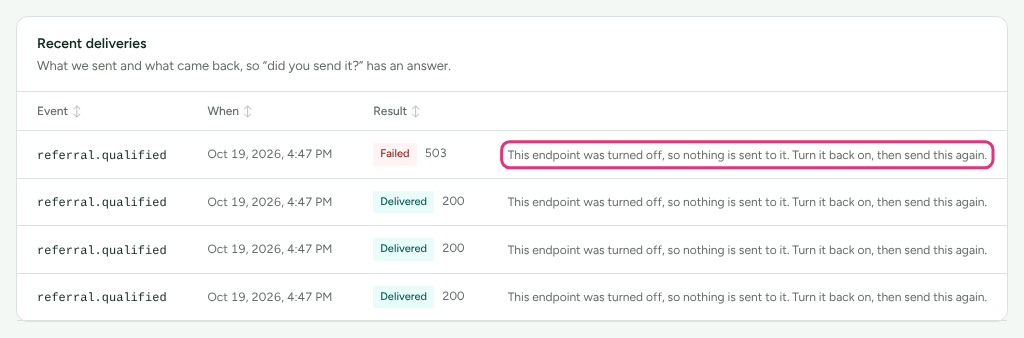
Send again sends a delivery's original body again, as a new delivery with a
new X-Refficks-Delivery and a fresh signature. The original row stays as it
was. Where the endpoint is not receiving, the button is replaced by the
reason, for example "This endpoint was turned off, so nothing is sent to it.
Turn it back on, then send this again."
Turn off, turn on, delete
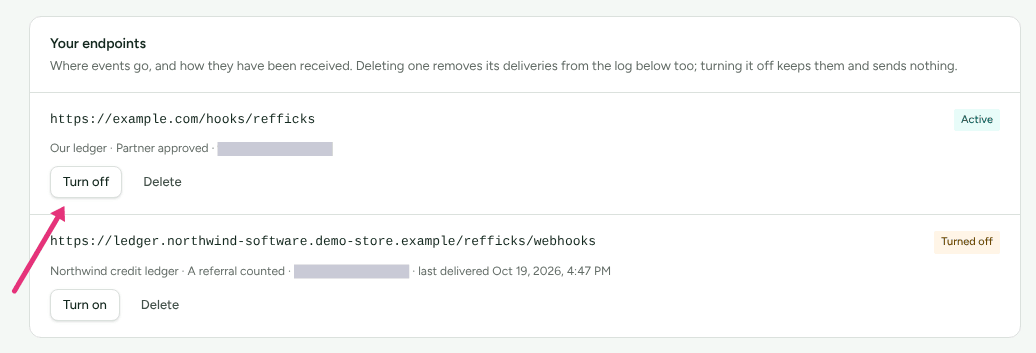
- Turn off stops all sending, including retries already waiting, and keeps the endpoint and its deliveries. Its status reads Turned off.
- Turn on starts sending again.
- Delete removes the endpoint and its deliveries from the log, with no confirmation. The screen says so before you press it: "Deleting one removes its deliveries from the log below too; turning it off keeps them and sends nothing."
- The address cannot be changed, and the screen has no control for changing an endpoint's events. To change either, add a new endpoint, put its new secret in your receiver, then delete the old one.
Adding, changing and deleting an endpoint, and Send again, are each recorded in Settings › Developer › History, naming the endpoint by its host only.
Subscriptions made through the Server API
Zapier, and any other automation platform that uses REST hooks, subscribes with a secret key instead of the screen. The deliveries are the same events, the same body and the same signature, keyed with the subscription's own secret.
curl -X POST https://go.refficks.com/api/v1/server/hooks \
  -H "Authorization: Bearer <SECRET_KEY>" \
  -H "Content-Type: application/json" \
  -d '{ "url": "https://hooks.example.com/catch/123", "event": "partner.approved" }'
201with the subscription and itssecret, shown this once. Sendevents(a list of up to 50) instead ofeventto subscribe to several.- The same address again from the same key is answered
200with the subscription it already has, and no secret. The same address while it is live under another key is409. - At most 200 live subscriptions per key.
GET /server/hooks/eventslists every event, what it needs, and whether this key may subscribe. A key must be able to see partners for every event, and to see commission and payouts forcommission.earned,commission.reversedandpayout.paid.GET /server/hooks/samples?event=…returns up to three of your own recent facts in the delivery shape, for a platform to show while an automation is built.DELETE /server/hooks/{id}unsubscribes (204). A key sees and ends only its own subscriptions.
Subscriptions are listed on Integrations › Webhooks with "Subscribed through your “…” key for Zapier. The address is kept secret, and what it listens for is changed there, not here." The address is shown only as a hint. Revoking the key ends every subscription it made, and nothing more is sent to them.
What this does not do
- It does not send history. An import from another platform announces nothing, and an endpoint hears only about what happens after it was added.
- A closed account sends nothing until it is reopened.
- It does not send a test delivery on demand. Use a real event, or Send again on one already in the log.
- It does not change the order things arrive in. Use
occurred_at, not arrival order. - It is not how sales come in. To report sales to Refficks, see Send events from your server.
Related
- Webhook event reference — when each event is
sent and what its
datacarries. - Why are Refficks webhook deliveries failing? — refused addresses, signature mismatches and paused endpoints.
- The Server API — the partner, commission and payout objects a delivery carries.
- Create and manage API keys — the key behind a subscription, and what revoking it ends.
- In-app guides for Make, n8n and Pabbly Connect — the same verification, step by step, in each platform.
Availability: The public guides above, and two behaviours described here (a stopped endpoint receiving neither retries nor Send again, and the reason shown in place of Send again), are newer than the last deployment of app.refficks.com this article was checked against.