Stripe payments are not appearing in Refficks
For owners and admins who took a payment in Stripe and cannot find it as a conversion in Refficks. The most common cause is a signing secret that does not match the endpoint Stripe is sending from.
Check this first
- Go to Integrations, which opens on Connections, and press Set up Stripe on the Stripe card.
- Look at the Your endpoint card:
- The most recent problem reads "A delivery arrived with a signature we could not verify." → the secret is wrong. Go to Fix: the signing secret is wrong. (Rejected counts every refusal since you connected and does not reset after a fix, so watch whether it is still going up.)
- Last delivery reads "None yet" → Stripe has never reached Refficks. Go to Fix: Stripe is not sending.
- If deliveries are arriving, find the payment's event id (
evt_…) under Recent deliveries and read its outcome and the sentence beneath it.
Likely causes
| What you see | Likely cause | Fix |
|---|---|---|
| Rejected goes up; status Error | The signing secret Refficks holds is not the one Stripe signs with: a mistyped secret, a rolled secret, or a test-mode endpoint and a live one both pointing at the same URL | The signing secret is wrong |
| Last delivery reads "None yet", and Stripe's dashboard shows no attempts | The endpoint in Stripe still has a temporary URL, or the events are not selected | Stripe is not sending |
| Stripe's dashboard shows attempts failing with HTTP 404 | You disconnected and connected again, which made a new URL | Copy the new URL into Stripe |
| No Your endpoint card; the page reads "Approved at Stripe, but no signing secret yet, so nothing can arrive." | You approved Refficks at Stripe but never added a webhook endpoint | Add the endpoint |
| The delivery shows Test | It came from Stripe's test mode | Test payments are never counted |
| The delivery shows Ignored: "The subscription invoice carries this payment." | A subscription checkout; its first invoice is the sale | Look for the invoice.paid row instead |
| The delivery shows Ignored: "A payment on its own…" | The payment belongs to no invoice and no checkout, and Count payments outside invoices and checkouts is off | Switch it on |
| The delivery shows "A payment made before counting payments outside invoices and checkouts was switched on" | Only payments made after you switched it on are counted | Nothing to fix for that payment |
| The delivery shows Ignored: "Already reported by …" | A one-time checkout and the invoice it made are one sale; the other one was counted | One sale, two deliveries |
| The delivery shows Pending for a minute or two | Some payments wait on purpose before they are read | Wait two minutes and reload |
| A conversion exists, but no partner is credited | The payment arrived; nothing told Refficks who sent the buyer | Sale not credited |
The buyer followed a partner's link that goes straight to a buy.stripe.com payment link, and no partner is credited |
Refficks adds the partner's code to such a link only once a Payment Links guide has been chosen, and it was not chosen when they clicked | On Integrations › Where you sell, open Stripe Payment Links and press I sell with Stripe Payment Links. See Connect Stripe |
| Payments from one of your companies arrive and another's do not | Each Stripe account needs its own approval, endpoint and secret | Connect the other account |
| The account reads Not approved, codes synced into it read as paused, and Settings › Developer › History has a "Refficks, automatically" entry marked "account unconfirmed" | The account id had been typed in rather than approved at Stripe, and Refficks cleared it. Payments still arrive on its secret | Press Connect with Stripe and approve that account |
Diagnose it step by step
- Is the payment live? In Stripe, check whether the payment was made in test mode. A test-mode payment arrives with the badge Test and is never counted. If it was live, continue.
- Did Stripe try to send it? In Stripe, open Developers → Webhooks,
open the endpoint and look at its recent attempts for the payment's event.
- No attempt: Stripe is not sending to Refficks. Go to Stripe is not sending.
- HTTP 400: the signature was refused. Go to The signing secret is wrong.
- HTTP 404: the URL is not one Refficks recognises. Go to The URL changed.
- HTTP 202: Refficks accepted it. Continue.
- What did Refficks make of it? On the Stripe page, find the event id
under Recent deliveries and read its outcome:
- Processed with a Why? link: it is a conversion. Press Why? to see who was credited and why.
- Ignored: the sentence under it says why it was not counted. Match it in the table above.
- Test: see Test payments are never counted.
- Failed: write to support (see below).
- Pending or Processing: wait two minutes and reload.
- Was it credited to nobody? If the conversion exists but no partner was credited, the payment arrived correctly. Follow Sale not credited.
Fixes
The signing secret is wrong
- In Stripe, open Developers → Webhooks and open the endpoint that points at your Refficks URL.
- Reveal and copy its signing secret (
whsec_…). - In Refficks, on the Your endpoint card, open Replace the signing secret.
- Paste it into New signing secret and press Replace. The URL stays the same.
- In Stripe, resend a failed event from the endpoint's page, or wait for Stripe's next retry.
Refficks holds one signing secret per Stripe account. If both a test-mode endpoint and a live-mode endpoint point at the same Refficks URL, one of them is always rejected. Keep only the endpoint whose secret Refficks holds, which for real sales is the live one.
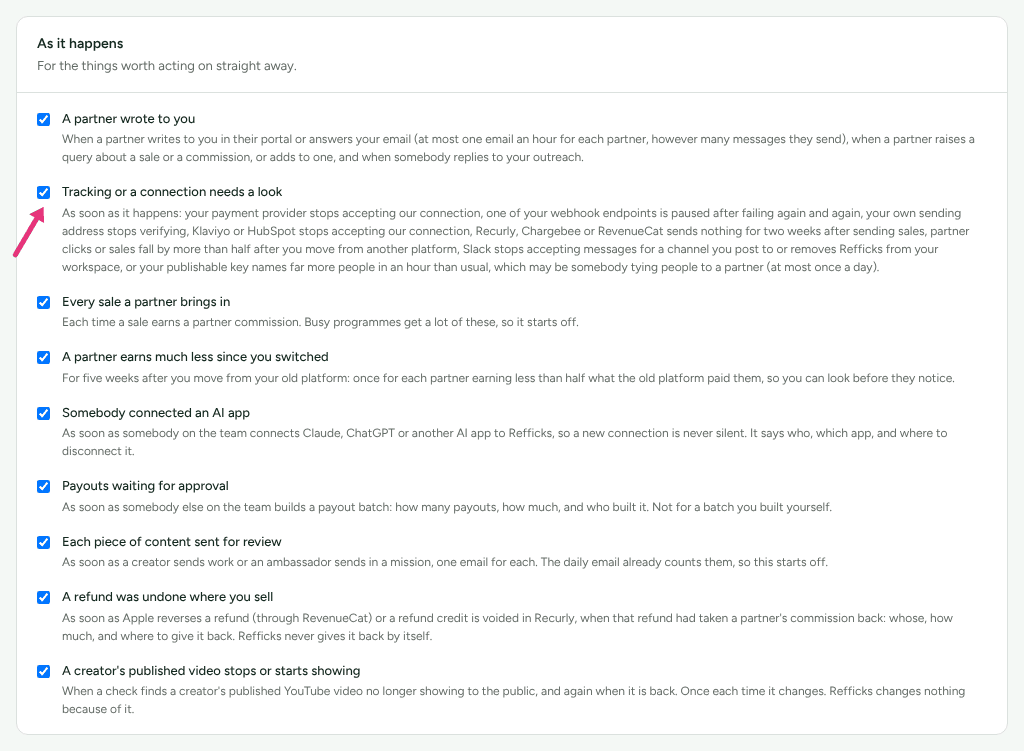
Owners and admins are emailed "Stripe events are not reaching Refficks" when a delivery is refused, at most once a day while it lasts. The switch for it is Tracking or a connection needs a look, under Settings › You › Your emails.
Stripe is not sending to this address
- On the Your endpoint card, press Copy URL. It ends in
/webhooks/stripe/and a long token. - In Stripe, open the endpoint and check its URL is exactly that.
- Check the endpoint sends at least
invoice.paid,checkout.session.completed,charge.refunded,charge.dispute.created,charge.dispute.closedandcredit_note.created. The full list is in Connect Stripe › Events to send. - Check the endpoint is in the same mode (test or live) as the payment.
- Make a live payment, or in Stripe resend a recent event from the endpoint's page, and watch Recent deliveries. Send test event on the Stripe page does not help here: it is signed and checked with the secret Refficks already holds, so it passes even when that secret is wrong, and it never comes from Stripe.
The URL changed
Disconnecting retires the endpoint URL. Connecting again, by pasting a secret or by approving at Stripe, makes a new one, and Stripe gets HTTP 404 at the old one.
- On the Your endpoint card, press Copy URL.
- In Stripe, edit the endpoint and paste the new URL.
Test payments are never counted
A payment from Stripe's test mode, and anything sent with Send test event, is "Recorded as a test: it credits nobody, pays nothing and appears in no report." The sentence under it says what a real payment like it would have credited. To see a real conversion, make a live payment.
Payments outside invoices and checkouts
Platforms that charge your Stripe account with their own form (Podia, SamCart, MemberSpace and others) make payments that belong to no invoice and no checkout. To count them:
- Approve Refficks at Stripe with Connect with Stripe, if you have not. Without it the box says "Approve Refficks in Stripe first."
- Tick Count payments outside invoices and checkouts.
Only payments made after you tick it are counted. Each one waits about two minutes before it is read.
One sale, two deliveries
A one-time checkout that also makes an invoice (Stripe Managed Payments
always does; a Payment Link can) sends both checkout.session.completed and
invoice.paid for the same money. Refficks counts one and records the other
as "Already reported". It prefers the checkout, which carries the partner's
code: the invoice waits 30 seconds for it. If Stripe delivered the invoice
more than 30 seconds before the checkout, the invoice was counted instead, and
the sale is credited only if Refficks knew the buyer another way.
A different Stripe account
Each Stripe account delivers through its own endpoint and secret, and a second account is added only by approving it at Stripe:
- On the Stripe page, press Approve another account and approve the other account on Stripe's page.
- Back in Refficks, that account's panel asks for its own Signing secret. Paste the secret of the endpoint you made on that account and press Connect this account.
There is no field to type an account id. Where Connect with Stripe is not offered, the page says "Another Stripe account is added by approving it at Stripe, which this deployment does not offer." With more than one account, Recent deliveries adds an Account column so you can tell them apart.
When to contact support
Write to support@refficks.com if a delivery shows Failed, if Rejected keeps rising after you replaced the secret, or if a Processed live payment has no conversion. Include:
- your workspace name;
- the Stripe event id (
evt_…) and the time Stripe sent it; - the outcome and the sentence shown under it in Recent deliveries;
- the text of The most recent problem, if there is one;
- the HTTP status Stripe recorded for the attempt;
- your Stripe account id (
acct_…), which is not a secret.
Never send a Stripe secret key, a webhook signing secret (whsec_…), your
endpoint URL's token, or a partner's payout details. Support does not need
them and will not ask for them.
Related
- Connect Stripe — the setup, the events to send, and what each card means.
- Sale not credited — the payment arrived but no partner, or the wrong one, was credited.
- Commission missing or wrong — a credited sale with no commission or the wrong amount.
- When an integration stops — the same states and emails for every other provider.