A partner says your emails are not arriving
For merchants whose partner says they never got an email. Most often the email was never sent: no automation sends it, it is switched off, or the partner turned that kind of email off.
Check this first
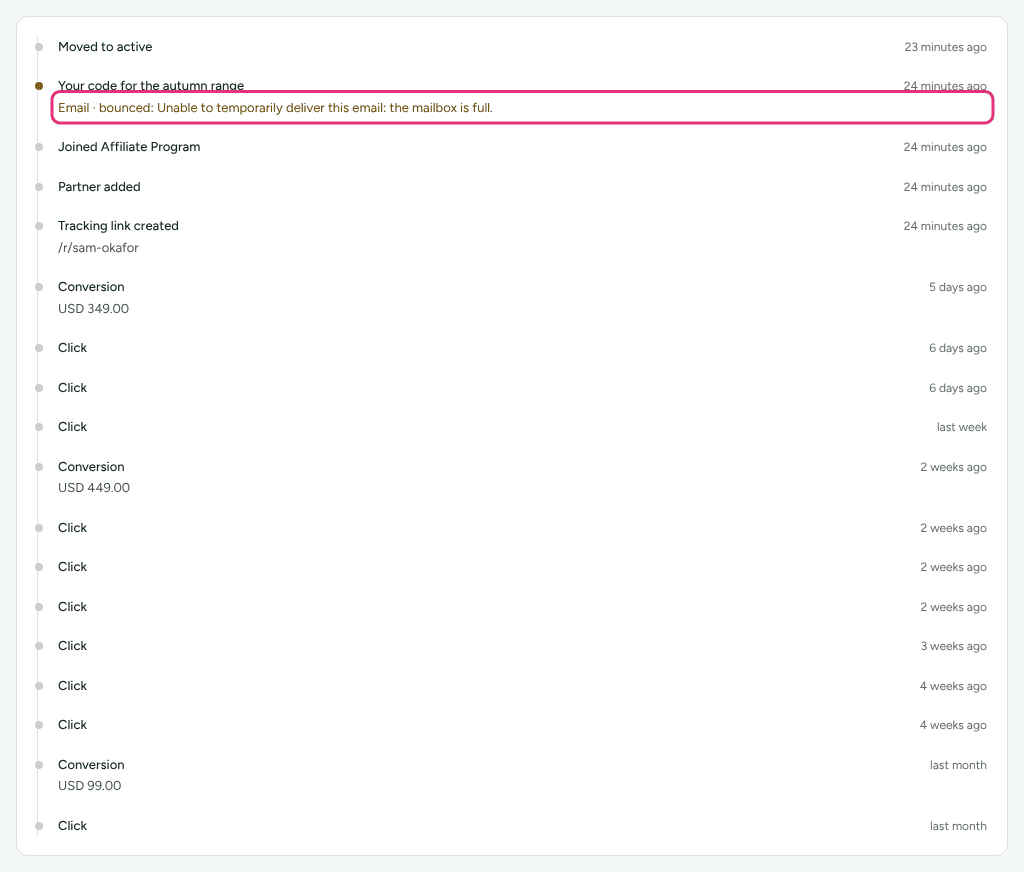
- Open the partner and choose Activity. Every email Refficks sends is recorded there, by subject, before it leaves. If the email is not listed, it was never sent: go to It was never sent.
- Look at what it says under the subject. "Email" or "Email · delivered" means the mail server took it. Anything else is the reason it did not arrive.
Likely causes
| What you see | Likely cause | Fix |
|---|---|---|
| The email is not on Activity at all | No automation sends it. The built-in emails go only when an automation or a recommendation sends them | It was never sent |
| Off on its card in Settings › Partners and payouts › Emails | You switched it off. It reaches nobody | Tick Send on its card |
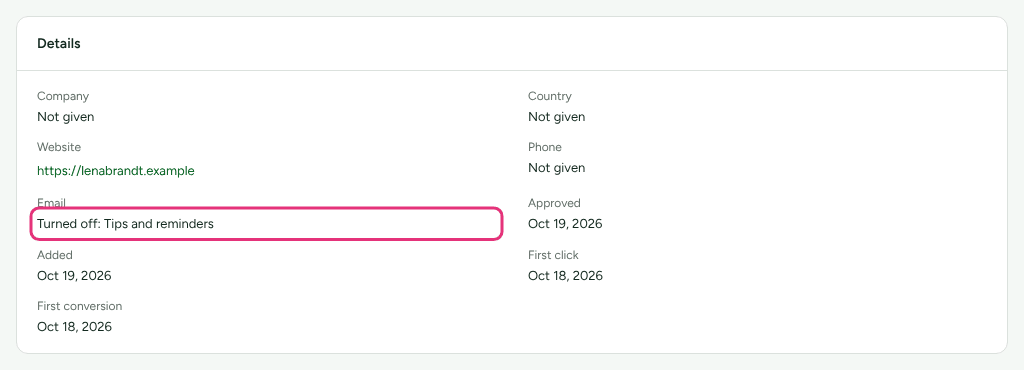
| The partner's Email detail reads "Turned off: …" or "Turned off everything but emails about their money" | The partner opted out of that kind, or of all programme email | They turned it off |
| "Email · not sent: This address does not accept mail. Nothing was sent." | The address bounced for good somewhere | The address is on the do-not-send list |
| "Email · not sent: This address asked not to receive programme email. Nothing was sent." | The person marked a message as spam | The address is on the do-not-send list |
| "Email · not sent: Refficks is not sending to this address. Nothing was sent." | Refficks support put the address on the list | Write to support |
| "Email · bounced: …" | The receiving server gave it back, with its reason | Read the reason. A full mailbox may clear; a mailbox that does not exist will not |
| "Email · not delivered: …" | The mail server refused it, with its reason | The mail server refused it |
| "Email · never sent. It was queued and never handed to the mail server." | Something stopped between writing it down and sending it | Send it again. Nothing retries it |
| "Email" or "Email · delivered", and the partner still has nothing | It left. It may be in spam, or with somebody else at their company | It left, and they cannot find it |
Diagnose it step by step
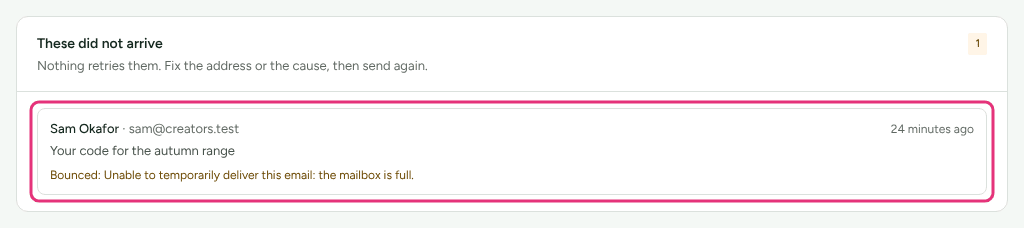
- On Settings › Partners and payouts › Emails, read These did not arrive. It lists every email that failed, bounced, was refused, or was lost, with the reason. If the partner is on it, the reason is the answer.
- Open the partner. On Overview, the Details card's Email line says what they receive: "Gets every kind of email", "Turned off: …", or "Turned off everything but emails about their money".
- Open Activity, find the email by its subject, and read the line under it against the table above.
- If the email is not there, check Campaigns › Automations for a rule that sends it, and Settings › Partners and payouts › Emails for an Off badge on its card.
Fixes
It was never sent
The built-in emails on Settings › Partners and payouts › Emails are not sent on their own. An automation sends them ("Send them an email" on Campaigns › Automations), or a recommendation you apply. Only Portal access ended and How a programme pays changed are sent by Refficks when the thing happens.
An automation that tried and was refused by the partner's choice records it as skipped: "They do not accept this kind of email, or there is no such template." A closed workspace sends nothing from its automations until it is reopened.
See Edit the emails your partners receive.
They turned it off
Partners choose what they receive, merchant by merchant: all programme email, or one kind at a time (tips and reminders, collaborations, invitations to other programs, messages from you, newsletters). You cannot turn it back on for them. Ask them to change it in their portal under Campaigns › Email preferences (see Turn off program emails).
What still reaches them: emails marked Always sent (Commission earned, Commission reversed, Payout sent, Portal access ended, How a programme pays changed), answers to their queries, and their account emails. A message you write waits in their portal, and the partner's Messages section says so before you send.
The address is on the do-not-send list
Refficks stops writing to an address that bounced permanently, or whose owner marked a message as spam. The list covers every Refficks merchant, because a mailbox that does not exist does not exist for anybody. A temporary bounce (a full mailbox) never puts an address on it.
- A bounce usually means a typo or somebody who has left. The partner's address is also how they sign in to every merchant, so neither you nor they can change it: Refficks support moves it. Ask the partner to write to support@refficks.com.
- A spam complaint means the address is right and the person does not want the mail. Changing it would be a way around them.
- Refficks support can take an address off the list once the cause is fixed.
A newsletter's count says how many addresses do not accept mail before you send it.
The mail server refused it
The reason is the mail server's own words. "That address does not exist" and "our sending account is suspended" need different fixes, and only the reason tells them apart. Nothing retries a refused email: fix the cause, then send it again (apply the action again, or write to them from Messages).
It left, and they cannot find it
- Money emails go to their finance contact. Commission earned, Commission reversed and Payout sent go to the partner's finance contact, where you have named one on their Contacts card.
- Spam folders. Until your own sending address is verified, partner mail comes from Refficks's address with your sender name on it. If your address is set up and Stopped verifying, mail falls back to Refficks's address until both DNS records are back. See Send from your own address.
- Delivered appears only where the mail provider reports back. "Email" on its own means the mail server took it and nobody has said more.
What you can and cannot change
| You can | You cannot |
|---|---|
| Switch an email on or off, and rewrite it | Change a partner's email address (Refficks support does) |
| Add an automation that sends it | Turn email back on for a partner who turned it off |
| Name a finance contact for money emails | Take an address off the do-not-send list (Refficks support does) |
| Set your sender name, reply-to and own sending address | Make Refficks retry an email that did not arrive |
When to contact support
Write to support@refficks.com if an address is on the do-not-send list and the cause is fixed, if a partner's address needs changing, or if These did not arrive shows a refusal you cannot explain. Include:
- your workspace's name, and the partner's name;
- the email's subject and the time on Activity;
- the exact line under it, or the reason on These did not arrive.
Never send a secret key, a signing secret, or a partner's payout details. Support does not need them and will not ask for them.
Related
- Edit the emails your partners receive: the built-in emails, switching them off, and your sending address.
- Newsletters, notices and messages: writing to partners yourself.
- Turn off program emails: what the partner sees and can change.
- Automations: what sends the built-in emails.