Rows refused in an import
For merchants whose partner import, or migration, left some rows out. Every refused row comes with a reason in Refficks's own words; find yours below, fix the file, and import it again. Rows that went in are not affected, and a second import never duplicates them.
Check this first
- Go to Import and export › Import a file and find the import under Imports so far.
- Press Which rows?. Each row that did not go in is listed as "Line <n> · <email>: <reason>". The line number counts every line of your file, so it matches what you see when you open it.
- Find the reason in the tables below.
Before an import, the What is in it card lists the same reasons for rows that cannot go in ("Line <n>: <reason>"), up to 50 of them. You can fix the file and choose it again before importing anything.
Likely causes
Rows refused by Import a file
| What the row says | What it means | Fix |
|---|---|---|
| Line 1: "No email column. Refficks needs one to know who a row is about." | No heading in the file was recognised as an email column, so nothing can be imported. | Rename the heading to email (or email address, contact email, partner email, affiliate email) and choose the file again. |
| "No email address on this row." | The email cell is empty. | Fill it in, or delete the row. |
| ""<value>" is not an email address." | The email cell holds something that is not an address. | Correct it. Watch for spaces inside the address, or two addresses in one cell. |
| "The same address is already on line <n>." | The file lists this address twice. The first line is used. | Merge the two lines, or delete the second. |
| "Already a partner here. Nothing was changed." | The address belongs to a partner in your workspace, and Update partners already here was off. Counted as already here, not as failed. | Nothing to fix. To fill in their details from the file, tick Update partners already here and import again. |
| "Nothing in this row that is not already on record." | Update partners already here was on, and the row had nothing new. | Nothing to fix. |
| "Your plan allows <n> partners." | Your workspace reached its plan's partner limit part way through the file. The rows before it went in. | Archive partners you no longer work with (archived partners do not count), or ask about a larger plan, then import the file again: rows already in are skipped. |
| "A partner with that email already exists." | Someone added the same partner while the import ran. | Nothing to fix: that partner exists. |
| "This row could not be read." | Refficks could not make a partner from the row, and has no more specific reason. | Open that line of the file in a text editor and check it is complete. If it looks right, write to support with the line number. |
Some things are not refused but left out quietly, so check them in the file:
- Country must be a two-letter code (
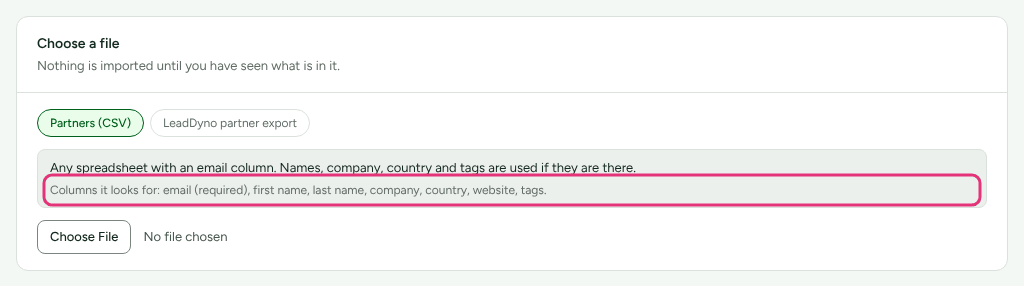
GB, notUnited KingdomorUK). Anything else is left blank and the partner is still imported. - Columns Refficks does not recognise are ignored. The "Columns it looks for" line in the Choose a file card lists the ones it does read.
- Blank lines are skipped and are not counted.
If the whole import reads Failed with no rows listed, it stopped before it reached them. Its line reads "Line 0" with the reason. Choose the file and import it again; if it fails the same way, write to support.
Rows refused in a migration
A migration checks every row against the columns you matched, and holds back a row it cannot use. Open the migration from Import and export › From another platform and use Does it add up › Look up one row: with nothing typed it lists the rows that did not go in, and what happened to each. You can also type an ID from your old platform or an email.
These hold a row back:
| What the row says | Fix |
|---|---|
| "No column is mapped to <field>, which every <kind> row needs." | A field every row needs (a partner's email, for example) has no column. In What your <kind> columns mean, choose the column for it and press Save and check the rows. |
| "<field> is needed and this row has none." | The cell is empty on this row. Fill it in your export and add the file again. |
| ""<value>" is not an email address." | Correct the address. |
| ""<value>" cannot be read as an amount without guessing." | Write the amount as a plain number, such as 1234.56, without words. Refficks will not guess, because a wrong guess is a wrong payment. |
| ""<value>" is not a three-letter currency code." | Use the ISO code, such as USD or EUR. |
| "Refficks cannot hold <currency> amounts correctly yet, so these rows are not imported." | Rows in that currency cannot be brought across. Settle them on your old platform. |
| ""<value>" is longer than the 64 characters a code may have." | Shorten the code, or leave it out and give the partner a new one. |
| "This row is empty." | A line of nothing but separators. Delete it, or ignore it. |
These let the row in, with a note:
| What the row says | What happens |
|---|---|
| ""<value>" is not a two-letter country code. It will be left blank." | The partner is imported without a country. |
| ""<value>" does not look like a web address." | The partner is imported with it; check it. |
| ""<value>" is not a web address, so this partner is imported without a website." | The partner is imported without a website. |
A whole file can also be refused before any row is read:
- "The file is empty."
- "The file has no readable rows."
- "The first row is blank, so there is nothing to name the columns."
Add a header row and at least one row of data, then add the file again.
When to contact support
Write to support@refficks.com if an import reads Failed twice for the same file, or if a reason here does not match what you see in the file. Include:
- your workspace's name;
- for an import from a file, the file name and the time shown under Imports so far;
- for a migration, its name, and the line number and old-platform ID of one refused row;
- the exact reason Refficks showed.
Do not attach the file itself unless support asks: it is your partner list. Never send a secret key, a platform's API key, or a partner's payout details.
Related
- Import partners from a spreadsheet: the columns Refficks recognises and what each import does.
- Move your program from another platform: matching columns and checking a migration.
- Invite partners: adding one partner by hand instead.