A commission is missing, wrong or has disappeared
For merchants whose partner was credited with a sale but earned nothing, earned a different amount than expected, or had a commission vanish. The most common cause of a missing commission is that no plan covers the sale; the conversion's page says which rule said no.
Check this first
Go to Conversions and open the sale; typing the partner's or the customer's name into Search by partner or customer finds it. (From Commissions, the Why? link at the end of a row's How it was worked out line opens the same page.)
Look at the What it paid card:

- It lists entries: a commission exists. Note their statuses and go to Wrong amount or Disappeared.
- It says "Nothing, and why." with a sentence: read the sentence and find it in the table below.
- Instead, a warning says "No partner earned this conversion": the sale was not credited to any partner, so there was nothing to pay. See A sale was not credited to a partner.
Likely causes
| What you see | Likely cause | Fix |
|---|---|---|
| "This programme has no commission plan that pays Sam Rivera, so the sale paid nothing." | The program has no plan, or none that applies to this partner. | Create a plan. |
| "The conditions on “Hardware” rule this sale out, so it paid Sam Rivera nothing." (or "None of the 4 commission plans that could pay … applies: …") | Every plan is limited to something this sale is not. | Add a catch-all plan (Pays on: Every sale) at a lower priority. |
| "The plan “Hardware” pays only on what it names (products: Laptop Pro), and none of it is on this sale." | The winning plan is limited to products, and none were in the cart. | Same as above. |
| "The plan “Standard affiliate” pays on a customer's first purchase only, and Sam Rivera has already been paid on this customer." | A one-time plan, and this is a repeat purchase. Or this sale's own commission was rejected: the card leaves rejected entries out, and the plan then finds that entry. | Check Commissions with the filter on Rejected first. Otherwise it is working as set; for future renewals, create a recurring plan. |
| "The plan “Standard affiliate” pays for 12 months from a customer's first purchase, and this sale came after that." | The recurring plan's months have run out for this customer. | Working as set. |
| "The plan “Standard affiliate” pays nothing on this sale." | The plan worked out nothing: most often a flat-amount plan in one currency and a sale in another. | Create a plan for that currency, or use a percentage plan. |
| "Your previous platform is still the one paying commission, so Refficks has not worked any out for this sale." | You are migrating, and your old platform is still the one that pays. | Expected until your cutover date. |
| "This sale happened before your cutover on Oct 1, 2026, so it is your previous platform’s to pay." | The sale is before your cutover. | Expected. Pay it from your old platform. |
| The sale has a partner but no What it paid card at all | Either the commission was rejected (the card leaves rejected entries out), or the sale was credited before a plan that pays it existed. | Set Commissions to Rejected and look for it. If it is not there, see Sales from before the plan existed. |
| A commission exists but stays Pending | Nobody has approved it, or automatic approval is waiting; the row says why. A sale credited by hand by a manager always waits for an owner or admin. | Approve commissions. |
| No sale since the account was closed has earned anything | A closed account's sales are recorded and wait, and nothing is credited or owed. | Reopening the account works them out, by the plans in force then. |
The amount is not what you expected
Every commission stores how it was worked out, so start from the row, not from the plan as it is today.
- Go to Partners, open the partner, choose Money, and find the entry in the Commissions card. The plan that paid it is named under the entry, and How it was worked out shows the arithmetic, for example "20% of USD 299.00".
- Compare the plan name with what you expected:
- A different plan won. The highest-priority plan whose conditions match pays; on a tie, the more specific one. A plan made for this partner alone beats every other. The partner's Commission rules card, further down Money, lists "Which plans apply to this partner, in the order they are considered". A plan made for them alone is marked "Theirs only, beats the rest".
- The partner has their own rate. The rule shows a Their own rate badge on the partner's Commission rules card.
- Compare the rate:
- "(the discounted rate, because a discount code was used)" means the customer typed a code, and the plan's Percentage when a discount code was used applied. Any code counts, including the partner's own coupon.
- Compare the base (the amount after "of"):
- It is the amount after tax and shipping when your store or provider reports it, so it is often less than the order total. When the source reports no such figure, the amount collected is used.
- A plan limited to some products pays only on those lines of a cart that had other things in it, and line amounts exclude tax.
- The currency is the sale's own. A EUR sale in a USD program earns euros.
- Look for corrections beside it on the Commissions list: a negative row "Reversed in part: …" from a partial refund, or a row "Recalculated: …". The amount owed is the commission plus its corrections.
Correct an amount
Refficks never edits a commission. A correction is a new entry beside it, and the partner sees both.
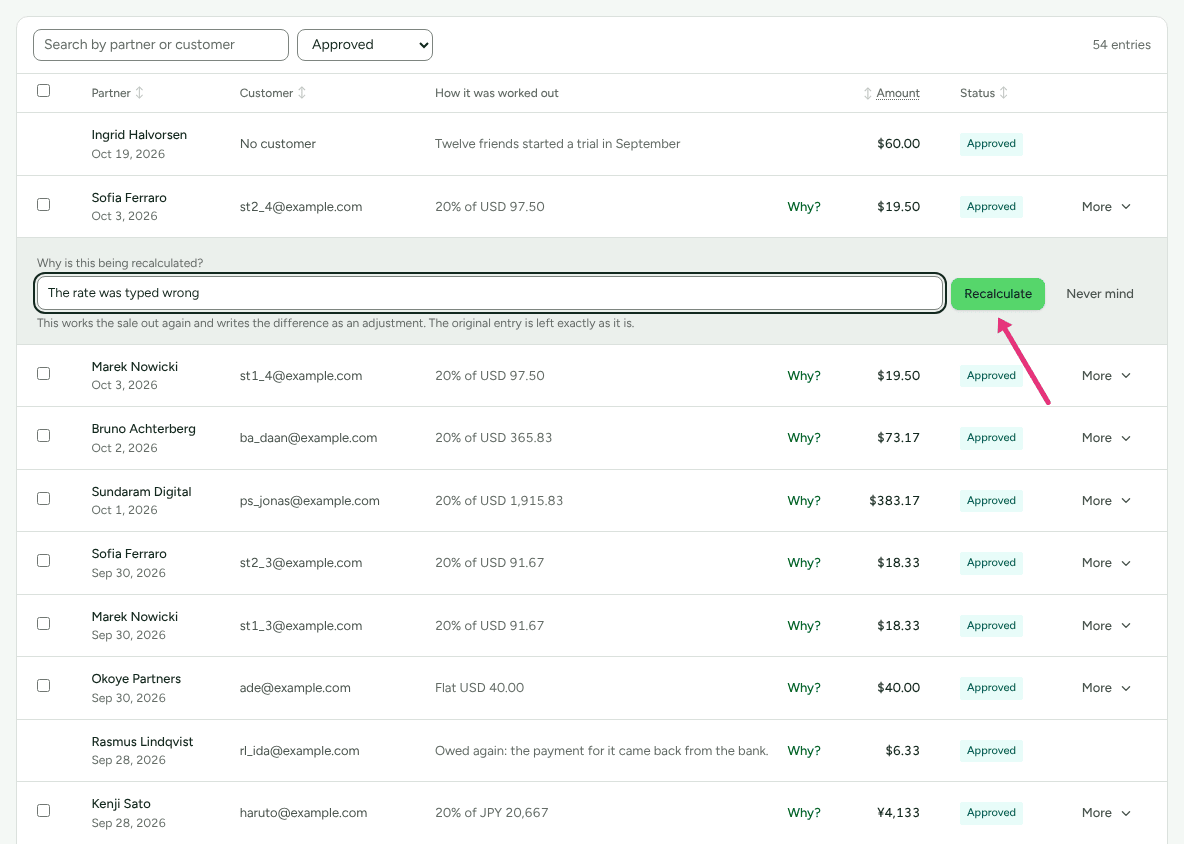
The plan or the partner's rate was wrong and you have fixed it (for example by giving the partner their own rate): on Commissions, press More on the row and choose Recalculate…, write the reason in Why is this being recalculated?, and press Recalculate. Refficks works the sale out again under today's plans and writes the difference as an adjustment, such as "Recalculated: USD 59.80 instead of 29.90. The rate was typed as 10 and should have been 20." The adjustment is Pending: approve it like any commission. If nothing changed, the page says "The plan says what it always said, so nothing changed."
If one plan or rate paid several commissions wrongly, tick them and press Recalculate 3 selected instead, write one reason in Why are these 3 being recalculated?, and press Recalculate 3. Each is worked out as Recalculate… on its own row would, and the page says how many were "recalculated, each with an adjustment for the difference", how many "already matched" their plans, and, for any the plan refused, "One was not:" with the plan's words. See Approve commissions.
The commission should not exist at all: press More on its row and choose Cancel commission…, give the reason, and press Cancel this commission. This writes a reversal; see Refunds and reversals.
A recalculation is refused when the plan now pays nothing on the sale ("Cancel the commission instead if that is what you mean"), and when the plan now pays in a different currency from the commission. You must be an owner or admin to recalculate or cancel; nobody else sees More. A Recalculate… or Cancel commission… form closes, changing nothing, if you move the list to another page, filter, search or sort before pressing its button.
There is no way to add an amount by hand, up or down, outside Recalculate… and Cancel commission…. Some messages say "Raise a new adjustment instead" or "add an adjustment for the partner instead".
Not yet documented: No screen raises an adjustment by hand. If a correction is needed that a recalculation cannot make, write to support@refficks.com with the commission and the conversion.
A sale credited or moved by hand
Sales your team credits to a partner by hand, or moves from one partner to another, follow two rules (see Credit or move a sale):
- Credited by a manager or anyone below admin, the commission is written as usual but never approves itself on its plan's timer. Its row says "This sale was credited to the partner by hand by someone who may not approve money, so it waits for someone who may." An owner or admin approves it.
- A move that would take back a commission already approved or paid is refused to anyone below admin: "Moving this sale would take back a commission that is already approved or paid, so it needs someone who may approve money."
A commission has disappeared
Commissions are never deleted. Set the Commissions filter to All statuses, type the partner's name into Search by partner or customer, and look at the status. A reversed commission says why on its own row, under its status:
| Status or row | What happened | Where to read why |
|---|---|---|
| Reversed, reading "Cancelled: Reversed because the sale was refunded." | The sale was refunded, disputed, or the paid order cancelled. | Refunds and reversals |
| Reversed, reading "Cancelled: Reversed because this sale was moved to another partner." | Somebody credited the sale to a different partner. | Settings › Developer › History |
| Reversed, reading "Cancelled:" and your team's own words | Somebody chose Cancel commission… and gave that reason. | Settings › Developer › History |
| Rejected | Somebody rejected it while it was pending. | Settings › Developer › History |
| Paid | It went out in a payout and no longer counts as outstanding. | Payouts, then the payout |
| Paid, reading "Taken back:" and a reason | It was paid, then refunded, moved or cancelled; the reversal comes off the partner's next payout. | Refunds and reversals |
A reversal pressed by mistake can be taken back from Settings › Developer › History with Take the reversal back, while nothing has been paid on it.
Two commissions for one sale
Each sale earns at most one commission per partner: a retried delivery or a double click returns the commission already written, and a refund takes back once per refund. If you see two, they are almost always two sales. Open each with Why? and compare the conversions. A one-time checkout and the invoice it made, or one order reported by both a store and Stripe, are recorded as one sale.
If two commissions point at the same purchase, write to support (below).
A credited sale with no commission and no reason
If a sale shows a partner, no What it paid card, nothing under Rejected, and a plan that covered it at the time, its commission may never have been written. Write to support (below): Refficks can find credited sales with no commission and write the missing ones, but only where nothing that decides the commission (the program's plans, the partner's rates and place in the program) has changed since the sale. The rest are listed for a person to decide. A commission written this way waits for your approval.
Sales from before the plan existed
A plan pays on sales credited after it exists. Sales credited to a partner while the program had no plan that covered them stay recorded with no commission, and creating a plan does not go back and pay them.
Not yet documented: There is no screen for paying a commission on a sale credited before its plan existed. Write to support@refficks.com with the conversions if you need them paid.
When to contact support
Write to support@refficks.com if the conversion's page and the commission's arithmetic do not explain the amount, or if two commissions point at one purchase. Include:
- the conversion id from the page address (
/dashboard/conversions/<id>) and, if there is one, the commission's row as it reads (partner, How it was worked out, Amount, Status); - the plan name and the program;
- the sentence on the What it paid card, exactly as written;
- the order or invoice number in your store or payment provider.
Never send a secret key, a webhook signing secret, or a partner's payout details. Support does not need them and will not ask for them.
Related
- How commission plans work: priority, conditions and what the percentage is taken of.
- Approve commissions: why a commission is still pending.
- Refunds and reversals: where a commission goes when a sale is refunded.
- A sale was not credited to a partner: when there is no partner on the sale at all.
- Credit or move a sale: crediting a sale by hand, and who may move one.