When you get paid
You are paid when the merchant runs a payout and marks it sent. Your Payouts page shows what is approved and waiting, where it will go, the merchant's minimum, and every payout so far with what happened to it.
Your portal may use the merchant's own words for partner, commission, payout, referral and reward.
The short version
- Approved commission waits under Waiting for the next payout until the merchant pays. Refficks never sends a payout on its own: a person at the merchant decides when.
- Where the merchant has a minimum, anything below it rolls over to a later payout. Nothing is lost.
- "Going to …" says where the money will go, as a masked hint of your details.
- A payment that did not reach you says why, and the money goes back to waiting.
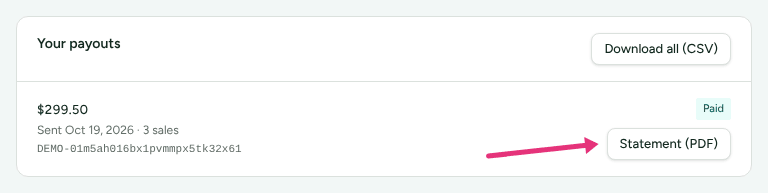
- Every payout that was sent has a Statement (PDF), and Download all (CSV) lists them all.
In detail
What is waiting
The first card reads Waiting for the next payout, with the amount and one line under it:
| Line | Means |
|---|---|
| "Going to method · hint" | The next payout goes to the details on your profile |
| "As store credit on your account at the store" | This program pays in store credit at the merchant's store |
| "Not going to … because the last payment to it did not reach you" | Your details did not work last time. Save new ones |
| "Add a payout method on your profile so this can be sent." | You have not said how to be paid yet |
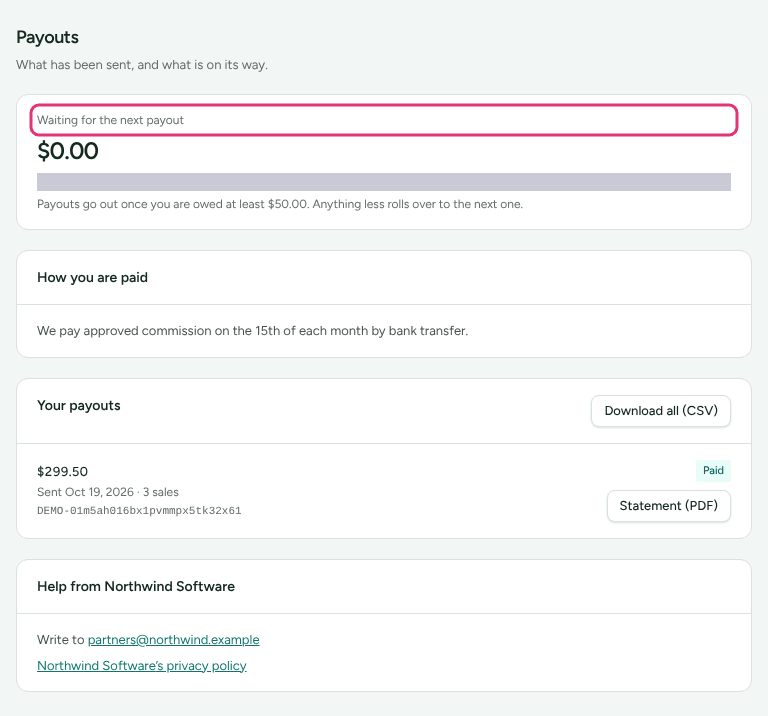
Owed in more than one currency, each currency waits on its own line, against its own minimum. Amounts in two currencies are never added together.
The minimum, and rollover
Where the merchant has a minimum, the card says so: "Payouts go out once you are owed at least €50.00. Anything less rolls over to the next one." When you are under it: "… so this waits for a later one. Nothing is lost; it rolls over."
The minimum is in one currency. The merchant's own figure applies to partners paid in their program's currency; anybody paid in another currency waits for Refficks's figure in theirs.
When the merchant pays
The portal does not show a payout date. The merchant decides when to pay, and if they have written how they pay, it is under How you are paid. Where the merchant has given a help address or page, Help from Merchant at the bottom of the page says where to ask.

Something waiting on you
A warning names what holds money back when it is yours to fix:
- Nobody can pay you yet: "Until your programme knows where to send it, your commission stays here. Add a method on your profile."
- Your last payment did not reach you: "The next payout waits until you save new payout details on your profile. Nothing you are owed is lost; it is sent once they change." The word profile opens Profile › Getting paid.
- Amount is waiting, when the program pays in money and store credit is the only way you chose, when the merchant paused store credit, or when the merchant stopped paying through Tremendous and you chose it. Each says what to do.
Not yet documented: A merchant can require a tax form before paying. Until you give one, your payouts are held, and the Payouts page does not say so. Fill in the tax form on your Getting set up list is the only sign. See Add payout and tax details.
Your payouts
Your payouts lists up to the latest 50, newest first. Each shows the amount, "Sent date" (or "Created date" before it was sent), how many sales it covered, the merchant's reference for the transfer if they gave one, and a status:
| Status | Means |
|---|---|
| Draft, Pending approval, Approved | The merchant is preparing it. Nothing has been sent |
| Processing | Being sent (through PayPal, Tremendous or as store credit) and not finished yet |
| Paid | Sent |
| Failed | "This payment did not reach you." with the reason, if known |
| Cancelled | "This payout was called off before any money was sent." |
| Returned by the bank | "This payment was sent and then came back from your bank." |
A payment that did not reach you
Failed, cancelled and returned payouts are not lost: "The commission it covered went back to waiting for a future payout", or after a return, "is owed to you again and will be in a future payout." The reason is the bank's, in words, for example:
- "Your bank said the account is closed."
- "Your bank said the account details were wrong."
- "Your bank said the name did not match the account."
- "Your account could not receive this currency."
- "The payment was not claimed in PayPal within 30 days, so it went back."
The merchant's own reason for calling a payout off is never shown to you.
Two payment services add their own line while a payout is Processing or Paid:
- PayPal, when nobody has claimed it yet: "This was sent to s•••@example.com through PayPal, and is waiting for you to claim it." PayPal emailed that address how, usually by signing up to PayPal with it. "If it is not claimed within 30 days, PayPal sends it back and it will be paid again later."
- Tremendous: "Sent to … by Tremendous on date. Open the email to choose how to receive it", with the date the choice closes; or, if it could not be delivered, "If that address is wrong, change it under your profile; what you are owed is unchanged."
Statements, invoices and the download
- Statement (PDF): for each payout that was sent. It says what was paid, when, how, and what it covered. It is not a tax invoice.
- Invoice number (PDF) and Credit note number (PDF): only where you agreed that the merchant issues your invoices (UK and EU merchants). See Add payout and tax details.
- Download all (CSV): every payout, with the columns Payout, Status, Amount, Currency, Entries, Paid to (the masked hint), Reference, Covers from, Covers to, Created on, Paid on and Paid as.
Where to see it in Refficks
- Payouts in your menu, for the merchant you are looking at.
- Commission for the lines a payout covers: their status turns Paid.
- Profile › Your data › Account history: "Payout of USD 120.00 sent", or "… did not reach you" with the reason.
Settings that change it
| Setting | Whose | What it changes |
|---|---|---|
| How you get paid | Yours, on Profile › Getting paid | Where the money goes ("Going to …") |
| The minimum payout | The merchant's | When an amount is big enough to send |
| How and when they pay | The merchant's | The How you are paid text, and the day they run payouts |
| Store credit, Tremendous, PayPal sending | The merchant's | Which ways to be paid you are offered |
| Invoices issued for you | Yours, where offered, on Profile › Getting paid | Whether each payout comes with an invoice |
Limits
- No payout date is shown, and nothing is paid automatically.
- Each merchant pays separately. Switch merchant to see another's payouts.
- Whether you get an email when a payout is sent is the merchant's choice.
- A tax-form hold is not shown on this page (see above).
Related
- Add payout and tax details: so "Going to …" is right.
- Understand your earnings: how a line becomes Approved.
- Raise a query: when a commission looks wrong.
- Partner left out of a payout: the merchant's side of "why wasn't I paid?".