Answer a brief and send your work
How to read what a brand is asking for, say yes or no, send your work in, deal with a revision, and see what the brand has sent you. For creators.
Your portal may use the merchant's own words for partner, commission, payout, referral and reward.
Before you start
- Where: Collaborations and Gifts are in your portal menu when the brand works with you as a creator.
- What the brand sees about you: on Profile › Details, What you make is "what the merchant sees when they are deciding who to work with. It is yours to keep right."
Read the brief before you answer
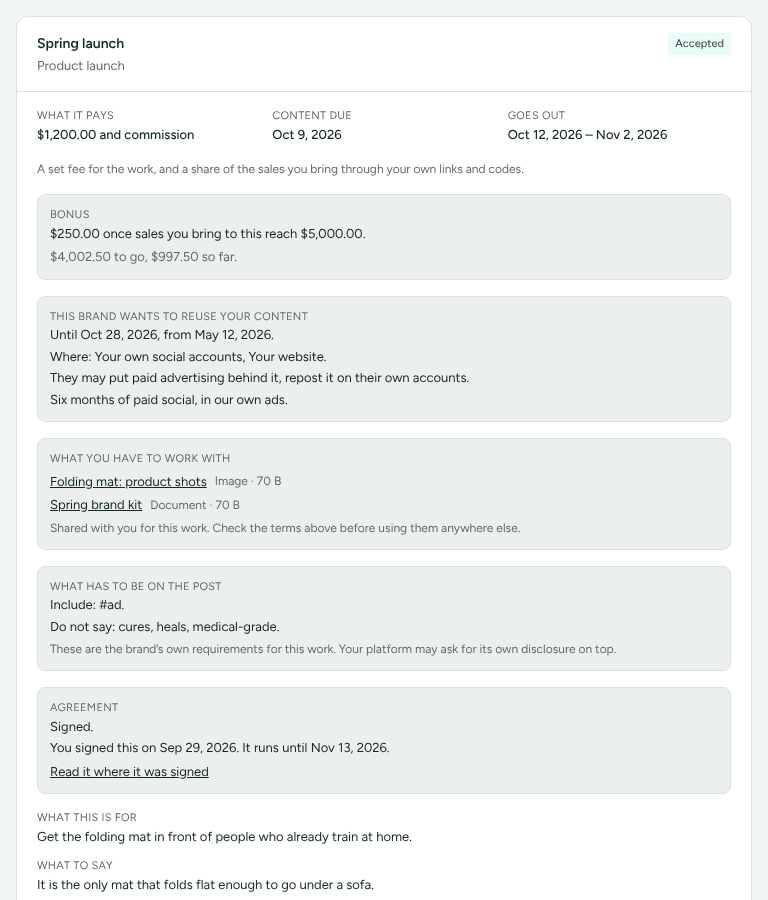
Collaborations lists every piece of work you have been asked to do. Each card shows the brand's terms first:
- What it pays: your fee, followed by "and commission" when the brand also pays you a share of the sales you bring (for example "$1,200.00 and commission"), or "Commission on your sales" when it pays a share and no fee. A line under the terms says it in a sentence, such as "A set fee for the work, and a share of the sales you bring through your own links and codes."
- Content due and Goes out: the dates.
- Bonus, when there is one: an amount once sales you bring to this work reach a figure. Only sales in the bonus's currency count towards it.
- This brand wants to reuse your content, when they do: until when, where, and whether they may put paid advertising behind it, repost it or edit it. If they wrote nothing down, the card says "They have not written down the terms. Ask before you agree."
- What has to be on the post: the brand's required disclosures and the words not to use. "Your platform may ask for its own disclosure on top."
- Agreement, when the brand needs a signed contract: whether it is signed, Download your copy or Read it where it was signed. Refficks records the contract; it does not send one for signature.
- The brief itself: what it is for, what to say, what must appear, what not to say, hashtags, the call to action and the format.
Say yes or no
"You answer once, so read the terms above first."
- Press Accept, or
- press Decline, optionally fill in Why, if you do not mind saying ("It helps them make a better offer next time."), and press Decline again.
The card then says "You accepted this on …" or "You declined this." If the brand withdraws the invitation, it says "This invitation was withdrawn by the brand."
Once you accept, What you have to work with lists the brand's files for this work, and What you agreed to make lists each piece with its due date.
Send your work
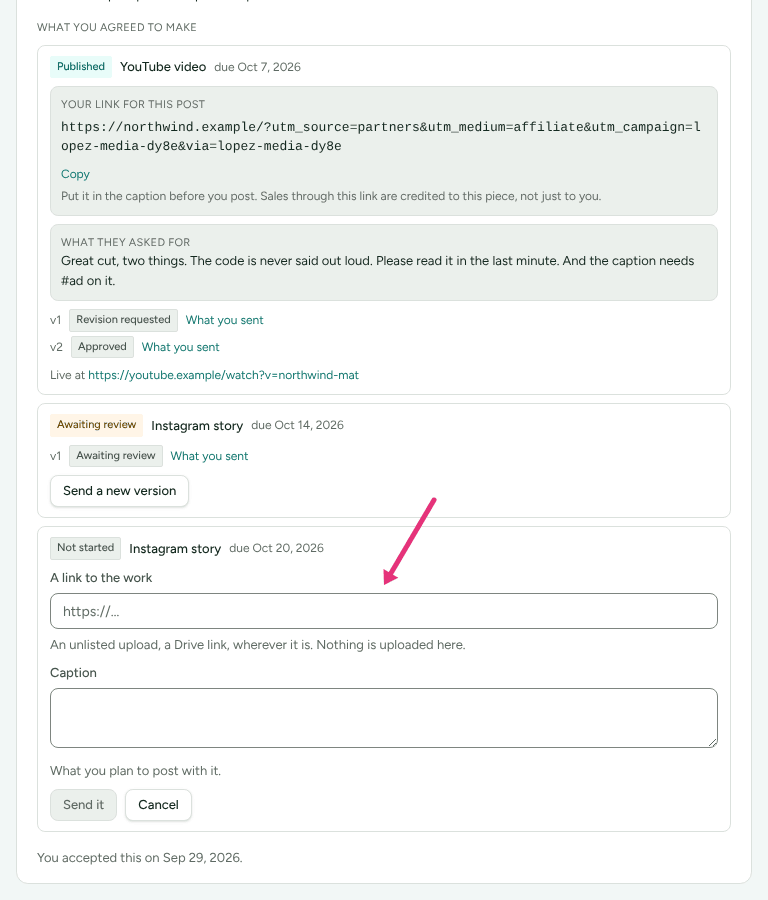
- Under What you agreed to make, find the piece and press Send your work.
- In A link to the work, paste where it is: "An unlisted upload, a Drive link, wherever it is. Nothing is uploaded here."
- In Caption, type what you plan to post with it.
- Press Send it. The piece reads Awaiting review.
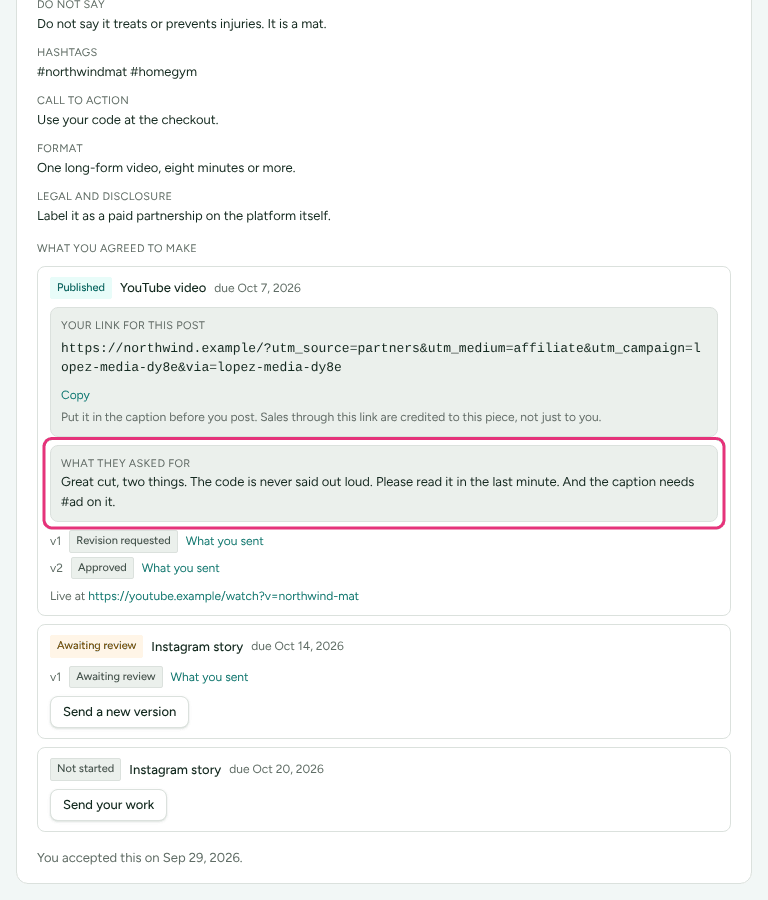
If the brand gave the piece its own link, Your link for this post is above the button with Copy: "Put it in the caption before you post. Sales through this link are credited to this piece, not just to you."
If they ask for changes
The piece reads Revision requested, and What they asked for shows the brand's note.
- Make the change.
- Press Send a new version and send the new link.
Every version stays listed with its status and What you sent, including the one that was finally approved.
Say where it went up
Once the brand approves a post you publish yourself, fill in Where you posted it and press Add the link. The piece then shows "Live at" and the address. Content the brand posts itself, such as a UGC video, needs no link: "Approved. This one is theirs to post, so there is no link to add."
See what the brand sent you
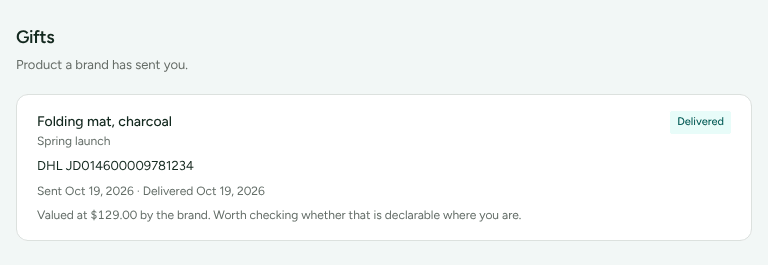
Gifts lists product a brand has sent you, from the moment it is ordered: what it is, which collaboration it belongs to, where it has got to (Ordered, Shipped, Delivered or Cancelled), the tracking when there is any, and the dates.
When the brand gave it a value, the card says "Valued at … by the brand. Worth checking whether that is declarable where you are."
How you are paid
A collaboration pays a fee, a share of the sales you bring through your own links and codes, or both; What it pays says which. Your fee falls due at the moment the brand chose (when they approve your work, when it is published, when you accept, or when they say so). It then appears on your Commission page and is paid in the brand's payouts, like any commission. A bonus and a share of sales are separate lines.
Check it worked
The piece's status moves from Not started to Awaiting review, then to Approved or Revision requested, and to Published once the link is added.
What this does not do
- Nothing is uploaded to Refficks. You send a link to where the work is.
- You cannot review, price or pay anything. The brand decides; you answer and send.
- A planned gift is not shown until the brand has ordered it.
Switched off: A Your YouTube channel card on Profile › Details, for connecting your channel with Google so the brands you choose can see your videos are on your own channel, is built and not yet on. It needs Google to review Refficks's app. Until then the card is not shown.
Related
- Partner getting started: signing in.
- Add payout and tax details: before your first fee is paid.
- Understand your earnings: fees, bonuses and commission from pending to paid.
- Raise a query: if a figure looks wrong.