Collect tax forms and prepare the 1099-NEC
Refficks collects your partners' tax declarations (W-9, W-8BEN or W-8BEN-E), can hold payouts until a partner has given one, and adds up what you paid each US partner in the year so you can file their 1099-NEC. You file the forms yourself: Refficks moves no money, so you are the payer of record.
This article is for owners and admins of a workspace that pays US partners in US dollars.
Before you start
- Role: owner or admin to switch the tax hold on and to see the 1099-NEC year card. Owner, admin or manager to pay one partner without a form.
- You need: partners who have given their declaration in their portal (see Add payout and tax details). Nobody on your team can enter a partner's tax form for them.
What partners give
| Form | Who gives it | On the 1099-NEC year card |
|---|---|---|
| W-9 | A US person or US business | Listed with their total, and in the file |
| W-8BEN | A person who is not a US person | Counted in one line ("declared a W-8, as not a US person"), not listed |
| W-8BEN-E | A business that is not a US business | Same as W-8BEN |
A partner gives exactly one, in their portal. Whichever they give counts as "a tax declaration on file" for the hold below.
Hold payouts until a partner has given a form (optional)
- Go to Settings › Partners and payouts › Payout runs.
- Tick Only pay partners who have a tax declaration on file.
- Press Save.
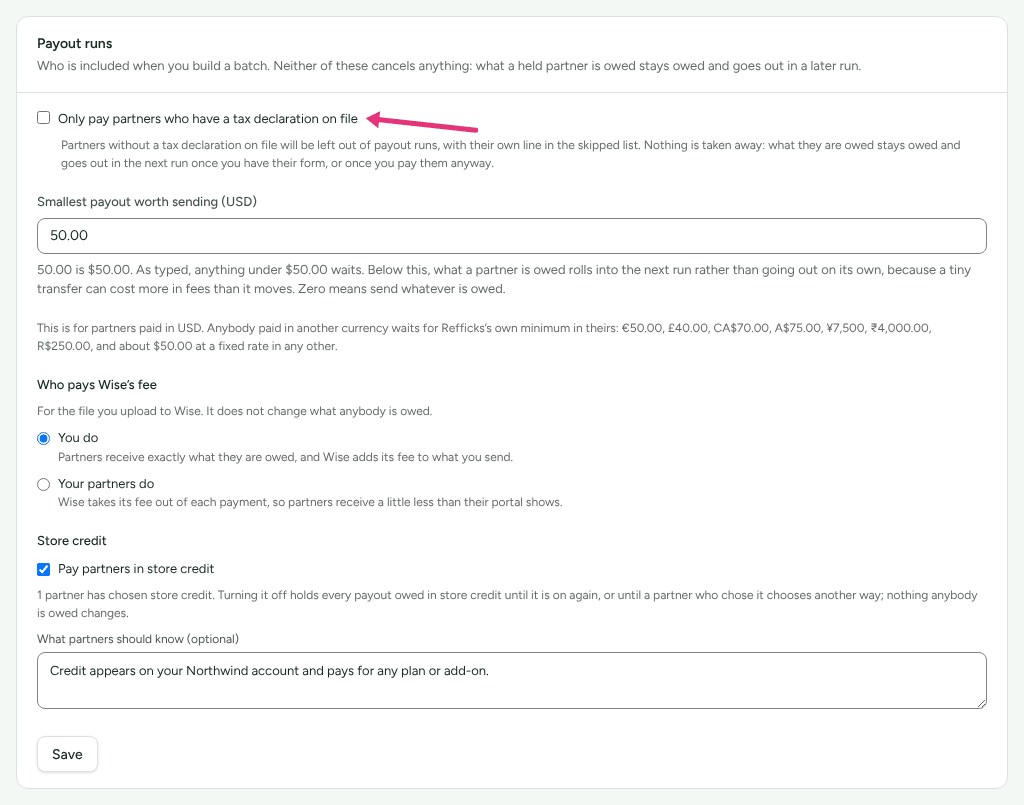
The screen says what this does, and what it does not: "Partners without a tax declaration on file will be left out of payout runs, with their own line in the skipped list. Nothing is taken away: what they are owed stays owed and goes out in the next run once you have their form, or once you pay them anyway."
From then on, a partner without a declaration appears in Payouts › Ready to pay dimmed, with "Held: no tax declaration on file" under their name. Their commission keeps adding up; it goes out in the first run after they give their form.
Pay one partner without a form
Sometimes you know a partner and choose to pay them before their form arrives. The tax hold has to be on for this to appear.
- Go to Partners and open the partner.
- Choose Money, and find the Tax declaration card: "You only pay partners who have one on file. This is where that rule meets this partner."
- Optional: in Why you are paying them without one (optional), write your reason. "Kept against your name and the date, so somebody reading this in January knows a decision was taken rather than missed."
- Press Pay them anyway.
The card then reads "No declaration on file, and you have chosen to pay them anyway since …", with your note. They join the next payout run. To undo it, press Hold their payouts again.
Paying anyway does not remove the need for the form. The 1099-NEC year card keeps listing them as paid without one: "You chose to pay them without a form, which does not remove the need for one."
Prepare the year's 1099-NEC
Go to Payouts and scroll to the 1099-NEC year card: "Your US partners' totals for the year, the tax declarations you need to file their 1099-NEC, and who you paid without one."
In Tax year, choose the year. In January and February the card starts on the year just finished; the rest of the year, on this one.
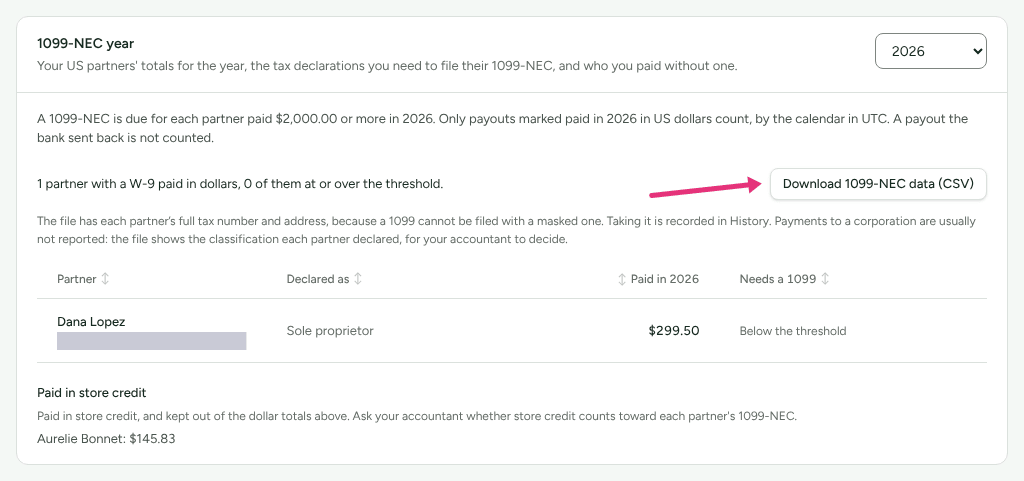
If anybody is listed under Paid in dollars without a tax form, read it. "If they are a US person you need their W-9 before you file. Ask them to add it in their portal." Each is marked Over the threshold, Getting close (three quarters of the way there) or Threshold not published.
Read the table of partners with a W-9: Partner, Declared as (the classification they declared), Paid in the year, and Needs a 1099 (Yes, "Below the threshold" or "Threshold not published").
Press Download 1099-NEC data (CSV), and give the file to whoever files your forms.
What counts toward the year
- Only payouts marked paid in that calendar year, in US dollars, by the calendar in your workspace's time zone. A payout marked paid next January counts next year, even if the commission was earned this one.
- A payout the bank sent back is not counted.
- The threshold is the IRS figure for the year: "A 1099-NEC is due for each partner paid $2,000.00 or more in 2026." For 2025 it is $600.00. For a year the IRS has not published yet, the card says so and marks nobody, and lists every partner you paid in dollars.
- Paid in other currencies: listed by name, not added in. "A 1099 is in US dollars, and Refficks does not convert currencies." Convert them at the rate your accountant uses if any of those partners is a US person.
- Paid in store credit: listed by name, kept out of the dollar totals. "Ask your accountant whether store credit counts toward each partner's 1099-NEC." The file carries it in its own column, never in box 1.
- Erased partners: a partner erased at their request after being paid this year is in the file only if their W-9 was kept for your filing, and is marked as erased there and named nowhere else.
What the file holds
The file is the one place a partner's full tax number and address appear, because a 1099 cannot be filed with a masked one. Downloading it is recorded in Settings › Developer › History, with the year and which partners it held. Its columns:
tax_year, recipient_legal_name, business_name, tax_classification,
tin, address, country, box_1_nonemployee_compensation_usd, payouts,
reportable, partner_id, certified_on, certification_version,
store_credit_not_in_box_1_usd, partner_erased.
"Payments to a corporation are usually not reported: the file shows the classification each partner declared, for your accountant to decide."
Check it worked
- A partner who gave a W-9 appears in the card's table with "W-9" and the last digits of their number under their name.
- A held partner's row in Ready to pay reads "Held: no tax declaration on file" until they give a form or you press Pay them anyway.
- Settings › Developer › History shows each Pay them anyway, with who and why, and each download of the file.
What this does not do
- Refficks does not file anything with the IRS, and does not send partners their 1099. You file, from the file.
- It does not convert other currencies, or decide whether store credit or a payment to a corporation is reportable.
- It does not check a tax number with the IRS.
- EU reporting under DAC7 is not built.
- Nobody on your team can type a partner's tax form in for them; the partner gives it in their portal.
Related
- Pay your partners: where the tax hold shows during a run.
- A partner was left out of a payout: "Held: no tax declaration on file" and the other reasons.
- Add payout and tax details: what your partners fill in.
- Self-billed invoices: the UK and EU paperwork.
- Read History: finding who downloaded the file.