Change your workspace's currency
Every workspace starts in US dollars. If you sell in another currency, change it under Settings › Workspace › Organization. Refficks shows you, before you save, which of your own figures stay in the old currency and what moves to the new one. Nothing anybody is owed or has been paid is converted.
Before you start
- Role: Owner or Admin. Everyone else sees the card with the control greyed out.
- When: at any time, as often as you need. Do it before you add a commission plan with a flat amount if you can (see Programs keep their currency).
Steps
Go to Settings › Workspace › Organization.
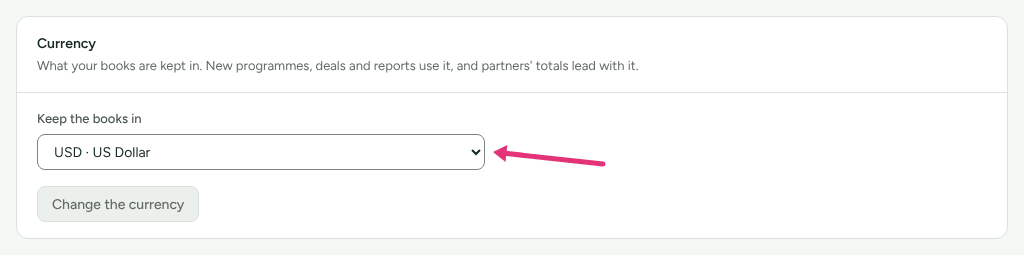
Find the Currency card: "What your books are kept in. New programmes, deals and reports use it, and partners' totals lead with it."
Choose the currency in Keep the books in. The list shows each currency by its code and name, for example EUR · Euro.
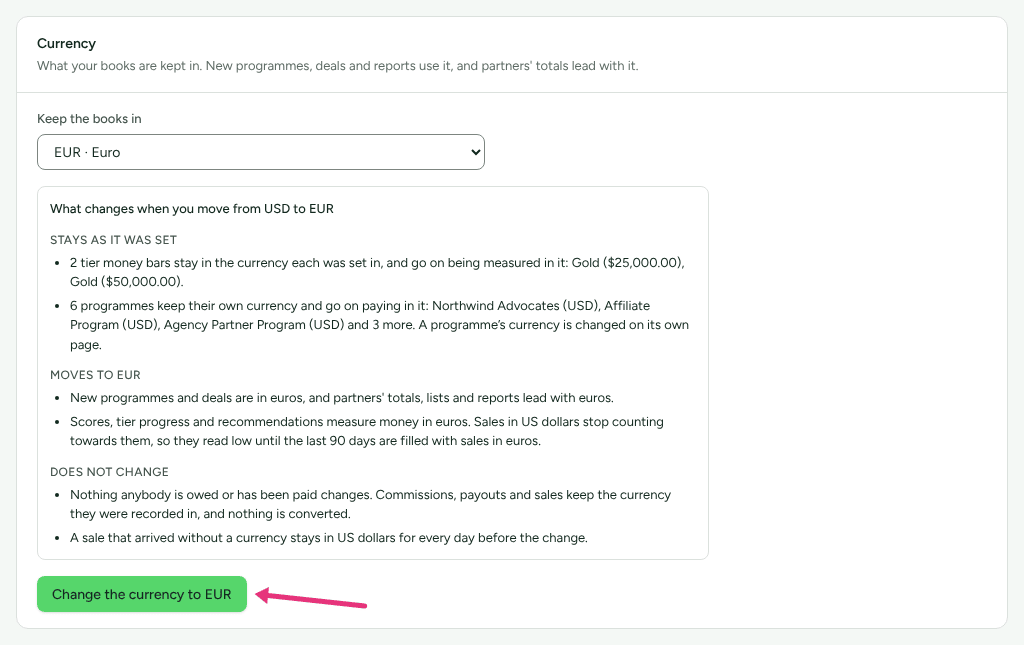
Read the box that appears: What changes when you move from USD to EUR (with your two codes). Nothing is saved yet. It has three lists:
- Stays as it was set: each of your own figures in the old currency, by name and amount.
- Moves to EUR: what the new currency is used for from now on.
- Does not change: what is never converted.
Press Change the currency to EUR (the button names the code you chose). It stays greyed out until the box has loaded.
What stays as it was set
The rule is that every figure of yours that decides money keeps the currency it was set in. Refficks never converts one at a rate, so no exchange rate decides who is paid or promoted. Three kinds of figure stay:
| Figure | Where it is set | After the change |
|---|---|---|
| Your payout minimum (Smallest payout worth sending) | Settings › Partners and payouts › Payout runs | It keeps holding back partners paid in the old currency. The screen says so: "Your own minimum of $20.00, set before the workspace moved to EUR, still holds partners paid in USD." Partners paid in the new currency wait for Refficks's own minimum in it until you set one. |
| A tier's money bar (for example revenue of at least $5,000) | A program's Tiers card › Requirements | It goes on being measured in the old currency. The dialog labels it At least (USD) and says it was "Set in USD before your books moved to EUR, and still measured in USD." |
| A rule's condition on a partner's lifetime revenue or commission | Campaigns › Automations | It goes on comparing in the old currency, and the rule shows the code, for example (USD). |
The preview names each one ("Your payout minimum of $20.00 stays in US dollars…", "Gold ($5,000.00)", the rule's name) so you can decide which to set again.
To move a figure to the new currency, type it again:
- Payout minimum: type a new Smallest payout worth sending on Settings › Partners and payouts › Payout runs and save. It is then in the new currency, and replaces the old one. Saving that page without touching the minimum leaves it in the old currency.
- Tier bar: open the tier's Requirements and press Measure it in EUR instead. The amount empties for you to type it again in the new currency.
- Rule: no screen edits a rule's conditions. A rule with a money condition that is made after the change compares in the new currency, so make the rule again and press Pause on the old one.
What moves to the new currency
From the moment you save:
- New programs and new deals are in the new currency.
- Partners' totals and lists, and your reports, lead with the new currency. Amounts in the old one are shown beside it, never added in.
- Scores, tier progress and recommendations measure money in the new currency. Sales in the old currency stop counting towards them, so they read low until the last 90 days are filled with sales in the new one.
What does not change
- Nothing anybody is owed or has been paid. Commissions, payouts and sales keep the currency they were recorded in.
- A sale that arrived without a currency stays in the old currency for every day before the change. One that arrives without a currency after it is in the new one.
- Partners are not emailed about it. In their portal, what they earned is still shown in the currency it was earned in.
Programs keep their currency
A program takes the workspace's currency when it is created, and keeps it. So after a change from US dollars to euros, the Affiliate Program your workspace started with, and any other program you already had, are still in US dollars:
- the preview lists them: "A programme keeps its own currency and goes on paying in it: Affiliate Program (USD).";
- a new commission plan on such a program writes its flat amount in US dollars (the field reads Amount (USD));
- a referral program's rewards and a B2B program's new deals use the program's currency.
A percentage plan is not affected: it pays a share of each sale, in that sale's currency.
The preview also says "A programme's currency is changed on its own page." On main @ ca63032 no program page has a currency field. Two ways to move a program to the new currency:
Create a new program after the change. It takes the new currency. Then archive the old one once its partners have moved over.
Ask a developer to change it through the Server API, with a secret key from Settings › Developer › API keys:
curl -X PATCH https://go.refficks.com/api/v1/server/programs/<PROGRAM_ID> \
  -H "Authorization: Bearer <SECRET_KEY>" \
  -H "Content-Type: application/json" \
  -d '{"default_currency": "EUR"}'
Plans already on the program keep their own currency; new ones take the program's.
Check it worked
- The Currency card says "Your books are now kept in EUR. Every figure set in the old currency stays as it was set." and Keep the books in shows the new code.
- Settings › Developer › History has an entry, "currency changed · Organization", with the old and new codes and what was kept in the old one.
- Settings › Partners and payouts › Payout runs shows, under the minimum, which partners your old minimum still holds.
What this does not do
- It does not convert anything, at any rate. A figure you want in the new currency, you type again.
- It does not change a program's currency, a commission plan's currency, or any commission, payout or sale already recorded.
- The list offers only currencies Refficks has a payout minimum and thresholds for. Others (the offshore yuan, the IMF's drawing right, units of account and replaced currencies) are refused with "Choose one of the currencies in the list."
- The demo workspace stays in US dollars.
Related
- Get your partner program running: where the currency is first set.
- Create a program: a new program takes the currency of the moment.
- How commission plans work: flat amounts and percentages.
- Pay your partners: the payout minimum and payout runs.
- Server API: changing a program with a secret key.